Esker vs. OpenText XM Fax

Overview
ProductRatingMost Used ByProduct SummaryStarting Price
Esker
Score 10.0 out of 10
N/A
Esker is a global cloud platform built to unlock strategic value for finance and customer service professionals and strengthen collaboration between companies by automating the cash conversion cycle. Esker’s mission is to build a foundation that promotes positive-sum growth, increased productivity, improved employee engagement, and greater trust between organizations.N/A
OpenText XM Fax
Score 10.0 out of 10
Small Businesses (1-50 employees)
XM Fax, now from OpenText (acquired March 2020) is a software-based solution for sending and receiving confidential faxes by email. It allows secure transmission of highly sensitive documents, using standardized T.38 Fax-over-IP and G.711 Fax Pass-Through protocols. The vendor says it is easy to install, and faxes can be sent using a desktop client (SendFAX), email clients (MS outlook), networked MFPs or via Web Services. According to the vendor, one of the main benefits of using XM Fax…N/A
Pricing
EskerOpenText XM Fax
Editions & Modules
No answers on this topic
Offerings
Pricing Offerings
EskerOpenText XM Fax
Free Trial
NoYes
Free/Freemium Version
NoNo
Premium Consulting/Integration Services
NoNo
Entry-level Setup FeeNo setup feeOptional
Additional Details
More Pricing Information
Community Pulse
EskerOpenText XM Fax
Best Alternatives
EskerOpenText XM Fax
Small Businesses
Square 9 Softworks
Square 9 Softworks
Score 9.5 out of 10

No answers on this topic

Medium-sized Companies
MSB Docs
MSB Docs
Score 9.4 out of 10

No answers on this topic

Enterprises
Tungsten Capture
Tungsten Capture
Score 8.0 out of 10

No answers on this topic

All AlternativesView all alternativesView all alternatives
User Ratings
EskerOpenText XM Fax
Likelihood to Recommend
10.0
(0 ratings)
10.0
(0 ratings)
Usability
5.5
(0 ratings)
-
(0 ratings)
Support Rating
8.9
(0 ratings)
-
(0 ratings)
User Testimonials
EskerOpenText XM Fax
Likelihood to Recommend
I would recommend Esker based on the automation of invoice sending - it is very nice to have a tool that not only stores all of the contact info, but sends the invoices out as well. The tracking feature is great to have to see if the submission was successful. I do think that overall it could be much more user-friendly, but once you know what you're doing, it is not hard software to use.
Read full review
XMedius is well suited for a large business with hundreds of fax numbers. Could you imagine trying to manage 1000 individual fax machines? That would be a nightmare! Instead it's all in one neat place
Read full review
Pros
  • Everything is electronic and every manager receives an email each morning telling them how many invoices they need to approve.
  • It has completely removed paper form the Accounts payable process and automatically archives invoices for the mandatory period required by Inland Revenue.
  • For monthly reporting there is visibility over what has not yet been included in the accounts and staff can follow with the tardy managers.
Read full review
  • Goes right to my mobile
  • Can respond immediately with a forward of the attachment
  • Don't have to save to my desktop faxes.
Read full review
Cons
  • We can't enter credit memos in Esker. Need to enter in SAP and then link.
  • PO invoices that were trained to go into the PO bucket, route into the non-PO buckets.
  • Freight invoices that have had hundreds going into the non-PO bucket have a tendency to route to the PO-bucket because a PO number is referenced on page 7.
Read full review
  • Error logs include error codes, but sometimes it is hard to understand what it means. Either a shared documentation or detailed error log might help end users better to detect any issue on fax requests.
Read full review
Usability
Esker does everything that it promises to do, but it is very hard to figure out. I am a very tech-savvy person, but I needed extensive training to be able to use the basic functions of Esker. Once you know what you're doing, it's not too hard, but I don't understand why they couldn't make it easier to use.
Read full review
No answers on this topic
Support Rating
They have been very helpful and the online support site is awesome. They keep the site up to date with the latest changes and present challenges to keep learning the new updates to keep things entertaining. They are overall a great crew to work with
Read full review
No answers on this topic
Alternatives Considered
We investigated Readsoft early in our exploration of upgrade options. We were on Esker DeliveryWare, but the UI for Readsoft, at the time, seemed to be a little convoluted and geared towards exception handling and required tiered users. Also, Readsoft was more cost prohibitive and did not have a solution for our faxing. Though, as I understand it, they may have since found a solution for this issue
Read full review
The XM Fax Connector that is available for the Xerox MFP devices make faxing from XM Fax simple and convenient.
Read full review
Return on Investment
  • We now have reporting available down to the individual field level (changes, errors, etc) and can calculate cost to serve.
  • It replaced on-premise hardware with cloud SaaS that is more cost effective and risk adverse.
  • It is more intuitive; we can put new hires on order entry and experience less user errors. As a solution owner who fixes problems and answers questions, I don't find myself having to "think" about Esker and it has become a smaller part of my job now that end-users are more self-sufficient.
Read full review
  • I m not sure on pricing or how XMedius is pricing solutions now
  • Cloud-based / vs On-Prem I think my vote always goes for on Prem
  • ROI (not my field)
Read full review
ScreenShots

OpenText XM Fax Screenshots

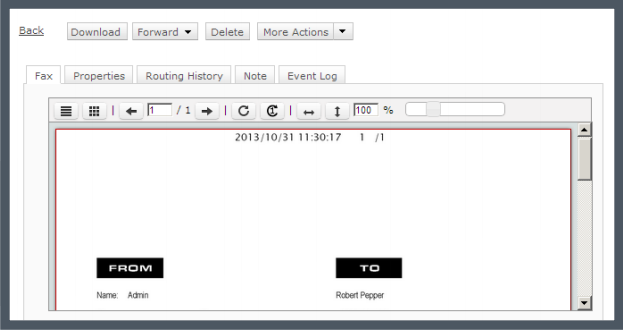
Screenshot of Track your faxes through an event log tab.Screenshot of Built-in viewer in the web client: XMediusFAX® allows you to view faxes directly in your browser without having to download files.Screenshot of Download the free XMediusFAX® application for Android, iPhone or iPad and send secure faxes from your mobile.Screenshot of Choose your fax recipients (Device contacts, Fax service Phone Book, Favorites).Screenshot of Select your documents from any file management application available on your mobile device.Screenshot of Configure your fax options (priority, resolution, retries).