
Box vs. OpenText Hightail
Box vs. OpenText Hightail
| Product | Rating | Most Used By | Product Summary | Starting Price |
|---|---|---|---|---|
 Box | N/A | Box is an online Intelligent Content Management solution that caters to individual users as well as businesses. | $7 per month per user (3 minimum) | |
 OpenText Hightail | N/A | OpenText Hightail is a cloud-based collaboration software for creative content reviews and approvals. With one place for teams to share large, multimedia files, collect precise feedback and approve content, Hightail streamlines the creative process and helps teams keep projects on schedule. | $0 100MB per file upload |
| Box | OpenText Hightail | |||||||||||||||
|---|---|---|---|---|---|---|---|---|---|---|---|---|---|---|---|---|
| Editions & Modules |
|
| ||||||||||||||
| Offerings |
| |||||||||||||||
| Entry-level Setup Fee | Optional | No setup fee | ||||||||||||||
| Additional Details | A discount is available for annual pricing. | Lite: Send large files with anyone. Files are limited to 100MB for each file size uploaded, 2GB storage max. Files expire after 7 days. Pro: Send large files with anyone and set advanced security permissions such as expiration dates and access codes. Files are limited to 25GB for each file size uploaded, with unlimited storage. Teams: Send large files, collaborate in real-time and manage creative projects with your team. The Hightail Teams plan allows you to purchase multiple users online (from 1-30 users per organization) and allows users to send file sizes up to 50GB with unlimited storage. The Teams plan also includes features such as file previews, organization, annotations, version control, discussions, follow-ups, approval routing and more. Business: Create unlimited visual project folders (called a Space) with collaboration and project management features such as approval routing and assigning to-dos, upload unlimited files up to 100GB each, protect them with access codes and manage user permissions., plus intuitive admin controls , detailed activity analysis for your entire company, advanced organization options and priority support. | ||||||||||||||
| More Pricing Information | ||||||||||||||||
| Box | OpenText Hightail |
|---|
| Box | OpenText Hightail | ||||||||||||||||||||||||||||||||||||||||||
|---|---|---|---|---|---|---|---|---|---|---|---|---|---|---|---|---|---|---|---|---|---|---|---|---|---|---|---|---|---|---|---|---|---|---|---|---|---|---|---|---|---|---|---|
| Enterprise Content Management |
|
| Box | OpenText Hightail | |
|---|---|---|
| Likelihood to Recommend | 6.8 (0 ratings) | 9.0 (0 ratings) |
| Likelihood to Renew | 8.0 (0 ratings) | - (0 ratings) |
| Usability | 6.8 (0 ratings) | - (0 ratings) |
| Availability | 10.0 (0 ratings) | - (0 ratings) |
| Performance | 9.1 (0 ratings) | - (0 ratings) |
| Support Rating | 8.5 (0 ratings) | - (0 ratings) |
| In-Person Training | 10.0 (0 ratings) | - (0 ratings) |
| Online Training | 10.0 (0 ratings) | - (0 ratings) |
| Implementation Rating | 10.0 (0 ratings) | - (0 ratings) |
| Configurability | 10.0 (0 ratings) | - (0 ratings) |
| Ease of integration | 10.0 (0 ratings) | - (0 ratings) |
| Product Scalability | 10.0 (0 ratings) | - (0 ratings) |
| Vendor post-sale | 10.0 (0 ratings) | - (0 ratings) |
| Vendor pre-sale | 10.0 (0 ratings) | - (0 ratings) |
| Box | OpenText Hightail | |
|---|---|---|
| Likelihood to Recommend | 
 Pjeter Gjergjaj Senior Network Engineer | 
|
| Pros |
 james dean Senior Software Engineer |
 Sarah Bandy Executive Director |
| Cons |
|
 Lisa Moughan Global Marketing / Corporate Communication Manager |
| Likelihood to Renew |
 Michael Thomas Lead Web Developer | No answers on this topic |
| Usability |
 burt smith Graphic Design Specialist | No answers on this topic |
| Reliability and Availability |
| No answers on this topic |
| Performance |
 Tyler Grudowski Product Development Engineer | No answers on this topic |
| Support Rating |
| No answers on this topic |
| In-Person Training |
| No answers on this topic |
| Online Training |
| No answers on this topic |
| Implementation Rating |
| No answers on this topic |
| Alternatives Considered |
|
 Daniel Shatzkes Founder/CEO |
| Scalability |
| No answers on this topic |
| Return on Investment |
|
 Saryia Green Marketing Coordinator |
| ScreenShots | Box Screenshots      | OpenText Hightail Screenshots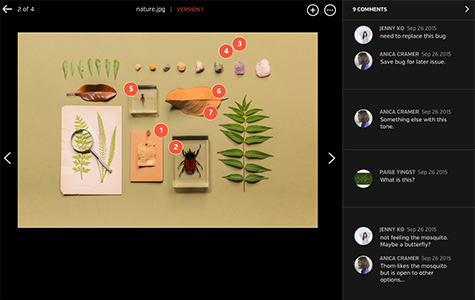    |