OpenText™ ALM/Quality Center, formerly from Micro Focus, serves as the single pane of glass for software quality management. It helps users to govern application lifecycle management activities and implement rigorous, auditable lifecycle processes.
N/A
Planview AgilePlace
Score 9.9 out of 10
N/A
AgilePlace is a project management solution built around flexibility, data-driven analytics, and workflow automation. The software was acquired by Planview in December 2017 to expand that company's capabilities.
$19
per user, per month
Pricing
OpenText ALM/Quality Center
Planview AgilePlace
Editions & Modules
No answers on this topic
Teams
$19
per user, per month
Scaled Teams
$29
per user, per month
Custom
Contact Sales for Quote
per user, per month
Offerings
Pricing Offerings
OpenText ALM/Quality Center
Planview AgilePlace
Free Trial
No
Yes
Free/Freemium Version
No
No
Premium Consulting/Integration Services
No
No
Entry-level Setup Fee
No setup fee
No setup fee
Additional Details
—
All editions include unlimited boards.
More Pricing Information
Community Pulse
OpenText ALM/Quality Center
Planview AgilePlace
Features
OpenText ALM/Quality Center
Planview AgilePlace
Project Management
Comparison of Project Management features of Product A and Product B
OpenText ALM/Quality Center
-
Ratings
Planview AgilePlace
7.4
Ratings
3% below category average
Task Management
00 Ratings
10.00 Ratings
Resource Management
00 Ratings
9.90 Ratings
Gantt Charts
00 Ratings
10.00 Ratings
Scheduling
00 Ratings
9.90 Ratings
Support for Agile Methodology
00 Ratings
9.30 Ratings
Support for Waterfall Methodology
00 Ratings
4.00 Ratings
Document Management
00 Ratings
6.50 Ratings
Email integration
00 Ratings
7.30 Ratings
Mobile Access
00 Ratings
2.10 Ratings
Timesheet Tracking
00 Ratings
6.40 Ratings
Change request and Case Management
00 Ratings
7.20 Ratings
Visual planning tools
00 Ratings
7.30 Ratings
Agile Development
Comparison of Agile Development features of Product A and Product B
HP ALM is well suited for waterfall projects specifically if the teams are novice. It provides excellent support for project planning, tracking & test management. Top leadership can efficiently track, measure and report on project milestones & key performance indicators. Development teams have access to a wide variety of tools to automate their development, testing, bug tracking, and reporting tasks in one place. Its extensive documentation and tutorials help new users to learn this tool pretty fast. Though for agile teams HP ALM Octane can be explored but its not value for money & did not handle distributed teams well.
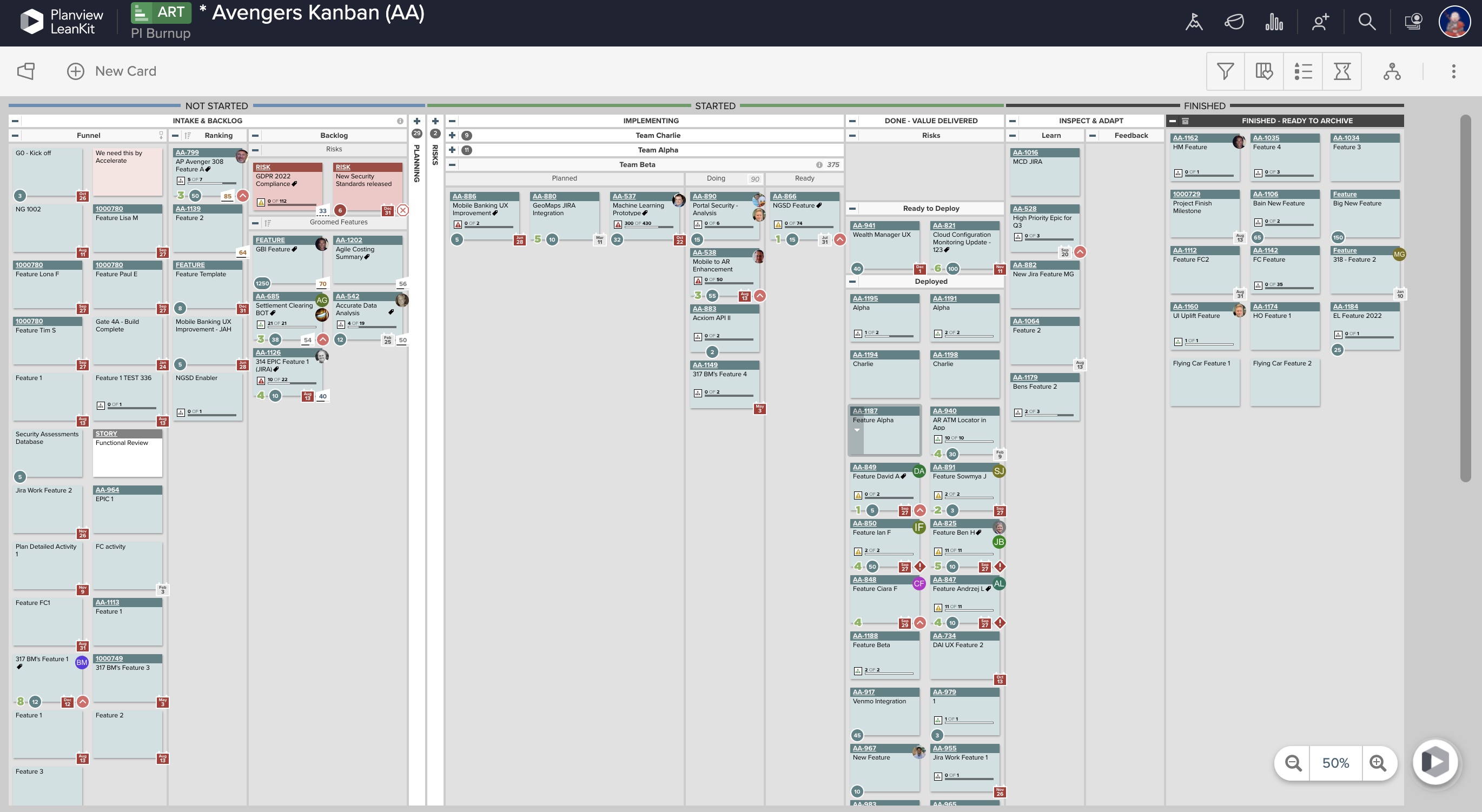
AgilePlace is a great way for teams, or individuals, to bring visibility to the work in process and in their backlog. The color coding and icon use helps to quickly analyze the type of work or status of the work. The product team is doing a good job at listening to their user's feedback and implementing improvements. Where it falls short is when reporting needs to occur.
Release & Cycle Planning - Whether it is a new release or managing change requests, HP ALM can handle it all. In one click you can generate the status of a particular release from scoped requirements to test executed and everything in between. It also have KPI functionality which cane generate health indicators for each release to make go and no go indicators. The baseline features is a well thought out feature which is often neglected in many organization.
Requirements Management - HP ALM provides all the features which are needed by robust requirements management professionals. Teams can easily create and update the requirements and provide the full visibility to the team downstream. The tractability and impact analysis feature is the greatest suite of HP ALM complemented with great reporting and graphs.
Test Management - This is strongest module of HP ALM and provides the maximum values to team using HP ALM. Teams can perform manual, automated, performance and mobile testing with HP ALM. WIth HP UFT, teams can easily execute automated test case within ALM and report the results back. It also integrates with HP Mobile Center and test can be executed within HP ALM.
Defect Management - Simple and Strong are the two words to describes HP ALM defect module capability. Team can use it out of the box or customize it using workflow scripts to accommodate any process flow a organization may have. Their tons of features within this module which helps in expediting your release cycle and help you market the release faster.
Dashboard & Reports - HP has made numerous improvements to this module since I have known this product. You can generate any report or metrics if the data is present in ALM. Their are many after market solutions which can extend ALM data beyond the out of box reporting capabilities.
Okta Integration: We love using SSO for all our SaaS apps, and as new team members join, they can be automatically joined to the appropriate LeanKit boards.
Filtering and viewing: Can filter and refine by several fields as well as custom fields. Assigned Users, Tagged, Card Type, Date, etc
Their analytics and reporting can be helpful for PMs, especially if they have several teams they oversee.
Because it lets me track the test cases with detailed scenarios and is clearly separated in folders. Also the defect filter helps me filter only the ones that have been assigned to a particular area of interest. The availability of reports lets me see the essentials fields which I might be missing the data on and helps me to work on these instead of having to go through everything.
LeanKit isn't the best designed Kanban system I've seen, but overall it's pretty usable. The boards I've used are pretty complex, so it can be difficult to find things. I found that searching and filtering for specific cards was somewhat of a challenge. Dragging a card from one lane to another is kind of a fun way to get things done though.
It is a great tool, however, it got this rating because there is a lot of learning that takes a lot longer than other tools. There are no mobile versions of ALM even with just a project summary view. I believe ALM is well capable of integration with other analytics tools that can help business solutions prediction based on current and past project data. This is Data held in ALM but with no other use apart from human reading and project progress. ALM looks like a steady platform that I believe can handle more dynamic functionality. You could add an internal communication platform that is not a third party. Limit that communication tool to specific project members.
Every time I have reached out to the AgilePlace support team I have received a timely response in addition to professional & personal feedback. Their consultants are knowledgeable and the management team is happy to jump in and help when needed.
We have various criteria as a part of the requirements in which we gathered from teams. We started evaluating each requirement across the tools, and we started providing score ranges from 1-10 and the Quality center holds top to that. Some of them are listed below: User Experience
The tool should be easy to use for testers, end-users, and administration
The tool should have available integrations to IDEs like Eclipse, Visual Studio and IntelliJ, which are used most commonly. Ability to execute tests from within the IDE
Available integrations to ALM tools (Jira) , where we are able to associate Requirements, Defects, Epics and User Stories with Test Cases. Ability to measure test effectiveness through these integrations
Availability of relevant documentation for users, administrators and managers.
Availability of on-line help for quick resolution to tester’s needs.
24x7 Vendor support for quick resolution to issues and to ensure maximum productivity
Availability of intuitive, easy-to-use interface for end-users
The tools should have the ability to import test cases from common tools like Excel and export test results into Excel and PDF
There is a low learning curve for end-users. The ability to quickly onboard technical and non-technical end-users quickly is great.
The tool should have powerful search capabilities and should provide the ability to search and filter based on test case information or attributes of the test cases.
The tool should provide the ability to search and replace text or field values and auto-replace content based on conditions.
Test Management
The tool should support Central management of test artifacts, and support for product structures for managing test artifacts.
The tool should be able to provide support for popular Testing Methodologies including Agile, Exploratory, TDD, Black box testing, Functional testing, etc., and should support Finastra’s shift-left philosophy.
The tool should support the ability to create and manage test cases and test steps.
The tool should be able to segregate manual and automated tests and should be able to measure effective automation at the product level. The tool should also provide the ability to link/associate manual tests to automated tests.
The tool should provide the ability to create test suites by associating test cases and have the ability to execute test suites as well as report on tests at the test script, test case, test suite, and product levels.
The tool should support Test Data - Defect Link and should be able to provide complete Traceability Coverage at product and release levels.
The tool should provide the ability to stop tests before complete execution. The tools should also have the ability to resume test execution from the point of last pause or failure.
The tool should provide the ability to capture screenshots of successful or failed tests for documentation purposes and to capture replication steps.
The tool should allow capturing and storing attachments at a test step or test step level.
The tool should support parameterization for different test data.
The tool should have versioning capability for test artifacts.
The tool should have the ability to integrate with Mobile testing tools and should help manage test cases related to the native apps, simulators, and emulators for mobile testing.
The tool should have the capability of creating manual template tests.
The tool should provide history changes for all available fields.
The tool should have the capability to save and view Favorites
The tool should provide a shortcut key functionality for features.
The tool should have the capability of scheduling the test suites to run.
The tool should provide the capability of the "Check Spelling" feature while writing tests. Reporting and validation
The tool should support standard test reporting out-of-the-box.
The tool should provide the capability of creating, saving, and reusing reports and dashboards for all users.
The tool should provide the capability of sharing reports within user groups.
The tool should provide the capability of exporting reports and report data to Excel and PDF.
The tool should provide the capability of customizing, configuring, and modifying reports to suit product development team requirements.
The Tool Should provide Dashboards, Widgets, and Reports which can be customizable for business teams to highlight scheduled tasks and provide insight into progress.
The tool should provide Full Coverage and traceability Matrix reports. Administration and Usability
Tool - Server installation should be available on Windows and Linux
The tool should support Windows, Linux UI, and Mac for client interface.
The tool should have support for Web interface and should have support for commonly used web browsers like IE, Edge, Chrome, Firefox, and Safari.
The tool should have support for LDAP servers (AD) and should support single-sign-on capabilities. The tool should provide the ability to integrate with multiple LDAP servers simultaneously.
The tool should have the ability to create users at the tool level (outside the LDAP domain) to support partners and 3rd party entities.
The tool should have APIs for integrations and reporting. Preferably, the tool should support REST and SOAP APIs.
The tool should provide authorization and authentication through user groups.
The tool should enable an easy way to create, manage, delete, and deactivate users and user profiles as required. The tool should have the ability to move users across groups in a simple and intuitive manner.
The tool should provide the ability to import and export users from Excel, LDAP, and through APIs.
The tool should provide the ability to segregate roles and responsibilities at a tool level, project/product level, or a group/team level.
The tool should support a distributed topology for implementation and installation.
The tools should provide clustering capabilities, high availability architecture, and options for disaster recovery implementation. The licensing option for the tool should also support these capabilities.
The tool should provide out-of-the-box capabilities for backup and recovery of data in a simple, initiative manner.
The tool should have the ability to integrate to Jira, HP ALM, GIT, and other standard tools that are defined in Finastra.
The Tool should provide the capability of configuring file change alerts and to whom to send the Email notifications.
The Tool should provide the capability of configuring user notifications. Integration , Automation, and Operation
The Test management tool should provide Rest API support for integration with the test automation framework.
The Test management tool should support rest API integration with the test automation framework. It should support the following features:
Automated Test suite creation, modification, and deletion
Automated Test case creation, modification, and deletion
Manual test case mapping with automated test scripts. API capability to do mapping externally
It should support live reporting of automated test during execution
It should support controlling test execution from external tools like Jenkins, VSTS etc.
Capability to upload, modify and delete automated test reports
The Test management tool should Feature to map automated test scripts with manual test cases and update test status and reports
The Test management tool should Feature to create automated test suites and execution controller dashboard with live report capability. Capability to define test execution dependency.
The Test management tool should report dash board for both manual, automation and test report history
The Test management tool should be able to run Test execution on remote machine and parallel execution capability
The Test management tool should have CI / CD support and integration with different tools like Jenkins, VSTS etc..
The Test management tool should have GIT integration
The tool should have support for mobile testing. The tool will have the ability to integrate with Mobile testing tools like Appium, Mobile Center, Perfecto, etc.
The tool should support native mobile application testing, simulation-based testing, and emulators-based testing to support shift-left.
Originally, we had evaluated two other tools next to Planview LeanKit: Kanbantool and Kanbanflow. The latter was a close contestant for productive use, as it was also very customizable and a joy to work with and look at. It also had lower user fees and a mobile integration. In the end, we picked Planview LeanKit because of several reasons: Aesthetics: The look was much more clean and professional. Reporting: It was obvious from the start that we could use Planview LeanKit as a tool for improvement. API: We needed to integrate the Kanban into our central systems and Planview LeanKit API was (and still is) a way to do it. Card Headers: This sounds like a simple thing, but the headers above the titles fit our work perfectly and looked perfect, which helped the decision.
By developing a single template for use across all divisions, common training, ease of reporting, and consistent use is gained by the enterprise. This meets many requirements imposed by regulators as well as reducing costs for support, integration and training.
With consistency, we are able to develop regression tests and automate them efficiently. Having a regression suite ensures that code deployment does not break existing code. Once new capabilities are introduced into production, these functional tests can be added to the regression suite and automated for future use.
As the environment grows, the need to support multiple testing applications is reduced. ALM is scalable. As the number of projects and users increases, adding additional database or application servers is easily managed.