OneStream is an enterprise finance platform that unifies financial and operational data, embeds AI for better decisions and productivity, and can extend to meet the evolving needs of businesses without adding technical debt. Presented as an operating system for modern Finance, it unifies core financial functions and empowering the CFO to become a critical driver of business strategy, innovation, and growth. It is a cloud-based platform that modernizes the Office of the CFO. The…
$0
SAP Analytics Cloud
Score 7.8 out of 10
N/A
The SAP Analytics Cloud solution brings together analytics and planning with integration to SAP applications and access to heterogenous data sources. As the analytics and planning solution within SAP Business Technology Platform, SAP Analytics Cloud supports trusted insights and integrated planning processes enterprise-wide to help make decisions without doubt.
$36
per month per user
Pricing
OneStream
SAP Analytics Cloud
Editions & Modules
Free
$0
Basic
$12
per month billed annually
Basic
$15
per month
Standard
$32
per month billed annually
Professional
$39
per month billed annually
Standard
$39
per month
Professional
$49
per month
Enterprise
$83
per month billed annually
Enterprise
$99
per month
SAP Analytics Cloud for Business Intelligence
$36.00
per month per user
SAP Analytics Cloud for Planning
Price upon request
per month per user
Offerings
Pricing Offerings
OneStream
SAP Analytics Cloud
Free Trial
No
Yes
Free/Freemium Version
Yes
No
Premium Consulting/Integration Services
No
No
Entry-level Setup Fee
Required
No setup fee
Additional Details
The solution is only for Enterprises. Pricing for software is based on number of total users and one user gets all software functionality. Implementation would be based on what business problem or problems the solution will be used to solve, such as financial consolidation and reporting or planning or account reconciliations, etc.
A 30-day trial with SAP Analytics Cloud is available, supporting analytics enterprise-wide. A trial can be extended up to 90 days on request.
More Pricing Information
Community Pulse
OneStream
SAP Analytics Cloud
Features
OneStream
SAP Analytics Cloud
BI Standard Reporting
Comparison of BI Standard Reporting features of Product A and Product B
OneStream
8.2
Ratings
7% above category average
SAP Analytics Cloud
8.0
Ratings
2% below category average
Pixel Perfect reports
7.00 Ratings
8.00 Ratings
Customizable dashboards
8.70 Ratings
8.10 Ratings
Report Formatting Templates
8.90 Ratings
7.90 Ratings
Ad-hoc Reporting
Comparison of Ad-hoc Reporting features of Product A and Product B
OneStream
6.4
Ratings
24% below category average
SAP Analytics Cloud
7.9
Ratings
2% below category average
Drill-down analysis
5.60 Ratings
8.10 Ratings
Formatting capabilities
6.60 Ratings
8.10 Ratings
Report sharing and collaboration
7.00 Ratings
7.80 Ratings
Integration with R or other statistical packages
00 Ratings
7.70 Ratings
Report Output and Scheduling
Comparison of Report Output and Scheduling features of Product A and Product B
OneStream
8.3
Ratings
1% above category average
SAP Analytics Cloud
8.0
Ratings
4% below category average
Publish to Web
8.90 Ratings
8.00 Ratings
Publish to PDF
9.00 Ratings
8.40 Ratings
Report Versioning
7.70 Ratings
8.10 Ratings
Report Delivery Scheduling
7.70 Ratings
7.70 Ratings
Data Discovery and Visualization
Comparison of Data Discovery and Visualization features of Product A and Product B
OneStream is best suited for medium to large companies that find themselves doing a wide variety of manual processes during their financial close cycle will get the most benefit. That does mean a lot of change so there has to be very intentional communication around change management in order to get the buy in that is necessary for success.
SAP Ecosystem Integration:For businesses already using other SAP solutions such as SAP BW or SAP HANA, SAP Analytics Cloud is a natural fit. It integrates well with the broader SAP ecosystem, providing a cohesive analytics experience for users familiar with SAP technologies.Predictive Analytics Use Cases:Companies seeking to incorporate predictive analytics into their decision-making processes can leverage SAP Analytics Cloud. Its built-in predictive features enable users to create models and gain insights into future trends based on historical data.
Consolidation engine is powerful, we have around 500 entities translating from multiple source currencies into a common currency at good speed.
We leverage the Flash and Quarterly forecast providing users with pre seeded data so they only need to make tweaks rather then filling in a lot of manual forms.
We use Transaction matching for processing a lot of intercompany matching invoices from the ERP systems which helps end users a lot. Data is fed in from source ERPS and TXM generates the auto matches based on criteria provided.
We have a custom Tax module which we use to pull in tax entries from the consolidation side and this gives the Tax teams starting position for their tax calculations and enables them to also do a quarterly forecast estimate.
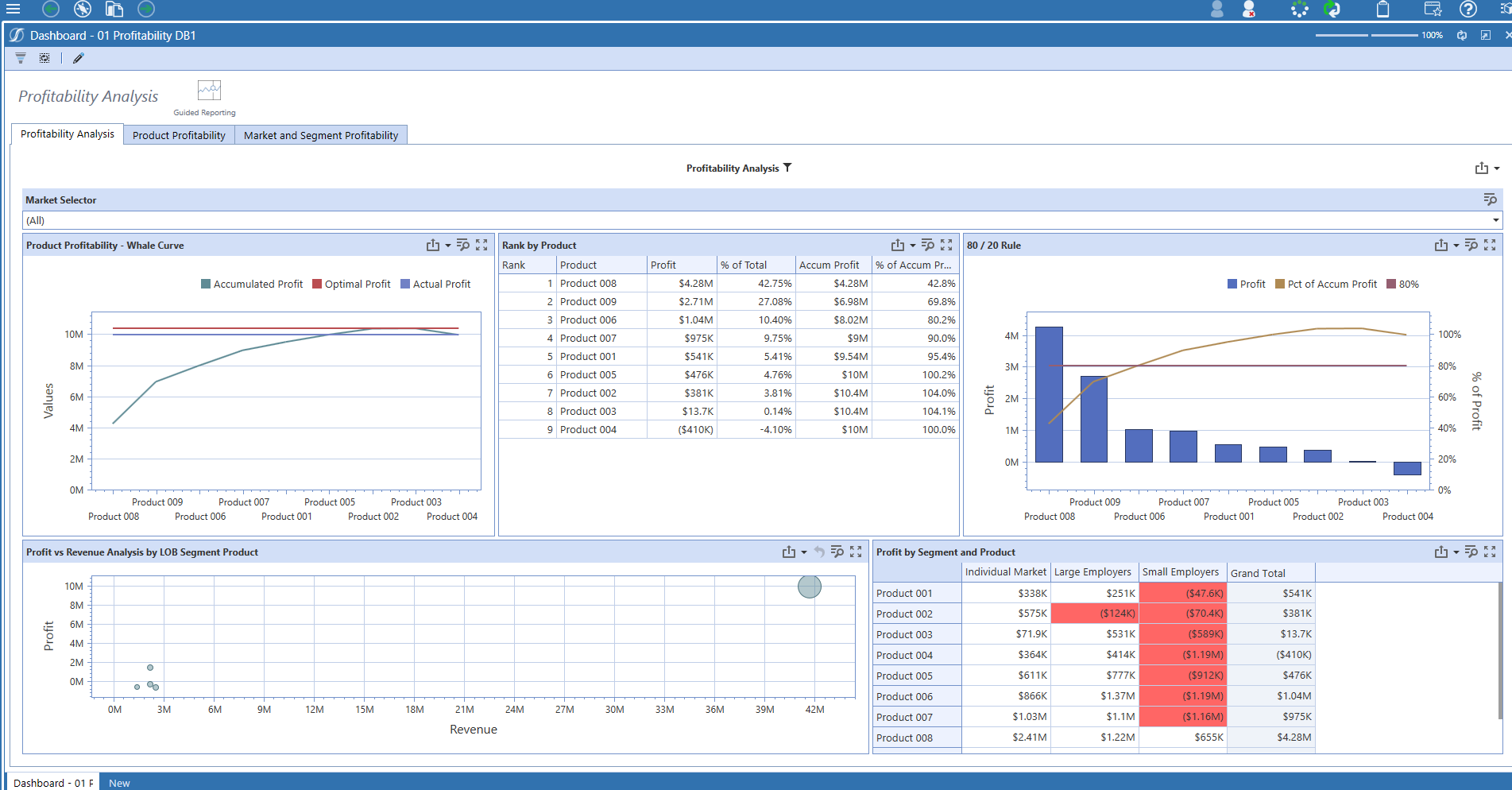
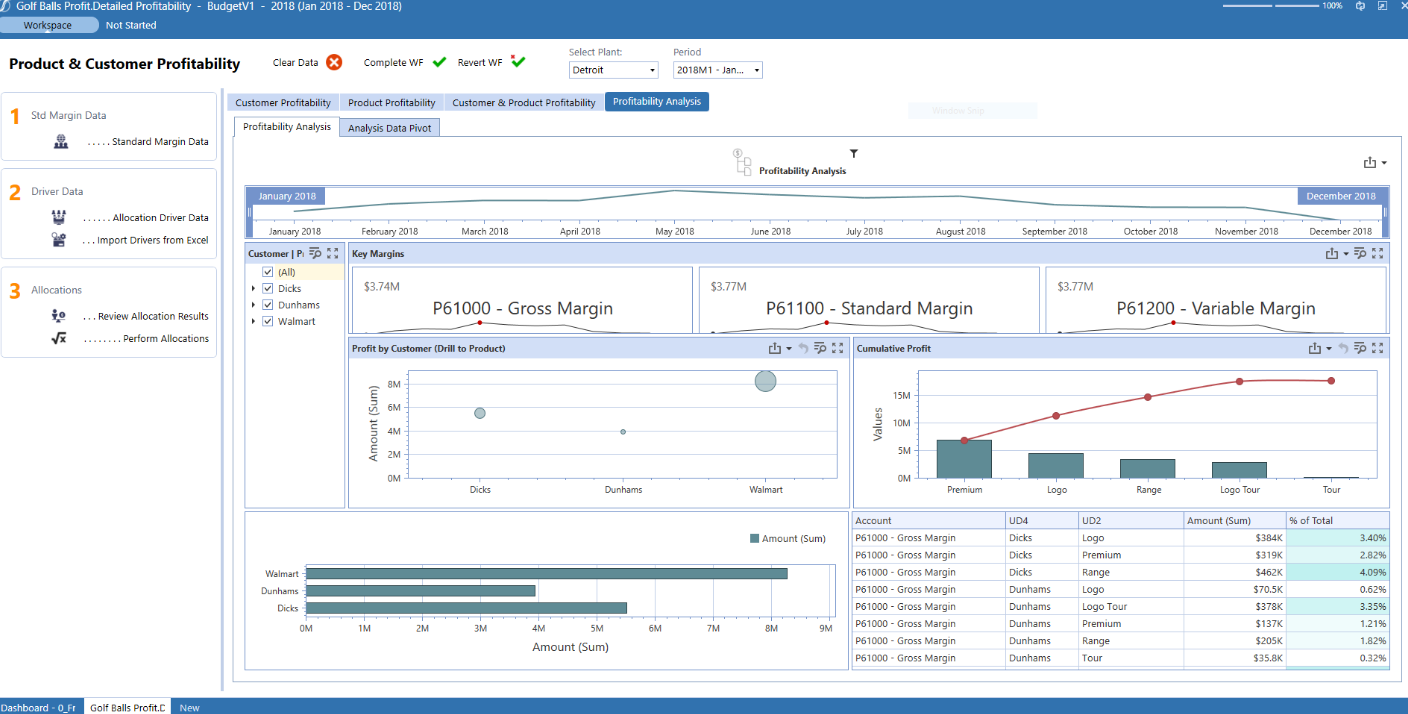
OneStream has great dashboarding capabilities for a whole range of use cases from charts and graphs, to drill-back data to running even steps that users can execute without having access to the source code/rules in the background!
It makes it easier yo analyse order and related records easily.
We can easily maintain and track the performance of employees in organisation.
Can easily track various aspects for the growth of an organisation thus allowing real time analysis and tracking of organisation's growth and performance.
Provide some more prebuilt dashboards that serve as reference examples for specific topics, to allow users to gain an idea of all that is possible
Provide some clear cut explanations to explain some of the standard concepts, to allow companies that start their implementation to gain a quick understanding of how things work
Currently we are using OneStream with people 80 - 100 to load the PL, BS , Forecast budget and People Planning. OneStream give us more visibility on trend and way forward thinking. Thanks to OneStream for the tool which helps the business in growing way. Thinking of innovation OneStream is right path.
There’s no doubt I will renew SAP Analytics Cloud. It is the most vital tool in our organization that makes it seamless to make rapid business decisions by collecting, modeling and visualizing data in real-time.
Overall usability as an end-user is very easy. There are more people in the system getting information now than the prior platform used. People are gathering their information quicker as well. From an administrator standpoint, there are fewer glitches and issues than the prior platform. This is very good.
On a scale of 1 to 10, I would rate 8 SAP Analytics Cloud's overall usability as a 7. SAC has a clean, modern user interface with drag-and-drop features. It is an integrated platform that combines reporting, planning, and predictive analytics in one tool. It has Real-time connectivity with SAP data sources like S/4HANA.
Self-service analytics capabilities allow non-technical users to build simple dashboards.
I would rate SAP Analytics Cloud an 8 out of 10 for scalability. It offers a flexible, cloud-based architecture that supports expansion across departments and geographies. The platform adapts well to growing data volumes and user needs, making it a strong choice for organizations looking to scale analytics capabilities efficiently.
I would rate SAP Analytics Cloud’s performance an 8 out of 10. Pages generally load quickly, and reports run within a reasonable time frame, even with complex datasets. Integration with other systems is smooth and doesn’t noticeably affect performance. Overall, it’s a responsive and efficient tool for business analytics. But
OneStream support is focused on the infrastructure. Which means mainly when there issues with accessing to the system, they will be able to help. When the question is to much leaning towards functional it really becomes billable. The other issue is that the response time is not optimal. There is a lot of pingpong of messages and the time between the message can sometimes be long. Sometimes this result into a simple ticket to be taking days before it is closed.
Since the implementation stage, the support team has been very helpful and assisting. Even in the later stages, the tech team had quite a rapid response. In general, SAP has provided us with great customer support, let it be for a specific product of SAP or for integration of different modules.
onestream offers a range of training. I have attended a number of trainings. During the trainings a vast amount of information is discussed. The trainings also include exercises. The speed of the training is pretty high. When reviewing the training material afterwards, I found that the material is not complete as reference as it relies also very much on the verbal explanation and elaboration.
SAC is a simple solution ad it works fine when connecting it to other SAP tools. On the other hand, connecting it to third party solutions brings difficulties when there's no previous design and the objetives are not clear. It is really important to integrate Business users from the start to provide with valuable business insights
OneStream is much more robust, has functionality around creating financial statements in Common Currency which other systems we used could not handle. OneStream has a really good structure around it. We believe it's a much better fit for a Global company of our size. We're just scratching a surface of what the system capabilities are.
SAP Analytics Cloud and Power BI are both tools that help businesses understand their data, but they have some differences. SAC, made by SAP, works well if your company already uses other SAP products. It's in the cloud, easy to use, and has features for analyzing data, getting insights, and planning for the future. Power BI, made by Microsoft, can be used in the cloud or on your own computers. It fits well with Microsoft tools, is easy to use, and can do advanced data analysis. SAC has built-in planning tools, while Power BI needs extra tools for detailed planning
I would rate SAP Analytics Cloud an 8 out of 10 for scalability. It offers a flexible, cloud-based architecture that supports expansion across departments and geographies. The platform adapts well to growing data volumes and user needs, making it a strong choice for organizations looking to scale analytics capabilities efficiently.
Customers have moved from multiple EPM systems as well as multiple EPM applications to OneStream.
Their ROI has been quite high as lesser admins are required, no need to move data back & forth, no need for an additional dashboarding / BI tool, once a user is on OneStream can leverage it for more than 50+ use cases at no additional license cost.
Automation, direct integration, scheduling, complex calculation capabilities, all help to further improve ROI and free up the time for the team to do value-adding tasks.
Last but not the least is the confidence on the numbers is much higher.
Optimized our budgeting and forecasting processes. The platform facilitates real-time collaboration among our teams, allowing for more accurate and agile financial planning. This has led to improved precision in budget allocation, ensuring that resources are strategically deployed to support the most promising startups within our portfolio.
SAC's intuitive dashboards and visualizations provide a consolidated view of key performance indicators, startup health metrics, and portfolio analytics. This heightened data visibility enables our teams to make informed decisions promptly, identify emerging trends, and proactively address challenges.
Routine tasks, such as performance tracking and reporting, are automated, allowing our teams to focus on more strategic initiatives. This has resulted in time savings and increased productivity across various operational processes.