NoteVault is a construction reporting tool with three components. The Notes! app is supported by an audio-to-text translation service, and the Crew! app allows users to track labor, materials, and equipment quantities. The AlertMe! app supports group calls for issue notification.
N/A
WorkflowMax
Score 9.2 out of 10
Small Businesses (1-50 employees)
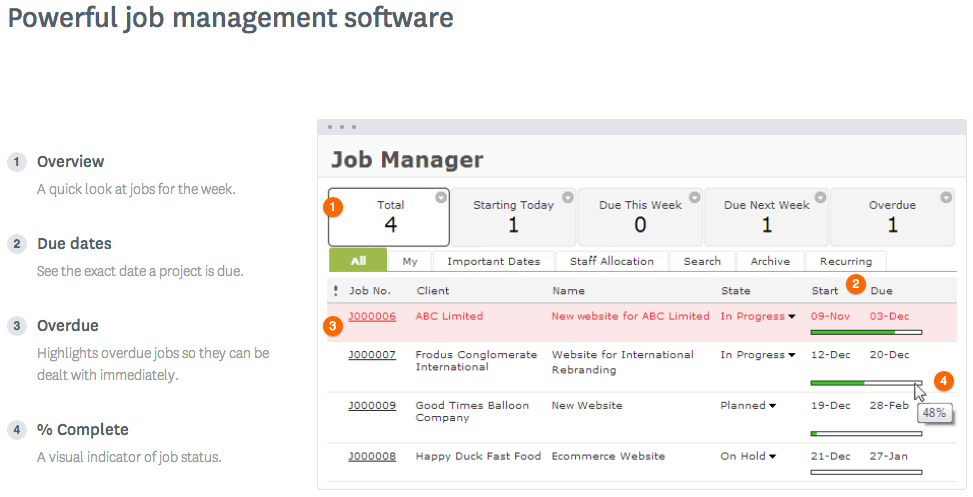
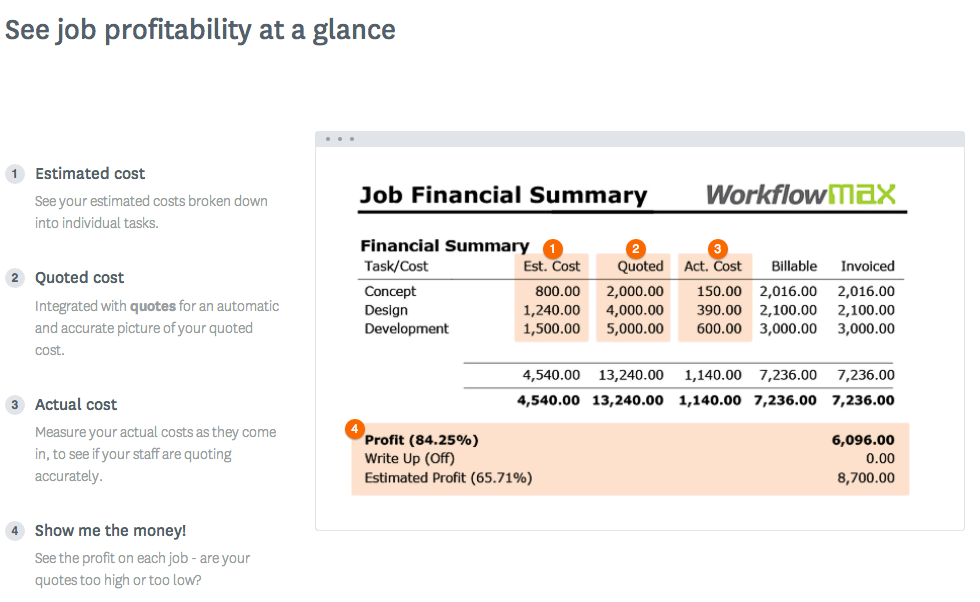
WorkflowMax is a web-based project management solution.The platform offers end-to-end functionality standard to project management software, including time tracking, lead management, collaboration with external stakeholders, invoicing, integrations, and customizable reporting.
$20
per month
Pricing
NoteVault
WorkflowMax
Editions & Modules
No answers on this topic
Standard
$20
per month
Standard
$35
per month
Premium
$70
per month
Offerings
Pricing Offerings
NoteVault
WorkflowMax
Free Trial
No
Yes
Free/Freemium Version
No
No
Premium Consulting/Integration Services
No
No
Entry-level Setup Fee
No setup fee
No setup fee
Additional Details
—
—
More Pricing Information
Community Pulse
NoteVault
WorkflowMax
Features
NoteVault
WorkflowMax
Construction Project & Field Management
Comparison of Construction Project & Field Management features of Product A and Product B
NoteVault
9.1
1 Ratings
19% above category average
WorkflowMax
-
Ratings
Photo documentation
9.11 Ratings
00 Ratings
Jobsite reports
9.11 Ratings
00 Ratings
Project Management
Comparison of Project Management features of Product A and Product B
NoteVault
-
Ratings
WorkflowMax
9.3
27 Ratings
20% above category average
Task Management
00 Ratings
9.525 Ratings
Resource Management
00 Ratings
9.56 Ratings
Gantt Charts
00 Ratings
9.23 Ratings
Scheduling
00 Ratings
9.419 Ratings
Workflow Automation
00 Ratings
9.54 Ratings
Team Collaboration
00 Ratings
9.519 Ratings
Support for Agile Methodology
00 Ratings
8.93 Ratings
Support for Waterfall Methodology
00 Ratings
9.23 Ratings
Document Management
00 Ratings
9.219 Ratings
Email integration
00 Ratings
9.44 Ratings
Mobile Access
00 Ratings
9.221 Ratings
Timesheet Tracking
00 Ratings
9.624 Ratings
Change request and Case Management
00 Ratings
9.111 Ratings
Budget and Expense Management
00 Ratings
9.418 Ratings
Professional Services Automation
Comparison of Professional Services Automation features of Product A and Product B
It's is absolutely well suited for all daily reporting/documentation needs, also since it essentially 'self archives' you can revisit past projects by logging into the admin panel faster than going to my own archived job files. It saved our skin by documenting where a bad GC Superintendent had been giving false information to the office, and we were able to prove our conditions/progress and alleviate the issue. It's very well suited for large projects, and ongoing projects. A bit less suited for small fast service type projects. We keep one 'service' job open to document the fast turn over stuff to alleviate that issue.
WorkflowMax is very well suited for a business that wants to track time billed by project, to have an easy way to generate invoices for those projects, and to keep track of overall productivity and invoice status. I imagine it can also be adapted to different types of businesses that deal in goods rather than services and time. I am not sure for which scenarios or businesses the program is not appropriate.
As a delay has occurred in the field, the foremen are able to report it immediately. The project manager now gets this information as it happened, not just trying to remember the next time they talk or see each other.
As an RFI arises, the foremen can ask their questions immediately so that the PM can address it right away.
We input our manpower on a daily basis, which helps us project where we are as it pertains to hours on a job.
You can customize the notifications and this has helped us enormously to schedule dates that we overlooked. Also the templates are customizable which gives the company its own branding on its reports.
It is integrated with the Xero platform which makes it very useful to streamline the processes of billing, accounts payable, accounts receivable, petty cash flow and all the accounting and administrative area.
It also has a very complete mobile version, where we can be present and monitor the progress of projects in real time, no matter where we are.
Difficult to bring back reports from the archives. I don't archive any more; I just sequentially date my projects and keep them all live.
Notevault is set up for normal work shifts. But I mostly work night shifts from about 10 pm to 6 am. You then have to sort and filter the notes from two separate "days" in the system to get a coherent report from a single night shift. I live with it, but I don't like it.
Currently the timesheet function allows staff to input time for overlapping periods which can cause some headaches when it comes to payroll and invoicing. We understand this is being addressed.
The amount of flexibility in the product can create some challenges when setting up the jobs database at the onset. It is a daunting challenge but worthwhile when completed correctly and rolled out across the firm. Adding new jobs is much easier.
No search function to find a specific job, you have to scroll through all jobs allocated to you.
Decide how to breakdown your ongoing jobs - are they monthly recurring or annual broken into chunks? What are you going to give clients i.e. how will your proposals and invoices look?
I have used both Raken and NoteVault. It is my preference to use NoteVault due to the simplicity of it. Raken tended to be a bit cumbersome. I did not like the photo features used with Raken as opposed to the very simple straight forward approach with NoteVault
WorkflowMax is much much easier than Streamtime, much more affordable and easier to try out and see if it meets your needs. Streamtime is a great comprehensive product but we lost a year's subscription in investment because we couldn't get answers to the support questions we needed and they had a no refund policy!
Daily reports get published the following day after downloaded to NoteVault.
From an executive standpoint, I am able to track the progress of each project on a daily basis and to be able to focus my efforts to the project that needs help.
Max enables Loan Assistant to invoice very quickly and easily and integration with Xero for card payments brings our cashflow forward.
Max enables the Loan Assistant team to manage their workflow in an efficient and productive way. The team all work from home. It is the centre of our Loan Assistant universe.