MS SharePoint / SQL vs. SAP Lumira Discovery

Overview
ProductRatingMost Used ByProduct SummaryStarting Price
MS SharePoint / SQL
Score 8.5 out of 10
N/A
MS SharePoint / SQL refers to Microsoft Sharepoint, a web-based collaborative platform, being used in tandem with Microsoft SQL Server to provide business intelligence analytics and reporting. They can provide BI content such as data connections, reports, scorecards, dashboards, and more.N/A
SAP Lumira Discovery
Score 4.4 out of 10
N/A
SAP Lumira Discovery is SAP’s data visualization and discovery application. It facilitates data discovery, visualization, and analysis by assisting users with creation of dashboards, infographics, presentations, data facets, tag clouds, and more.
$185
per user
Pricing
MS SharePoint / SQLSAP Lumira Discovery
Editions & Modules
No answers on this topic
SAP Lumira, standard edition
$185
per user
Offerings
Pricing Offerings
MS SharePoint / SQLSAP Lumira Discovery
Free Trial
NoYes
Free/Freemium Version
NoNo
Premium Consulting/Integration Services
NoYes
Entry-level Setup FeeNo setup feeNo setup fee
Additional Details
More Pricing Information
Community Pulse
MS SharePoint / SQLSAP Lumira Discovery
Considered Both Products
MS SharePoint / SQL
Chose MS SharePoint / SQL
The MS Sharepoint offers a more robust toolset for document storing and searching, using the file metadata. Also, it provides a support for workflow process, it can trigger action when a documents is added, changed etc. Sharepoint seems also better in versioning the documents. …
SAP Lumira Discovery

No answer on this topic

Features
MS SharePoint / SQLSAP Lumira Discovery
BI Standard Reporting
Comparison of BI Standard Reporting features of Product A and Product B
MS SharePoint / SQL
7.7
58 Ratings
6% below category average
SAP Lumira Discovery
8.0
97 Ratings
2% below category average
Pixel Perfect reports8.739 Ratings00 Ratings
Customizable dashboards7.055 Ratings8.097 Ratings
Report Formatting Templates7.448 Ratings00 Ratings
Ad-hoc Reporting
Comparison of Ad-hoc Reporting features of Product A and Product B
MS SharePoint / SQL
8.3
53 Ratings
3% above category average
SAP Lumira Discovery
7.3
103 Ratings
10% below category average
Drill-down analysis8.042 Ratings10.0100 Ratings
Formatting capabilities8.553 Ratings7.0103 Ratings
Integration with R or other statistical packages8.030 Ratings00 Ratings
Report sharing and collaboration8.750 Ratings5.098 Ratings
Report Output and Scheduling
Comparison of Report Output and Scheduling features of Product A and Product B
MS SharePoint / SQL
8.9
58 Ratings
7% above category average
SAP Lumira Discovery
6.1
95 Ratings
31% below category average
Publish to Web8.752 Ratings7.082 Ratings
Publish to PDF9.549 Ratings5.094 Ratings
Report Versioning8.248 Ratings00 Ratings
Report Delivery Scheduling9.039 Ratings6.355 Ratings
Delivery to Remote Servers9.032 Ratings00 Ratings
Data Discovery and Visualization
Comparison of Data Discovery and Visualization features of Product A and Product B
MS SharePoint / SQL
8.6
36 Ratings
8% above category average
SAP Lumira Discovery
4.3
104 Ratings
60% below category average
Pre-built visualization formats (heatmaps, scatter plots etc.)8.734 Ratings5.0102 Ratings
Location Analytics / Geographic Visualization8.032 Ratings6.095 Ratings
Predictive Analytics9.330 Ratings2.072 Ratings
Pattern Recognition and Data Mining8.33 Ratings00 Ratings
Access Control and Security
Comparison of Access Control and Security features of Product A and Product B
MS SharePoint / SQL
8.3
69 Ratings
2% below category average
SAP Lumira Discovery
-
Ratings
Multi-User Support (named login)8.060 Ratings00 Ratings
Role-Based Security Model8.264 Ratings00 Ratings
Multiple Access Permission Levels (Create, Read, Delete)8.468 Ratings00 Ratings
Report-Level Access Control8.04 Ratings00 Ratings
Single Sign-On (SSO)8.754 Ratings00 Ratings
Mobile Capabilities
Comparison of Mobile Capabilities features of Product A and Product B
MS SharePoint / SQL
9.4
59 Ratings
18% above category average
SAP Lumira Discovery
-
Ratings
Responsive Design for Web Access9.557 Ratings00 Ratings
Mobile Application9.536 Ratings00 Ratings
Dashboard / Report / Visualization Interactivity on Mobile8.739 Ratings00 Ratings
Application Program Interfaces (APIs) / Embedding
Comparison of Application Program Interfaces (APIs) / Embedding features of Product A and Product B
MS SharePoint / SQL
8.8
38 Ratings
12% above category average
SAP Lumira Discovery
-
Ratings
REST API9.329 Ratings00 Ratings
Javascript API9.328 Ratings00 Ratings
iFrames9.027 Ratings00 Ratings
Java API9.025 Ratings00 Ratings
Themeable User Interface (UI)8.033 Ratings00 Ratings
Customizable Platform (Open Source)8.124 Ratings00 Ratings
User Ratings
MS SharePoint / SQLSAP Lumira Discovery
Likelihood to Recommend
8.8
(77 ratings)
5.0
(105 ratings)
Likelihood to Renew
8.8
(7 ratings)
-
(0 ratings)
Usability
9.0
(12 ratings)
8.0
(15 ratings)
Availability
-
(0 ratings)
9.0
(1 ratings)
Performance
-
(0 ratings)
7.0
(1 ratings)
Support Rating
8.8
(7 ratings)
7.0
(11 ratings)
In-Person Training
-
(0 ratings)
6.0
(1 ratings)
Online Training
-
(0 ratings)
6.0
(1 ratings)
Implementation Rating
7.0
(2 ratings)
10.0
(3 ratings)
Configurability
-
(0 ratings)
2.0
(1 ratings)
Ease of integration
-
(0 ratings)
5.0
(1 ratings)
Product Scalability
-
(0 ratings)
6.0
(1 ratings)
Vendor post-sale
-
(0 ratings)
8.0
(1 ratings)
Vendor pre-sale
-
(0 ratings)
8.0
(1 ratings)
User Testimonials
MS SharePoint / SQLSAP Lumira Discovery
Likelihood to Recommend
Microsoft
As I mentioned in my previous answers, MS SharePoint is very useful as a shared drive for the organization and is very easy to manage. It also helps us import data from SharePoint directly into PowerBI for creating reports. According to my understanding, only share link features should be improved.
Read full review
SAP
Infographics derived from specific data sources appears to be well suited for development using Lumira. The development of executive level dashboards was less appropriate from my perspective. The software does not provide sufficient demonstration or samples for the users to learn from in my opinion.
Read full review
Pros
Microsoft
  • Flexible - able to make any changes we would like vs traditional service desk system.
  • ROI - We were already using SharePoint for internal intranet, so we are simply getting more use out of licensing we had already committed to.
  • Easy to use for end users.
Read full review
SAP
  • SAP has built in features you would expect from a data visualization package, like easy import from other SAP systems.
  • SAP has most of the typical charts that you would expect in order to visualize your data.
  • SAP allows you to have multiple charts on one visualization for your data.
Read full review
Cons
Microsoft
  • It is hard to setup and nightmare
  • It requires a of infrastructure, thus it could be costly because of requirement and licensing required for everything to run smoothly
  • If it is not setup and organized properly from the beginning it could be maintenance nightmare
  • It is hard to have "test" environment to do patches or similar
Read full review
SAP
  • Even though the process of creating visualizations of data is now greatly improved, it could still be a lot better as users become accustomed to this kind of tool and bring forward edge cases the developers did not anticipate.
  • It would be awesome to have a cross platform tool that works on more than just Windows.
  • Some options for specific graphs feel limiting.
Read full review
Likelihood to Renew
Microsoft
This was a long-term buy-in from a corporate perspective, to remain in the SharePoint space. Migration is certainly possible, which is good for planning and having options further out. At this point, the only planned migration is to eventually move the architecture up to SharePoint/SQL 2013. At that point, we will be able to leverage some greater efficiencies, some enhanced content design and management features, and some more current social features. It is well worth a full consideration in any shop looking at a new implementation of or migration to SharePoint (although you will probably be considering 2013 versions or beyond in those discussions), but the platform should be a strong competitor to any alternatives. Realizing the capability of a fully-branded and customized website was not part of the original choice for the architecture at Lincoln, but seeing it implemented and functioning now with this capacity far beyond original expectations has certainly cemented plans to continue using it.
Read full review
SAP
Given the scope ,maintanence , support and budget are the main drivers to deciding renewal of a software
Read full review
Usability
Microsoft
I gave this rating due to MS SharePoint being a big help with our userbase. We have a lot of users that are just old enough to not have much technical skills or they have been in this industry long enough to where they haven't really needed to utilize much technology. MS SharePoint helped us move beyond that barrier without too many bumps and bruises.
Read full review
SAP
SAP Lumira is very good self service analytical tool with powerful capabilities. However need to look into other SAP products in BI space, like SAP SAC. SAP Lumira is more used for custom and complex analytical need in business intelligence area. Also SAP Lumira is going out of maintenance in coming future replaced by SAP SAC.
Read full review
Reliability and Availability
Microsoft
No answers on this topic
SAP
Lumira is a desktop application runs in its own JVM. It installs its own java runtime libraries to avoid any core java version conflicts. The availability of the application is completely relies on individual machine hardware configuration. On a decent desktop, it performs well and always launches in either 32 or 64 bit environment based on the hosts system's OS
Read full review
Performance
Microsoft
No answers on this topic
SAP
The performance is linear with amount of data that is being explored. We have done some benchmarks acquiring 10million data cells without having any performance problems. We need to make proper adjustments to jvm run time properties to start with higher heap size and other parameters that optimizes the run time performance
Read full review
Support Rating
Microsoft
I've only had to call in to support on one occasion but they were able to work though our issue and find a solution that did fully resolve the issue in a timely manner. I can't always say the same about support from other companies so it was a refreshing change to have support that did help.
Read full review
SAP
It does not have many bugs or issues since not a lot of new features are being added. The customer support for SAP Lumira Discovery is good and anyone considering this as a self-service tool would be happy. It integrates well in the SAP BI suite of products and the overall experience is positive.
Read full review
In-Person Training
Microsoft
No answers on this topic
SAP
We did not take in-person training
Read full review
Online Training
Microsoft
No answers on this topic
SAP
Most of the user guides are pretty comprehensive and very easy to understand. The product itself is designed to be self-serve tool, did not need much of the end-user training. Most of the training we had is to how to read the data, how to explore the data, how to acquire the data etc.
Read full review
Implementation Rating
Microsoft
Not implemented in best practice way, there are many customizations
Read full review
SAP
Installing the desktop software on end-user machines is always challenging. The machine specifications are the biggest factor when running Lumira and be able to handle large datasets during data exploration. This often demands beefy machines at least for power-users. Although Lumira software licensing is not a big problem but managing partner's extensions and keeping track of their individual licenses may be an issue. If there is a way to bundle the more popular extensions such as vSQL or vOLAP should be bundled in core product and offer them as part of Lumira license instead of a separate license which causer operational burden.
Read full review
Alternatives Considered
Microsoft
At the time of the two large projects, SharePoint was the enterprise solution so we were required to use that. We have since lobbied the enterprise teams to review and consider Atlassian Confluence and were successful. Confluence is cheaper than Sharepoint which is why we wanted to bring that in. The enterprise has now made Confluence an enterprise solution as an alternative to SharePoint. After using both I think SharePoint has many more add-ins than Confluence. It has much more customization ability than Confluence. SharePoint is not good for mobile readiness. Confluence is so there is a difference that might lead you to Confluence over SharePoint. I would also say that SharePoint is very document-centric and that Confluence has better KM than SharePoint does. even with the use of SQL Server. We were told that we could not use Google Drive even though it had features we liked.
Read full review
SAP
Even though SAP Analytics Cloud is considered to be better in aspects such as data connectivity or analytics, we decided to choose Lumira as it was easier to understand, learn and use. As our business is not really that big and does not require the inclusion of large amounts of data, Lumira was overall the safest and most comfortable option. Also, some members in our team had previous knowledge so it was easier to adapt
Read full review
Scalability
Microsoft
No answers on this topic
SAP
Enterprise wide implementation is a challenge with data security and trustedness. No easy installation can be done across the enterprise. no upgrade paths also available from SAP. They have so much of experience with desktop implementation, there it could be a controlled environment with a capital budget. These may be resolved in the upcoming releases

Read full review
Return on Investment
Microsoft
  • ROI for ms SharePoint/SQL considering that is the best database engine with excellent features that help you to have all information in your hand.
  • Something negative could be license format.
  • These are the best relational databases in the market with powerful features that complement your system.
Read full review
SAP
  • We could obtain original data from vast and detailed corporate and personal data sources.
  • We could share visual analysis results with stakeholders via the cloud, and it could also be viewed on a tablet.
  • It is very flexible and accurate to use. It can be used for forecasting sales, resource planning, and scheduling.
Read full review
ScreenShots

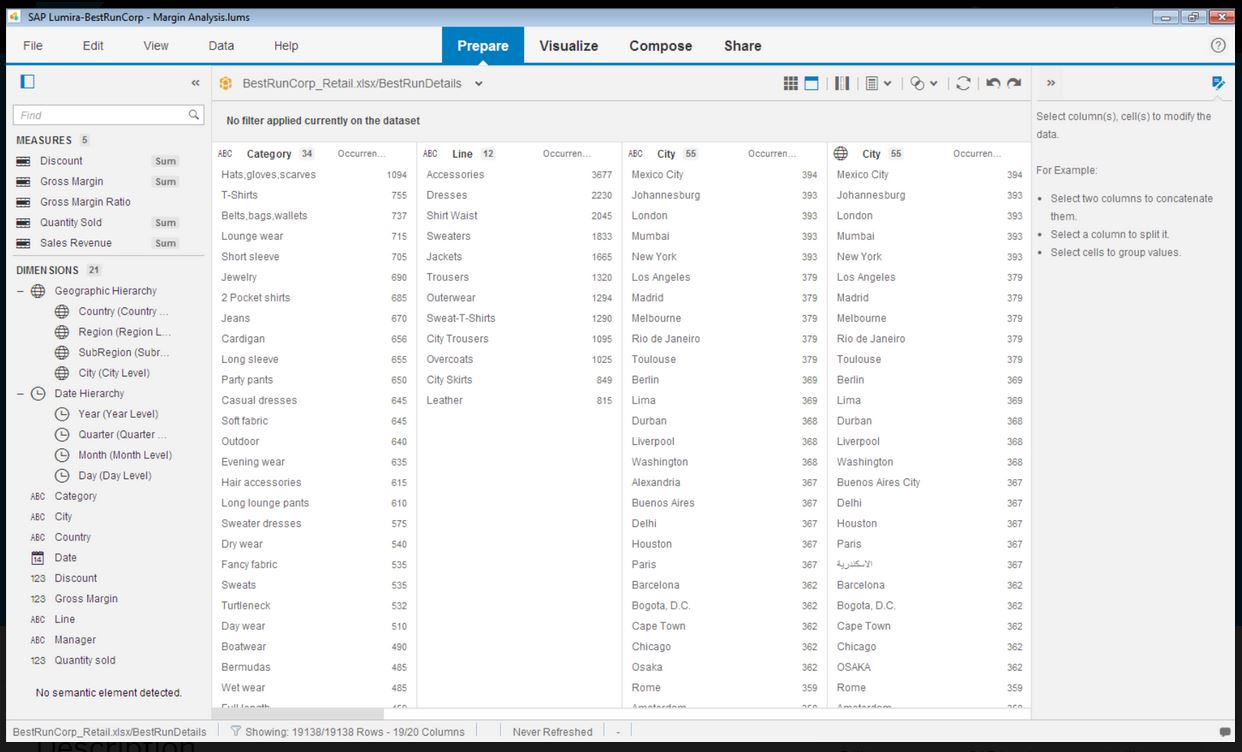
SAP Lumira Discovery Screenshots

Screenshot of Screenshot of Screenshot of Screenshot of Screenshot of Screenshot of