TrustRadius: an HG Insights company

Save this comparison

Save this comparison

Add Product

Recommended Comparisons

    Overview
    ProductRatingMost Used ByProduct SummaryStarting Price

    MonitUp

    N/AN/AEmployee monitoring platform designed to help businesses with monitoring employee website access, computer performance, and time tracking. Features of the platform include an activity dashboard with an overview of all employees' activity, login and logout tracking, visibility into which websites employees are accessing, a list of all online and offline computers, customization, and user-specific data.

    $2

    per month per user

    OgyMogy

    Score8.3 out of 10
    N/AOgyMogy is an employee monitoring solutions that aims to address all employers' concerns about their employees. The vendor states employees are nowadays excessively getting contacted by cybercriminals over the online networks, and that now the most common source of employees getting in excessive contact of cybercriminals is social media. Many criminal individuals seek to get in touch with employees, know their life secrets, and exploit them for gaining monetary and…

    $15

    Per License

    Pricing
    MonitUpOgyMogy
    Editions & Modules
    No answers on this topic
    Basic
    $15
    Per License
    Standard
    $65
    Per License
    Extreme
    $90
    Per License
    Offerings
    Pricing Offerings
    MonitUpOgyMogy
    Free Trial
    YesNo
    Free/Freemium Version
    NoNo
    Premium Consulting/Integration Services
    NoNo
    Entry-level Setup FeeOptional$15 per license
    Additional Details
    More Pricing Information
    User Ratings
    MonitUpOgyMogy
    Likelihood to Recommend
    -
    (0 ratings)
    8.0
    (1 ratings)
    User Testimonials
    MonitUpOgyMogy
    Likelihood to Recommend
    MonitUp
    No answers on this topic
    Ogymogy
    Without a doubt this software is one of the best purchases we have been able to make since our employees are much more focused on their work, unproductive hours have decreased and all projects are executed in the best way. I 100% recommend this great tool.
    Incentivized
    Read full review
    ScreenShots

    MonitUp Screenshots

    Screenshot of User Dashboard
It gives you information about users, when he turned on his computer, how long he was away from his computer, when he shut down his computer in the evening. You can see the pie chart of the most used applications. The list at the bottom will show you the details of all the transactions of the user in the date range you have specified. In this way, you can have an idea about the efficiency of the user.Screenshot of Dashboard
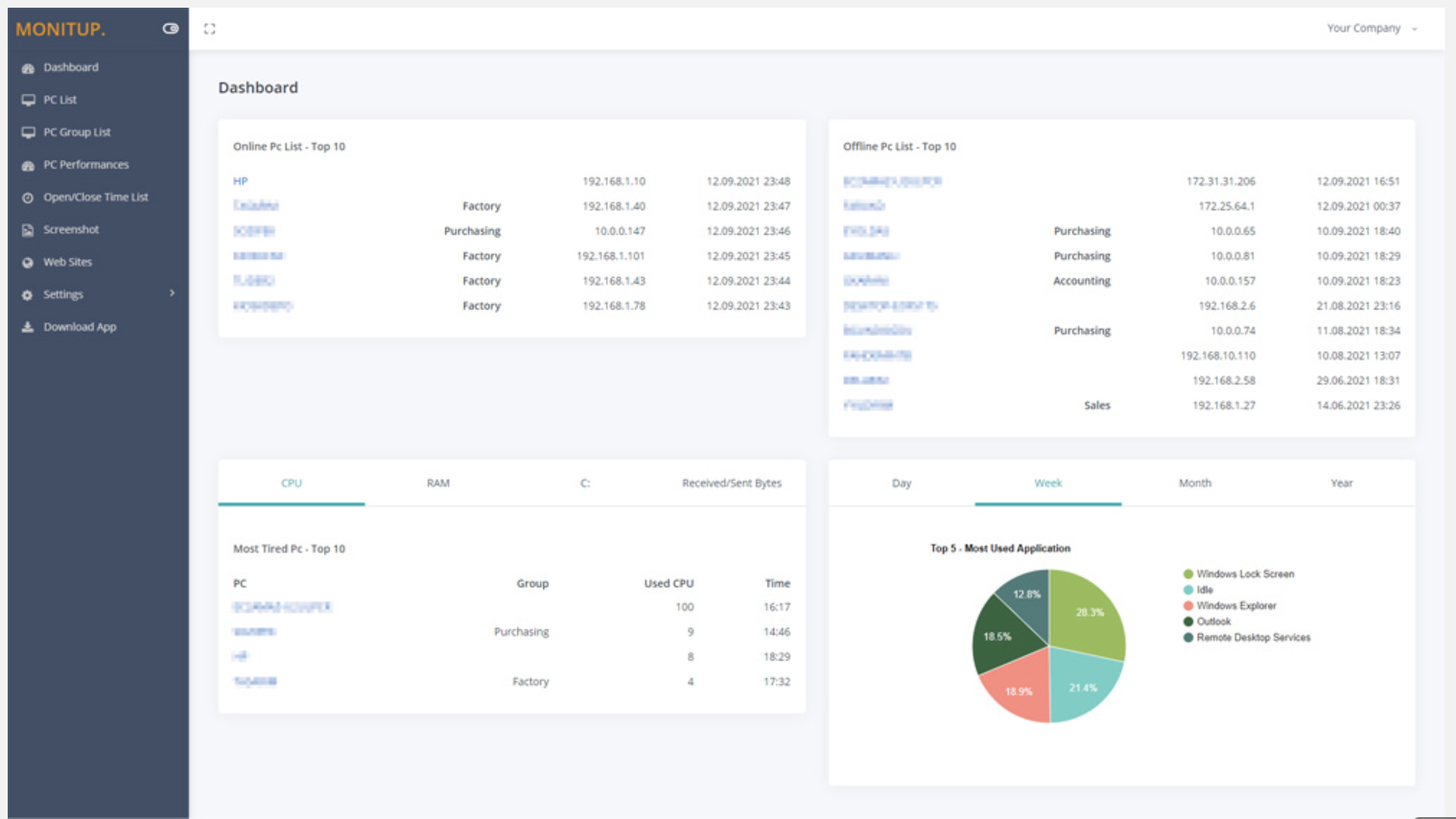
You can see the summary of the movements of the company employees on this screen. Online Computers, Offline Computers, IP Addresses, latest trading hours and pie chart of the most used programs in your company.Screenshot of Employee entrance and exit control
You can see when all employees turned on and off their computers. It helps you to distinguish missing or overwork easily.Screenshot of Websites are under control
You can see which websites employees browse and keep them under control. It is important information to increase employee productivity.Screenshot of Screenshot
Screenshots of the users you specify are taken every 5 minutes. In this way, you will have more data at hand to increase efficiency.Screenshot of Application Categories
All applications are divided into 3 categories. You can set the desired application as Productive, Unproductive Neutral. Thus, you can see the transactions on the graph and instantly analyze the efficiency of the user.