monday.com vs. WorkOtter PPM

Overview
ProductRatingMost Used ByProduct SummaryStarting Price
monday.com
Score 8.6 out of 10
Mid-Size Companies (51-1,000 employees)
monday.com Work OS is an open platform designed so that anyone can create the tools they need to run all aspects of their work. It includes ready-made templates or the ability to customize any work solution ranging from sales pipelines to marketing campaigns, CRMs, and project tracking.
$12
per month per user
WorkOtter PPM
Score 9.1 out of 10
Mid-Size Companies (51-1,000 employees)
WorkOtter is presented by the vendor as a simple, flexible, and scalable project portfolio management (PPM) solution for IT, Engineering, and Professional Service PMOs. The software manages the lifecycle of work from ideas through project planning, control, lessons learned, and close. Projects can then be rolled up to Programs (multi project efforts) or Portfolios (Roadmaps with What If Scenarios). All features were designed to support Project Teams with simplicity and usability in mind.…
$10
per user per month
Pricing
monday.comWorkOtter PPM
Editions & Modules
Basic
$12
per month per user
Standard
$14
per month per user
Pro
$24
per month per user
Enterprise
Contact Sales
Contact us
Time/Status
$10
per user per month
Team
$20
per user, per month
Manager
$35
per user, per month
Offerings
Pricing Offerings
monday.comWorkOtter PPM
Free Trial
YesYes
Free/Freemium Version
YesNo
Premium Consulting/Integration Services
NoNo
Entry-level Setup FeeNo setup feeNo setup fee
Additional DetailsYearly plan: Save 18% Monthly plan also availableTime/Status Tier is BEST FOR: Contractors, Consultants, Limited Team Members FUNCTIONALITY AVAILABLE:Timesheets, Adjust Estimate To Complete, Create Notes for PM and Team Members Team Tier is BEST FOR: Customers, Suppliers, Contractors, Consultants, Team Members FUNCTIONALITY INCLUDES TIME/STATUS PLUS: My Home Dashboards, Support Log Updates, Issue Updates, Changes, Timesheet & Expenses, Risks, Action Items Limited, Reporting, E-Mail Updates, Chat & Collaboration Manager Tier is BEST FOR: Project Managers, Program Managers, Executives, PMO Department Managers, Administrators FUNCTIONALITY INCLUDES TEAM PLUS: Project Management, Microsoft Project -Way Sync, Dashboard Reporting, Program Management, Resource Management, Portfolio Management, Workflow Management, Estimating and Templates
More Pricing Information
Community Pulse
monday.comWorkOtter PPM
Features
monday.comWorkOtter PPM
Project Management
Comparison of Project Management features of Product A and Product B
monday.com
8.9
Ratings
15% above category average
WorkOtter PPM
9.9
Ratings
26% above category average
Task Management9.50 Ratings10.00 Ratings
Resource Management9.30 Ratings10.00 Ratings
Gantt Charts8.40 Ratings10.00 Ratings
Scheduling8.60 Ratings10.00 Ratings
Workflow Automation9.60 Ratings10.00 Ratings
Team Collaboration9.40 Ratings9.00 Ratings
Support for Agile Methodology8.80 Ratings10.00 Ratings
Support for Waterfall Methodology7.00 Ratings00 Ratings
Document Management8.50 Ratings00 Ratings
Email integration9.40 Ratings00 Ratings
Mobile Access8.60 Ratings00 Ratings
Timesheet Tracking9.00 Ratings10.00 Ratings
Change request and Case Management9.60 Ratings10.00 Ratings
Budget and Expense Management9.20 Ratings00 Ratings
Professional Services Automation
Comparison of Professional Services Automation features of Product A and Product B
monday.com
9.8
Ratings
26% above category average
WorkOtter PPM
-
Ratings
Quotes/estimates9.90 Ratings00 Ratings
Project & financial reporting9.80 Ratings00 Ratings
Integration with accounting software9.80 Ratings00 Ratings
Best Alternatives
monday.comWorkOtter PPM
Small Businesses
Stackby
Stackby
Score 9.0 out of 10
Stackby
Stackby
Score 9.0 out of 10
Medium-sized Companies
InEight
InEight
Score 8.3 out of 10
InEight
InEight
Score 8.3 out of 10
Enterprises
InEight
InEight
Score 8.3 out of 10
InEight
InEight
Score 8.3 out of 10
All AlternativesView all alternativesView all alternatives
User Ratings
monday.comWorkOtter PPM
Likelihood to Recommend
9.1
(0 ratings)
10.0
(0 ratings)
Likelihood to Renew
9.0
(0 ratings)
-
(0 ratings)
Usability
8.7
(0 ratings)
-
(0 ratings)
Availability
8.2
(0 ratings)
-
(0 ratings)
Performance
8.6
(0 ratings)
-
(0 ratings)
Support Rating
9.5
(0 ratings)
-
(0 ratings)
In-Person Training
9.1
(0 ratings)
-
(0 ratings)
Online Training
9.1
(0 ratings)
-
(0 ratings)
Implementation Rating
9.1
(0 ratings)
-
(0 ratings)
Configurability
8.2
(0 ratings)
-
(0 ratings)
Ease of integration
9.0
(0 ratings)
-
(0 ratings)
Product Scalability
6.9
(0 ratings)
-
(0 ratings)
Vendor post-sale
9.0
(0 ratings)
-
(0 ratings)
Vendor pre-sale
9.0
(0 ratings)
-
(0 ratings)
User Testimonials
monday.comWorkOtter PPM
Likelihood to Recommend
Here, I will suggest that it is best to create employees, clients, or project reports. Easy to track with the dashboards. I did many integrations and developments. I can not list each of them here. I will say the best tool for management. I couldn't see criteria of unsuitable. But yes It will depend on the client's requirements. I will suggest it as very user-friendly tool for CEOs, CTOs, Managers, and company owners also for team.
Read full review
I know it works well for IT but not sure how it would work for construction. I think construction has a different set of needs.
Read full review
Pros
  • Set stages for each task and assign people to those stages to move projects along
  • Set up automated tasks to get assigned to people and to send out notifications to Slack as well as emails to contractors to work on a project
  • Create multiple boards for projects and the ability to review tasks by date to make sure no project slips through the cracks
Read full review
  • It allows you to know when someone who is running late on another project is going to be late on your project.
  • It has a good reporting/analytics.
  • Easy to communicate with others on projects.
Read full review
Cons
  • Ensuring I have set up a Private board vs public board is not clear - it would be useful to have an additional alert when creating a board as I work with sensitive information. It will eventually be used in a team based environment but while I test the boards, they needs to be private.
  • Time tracking is clumsy, could be easier to record
Read full review
  • I can't think of anything major that is missing. I understand it was challenging to integrate it with our commercial banking application but I wasn't involved in that process.
Read full review
Likelihood to Renew
Teams involved in content creation, such as marketing or editorial teams, could use monday.com to manage the entire content lifecycle. Boards might track content ideas, assignments, drafts, reviews, approvals, and publication schedules, helping teams collaborate and keep content production on track.
Read full review
No answers on this topic
Usability
It's straightforward to use and simple to understand. They have tutorials on different elements of the system that you can learn. The workflow there is very intuitive, drag and drop, which doesn't require a learning curve for most people. Templates that also make things more accessible can be found.
Read full review
No answers on this topic
Reliability and Availability
There have only been 2 instances in the past year where monday.com was down.
Read full review
No answers on this topic
Performance
Everything performs fairly well. Every now and then there are user errors where an employee will not click "ok" on a note they've created and simply exit out (I do wish that something was in place to prevent this, such as a pop "are you finished?")
Read full review
No answers on this topic
Support Rating
monday.com only really care about accounts that have 20 seats or more. While this is great for monday.com, it pushes smaller organisations to evaluate alternatives. We rate monday.com highly in our organisation because key staff have already got good experience with the application and we know we will get to 20+ seats one day. But, till then the billing model and lack of permanent enterprise features is a dread.
Read full review
No answers on this topic
Online Training
To have someone walk you thru the features and capabilities of Monday.com is priceless. Someone also coming along later in the contract to see if you are maximizing the program to suit your company needs is beyond helpful. The staff that have provided this training are fun, creative and very patient.
Read full review
No answers on this topic
Implementation Rating
We signed up for the accounts. Created the accounts. Ran the trial version and tested it live while we were running multiple projects and found that it was fitting our needs perfectly. When the trial ended and we were asked to purchase the full version, we did. We have found other ways to use it and it's a breeze.
Read full review
No answers on this topic
Alternatives Considered
We decided to go with monday.com because they offered a free tier for nonprofits and because they are easier to use and offered additional features that we could not find on the other choices. Hands down, there was no better choice for us than monday.com.
Read full review
No answers on this topic
Scalability
For it to work across multiple departments and sites, I would like to see improvements made with integrations and automation. For this question, I am acknowledging not only the addition of internal triggers/automation, but also an expansion on external ones.
Read full review
No answers on this topic
Return on Investment
  • By using monday.com as an enablement tool for templated onboarding plans, we have been able to begin calculating the number of manager hours saved through our work (not defined yet).
  • monday.com's reporting tools also allow us to more easily report on the productivity and output of our team since we keep up with all projects and subitems in monday.com.
Read full review
  • I think it has really helped us make sure we are using resources effectively but I think it is hard to prove. Although we don't have hard ROI numbers, I believe the general feeling is that you really need a good PPM tool or will waste a lot of time and money.
  • It helps with communication since we have a standard process.
Read full review
ScreenShots

monday.com Screenshots

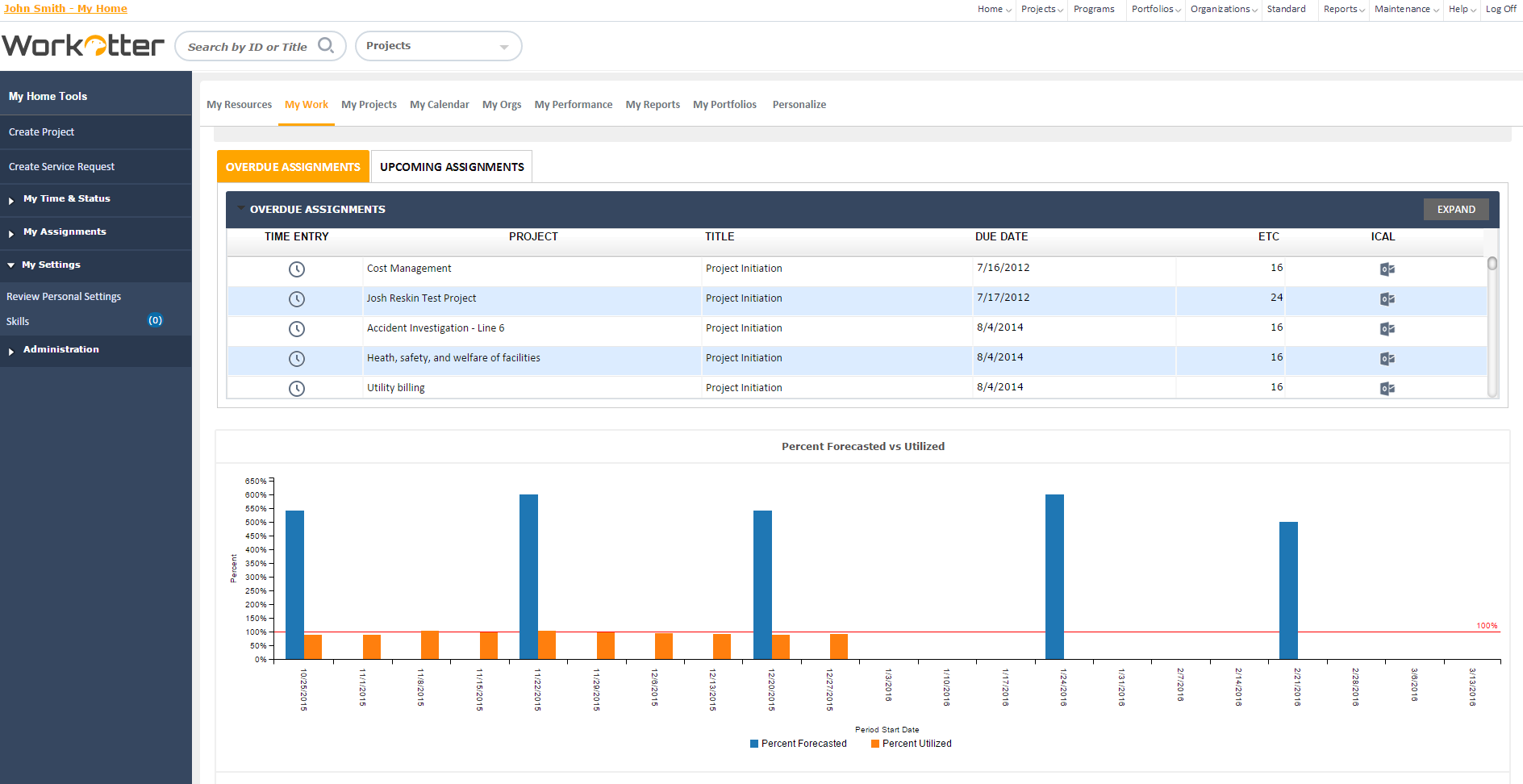
Screenshot of Work OSScreenshot of Ready-Made TemplatesScreenshot of MobileScreenshot of Visual BoardsScreenshot of Real-time NotificationsScreenshot of Automations

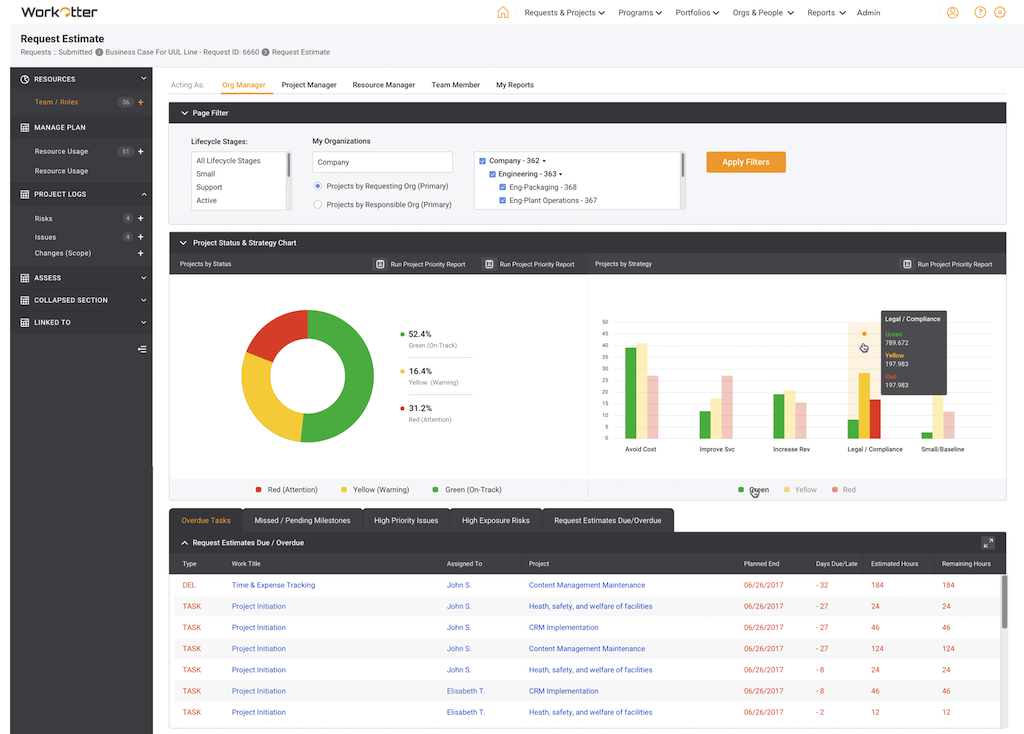
WorkOtter PPM Screenshots

Screenshot of Dashboard viewScreenshot of WorkOtter MyWork viewScreenshot of Dashboard OverviewScreenshot of Resource Usage for People, Tasks, Time, BudgetScreenshot of Over/Under resource allocation viewScreenshot of Project Management Workflow - Customizable