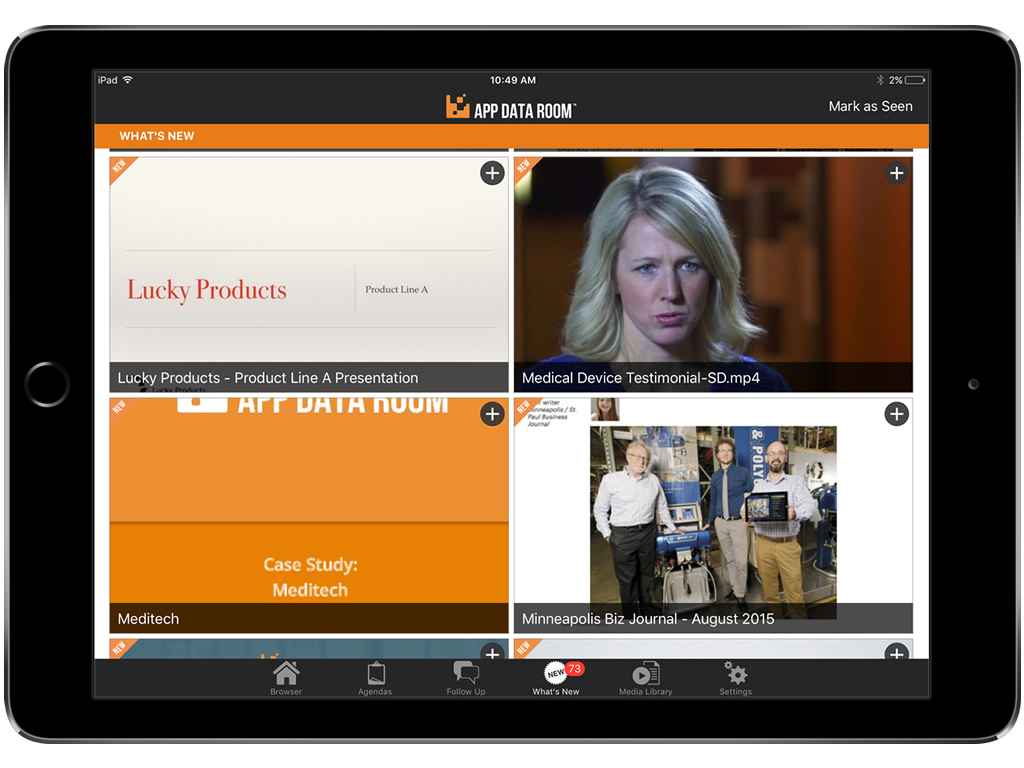
Modus (formerly App Data Room) is designed to drive sales success, by helping customers create and distribute content for the most critical moments of their sales process. The vendor boasts more than 120,000 sales and marketing professionals are using Modus to conduct 250,000 Critical Customer Conversations every day.
N/A
Prezi
Score 8.2 out of 10
N/A
Prezi’s advantage over static slides is that its interactive, zoomable canvas shows the relationship between the big picture and the fine details. The vendor’s value proposition is that this puts ideas in context, and makes them more likely to resonate, motivate, and be remembered.
$3
per month
Pricing
Modus
Prezi
Editions & Modules
No answers on this topic
Students & Educators - EDU Plus
$3
per month
Individual - Standard
$5
per month
Basic - Plus
$15
per month
Individual - Plus
$15
per month
Business - Plus
$15
per month
Individual - Premium
$59
per month
Business - Premium
$59
per month
Basic - Free
Free
Students & Educators - Basic
Free
Students & Educators - EDU Teams
Contact sales team
Business - Teams
Contact for quote
Offerings
Pricing Offerings
Modus
Prezi
Free Trial
Yes
Yes
Free/Freemium Version
No
Yes
Premium Consulting/Integration Services
No
No
Entry-level Setup Fee
Optional
No setup fee
Additional Details
The off-the-shelf version starts at $45 per user per month. Whitelabel, integrations, enterprise pricing and authentication packages available on request.
ADR is a great interactive tool for B2B businesses that sales deals one-on-one with the customer. I don't think it would be well suited for B2C businesses because of the need and cost for individual licenses per user. I would highly recommend this tool to B2B companies that practice traditional sales with a technological edge.
I believe Prezi is well suited when an author wants to create a more compelling presentation. It is also most useful when using it to explain processes, flows, and/or other visual elements. From another perspective, when it is necessary to create something more quickly, Prezi may not be the right solution, when compared to PowerPoint, for example. There are nice templates, but the creation process may not be so fast and simple.
Content Mangement System - Our Marcom department is able to maintain and update the app in real-time and push updates directly to our team without going to an outside vendor. The CMS has a great UI/UX and is easy to use and maintain.
What's New Feature - Our sales team can easily see every time we make additions or updates.
3D capabilities - the ability to use animation image sequences on the app really impresses our customers.
Prezi can provides a literal "big picture" view of the presentation content. This helps the audience understand what the presentation is ultimately all about.
Prezi is anything but bland. It animates the content and makes it feel like you are "in" the material.
Prezi presentations can incorporate video, images, text and more. There are many options to present content to an audience.
Hard to create something quick and simple, so even after we gained experience we still had a hard time using it to deliver a presentation overnight.
Can be slow to load a presentation, so we always setup 5-10 minutes before our actual presentation time and made sure everything is loaded and ready to go.
App Data Room has been instrumental in allowing our sale representatives to present up-to-date and innovative marketing collateral to potential customers. A second value add is that our Marketing Department is able to create and upload the most current material to the app so that our sales representatives have access to the most up-to-date information to present to our customers.
Overall, the App Data Room product is easy to use. Our Marketing Department is able to quickly upload updated and new material once they create the documents. Users are able to quickly find material filed by subject matter. Once the appropriate material is located, it can be presented on their iPad and emailed to prospective customers who indicate interest in the products.
Learning to use Prezi and create new presentations is very simple and easy to do. It does not require new skills or a long training process, since in general the use is quite intuitive (and if you have any questions there are many videos on how to use it). Its operation in both the browser version and the app is very good and fluid, managing to perform all the tasks you want properly.
The few support requests that we have submitted have been resolved within 2 business days. The App Data Room staff has also been responsive to suggestions from our staff to upgrade the product - specifically in the area of analytics.
It is a modern and easy-to-use tool (after a while) that allows you to make dynamic and trained presentations without the need to be an expert user. It has allowed me to improve the attention and motivational processes of my students. In addition, it has many [community users] who make videos and teach the many uses that you can use Prezi. And because, despite the restrictions of the free version, everyone can access and make use of Prezi and thus improve their boring ppt and inject some vitality into them.
No, key insights. Implementation was easy. The App Data Room staff hosted initial training sessions for our support personnel, and then these support persons conducted training and support sessions for our users.
We've used custom developed tools in the past but the upfront cost is very high and the solution we had was very costly to update. We did not have a CMS previously so real-time updates were unheard of. App Data Room has all of the features we previously had plus so much more.
We also tried Powerpoint and Visio to prepare hierarchical presentations, but it was not as easy, and it was kind of difficult to edit. Prezi provided built-in zoom-pan animation, which made it easier. Also, there were many samples from the Prezi community that one could learn from. Finally, Prezi Classic was free and there was not any limitation in using the free version.