Microsoft Project is a project management software. It provides core PM functionality, including agile workflow support and resource management. Project can be deployed in the cloud or on-premise.
$120
per year per user
Planview ProjectPlace
Score8.4 out of 10
N/A
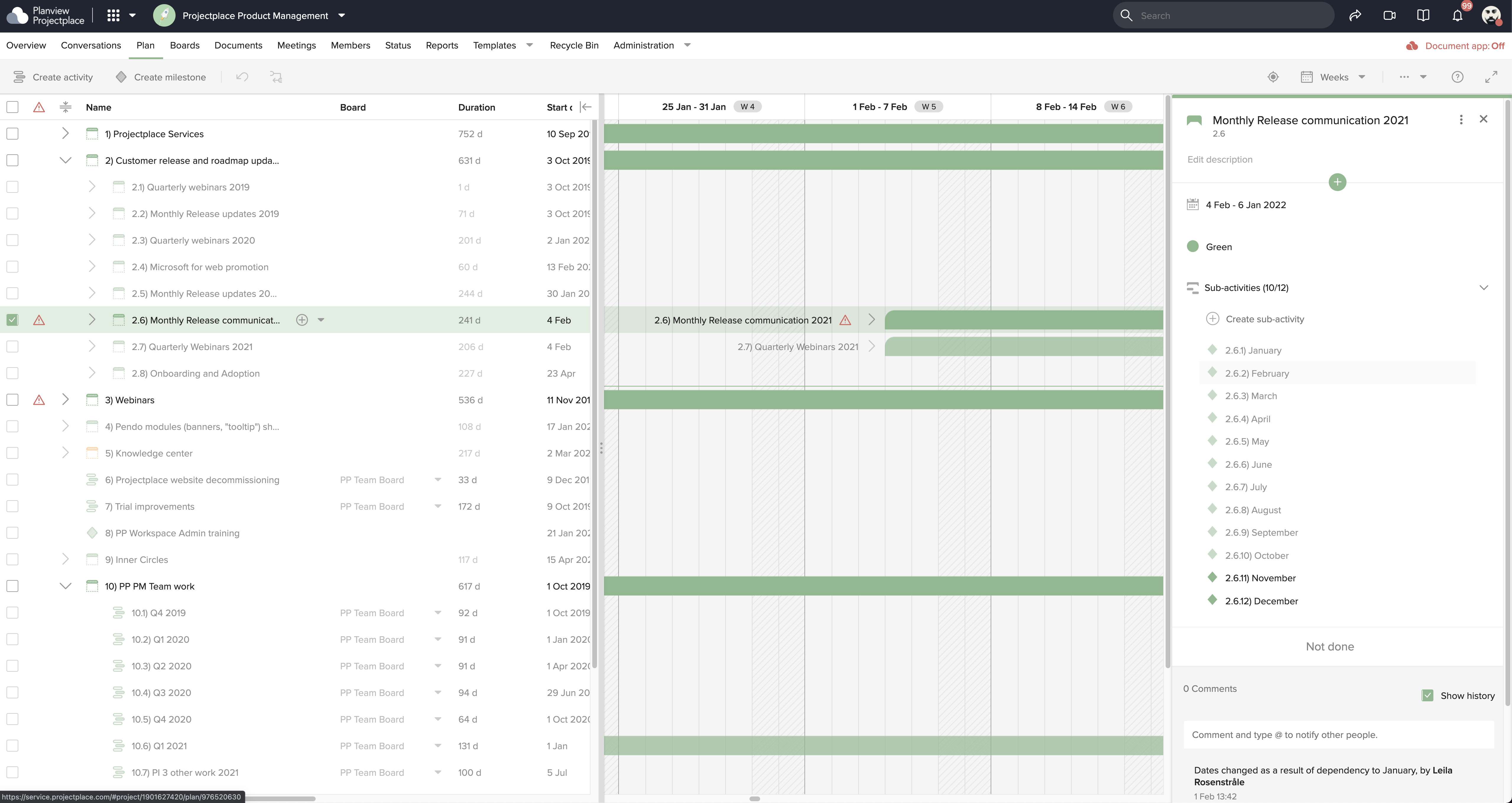
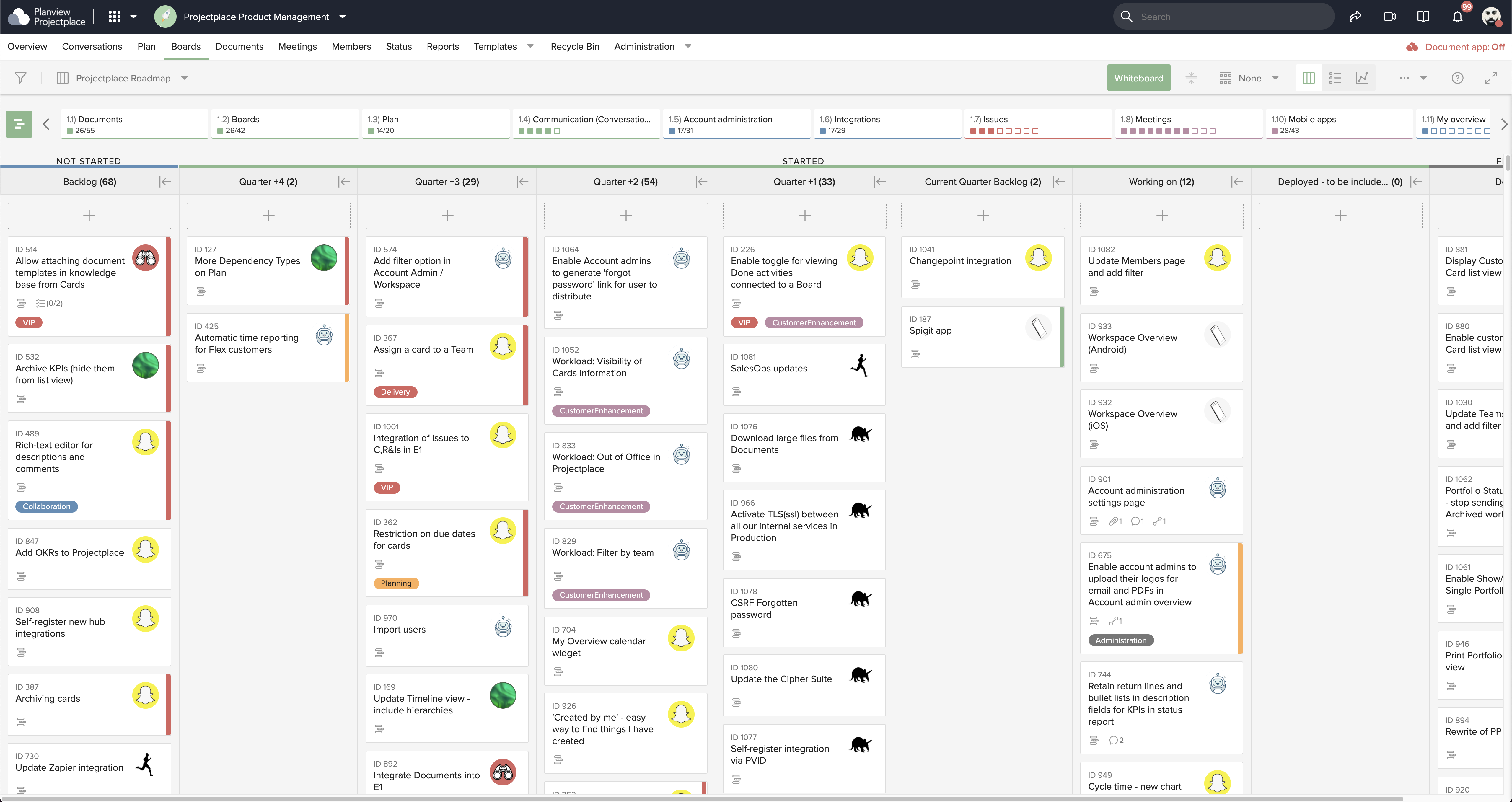
Projectplace is a collaborative work management solution. The vendor says the product is built with teams of all sizes and complexity in mind, from virtual teams of five to entire global enterprises with tens of thousands of active users. It is also designed to incorporate waterfall and agile workflows.
N/A
Pricing
Microsoft Project
Planview ProjectPlace
Editions & Modules
Project Server
$0
Planner Plan 1
$10
per month per user
Planner and Project Plan 3
$30
per month per user
Planner and Project Plan 5
$55
per month per user
Project Standard 2024
$679.99
one-time fee per installation
Project Professional 2024
$1,129.99
one-time fee per installation
No answers on this topic
Offerings
Pricing Offerings
Microsoft Project
Planview ProjectPlace
Free Trial
Yes
Yes
Free/Freemium Version
No
No
Premium Consulting/Integration Services
No
Yes
Entry-level Setup Fee
No setup fee
No setup fee
Additional Details
Plans are billed annually.
—
More Pricing Information
Community Pulse
Microsoft Project
Planview ProjectPlace
Considered Both Products
Microsoft
Verified User
Chose Microsoft Project
MS Project is most familiar to our users, so the learning curve is easiest. However, MS Project doesn't allow our teams to collaborate nor does it track actual vs. planned effort (time reporting). Hence it's not the only tool we use. We typically plan with MS Project and use it …
A de minimis incentive was given to thank the reviewer for their time. The incentive was not used to bias or drive a particular response, nor was the incentive contingent on a positive endorsement. More Info
Planview
Verified User
Chose Planview ProjectPlace
Microsoft Project has more features than Planview Projectplace but can be a bit difficult to get used to. I find that Projectplace is a balance between Asana and Microsoft Projects in terms of features. Projectplace shines in its ability to handle large projects better han Asana…
A de minimis incentive was given to thank the reviewer for their time. The incentive was not used to bias or drive a particular response, nor was the incentive contingent on a positive endorsement. More Info
Composer in Professional Services at Rob Gokee Music (Entertainment, 1-10 employees)
Chose Planview ProjectPlace
Slack is a wonderful product - I use it daily - but it's better suited for communication between employees in different places. Microsoft Project is a behemoth, the software is has a steep learning curve. Planview Projectplace was easy to jump into, and designed to handle any …
A de minimis incentive was given to thank the reviewer for their time. The incentive was not used to bias or drive a particular response, nor was the incentive contingent on a positive endorsement. More Info
Verified User
Chose Planview ProjectPlace
MS Project is not suitable for non-experts. Project management should, however, be an open activity as much as possible. Collaboration should be at the core. All this is far easier with Projectplace.
A de minimis incentive was given to thank the reviewer for their time. The incentive was not used to bias or drive a particular response, nor was the incentive contingent on a positive endorsement. More Info
Verified User
Chose Planview ProjectPlace
Project place does not replace any of the listed products except for MS Project. We like project place for schedule alignment, easy project switching, and time tracking. The other programs are still used for issue tracking, investigations, documentation, and reporting of …
A de minimis incentive was given to thank the reviewer for their time. The incentive was not used to bias or drive a particular response, nor was the incentive contingent on a positive endorsement. More Info
Sr. Analyst in Product Management at GM Financial (Automotive, 10,001+ employees)
Chose Planview ProjectPlace
Notion is an open book that allows you to create whatever you want... nice but having some bumpers makes creating and implementing a solution a bit easier. ProjectPlace is simple to get started and use. You might miss out on a cool feature or two, but I think the lack of a …
A de minimis incentive was given to thank the reviewer for their time. The incentive was not used to bias or drive a particular response, nor was the incentive contingent on a positive endorsement. More Info
Verified User
Chose Planview ProjectPlace
Both Planview Project Place and Planview PPM Pro have their own strengths. We use both; PPMPro is our portfolio tool, while Project Place is a project delivery application.
A de minimis incentive was given to thank the reviewer for their time. The incentive was not used to bias or drive a particular response, nor was the incentive contingent on a positive endorsement. More Info
Verified User
Chose Planview ProjectPlace
Once everyone was trained it was easy to keep the info updated
A de minimis incentive was given to thank the reviewer for their time. The incentive was not used to bias or drive a particular response, nor was the incentive contingent on a positive endorsement. More Info
Verified User
Chose Planview ProjectPlace
Reporting and Portfolio Management won out for ProjectPlace.
A de minimis incentive was given to thank the reviewer for their time. The incentive was not used to bias or drive a particular response, nor was the incentive contingent on a positive endorsement. More Info
Verified User
Chose Planview ProjectPlace
It offers a simpler alternative that's easier to manage by the less tech-savvy people. I also think that Planview Projectplace has managed to keep the product updated compared to other project management tools. Miro is perhaps the one that comes to mind, but while evaluating, …
A de minimis incentive was given to thank the reviewer for their time. The incentive was not used to bias or drive a particular response, nor was the incentive contingent on a positive endorsement. More Info
Verified User
Chose Planview ProjectPlace
It’s just ready to use and has far more possibilities.
A de minimis incentive was given to thank the reviewer for their time. The incentive was not used to bias or drive a particular response, nor was the incentive contingent on a positive endorsement. More Info
Verified User
Chose Planview ProjectPlace
Planview Projectplace and these other project management tools stack up in an honestly very similar way, most offer a similar suite of tools and helpful ways to track and plan all your projects and tasks. I think that Planview Projectplace ultimately has most of the great …
A de minimis incentive was given to thank the reviewer for their time. The incentive was not used to bias or drive a particular response, nor was the incentive contingent on a positive endorsement. More Info
A de minimis incentive was given to thank the reviewer for their time. The incentive was not used to bias or drive a particular response, nor was the incentive contingent on a positive endorsement. More Info
Verified User
Chose Planview ProjectPlace
ProjectPlace allows for more individual management of tasks. Gets team members involved personally in tracking activity status.
A de minimis incentive was given to thank the reviewer for their time. The incentive was not used to bias or drive a particular response, nor was the incentive contingent on a positive endorsement. More Info
A de minimis incentive was given to thank the reviewer for their time. The incentive was not used to bias or drive a particular response, nor was the incentive contingent on a positive endorsement. More Info
A de minimis incentive was given to thank the reviewer for their time. The incentive was not used to bias or drive a particular response, nor was the incentive contingent on a positive endorsement. TR verified that a representative sample of customers was invited. More Info
A de minimis incentive was given to thank the reviewer for their time. The incentive was not used to bias or drive a particular response, nor was the incentive contingent on a positive endorsement. TR verified that a representative sample of customers was invited. More Info
A de minimis incentive was given to thank the reviewer for their time. The incentive was not used to bias or drive a particular response, nor was the incentive contingent on a positive endorsement. More Info
Lead Technology Services Consultant in Information Technology at ADP (Human Resources, 10,001+ employees)
Chose Planview ProjectPlace
I prefer the way ProjectPlace is layed out and it is way easier to navigate than Clarizen. However, Clarizen does allow you to add fields to a project (i.e. configure it for your use case) while there is very little configurability in Project Place. Additional reporting out …
A de minimis incentive was given to thank the reviewer for their time. The incentive was not used to bias or drive a particular response, nor was the incentive contingent on a positive endorsement. More Info
Verified User
Chose Planview ProjectPlace
I detest Microsoft products, so any alternative is great.
A de minimis incentive was given to thank the reviewer for their time. The incentive was not used to bias or drive a particular response, nor was the incentive contingent on a positive endorsement. More Info
Verified User
Chose Planview ProjectPlace
Less hardware resources, more intuitive, software as a service, you can access it from multiple devices, easy sharing of information between team members.
A de minimis incentive was given to thank the reviewer for their time. The incentive was not used to bias or drive a particular response, nor was the incentive contingent on a positive endorsement. More Info
Chief Information Officer in Information Technology at Medivir AB (Pharmaceuticals, 51-200 employees)
Chose Planview ProjectPlace
Projectplace provided the best combination of file sharing project management functionality. The tool is unparalleled if considering its user-friendliness. Furthermore, as a SaaS solution, it does not require on-site installation and maintenance. The tool is stable and secure …
A de minimis incentive was given to thank the reviewer for their time. The incentive was not used to bias or drive a particular response, nor was the incentive contingent on a positive endorsement. More Info
A de minimis incentive was given to thank the reviewer for their time. The incentive was not used to bias or drive a particular response, nor was the incentive contingent on a positive endorsement. More Info
Microsoft Project Online is suited to Turnkey Projects where more Collaboration is required in Project Progress monitoring, risk assessment and conveying, issue recording and tracking. It is less appropriate when ERP Suites other than MS Dynamics are used, i.e when Enterprises need to integrate Finance / Accounting with It and having straight project management workflow
Planview ProjectPlace is a vibrant platform that manages all activities and schedules different roles based on their urgency, importance, and requests. Further, Planview ProjectPlace outlines the need for proper documentation with the aim of accurate referencing. Tasks are credibly shared, and proper reporting is enhanced to transform firms' work environment. ; Lastly, Planview ProjectPlace brings sustainable email integration for enterprises.
A de minimis incentive was given to thank the reviewer for their time. The incentive was not used to bias or drive a particular response, nor was the incentive contingent on a positive endorsement. More Info
I love the Gantt Chart that Microsoft Project offers me, because it provides me with a view from various aspects, it provides me with exact details about the fulfillment of tasks over a period of time, it also allows me to make comparisons with the necessary data and the fulfilled data. by the employees, in order to know exactly if the project's expectations have been met.
I love the Gantt Chart that Microsoft Project offers me, because it provides me with a view from various aspects, it provides me with exact details about the fulfillment of tasks over a period of time, it also allows me to make comparisons with the necessary data and the fulfilled data by the employees, in order to know exactly if the project's expectations have been met.
The alert system for the fulfillment and delay of assignments is perfect. Microsoft Project allows me to configure the task system, I can assign the necessary tasks to fulfill the project, and the software alerts me immediately if the managers are fulfilling the assignments.
A de minimis incentive was given to thank the reviewer for their time. The incentive was not used to bias or drive a particular response, nor was the incentive contingent on a positive endorsement. More Info
A de minimis incentive was given to thank the reviewer for their time. The incentive was not used to bias or drive a particular response, nor was the incentive contingent on a positive endorsement. More Info
A de minimis incentive was given to thank the reviewer for their time. The incentive was not used to bias or drive a particular response, nor was the incentive contingent on a positive endorsement. More Info
Under the time tracking, it would be nice to have a set template that would load each week and not have to click a button to load the previous week's template.
Somehow making it more intuitive.
Having to add in each service line and each detail that I cover for every service line each week is a bit ridiculous.
A de minimis incentive was given to thank the reviewer for their time. The incentive was not used to bias or drive a particular response, nor was the incentive contingent on a positive endorsement. More Info
A de minimis incentive was given to thank the reviewer for their time. The incentive was not used to bias or drive a particular response, nor was the incentive contingent on a positive endorsement. More Info
We're committed now & have >50 users on Projectplace. All our projects are now tracked in the tool. We this investment of time & training, the cost of maintaining Projectplace is relatively low for the benefit. So we will renew, even if there are some idiosyncrasies in the tool & there are opportunities for improvement.
A de minimis incentive was given to thank the reviewer for their time. The incentive was not used to bias or drive a particular response, nor was the incentive contingent on a positive endorsement. More Info
Microsoft Project is easy to operate because data could be inserted, changed and deleted like you are in an Excel timesheet. Besides, it provides a great level of automation beween his fields allowing few data changes. Also, its funcionalities are well defined and grouped in upper menus, so you can find a funcionality quickly
Easy to use platform and provides the user with an amazing experience and straightforward tools that empower and help execute tasks with fast performances that allow quick and easy service delivery. Easy on implementation and get started immediately with enterprise-ready Planview Projectplace and start to connect with teams and departments at once.
A de minimis incentive was given to thank the reviewer for their time. The incentive was not used to bias or drive a particular response, nor was the incentive contingent on a positive endorsement. More Info
A de minimis incentive was given to thank the reviewer for their time. The incentive was not used to bias or drive a particular response, nor was the incentive contingent on a positive endorsement. More Info
Microsoft in recent years has transformed itself and gives a positive feeling when one interacts with the company. The company is focusing on its customers and willing to go extra mile to make customers happy.The company continues to invest in its products and bringing new features from time to time. Overall it is a positive feeling to be associated with such an iconic company.
A de minimis incentive was given to thank the reviewer for their time. The incentive was not used to bias or drive a particular response, nor was the incentive contingent on a positive endorsement. More Info
I haven't needed to get in touch with support because the product is quite well structured and understandable. There were no issues initially when making payments or later for monthly payments. The project manager using the software is quite skilled in the software and has not needed much help. New licenses are easy to acquire, and there is no delay in getting them. I know there are several ways of support available, so that's a plus.
A de minimis incentive was given to thank the reviewer for their time. The incentive was not used to bias or drive a particular response, nor was the incentive contingent on a positive endorsement. More Info
A de minimis incentive was given to thank the reviewer for their time. The incentive was not used to bias or drive a particular response, nor was the incentive contingent on a positive endorsement. More Info
While many of the above tools are extremely well-versed, Microsoft Project's largest advantage comes from it being related to the largest business productivity company in the world. Project does have its sharing limitations - but regardless, offers one of the most robust tools in the market today. Microsoft Project is built with large-scale projects in mind but is more than up to the task for smaller projects as well. However, there are options available (especially cloud-based options) that may be more fitting for higher-level projects that do not require going into the weeds.
A de minimis incentive was given to thank the reviewer for their time. The incentive was not used to bias or drive a particular response, nor was the incentive contingent on a positive endorsement. More Info
[In my experience] Jira is more refined, better looking, and easier to become familiar with. Also, the massive market share of Jira helps in consultancy as you can switch between clients easily. Projectplace has many powerful tools but so does Jira, and Jira integrates with our suite of software much easier compared to Projectplace.
A de minimis incentive was given to thank the reviewer for their time. The incentive was not used to bias or drive a particular response, nor was the incentive contingent on a positive endorsement. More Info
A de minimis incentive was given to thank the reviewer for their time. The incentive was not used to bias or drive a particular response, nor was the incentive contingent on a positive endorsement. More Info
Project saved me, as the project manager, countless hours of digging through tickets and schedules to plan everything out. It also saved me time in adjusting the project triangle as needed, since it does so much automatically.
It is costly, and since it requires extensive training to master, it's not just the high licensing cost that you need to take into account.
The reporting features - even just printing out Gantt charts - makes it far easier to communicate with stakeholders. That means less time for PMs doing all of this manually, and it means less follow-up questions and delays moving forward.
A de minimis incentive was given to thank the reviewer for their time. The incentive was not used to bias or drive a particular response, nor was the incentive contingent on a positive endorsement. More Info
[We have the] ability to support remote work through projects that scale across multiple groups
We have large-scale quarterly projects, so the ability to save and duplicate project templates are helpful for us to keep track of tasks down to the specific card
A de minimis incentive was given to thank the reviewer for their time. The incentive was not used to bias or drive a particular response, nor was the incentive contingent on a positive endorsement. More Info