Microsoft Project Server vs. NQI Orchestra

Overview
ProductRatingMost Used ByProduct SummaryStarting Price
Microsoft Project Server
Score 7.6 out of 10
N/A
Microsoft Project Server is a project portfolio management option.N/A
NQI Orchestra
Score 0.0 out of 10
Mid-Size Companies (51-1,000 employees)
NQI Orchestra allows users to manage the entire life cycle of the project portfolio. From the genesis, selection and validation of a project (demand management) to its day-to-day management (project planning and collaboration), steering and finally aligning projects to the strategy and objective of the company, NQI Orchestra is designed to do it all. For senior executives, NQI Orchestra offers direct access to strategic and operational dashboards…
$20
per user
Pricing
Microsoft Project ServerNQI Orchestra
Editions & Modules
No answers on this topic
NQI Orchestra 6.0
$20
per user
NQI Orchestra 6.0
$1,000
Per installation
Offerings
Pricing Offerings
Microsoft Project ServerNQI Orchestra
Free Trial
NoYes
Free/Freemium Version
NoNo
Premium Consulting/Integration Services
NoYes
Entry-level Setup FeeNo setup fee$1,000 per installation
Additional DetailsThe above price is indicative only, for reference purposes. Our pricing is very customizable. It will depend on the number of users, type of installation, and number of features. Please don't hesitate to contact us for more details.
More Pricing Information
Community Pulse
Microsoft Project ServerNQI Orchestra
Best Alternatives
Microsoft Project ServerNQI Orchestra
Small Businesses
monday.com
monday.com
Score 8.6 out of 10
monday.com
monday.com
Score 8.6 out of 10
Medium-sized Companies
Planview PPM Pro
Planview PPM Pro
Score 9.0 out of 10
Planview PPM Pro
Planview PPM Pro
Score 9.0 out of 10
Enterprises
Planview PPM Pro
Planview PPM Pro
Score 9.0 out of 10
Planview PPM Pro
Planview PPM Pro
Score 9.0 out of 10
All AlternativesView all alternativesView all alternatives
User Ratings
Microsoft Project ServerNQI Orchestra
Likelihood to Recommend
8.0
(8 ratings)
-
(0 ratings)
Usability
10.0
(1 ratings)
-
(0 ratings)
Implementation Rating
10.0
(1 ratings)
-
(0 ratings)
User Testimonials
Microsoft Project ServerNQI Orchestra
Likelihood to Recommend
Microsoft
Microsoft Project Server I believe is best for any organization from small to large. As I mentioned, it is a little pricey so I would do research into alternative software and depending on your needs maybe look at all options, competing software. This is a tool with a learning curve and some may not be able to easily navigate this software. There isn't really great training, resources available for this tool however there are some free YouTube tutorial videos. This is great for cross company, department project management, sharing, managing of projects and timelines.
Read full review
Planisware
No answers on this topic
Pros
Microsoft
  • Project planning: tasks assignments, resources allocation, progress and cost tracking. The Server version is the natural extension of the Microsoft Project standalone.
  • Provides one place to manage all projects, accessible by everyone in the team. This opens the plan updates to team members as well(on their tasks), as opposed to being done only by the project manager.
  • Reporting and visualization - resources utilization, timeline etc
  • The integration with the Microsoft Project standalone: if you don't like the web version, you can download the latest and work locally. When done just sync it back to the server.
Read full review
Planisware
No answers on this topic
Cons
Microsoft
  • Resource loading and leveling extremely complicated within the tool
  • Software makes incorrect assumptions and changes without user knowledge
  • Inconsistencies within the tool make it hard to predict & troubleshoot
Read full review
Planisware
No answers on this topic
Usability
Microsoft
We don't have to worry about maintenance, upgrades, or compatibility issues. All the capabilities we need are there, and are easily customizable.
Read full review
Planisware
No answers on this topic
Implementation Rating
Microsoft
Per Microsoft, Project Online provides more value long-term by reducing infrastructure cost and increase feature release cycle time
Read full review
Planisware
No answers on this topic
Alternatives Considered
Microsoft
One of the key advantages of Microsoft Project Server (MSPS) is its ecosystem. It gels very well with SharePoint, Office, Office 365. The support from Microsoft is also a key driver and they are very experienced and many ways to resolve issues. Also, Microsoft has bridged the gap of cloud offering from other competitors by providing Project Online. It is an offering through Office 365 which is very lean and low maintenance.
Read full review
Planisware
No answers on this topic
Return on Investment
Microsoft
  • We've been able to reduce the number of staff in our PMO by utilising the Project Server data in Power BI, reducing the need for manual reporting.
  • Being able to forecast utilization in the product allows us to accurately estimate resource needs to ensure optimum staff levels.
Read full review
Planisware
No answers on this topic
ScreenShots

NQI Orchestra Screenshots

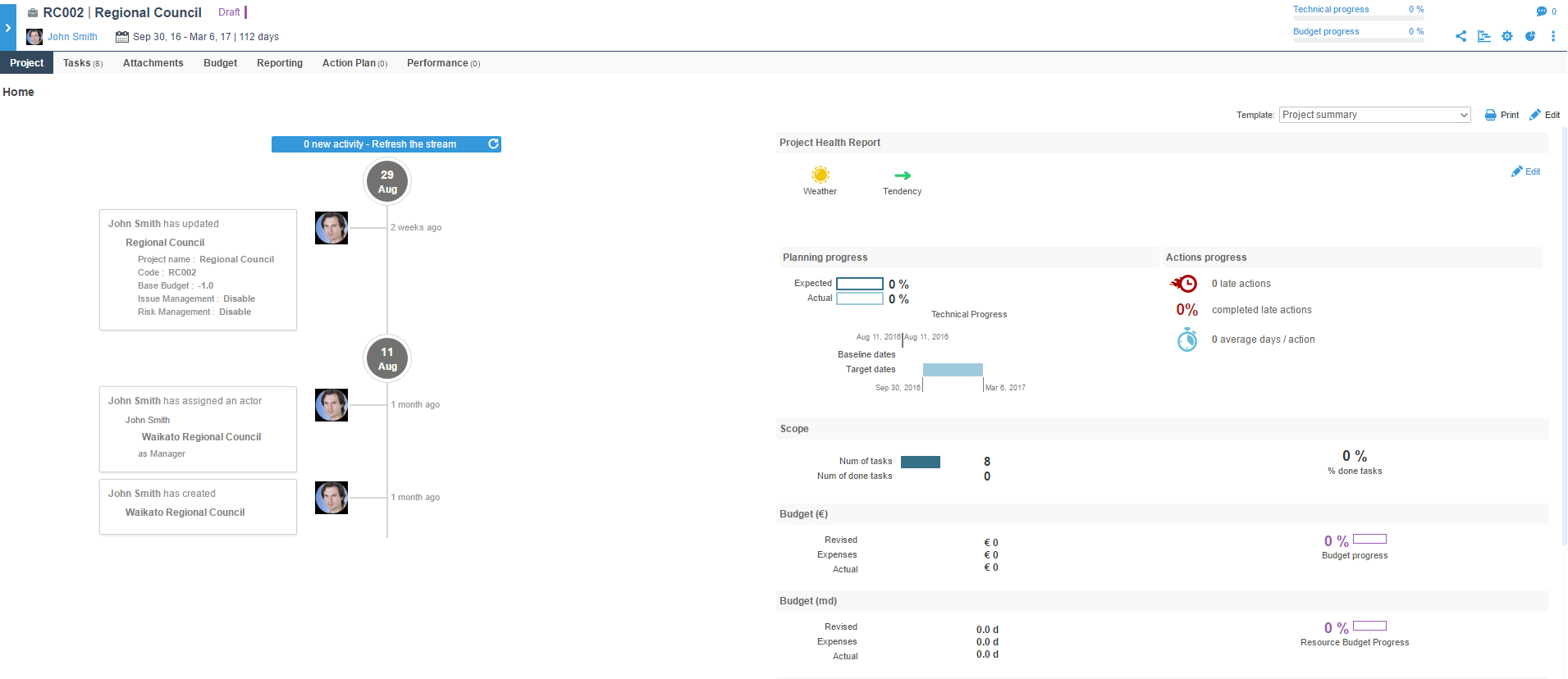
Screenshot of This screen shows the activity stream of a user.Screenshot of This screenshot is of a kanban board which shows the progress of each tasks.Screenshot of This is a screenshot of a dashboad providing a project summary with information such as project health report, planning progress, project scope and budget.Screenshot of This is a screenshot of a projet roadmap showing the key milestones and different go/no go decision stages.Screenshot of A screenshot of a gantt chart providing a timeline and showing the various interdependencies.Screenshot of A screenshot of a user profile providing information on the scope of the project, forcast of different allocations and capacity and also the achievements regarding different tasks.