Microsoft PowerPoint is a presentation software designed to allow users to create slide-based presentations including video and images, as well as slide transitions and animations.
$139.99
Reveal Trial Director
Score 7.0 out of 10
N/A
A solution to streamline pre-trial, trial, mediation, and other litigation-related presentations. Users can also Share the case and collaborate with colleagues, outside counsel, expert witnesses, and other key stakeholders on a centrally stored case.
The learning curve with Microsoft Powerpoint is not too steep, and most everyone can create really nice-looking presentations. The thing I like most about the new advancements in Microsoft Powerpoint comes to formatting. If you are creating a newsletter, don't get bogged down by all of the annoying formatting rules and issues you would have if creating in Publisher or Word. Microsoft Powerpoint makes it very simple. You can add text boxes and move them anywhere on the page. The templates are a nice touch, but they could use more, as most of these are outdated. I believe there are many free websites for downloading more templates.
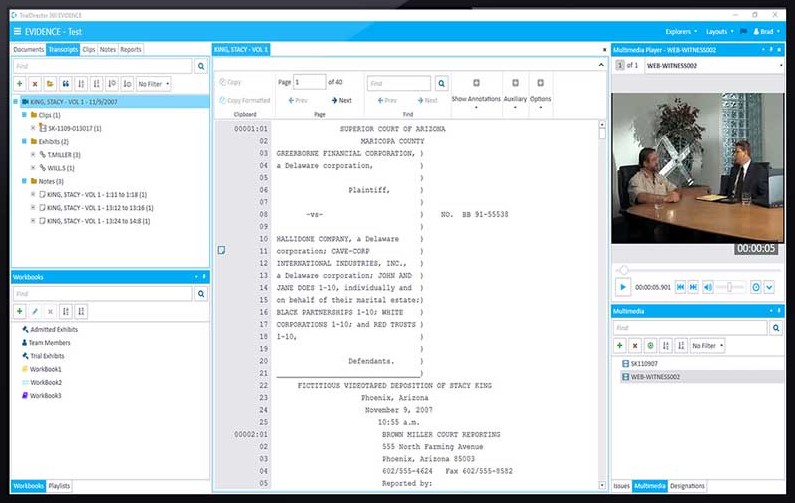
This trial presentation software is very well suited for trial, depositions and mediations. The software organizes exhibits and allows for synchronized deposition transcripts to be viewed simultaneously. It allows the attorney to tell the complete story of the case by quickly putting together productions, discovery and any additional documentation needed to build a case.
It’s great overall! I can think of a few improvements that would make it a 10, for example: better Smart Art graphs, automatic distribution of columns and rows in tables, and being able to more easily save templates for graphs. For example, if I could determine that a same brand name in all graphs would have a specific color, it would be great
I've never had any issues with its availability. As it is installed on my machine, it's ready when I need it, online or offline. Creating large slide decks with complex elements like video and audio doesn't affect its stability. The only limitation would be the capability of your own computer, as far as I can tell.
The performance is very strong. It loads reasonably quickly. Large presentations load relatively quickly too, given their complexity, and once loaded each slide is readily available. It's easy to scroll up and down through your slide deck and go to the slide you want. Videos, pictures and music all load on demand, controllable by clicks.
I have never had to use the actual support. Most of my questions are "how to" questions and there is a rich internet full of users sharing their tips and tricks with this application. Sometimes I find the answers on Microsoft support site but often I don't
Adobe Illustrator is an excellent software but it's not easy to use for [everyone without] having any training or previous experience in working with illustrator. Microsoft Powerpoint is very easy to use and it's fantastic as it saves time more than illustrator. Another thing is it takes small space while illustrator takes a significant amount of space in the business machine
I have used TrialPad in the past and found it very user friendly and easy to use. However, functionality is limited as to what you can do or how the data can be manipulated once uploaded to TrialPad. TrialDirector 360 by Ipro gives the user a full array of tools and functionality and in some ways is easier to navigate and control in presentation mode.
Scaling up use of Microsoft Powerpoint would be a simple case of buying further licences. The software is intuitive and therefore training demands from scaling it to more departments or more individuals would be relatively straightforward. Google Slides may be easier to share among those organisations that use Google's suite of apps, however.