Microsoft Power BI is a visualization and data discovery tool from Microsoft. It allows users to convert data into visuals and graphics, visually explore and analyze data, collaborate on interactive dashboards and reports, and scale across their organization with built-in governance and security.
$10
per month per user
SAS Visual Analytics
Score7.6 out of 10
Enterprise companies (1,001+ employees)
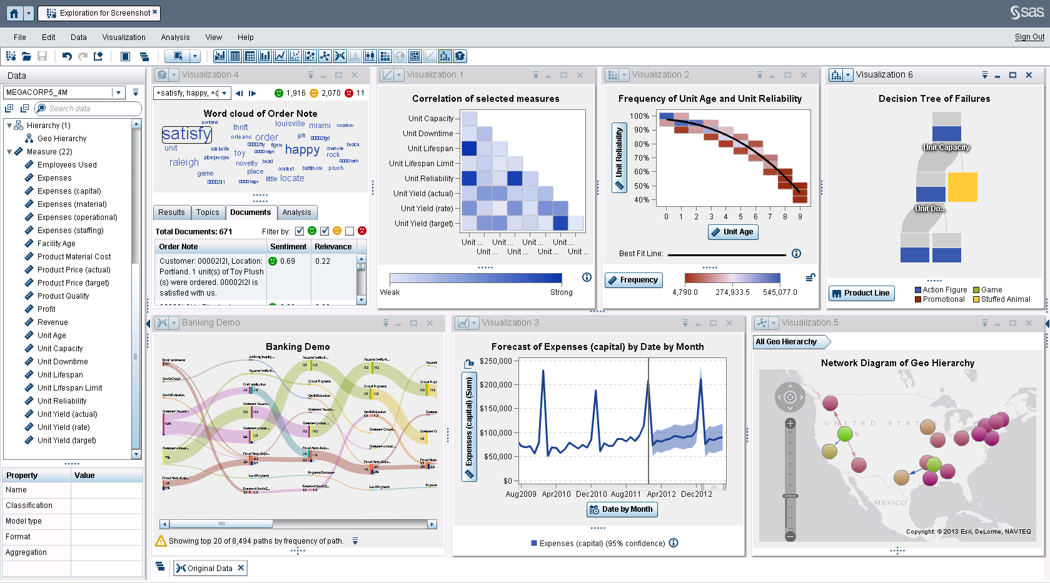
SAS Visual Analytics provides a complete platform for analytics visualization, enabling users to identify patterns and relationships in data that weren't initially evident. Interactive, self-service BI and reporting capabilities are combined with out-of-the-box advanced analytics so everyone can discover insights from any size and type of data, including text.
N/A
Pricing
Microsoft Power BI
SAS Visual Analytics
Editions & Modules
No answers on this topic
SAS Visual Analytics for SAS Cloud
$0
Annual By Users: 5, 10, 20
Offerings
Pricing Offerings
Microsoft Power BI
SAS Visual Analytics
Free Trial
Yes
Yes
Free/Freemium Version
Yes
No
Premium Consulting/Integration Services
No
Yes
Entry-level Setup Fee
No setup fee
No setup fee
Additional Details
—
SAS Visual Statistics and SAS Office Analytics are also available as add-ons.
Microsoft Power BI and SAS Visual Analytics are both data visualization and business intelligence (BI) tools aimed at helping businesses gain insights from business data. Microsoft Power BI has a strong community presence, with an open-source repository of user-created visualizations. SAS Visual Analytics, as part of the SAS suite of products, is an industry standard with strong predictive analytics and data preparation features.
SAS Visual Analytics is most popular by far with enterprise-level companies, who likely get more value out of the overall SAS suite of business intelligence tools than smaller businesses would. Microsoft Power BI, on the other hand, is almost equally popular with mid-size businesses as well as enterprise-level corporations, likely due to its cheaper per-user licensing and integration with the Microsoft Office 365 suite.
Features
Although both SAS Visual Analytics and Microsoft Power BI offer self-service data visualization and individualized dashboards, they each stand out in their own ways.
Microsoft Power BI offers an extensive degree of variety and customization for their visualizations through their open-source repository. The charts offered are professional and granular, making it easy to drill down on specific data points or categories. The software is designed with sharing in mind, making it easy to share visualizations with other users.
SAS Visual Analytics is commonly praised for its solid performance, especially at scale. It can effectively support many simultaneous users without slowing down. Its data preparation capabilities help users ensure that the data they’re visualizing is meaningful and properly formatted.
Limitations
Microsoft Power BI and SAS Visual Analytics are each powerful tools in their own right, but they also have key limitations that you should consider before choosing one or the other.
SAS Visual Analytics has a more limited set of visualizations than Microsoft Power BI, since there’s no open-source database to pull from or contribute to. Some users may find its visual customization options too limiting.Others found that its tools for generating PDF reports left much to be desired. SAS Visual Analytics also has a much higher price point than Microsoft Power BI, which can be exclusionary for smaller businesses.
Microsoft Power BI’s open-source visualization repository can also be a drawback. Tracking down documentation for visualizations can be difficult, if the documentation exists at all. Beginner users often report that they have a hard time getting started with the software, and there’s a steep learning curve before they’re able to use its more advanced features. It can also take a lot of computer resources, and might run slowly for some users.
Pricing
Microsoft Power BI offers two options for pricing. The Power BI Pro tier is $9.99 monthly per user and includes all of its self-service visualization and BI features on the cloud, with 10 GB of storage per user and a limitation of 1 GB for each individual dataset. The Power BI Premium tier is $4,995 monthly with no additional per-user fee and adds features aimed at enterprise-level BI, including big data analytics and on-premises deployment. It also expands the storage to 100 TB total, with a 10 GB maximum size per dataset.
Pricing for SAS Visual Analytics is available via quote from the vendor.
Features
Microsoft Power BI
SAS Visual Analytics
BI Standard Reporting
Comparison of BI Standard Reporting features of Microsoft Power BI and SAS Visual Analytics
Feature
Microsoft Power BI
8.8
140 Ratings
8% above category average
SAS Visual Analytics
8.3
11 Ratings
2% above category average
Pixel Perfect reports
8.5120 Ratings
8.011 Ratings
Customizable dashboards
10.0140 Ratings
8.011 Ratings
Report Formatting Templates
8.0128 Ratings
9.010 Ratings
Ad-hoc Reporting
Comparison of Ad-hoc Reporting features of Microsoft Power BI and SAS Visual Analytics
Feature
Microsoft Power BI
8.2
140 Ratings
2% above category average
SAS Visual Analytics
8.8
12 Ratings
9% above category average
Drill-down analysis
7.0139 Ratings
9.012 Ratings
Formatting capabilities
9.0138 Ratings
8.012 Ratings
Integration with R or other statistical packages
8.0103 Ratings
8.010 Ratings
Report sharing and collaboration
9.0135 Ratings
10.011 Ratings
Report Output and Scheduling
Comparison of Report Output and Scheduling features of Microsoft Power BI and SAS Visual Analytics
Feature
Microsoft Power BI
8.6
134 Ratings
3% above category average
SAS Visual Analytics
9.2
12 Ratings
10% above category average
Publish to Web
8.0129 Ratings
9.011 Ratings
Publish to PDF
9.0122 Ratings
9.012 Ratings
Report Versioning
9.0102 Ratings
9.09 Ratings
Report Delivery Scheduling
8.0104 Ratings
10.011 Ratings
Delivery to Remote Servers
9.074 Ratings
9.06 Ratings
Data Discovery and Visualization
Comparison of Data Discovery and Visualization features of Microsoft Power BI and SAS Visual Analytics
Has significantly improved collation of data and visualisation especially with business across Europe. Has given me the ability to see the Site availability at the click of a button to see which Site is in the "money" and seize opportunities based on Market data
A de minimis incentive was given to thank the reviewer for their time. The incentive was not used to bias or drive a particular response, nor was the incentive contingent on a positive endorsement. More Info
I was in a meeting with the client and there I have to show them some analytic data to them. But I was confused about how I will manage to show big data to clients with accuracy. But then the SAS Visual Analytics software helps me in presenting accurate data at the moment and it was very presentable and through that, I got the deal for that business.
A de minimis incentive was given to thank the reviewer for their time. The incentive was not used to bias or drive a particular response, nor was the incentive contingent on a positive endorsement. More Info
Options for data source connections are immense. Not just which sources, but your options for *how* the data is brought in.
Constant updates (this is both good and bad at times).
User friendliness. I can get the data connections set up and draft some quick visuals, then release to the target audience and let them expand on it how they want to.
A de minimis incentive was given to thank the reviewer for their time. The incentive was not used to bias or drive a particular response, nor was the incentive contingent on a positive endorsement. More Info
Provides the flexibility to the end user to slice and dice the data.
Anyone can make predictive models with the help of in-built algorithms without the need to write a single line of code or knowledge of what's under the hood of algorithms.
The feature to simply ask a question related to data and getting a response in form of text, chart or graph is amazing.
A de minimis incentive was given to thank the reviewer for their time. The incentive was not used to bias or drive a particular response, nor was the incentive contingent on a positive endorsement. More Info
A de minimis incentive was given to thank the reviewer for their time. The incentive was not used to bias or drive a particular response, nor was the incentive contingent on a positive endorsement. More Info
SAS is relatively expensive when compared to other BI tools and requires a large amount of upfront fee which becomes an issue for smaller organizations.
UI for the dashboards looks a little date in comparison to competitors like Tableau and Microstrategy.
Integration with other open source software like Python needs to be built in.
A de minimis incentive was given to thank the reviewer for their time. The incentive was not used to bias or drive a particular response, nor was the incentive contingent on a positive endorsement. More Info
Microsoft Power BI is an excellent and scalable tool. It has a learning curve, but once you get past that, the sky is the limit and you can build from the most simple to the most complex dashboards. I have built everything from simple reports with only a few data points to complex reports with many pages and advanced filtering.
SAS really is the cutting edge in Business Intelligence. That is all they do! They are constantly coming out with new products, product upgrades, and their tech support is second to none. In addition, their support of Education has made our ability to acquire their product possible.
Automating reporting has reduced manual data processing by 50-70%, freeing up analysts for higher-value tasks. A finance team that previously spent 20+ hours per week on Excel-based reports now does it in minutes with Microsoft Power BI's automated Real-time dashboards have shortened decision cycles by 30-40%, enabling leadership to react quickly to sales trends, operational bottlenecks, and customer behavior.
A de minimis incentive was given to thank the reviewer for their time. The incentive was not used to bias or drive a particular response, nor was the incentive contingent on a positive endorsement. More Info
SAS BI is good for creating reports and dashboards and then sharing it with the users. It also has ability to manage access to the reports and dashboards but somehow with most of the world moving to open source languages R, Python and Julia, SAS BI feels to be archaic in terms of feature set and integrations it allow[s]. Also, comparing it with other Business Intelligence tools like Tableau and Microsoft BI, the functionality of SAS BI is very limited and doesn't justify the pricing.
A de minimis incentive was given to thank the reviewer for their time. The incentive was not used to bias or drive a particular response, nor was the incentive contingent on a positive endorsement. More Info
It is a fantastic tool, you can do almost everything related with data and reports, it is a perfect substitutive of Power Point and Excel with a high evolution and flexibility, and also it is very friendly and easy to share. I think all companies should have Power BI (or other BI tool) in their software package and if they are in the MS Suite, for sure Power BI should be the one due to all the benefits of the MS ecosystem.
A de minimis incentive was given to thank the reviewer for their time. The incentive was not used to bias or drive a particular response, nor was the incentive contingent on a positive endorsement. TR verified that a representative sample of customers was invited. More Info
When you call tech support, you are immediately routed to a person who can answer your question. Often they can answer on the spot. However, if they cannot, you are given a track number and then followed up with. There have been times when I have had multiple track numbers open and they will actually TRACK YOU DOWN to ensure that your problem has been resolved. Issues do not fall into black holes with SAS. They are also willing to do a WebEx with you to diagnose the problem by seeing your environment, which is always helpful.
A de minimis incentive was given to thank the reviewer for their time. The incentive was not used to bias or drive a particular response, nor was the incentive contingent on a positive endorsement. More Info
Microsoft Power BI is free. If I didn't want to create a custom platform (i.e. my organization insisted on an existing platform that I *had* to use), I'd use Microsoft Power BI. For any start-up or SMB, I'd just use Claude & Grok to build it quickly, also for free. Would not pay for Tableau or Sigma anymore. Not worth it at all.
A de minimis incentive was given to thank the reviewer for their time. The incentive was not used to bias or drive a particular response, nor was the incentive contingent on a positive endorsement. More Info
I have used Crystal Reports, Jaspersoft and SQL Server Reporting Services (SSRS). I would recommended Business Intelligence over SSRS and Crystal Reports. SSRS is very SQL-centric and Crystal Reports is more of an end-user tool. I would recommend Jaspersoft over Business Intelligence for developing a seamless web-based reporting interface but I highly recommend Business Intelligence for end-user ad-hoc reporting.
A de minimis incentive was given to thank the reviewer for their time. The incentive was not used to bias or drive a particular response, nor was the incentive contingent on a positive endorsement. More Info
A de minimis incentive was given to thank the reviewer for their time. The incentive was not used to bias or drive a particular response, nor was the incentive contingent on a positive endorsement. More Info
A de minimis incentive was given to thank the reviewer for their time. The incentive was not used to bias or drive a particular response, nor was the incentive contingent on a positive endorsement. More Info