Micro Focus Business Process Testing (discontinued) vs. Progress Test Studio

Overview
ProductRatingMost Used ByProduct SummaryStarting Price
Micro Focus Business Process Testing (discontinued)
Score 5.0 out of 10
N/A
Business Process Testing (formerly HP BPT) is a functional testing framework acquired by Micro Focus from Hewlett Packard Enterprise. The product is no longer available as a standalone product, however similar capabilities are supplied by ALM / Quality Center, and Silk Test, both also from Micro Focus.N/A
Progress Test Studio
Score 9.0 out of 10
N/A
Progress Test Studio aims to be the easiest to use Web Automation tool on the market, widely used by Enterprise QA’s for testing, but easy enough for anyone. The product automates testing for WPF, Silverlight, Web, HTML, Angular, React, KUIB, iOS, Android, Mobile Web, and API’s. Test Studio is ideal for a no-code or low-code approach for: QA Test Automation, Application Monitoring, Performance and Load Testing, Web/Marketing Process Automation, and Mobile App Automation.N/A
Pricing
Micro Focus Business Process Testing (discontinued)Progress Test Studio
Editions & Modules
No answers on this topic
Offerings
Pricing Offerings
Micro Focus Business Process Testing (discontinued)Progress Test Studio
Free Trial
NoYes
Free/Freemium Version
NoNo
Premium Consulting/Integration Services
NoNo
Entry-level Setup FeeNo setup feeOptional
Additional Details
More Pricing Information
Community Pulse
Micro Focus Business Process Testing (discontinued)Progress Test Studio
User Ratings
Micro Focus Business Process Testing (discontinued)Progress Test Studio
Likelihood to Recommend
5.0
(0 ratings)
9.0
(0 ratings)
User Testimonials
Micro Focus Business Process Testing (discontinued)Progress Test Studio
Likelihood to Recommend
You may want to consider this solution if you are already using HP ALM and HP UFT. It's a nice add on and encourages the team to think more on building small component based tests and promote lot of reuse. Also, if your team want business analysts or any non technical people build tests based on the flows, its probably the best solution available now. On the down side, the execution times if you have too many components are not great and on top of that you have to pay extra for the licensing. You can also build such frameworks using more open source solutions like bdd solutions.
Read full review
The product is easy to learn and any customer making web based application will greatly benefit from a product like this and cut down on testing time. As new code builds go out it's an excellent tool for regression testing. The load testing feature has a great benefit as well and lets us test the limits of the application on different platforms and allows us to tweak the certain area and test again.
Read full review
Pros
  • Biggest advantage is - you can use the same components created for manual as well as automated testing
  • It has a nice little feature called extended capabilities where you can easily automate tests SAP and oracle type architectures.
  • Easy access library lets you create highly reusable and shareable components and the integrations is not that difficult
Read full review
  • Easy to configure.
  • Plugins can be integrated easily with visual studio.
  • Takes less time to run all the test scenarios, [and] also generates graphics report for all the tests.
  • Keeps bugs [out of] the production.
Read full review
Cons
  • If you are using components for automation testing, the time it takes to load a new component is too high and it sucks off the benefit of component based testing.
  • You want to have many components in a test and so a BA can also create automated tests easily but too many components takes too long to executed .
  • It comes with a cost. You can simply build a modular framework even without this framework and probably more efficiently.
Read full review
  • The user documentation and training materials seem to be outdated a bit.
  • Integration with newer version control systems such as VSTS is buggy.
Read full review
Alternatives Considered
The idea for building a component based modular test framework is great and it would be great add-on to HP tools if the add-on efficiency is made high and the cost is low.
Read full review
Very easy to record both http/https pages and supports all major browsers. Test Element repository is the killer feature that gives you piece of mind and confidence to write and reuse elements for several different scenarios. The built-in testing framework which also includes the .NET Framework Library. Integration with Jira. Supports source control such as GIT and Team Foundation.
Read full review
Return on Investment
  • As the tool itself promotes re usability, we were able to cut down development and maintenance costs by good %.
  • More than cost savings, out no technical folks started building automated tests based on user flows very easily.
Read full review
  • Excellent results, workloads for continuous regression testing has been decreased by more than 50 percent.
  • Time window needed for regression tests has decreased more than 50 percent.
Read full review
ScreenShots

Progress Test Studio Screenshots

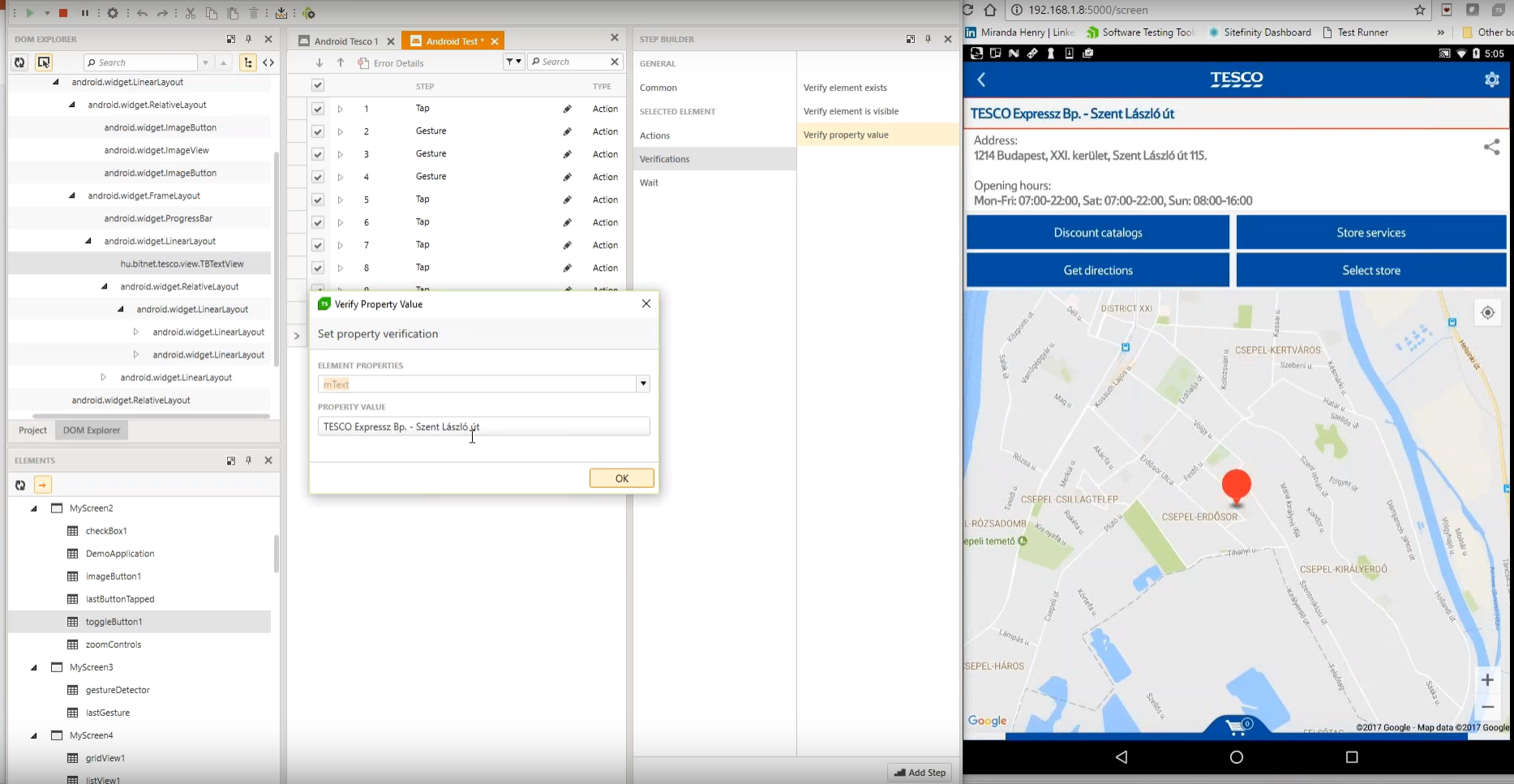
Screenshot of Test Studio Mobile – Codeless Test Automation for iOS and Android: Native, Hybrid, and Mobile Web applications. Including sophisticated find logic for test re-use across multiple devices. The Android Instrumentation Wizard will get you testing in no time.  And codeless maintenance will empower your QA’s.Screenshot of Test Studio Ultimate - makes it easy to reuse your functional tests as Performance tests, and in Load tests. This saves you many hours of extra maintenance. The Test Studio Runtime and Full License include the Profiler for tracking windows performance counter data. Combined this data will help you pinpoint the bottlenecks in your application.Screenshot of Test Studio allows you to customize the element find logic to custom fit each application. With a focus on ease-of-use a tester can quickly record their manual test and execute it back as automation. The Test Studio Element Highlighter will help you quickly add Verifications on-the-fly as you record your test. There are 4 different ways to automate applications with Test Studio, and only 1 way requires code.Screenshot of Test Studio for API’s – Codelessly capture and assemble your api calls into intricate tests with GoTo conditional operations and verifications, and of course it integrates with Fiddler. You can easily integrate Test Studio into your Continuous Integration process as well.