MaintainX helps users track reactive maintenance, preventive maintenance, and control the daily operations of businesses such as safety inspections, quality inspections, and operating checklists with a digital audit trail.
$25
per month per user
UpKeep Maintenance Management
Score 7.0 out of 10
Small Businesses (1-50 employees)
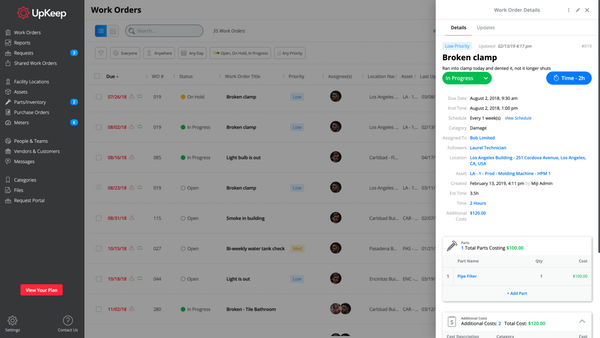
UpKeep allows users to snap a picture of a broken piece of equipment, create a work order, and schedule it for repair - all from a mobile device. UpKeep is designed for facility, property, restaurant, and manufacturing managers looking to improve communication by enabling real-time status updates for their teams. The vendor says it is a modern, intuitive, and customizable CMMS that is proven to expedite workflow processes. Capabilities include: -Add co-workers and easily assign work…
Creating work orders and procedures is a great way to insure our assets are being inspected as they are needed. Our organization sets up inspections by locations and the number of assets they have. Tying the inspection report and invoice to each asset. However, It was a bit challenging to create work orders/procedures for all assets rather than by location. The original process we set up in the implementation process just didn't work. but with the help of Sergio we were able to come up with a solution that works. It's a bit cumbersome but nevertheless it works.
Very appropriate within our business since It is so easy to use and implement. The software gives the techs more accountability and ownership of jobs, along with the ability to create re-occurring work orders for inspections and checks. I now get accurate data to report against on a weekly basis, and get KPI's to set goals for our team.
Periodic maintenance needs are still a little tricky keeping in the system without flooding the user with too many work orders.
It does not immediately update all the time. For example, closing out work orders and the number of total work orders stays the same until it’s rebooted.
From the initial trial period to now using the system in full, the system was easy to navigate from the very start. The teaching videos within the system are excellent and really help with how to use the system effectively
I think the platform is user-friendly but there have been some issues that colleagues have been complaining about. For example, the program tends to run slow from time to time. Reporting could be better. We could use more fields for categories under parts and assets.
I cannot say enough great things about their customer service. From the start of the purchase, Upkeep was extremely helpful and informative. They have been ongoingly keeping us informed and available to answer any of our questions as they arise. They ongoing learning portal is also helpful when new features and changes happen with the interface.
MaintainX is easier to use, more flexible, and allows us to manage multiple work orders at once, and the mobile app makes it easier for our workers to see and manage their work orders for their shifts. goFMX was more dated, did not offer a mobile app, and much harder to manage the work orders
We liked the Hippo CMMS for the mapping feature - you can do an overlay of the building plan and markup the locations - but the barcode feature was not there at the time we reviewed, so there was some automation lost there. UpKeep had the barcode - but lacked the mapping. We preferred the barcode feature. Also - the mobile app for UpKeep was much more mature, and they've since added the sensors (beta) which I don't believe Hippo has yet.
It has helped not only my team, but the management of our company to see what we do and how we are doing maintenance.
Our inventory is a lot to work on, but MaintainX has changed the way we used to inventory and makes it easier for the team to check out or put away parts.
Having QR codes around our building for requesters and maintenance to scan has helped out when trying to decipher where the problem is.
It's a bit too soon to speak of ROI, but being able to track issues over multiple service calls has proven to be useful, especially when it comes to holding workers accountable for their use of the machines.
It's easy to use for those who use it.
It's no harder to submit issues than it is to send an email. If you can send an email, you can submit an issue.