
Mailtrack vs. Vision Live
| Product | Rating | Most Used By | Product Summary | Starting Price |
|---|---|---|---|---|
 Mailtrack | Score9.7 out of 10 | N/A | Mailtrack is a free email tracker for Gmail, boasting over 1,5 million active users. The vendor states users will Ffollow up with more accuracy, find out the moment emails have been read, track the… | N/A |
 Vision Live | N/A | N/A | N/A | $4.99 per month |
| Mailtrack | Vision Live | |||||||||||||||
|---|---|---|---|---|---|---|---|---|---|---|---|---|---|---|---|---|
| Editions & Modules | No answers on this topic |
| ||||||||||||||
| Offerings |
| |||||||||||||||
| Entry-level Setup Fee | No setup fee | No setup fee | ||||||||||||||
| Additional Details | — | — | ||||||||||||||
| More Pricing Information | ||||||||||||||||
| Mailtrack | Vision Live | |
|---|---|---|
| Considered Both Products | No answer on this topic | No answer on this topic |
| Key User Insights | ||
| Would buy again | ||
100% Would buy again 48 Answers | No answers on this topic | |
| Delivers good value for the price | ||
100% Delivers good value for the price 37 Answers | No answers on this topic | |
| Happy with the feature set | ||
100% Happy with the feature set 48 Answers | No answers on this topic | |
| Lived up to sales and marketing promises | ||
97% Lived up to sales and marketing promises 38 Answers | No answers on this topic | |
| Implementation went as expected | ||
100% Implementation went as expected 40 Answers | No answers on this topic | |
| Mailtrack | Vision Live | |
|---|---|---|
| Small Businesses |  Yesware Score7.2 out of 10 | Mailtrack Score9.7 out of 10 |
| Medium-sized Companies | Yesware Score7.2 out of 10 | Mailtrack Score9.7 out of 10 |
| Enterprises | No answers on this topic | No answers on this topic |
| All Alternatives | View all alternatives | View all alternatives |
| Mailtrack | Vision Live | |
|---|---|---|
| Likelihood to Recommend | 9.4 | - |
| Usability | 8.7 | - |
| Support Rating | 7.1 | - |
| Mailtrack | Vision Live | |
|---|---|---|
| Likelihood to Recommend |
| No answers on this topic |
| Pros |
| No answers on this topic |
| Cons |
| No answers on this topic |
| Usability |
| No answers on this topic |
| Support Rating |
| No answers on this topic |
| Alternatives Considered |
| No answers on this topic |
| Return on Investment |
| No answers on this topic |
| ScreenShots | Mailtrack Screenshots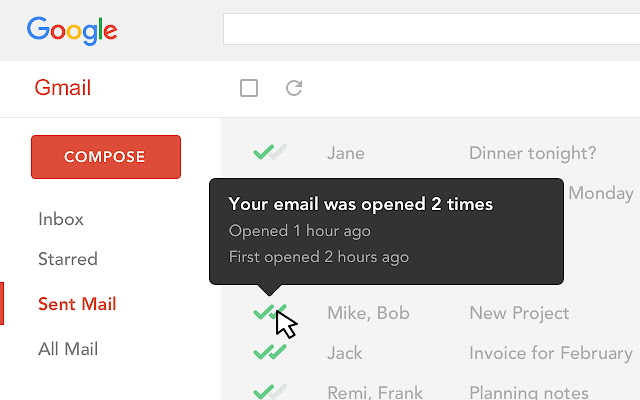 |


