Mailgun is a transactional email API service which was owned and supported by Rackspace (acquired in 2012) and then spun off in 2017 as an independent and standalone entity. It is now supported by Sinch since that company's acquisition of Mailgun and Mailjet, through acquiring Pathwire.
$35
per month
MailUp
Score6 out of 10
N/A
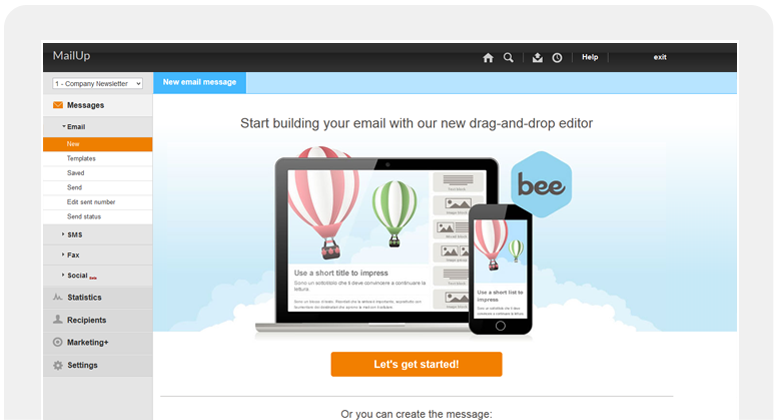
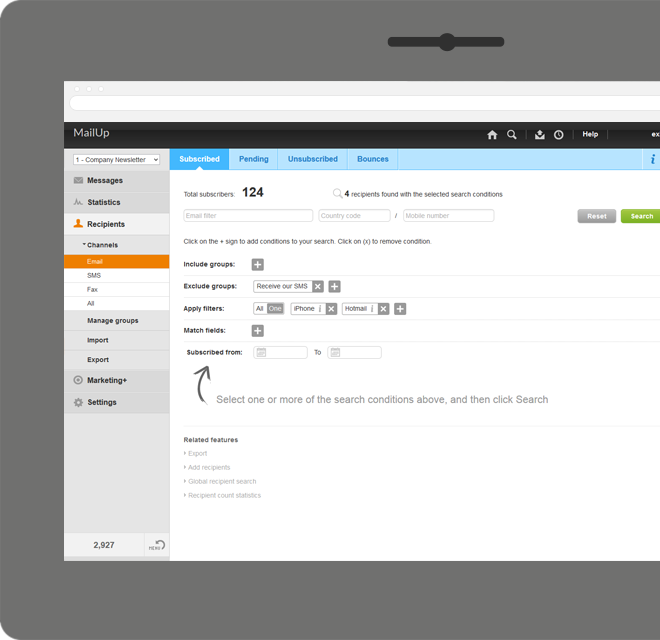
MailUp is the eponymous email & SMS platform from the Italian company that was founded in 2002 that now has a modest but respectable presence across the western world with a diverse customer base (Yamaha, Amnesty International, Korean Air, etc.). Mailup's platform combines email marketing, with transactional email and SMS features, and offers SMTP relay and plugins for ecommerce, CRM and CMS systems.
Their unusual pricing scheme is tiered just on subscribers but on volume of sends and that…
Mailgun's pay-as-you-go pricing structure is fantastic, especially if you don't need to send that much email. The pricing, including the free tier, is much more generous than what you can get with some pricier providers, like SendGrid. I mainly just use Mailgun as an SMTP server for web services, and the service has been set-up-and-forget, which is great because I never even have to log onto the Mailgun website and do any work. Mailing list support also looks great for rolling-your-own and not relying on more expensive mailing list services.
A de minimis incentive was given to thank the reviewer for their time. The incentive was not used to bias or drive a particular response, nor was the incentive contingent on a positive endorsement. More Info
A de minimis incentive was given to thank the reviewer for their time. The incentive was not used to bias or drive a particular response, nor was the incentive contingent on a positive endorsement. More Info
A de minimis incentive was given to thank the reviewer for their time. The incentive was not used to bias or drive a particular response, nor was the incentive contingent on a positive endorsement. More Info
A de minimis incentive was given to thank the reviewer for their time. The incentive was not used to bias or drive a particular response, nor was the incentive contingent on a positive endorsement. More Info
No built-in templating features (This was a bit sad after coming from Mandrill which excelled at this)
Dashboard UI (although easy to use) is a bit dated in appearance
Logs are cumbersome compared to Mandrill
Setting up TLD (top level domain) names (things like .online or .church) that are not common require an email to tech support (this is annoying)
Sometimes can be slow in delivery
Shared IP addresses can be SPAM filtered or delayed (requires an email to support to have a new one assigned - Note: this can be mitigated by buying a dedicated one for a monthly fee)
A de minimis incentive was given to thank the reviewer for their time. The incentive was not used to bias or drive a particular response, nor was the incentive contingent on a positive endorsement. TR verified that a representative sample of customers was invited. More Info
A de minimis incentive was given to thank the reviewer for their time. The incentive was not used to bias or drive a particular response, nor was the incentive contingent on a positive endorsement. More Info
The time for the initial setup is very quick, since you can start sending (thus developing) from their sandbox in no time. The actual configuration involves, as usual, some DNS changes that may require time but are well explained and documented. Once everything is set up, there are a lot of monitoring tools that you can use to optimize your lists.
A de minimis incentive was given to thank the reviewer for their time. The incentive was not used to bias or drive a particular response, nor was the incentive contingent on a positive endorsement. More Info
There have been a few minor outages through the years, but nothing more than a few minutes. These small outages are to be expected in any kind of a SaaS product, but Mailgun handles them very well. We designed our software to just retry sending after a while if there is an outage. As far as I know, we have never had to do more than a few retry cycles. This is all automated on our end, so we rarely even notice. Our customers have never noticed any mail sending outages.
A de minimis incentive was given to thank the reviewer for their time. The incentive was not used to bias or drive a particular response, nor was the incentive contingent on a positive endorsement. More Info
The API and the deliverability of emails is excellent. Their API is very responsive and performs perfectly fine. I have no complaints there. Their management interface though (accessed through the web) is pretty slow though. Searching through lists of emails when I'm tracking down a problem for a customer can take 10+ seconds which is annoyingly high for a modern web app.
A de minimis incentive was given to thank the reviewer for their time. The incentive was not used to bias or drive a particular response, nor was the incentive contingent on a positive endorsement. More Info
You can't seem to get ANY support until you shell out hundreds of dollars per month. I even did this when we could not deliver mail with Mailgun, and the response was slow and inadequate. Nor would they refund my money. I'll never be a customer of Mailgun again.
A de minimis incentive was given to thank the reviewer for their time. The incentive was not used to bias or drive a particular response, nor was the incentive contingent on a positive endorsement. More Info
To be honest, the tools are quite similar and again I dont recommend using them as a standalone products, but they power the work we do via CRMs and our marketing campaigns. Mailgun integrates slightly better which it is why it is the preferred choice for our agency, as it integrations options seem to be better
A de minimis incentive was given to thank the reviewer for their time. The incentive was not used to bias or drive a particular response, nor was the incentive contingent on a positive endorsement. More Info
Mailup has hands down the best editor for creating responsive emails, I've tried almost everything out there and this is the best, I recommend this to colleagues all the time!
A de minimis incentive was given to thank the reviewer for their time. The incentive was not used to bias or drive a particular response, nor was the incentive contingent on a positive endorsement. More Info
Over the past six years, Mailgun has scaled with our growth very easily. We haven't had to make any code changes to handle our larger volume today, and their pricing has scaled naturally with our growth. As far as I know, there is nothing we will need to do in order to grow 10-fold. Mailgun just handles the load really well.
A de minimis incentive was given to thank the reviewer for their time. The incentive was not used to bias or drive a particular response, nor was the incentive contingent on a positive endorsement. More Info
By not investing in our mail server, we have saved huge amount of money and time. For configuration and installation of an email server on Linux-based server, we would have to hire a network administrator.
If email delivery is an issue in a hosting provider, another solution is to switch the hosting. Fortunately with Mailgun, we didn't need to try different hosts and experiment which one works best for emails. We can stick to our existing web hosting provider and would not need to change it just for the sake of improving email deliverability.
The pricing of Mailgun is very cheap and straightforward. First 10K emails are free every month and that's a big advantage for our organization because our volume of emails is rarely more than 10K per month.
A de minimis incentive was given to thank the reviewer for their time. The incentive was not used to bias or drive a particular response, nor was the incentive contingent on a positive endorsement. More Info
A de minimis incentive was given to thank the reviewer for their time. The incentive was not used to bias or drive a particular response, nor was the incentive contingent on a positive endorsement. More Info