Loomly vs. ZoomSphere

Overview
ProductRatingMost Used ByProduct SummaryStarting Price
Loomly
Score 8.2 out of 10
N/A
Loomly is a brand success platform with solutions for brands of all sizes. Users can plan, create, publish, optimize, promote, and track social content across a variety of channels. Currently, Loomly supports Facebook, Twitter, Instagram, Pinterest, LinkedIn, Google My Business, YouTube, Snapchat, TikTok, and additional custom channels. Loomly was built for collaboration and organization, and is presented as an ideal tool for brands and agencies with multiple social accounts, locations,…
$0
up to 1 user
ZoomSphere
Score 9.1 out of 10
N/A
ZoomSphere is a social media scheduling and management solution designed for teams to plan, schedule, auto-publish, and analyze their social media content across multiple platforms. ZoomSphere is primarily used by social media managers, marketing teams, and agencies to streamline content workflows, improve collaboration, and track performance across various social media platforms, including Instagram, Facebook, TikTok, LinkedIn, YouTube, and X. The software helps users automate…
$29
per month
Pricing
LoomlyZoomSphere
Editions & Modules
Free
$0
up to 1 user
Enterprise
Contact Vendor
Enterprise
Custom
Leads Manager
$29
per month
ZoomSphere
$199
per month
Offerings
Pricing Offerings
LoomlyZoomSphere
Free Trial
YesYes
Free/Freemium Version
YesNo
Premium Consulting/Integration Services
NoNo
Entry-level Setup FeeNo setup feeNo setup fee
Additional DetailsTwo month discount available for annual billing.
More Pricing Information
Community Pulse
LoomlyZoomSphere
Features
LoomlyZoomSphere
Publishing
Comparison of Publishing features of Product A and Product B
Loomly
8.5
3 Ratings
6% above category average
ZoomSphere
8.0
1 Ratings
0% below category average
Content planning and scheduling8.93 Ratings8.01 Ratings
Audience targeting7.53 Ratings7.01 Ratings
Content optimization8.92 Ratings00 Ratings
Workflow management8.53 Ratings9.01 Ratings
Engagement
Comparison of Engagement features of Product A and Product B
Loomly
7.7
2 Ratings
3% below category average
ZoomSphere
-
Ratings
Customer interaction histories8.01 Ratings00 Ratings
Bulk actions7.52 Ratings00 Ratings
Marketing
Comparison of Marketing features of Product A and Product B
Loomly
8.0
3 Ratings
3% above category average
ZoomSphere
9.0
1 Ratings
15% above category average
Content marketing8.12 Ratings9.01 Ratings
Paid media management8.02 Ratings00 Ratings
Campaigns and promotions8.01 Ratings00 Ratings
Channel coverage/integration
Comparison of Channel coverage/integration features of Product A and Product B
Loomly
8.8
3 Ratings
4% above category average
ZoomSphere
8.4
1 Ratings
0% below category average
Twitter8.93 Ratings10.01 Ratings
Facebook8.93 Ratings10.01 Ratings
LinkedIn9.53 Ratings8.01 Ratings
Google+8.12 Ratings00 Ratings
Instagram8.93 Ratings7.01 Ratings
Pinterest8.93 Ratings00 Ratings
YouTube8.02 Ratings7.01 Ratings
Reporting/analytics
Comparison of Reporting/analytics features of Product A and Product B
Loomly
8.0
3 Ratings
1% above category average
ZoomSphere
8.3
1 Ratings
5% above category average
Campaign success analytics9.02 Ratings8.01 Ratings
Real-time tracking7.03 Ratings7.01 Ratings
Competitor analysis00 Ratings10.01 Ratings
Account management
Comparison of Account management features of Product A and Product B
Loomly
7.8
3 Ratings
3% below category average
ZoomSphere
8.5
1 Ratings
6% above category average
Role-based user permissions & privileges8.53 Ratings10.01 Ratings
Mobile access7.03 Ratings7.01 Ratings
Best Alternatives
LoomlyZoomSphere
Small Businesses
CoSchedule Marketing Suite
Score 10.0 out of 10
CoSchedule Marketing Suite
Score 10.0 out of 10
Medium-sized Companies
CoSchedule Marketing Suite
Score 10.0 out of 10
CoSchedule Marketing Suite
Score 10.0 out of 10
Enterprises
Social Suite by Reputation.com
Score 9.4 out of 10
Social Suite by Reputation.com
Score 9.4 out of 10
All AlternativesView all alternativesView all alternatives
User Ratings
LoomlyZoomSphere
Likelihood to Recommend
9.0
(3 ratings)
8.0
(1 ratings)
Usability
8.5
(2 ratings)
9.0
(1 ratings)
Support Rating
-
(0 ratings)
9.0
(1 ratings)
User Testimonials
LoomlyZoomSphere
Likelihood to Recommend
Loomly
I think for someone looking for a lower-cost social media management took, Loomly is the best I've found. It's pretty easy to use, and has a lot of tools that outshine the downsides of the platform. If you're looking for a pretty standard, easy to use, and aesthetically clean platform, I'd recommend Loomly. For more analytic tools, it's perhaps not for you.
Read full review
ZoomSphere
ZoomSphere is suited for all companies - from small to big, for one brand or more brands within company. With ZoomSphere you can leverage your social media presence - but you need to use lot of apps ZoomSphere has. I think that ZoomSphere is not suited for company that want to use ZoomSphere for only one purpose, for example content creation and publishing. There are plenty of ways how to use ZoomSphere more complex.
Read full review
Pros
Loomly
  • AI transcription of videos
  • Naming title of topic / outlining what the video is about
  • Saving and exporting video to send to co workers
  • Integrates well with other apps (teams, slack, etc)
Read full review
ZoomSphere
  • Content Creation and Publishing
  • Analytics and Reporting
  • Workflow management
Read full review
Cons
Loomly
  • It should make it easier to select more accounts at once while duplicating post
  • It should make it easier to edit on multiple accounts at the same time while duplicating
Read full review
ZoomSphere
  • Community Management
  • Viewable backlog or product roadmap
Read full review
Likelihood to Renew
Loomly
These services that Loomly offers when integrating multiple social media platforms is invaluable. It makes this side of the business a breeze.
Read full review
ZoomSphere
No answers on this topic
Usability
Loomly
I think it's a great for people at any level. It's straightforward and easy-to-use and once you set it up once, you're good to go
Read full review
ZoomSphere
There is always a space for improvement, but overall I see ZoomSphere as a valuable partner and tool for our business on social media. Maybe in a future rest of the apps in tool (community management, social media listening,...) will be on a same level as competitors and we will use only one tool for whole social media management. But if not, ZoomSphere is still awesome for the most of it
Read full review
Support Rating
Loomly
The chat feature is 10/10
Read full review
ZoomSphere
Whenever I contacted customer service, I had a great response within minutes. Sometimes was not easy to solve, but somehow we figured it out. I would like to reccommend more proactive communication with clients regarding product roadmap, for example "In 1Q we will launch XY,..." Client should know that before implementation - client can prepare for news, client can test something,...
Read full review
Alternatives Considered
Loomly
I found Loomly, while more simple, to be the most worth the price. Especially because I specifically can view analytics on client accounts directly, there's no need for me to have it within my platform. However, I know this is crucial for a lot of people. If they're looking for that, I'd probably say another platform might be better. But for me, Loomly is perfect!
Read full review
ZoomSphere
We see ZoomSphere as a better option than Kontentino. They are almost the same in way you can use the tool, but ZoomSphere has better UI and UX and also customer service. We also know that pricing levels are better with ZoomSphere than Kontentino. But both tools are quite awesome for social media management. Just book a demo, have a trial and you will see by yourself.
Read full review
Return on Investment
Loomly
  • Quicker scheduling times for clients.
  • Easy to pull social media analytics from one place instead of different platforms.
  • Can communicate with clients and colleagues in real time for editing purposes.
Read full review
ZoomSphere
  • Possitive effect into measure all awareness effects on social channels
  • Time effectiveness
  • Faster workflow management and realtime communication
Read full review
ScreenShots

Loomly Screenshots

Screenshot of Loomly DashboardScreenshot of Loomly List ViewScreenshot of Loomly Calendar ViewScreenshot of Loomly Post BuilderScreenshot of Loomly Post FinetuningScreenshot of Loomly Post View

ZoomSphere Screenshots

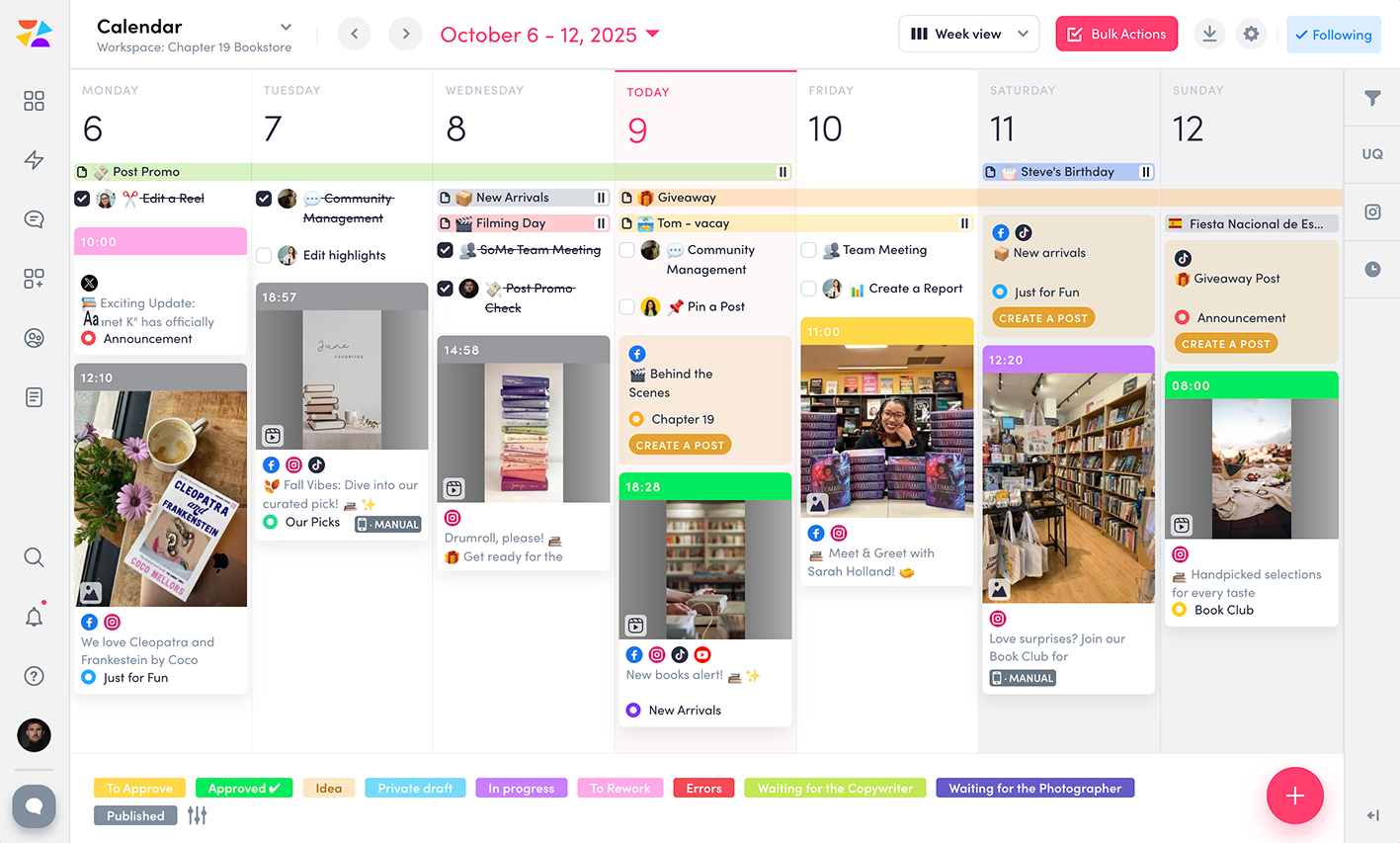
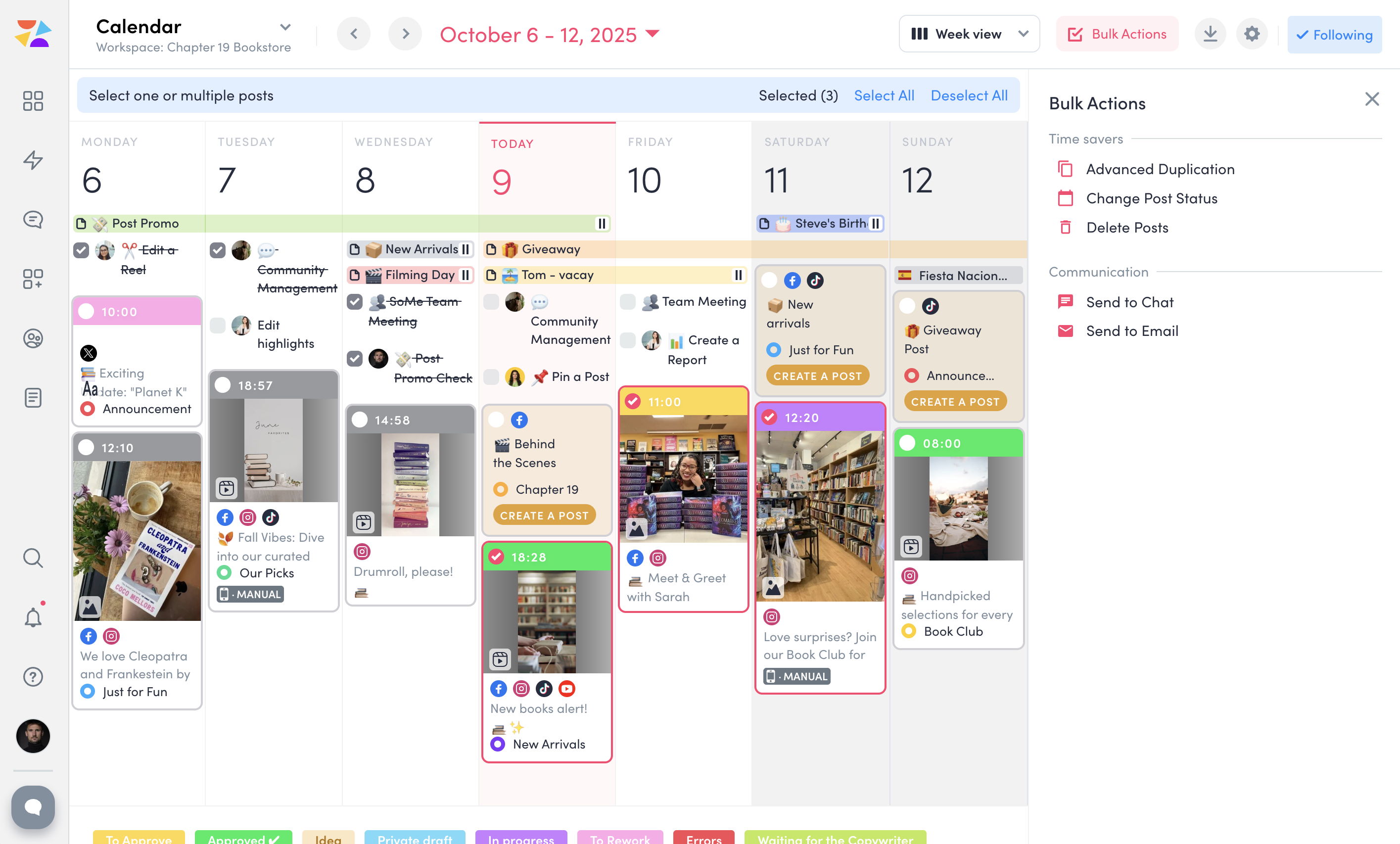
Screenshot of ZoomSphere Workspaces, which lets the user keep clients and projects organized. A separate workspace can be set up for each client with only needed apps—no extra clutter. Each workspace comes with a built-in Chat for easy communication and a Files section to store everything from images and videos to presentations and reports, keeping work in one place.Screenshot of ZoomSphere Scheduler, which simplifies social media planning and publishing across platforms like Instagram, Facebook, TikTok, LinkedIn, YouTube, and X. Users can manage formats like stories, carousels, and short videos, or set up a custom approval flow for fast approval from a manager or client, and enjoy features like Instagram grid preview, post performance panel, and bulk actions.Screenshot of a Kanban-style interface to streamline task management. Here, users can create tasks, set deadlines, attach files, and discuss each task card with a team to keep everything on track. With clear task organization, ZoomSphere Workflow Manager helps teams stay on top of their projects and ensures smooth collaboration from start to finish.Screenshot of ZoomSphere Notes, which makes organizing ideas and plans easy.Screenshot of ZoomSphere Analytics, which offers in-depth insights into social media performance. Content performance can be analyzed with over 100 available metrics, and reports can be generated for any time period.Screenshot of the tool to send multiple posts for approval to client at once. Bulk Actions lets users send entire batches of posts via email or built-in chat, as well as duplicate, update statuses, or delete multiple posts.