Localize vs. Wordbee

Overview
ProductRatingMost Used ByProduct SummaryStarting Price
Localize
Score 10.0 out of 10
Enterprise companies (1,001+ employees)
Localize is a no-code translation solution for SaaS platforms, allowing users to translate a web app, dashboard, or API docs. Localize enables users to translate a SaaS platform in hours , helping users to expand into new markets around the globe. Localize boasts users among enterprise SaaS brands like Cisco, Intuit, Atlassian, Afterpay, Discord, and Canva, who translate their platforms and provide better user experiences to customers.
$50
per month
Wordbee
Score 6.0 out of 10
N/A
Wordbee in Luxembourg offers their eponymous computer-assisted translation and translation management.N/A
Pricing
LocalizeWordbee
Editions & Modules
Individual
$50.00
per month
Basic
$275.00
per month
Core
$625.00
per month
Advanced
Contact sales team
No answers on this topic
Offerings
Pricing Offerings
LocalizeWordbee
Free Trial
YesNo
Free/Freemium Version
NoNo
Premium Consulting/Integration Services
NoNo
Entry-level Setup FeeNo setup feeNo setup fee
Additional Details
More Pricing Information
Community Pulse
LocalizeWordbee
User Ratings
LocalizeWordbee
Likelihood to Recommend
8.0
(0 ratings)
7.0
(0 ratings)
Usability
8.2
(0 ratings)
-
(0 ratings)
Support Rating
9.0
(0 ratings)
-
(0 ratings)
User Testimonials
LocalizeWordbee
Likelihood to Recommend
Localize is brilliant for a startup who needs to implement a cost effective solution for offering tailored languages on their site
Read full review
It is easy to view two columns of source and target, and when using the filter to see just untranslated segments. TM and matches can be seen and differentiated easily. Scenarios where it is less appropriate are their spellcheck and filter areas, which could be improved by adding more options.
Read full review
Pros
  • Super easy integration - it takes one minute to add and configure the Localize WordPress plugin.
  • Convenient Admin - it is straight forward to add a project, get the API key and start adding translations.
  • Front End display - the switch between language is intuitive and efficient. It loads all languages super fast.
Read full review
  • Different colors to differentiate the status of the segment. One can click on the segment and change the color for the segments that were translated and those that still need to be reviewed.
  • Machine translation interface. There are three different machine translators at the side of the segments.
  • TM can be seen with matches highlighted at the side.
Read full review
Cons
  • We used the automated translator service because we are a start-up and price was everything. This posed a small problem because we were translating from English to Finnish. This is not such a common global language so automated translations tend to be quite bad but this was easily fixed due to the fact that Localize allows us to easily amend their suggested translations.
Read full review
  • Find and replace option could be improved to be easier.
  • The filter could have more options.
  • Spellcheck and QA need to be improved because I can not see it as an option in the online interface of my client. I need to download the document to do the spell check, and then correct the errors with the find and replace option.
Read full review
Usability
Very simple to use website.
Read full review
No answers on this topic
Support Rating
Great support documentation is available on their platform and can solve 95% of your queries. Other queries are often resolved in a timely fashion and with attention to detail.
Read full review
No answers on this topic
Alternatives Considered
Frankly, we don't know what other translation management systems are out there, so we can't comment on how they compare to Localize.
Read full review
I did not choose Wordbee, but I use it with one of my clients who provides my login details.
Read full review
Return on Investment
  • Localize was setup and running on 4 websites in under 8 weeks.
  • Project was delivered well under budget with minimal problems.
Read full review
  • Saving time with the help of the tool with the TM and machine translation options.
  • Having knowledge-- knowing how to use this tool helps to get new clients who also use this tool.
  • I can add it to my CV and, depending on the workload, I may consider buying it.
Read full review
ScreenShots

Localize Screenshots

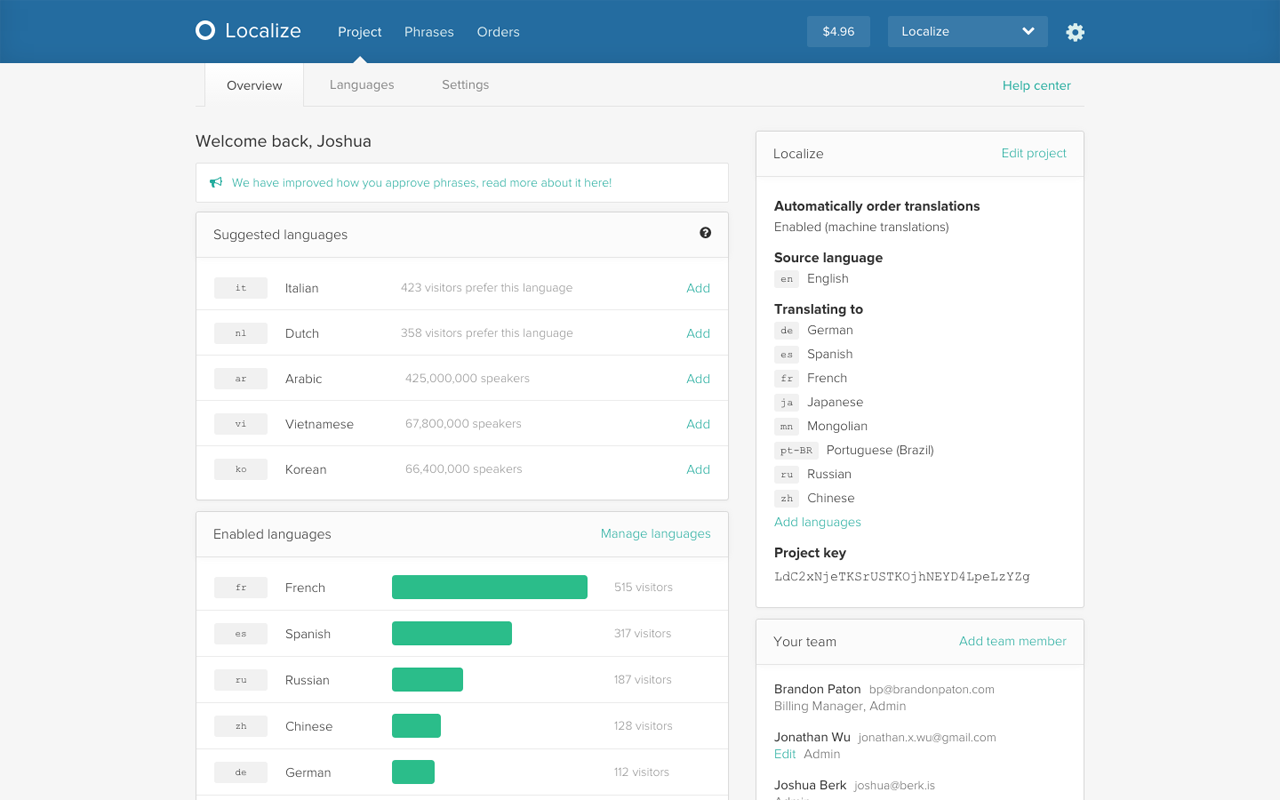
Screenshot of Project OverviewScreenshot of Content WorkflowScreenshot of Order TranslationsScreenshot of In-context EditingScreenshot of Widget on site