Lakeside Digital Experience Cloud, powered by SysTrack vs. Omnissa Dynamic Environment Manager

Overview
ProductRatingMost Used ByProduct SummaryStarting Price
Lakeside Digital Experience Cloud, powered by SysTrack
Score 7.0 out of 10
N/A
Lakeside Software offers cloud-based digital experience management. Lakeside’s Digital Experience Cloud, powered by SysTrack, gathers and analyzes more than 10,000 metrics every 15 seconds from every endpoint across the environment, collecting edge-based device telemetry data. With continuous insights into the ecosystems that power employees, customers use Lakeside’s technology to perform: End-User Experience Management Digital Workplace Planning IT Asset…N/A
Omnissa Dynamic Environment Manager
Score 7.9 out of 10
N/A
Dynamic Environment Manager offers personalization and dynamic policy configuration across any virtual, physical and cloud-based Windows desktop environment, and is a key component of JMP – the next generation of desktop and application delivery. The software is an evolution of technology acquired with Dutch company Immidio by VMware in February, 2015.N/A
Pricing
Lakeside Digital Experience Cloud, powered by SysTrackOmnissa Dynamic Environment Manager
Editions & Modules
No answers on this topic
Offerings
Pricing Offerings
Lakeside Digital Experience Cloud, powered by SysTrackOmnissa Dynamic Environment Manager
Free Trial
NoNo
Free/Freemium Version
NoNo
Premium Consulting/Integration Services
NoNo
Entry-level Setup FeeNo setup feeNo setup fee
Additional Details
More Pricing Information
Community Pulse
Lakeside Digital Experience Cloud, powered by SysTrackOmnissa Dynamic Environment Manager
Best Alternatives
Lakeside Digital Experience Cloud, powered by SysTrackOmnissa Dynamic Environment Manager
Small Businesses
SolarWinds Pingdom
SolarWinds Pingdom
Score 9.7 out of 10

No answers on this topic

Medium-sized Companies
Cisco ThousandEyes
Cisco ThousandEyes
Score 8.9 out of 10

No answers on this topic

Enterprises
Cisco ThousandEyes
Cisco ThousandEyes
Score 8.9 out of 10

No answers on this topic

All AlternativesView all alternativesView all alternatives
User Ratings
Lakeside Digital Experience Cloud, powered by SysTrackOmnissa Dynamic Environment Manager
Likelihood to Recommend
9.0
(0 ratings)
8.0
(0 ratings)
User Testimonials
Lakeside Digital Experience Cloud, powered by SysTrackOmnissa Dynamic Environment Manager
Likelihood to Recommend
We are able to get to the root of the issue much more rapidly this way, and we don't have to interrupt the end user in order to see how their computer is functioning. Systrack is installed on-premises at our company. Check out that hosted infrastructure if you're in the market for it. In a matter of minutes, you may move from one workstation to more than 100k.
Read full review
VMware Dynamic Environment Manager is excellent addition of VMware products and is very well suited for User profiles (settings, files, configuration) redirection when users connect to dedicated or shared hosts. It also offers good set of features for Windows OS configuration and customization for multiple users. Place for improvement, simplicity for configuration.
Read full review
Pros
  • Systrack may also be scaled up thus simply
  • Systrack provides a comprehensive picture of each system
  • Systrack's customer service is second to none
Read full review
  • The VMware User Environment Manager helps place all tools on a virtual desktop, creating ease of access for employees.
  • The use of VMware User Environment Manager also helps with addressing problems within a remote environment by limiting those issues to the desktop that it creates. This also helps when issues arise that may need to be addressed for a particular program, and allows us to focus on a problem without affecting the real-time desktop.
  • Allowing to log in to different servers quickly is also a benefit. Time is of the essence for many employees, and the ability for employees to take 2 minutes or so to log in to the VMware User Environment Manager helps each employee have additional time to do other tasks.
Read full review
Cons
  • Every new version brings new ideas and capabilities to the table
  • Because of the sheer volume of information available, it can be difficult to know where to begin
  • With enough time and skill, creating bespoke dashboards with meaningful titles may be effective
Read full review
  • There are no major faults with it. It does the job well and I can rely on it.
Read full review
Usability
No answers on this topic
It is a great product and does the job well. We have been using it for 7 years now, and I can not think of a single time where it broke or had issues... it just WORKS.
Read full review
Alternatives Considered
Systrack is also used to provide baseline and post-change analytics for the testing of new applications and equipment. This gives me the confidence to install high-quality items that won't cause any serious problems for customers. These are just some of the useful tools Systrack offers to assess the digital experience and take appropriate action.
Read full review
This is not a real 1 vs 1 comparison. Both manage the user profile in a different way. Unidesk (Citrix app layering) is a great way to provide a golden image with extra applications and store personal settings. You still need tools like Group Policies (preferences) to control the user profile settings while Dynamic Enviroment Manager is more comming from these settings to complement the user profile
Read full review
Return on Investment
  • It was easy to install Systrack to a group of virtual workstations while doing CPU utilization analysis in a virtual environment
  • You still need specialists to discover and fix problems in your environments with Systrack, but it will save you a lot of time
Read full review
  • Positive: Ability to create floating pools through VMware Horizon, and the user can log in to any PC and have the best experience. No more dedicated PCs.
  • Positive: No wasted time in transferring over old profile data to a new PC.
  • Negative: A bit of work to set up and get working properly.
Read full review
ScreenShots

Lakeside Digital Experience Cloud, powered by SysTrack Screenshots
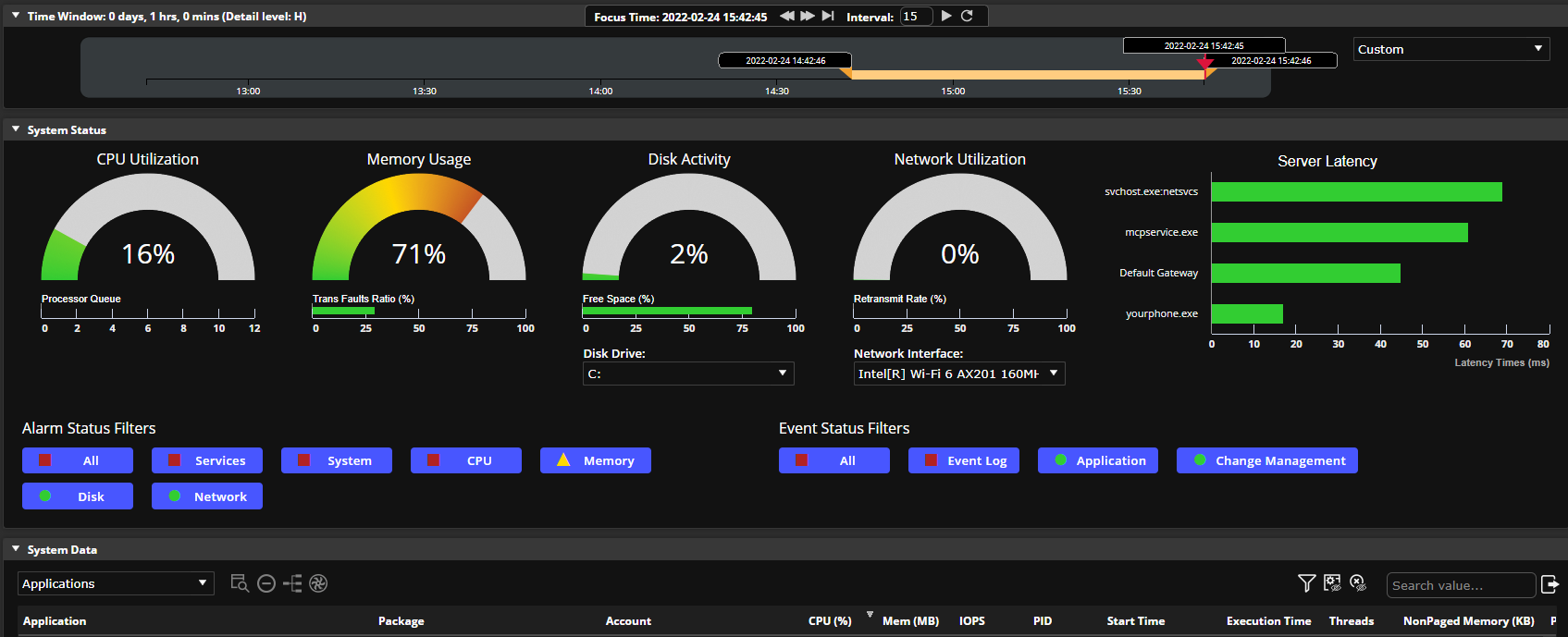
Screenshot of Lakeside Assist is an all-in-one workspace for Level 1 service desk staff to quickly diagnose and resolve issues.Screenshot of Lakeside Resolve is a powerful root cause analysis tool to diagnose and resolve complex, estate wide issues by providing heightened visibility into physical and virtual desktops, quick problem resolution, and incident prioritization.Screenshot of By automating incident detection, troubleshooting, and resolution and streamlining workflows, Prevent makes robust proactive service operations possible for more members of the IT support team.Screenshot of Lakeside helps you proactively measure, analyze and optimize your employees’ digital experience anywhere they are working, all from easily consumable dashboards that surface that data you need quickly.Screenshot of Provide the right-sized hardware for different departments across your organization, saving IT costs and improving DEX. Take the guess-work out of your next refresh and ensure end users have what they need to be their most productive.