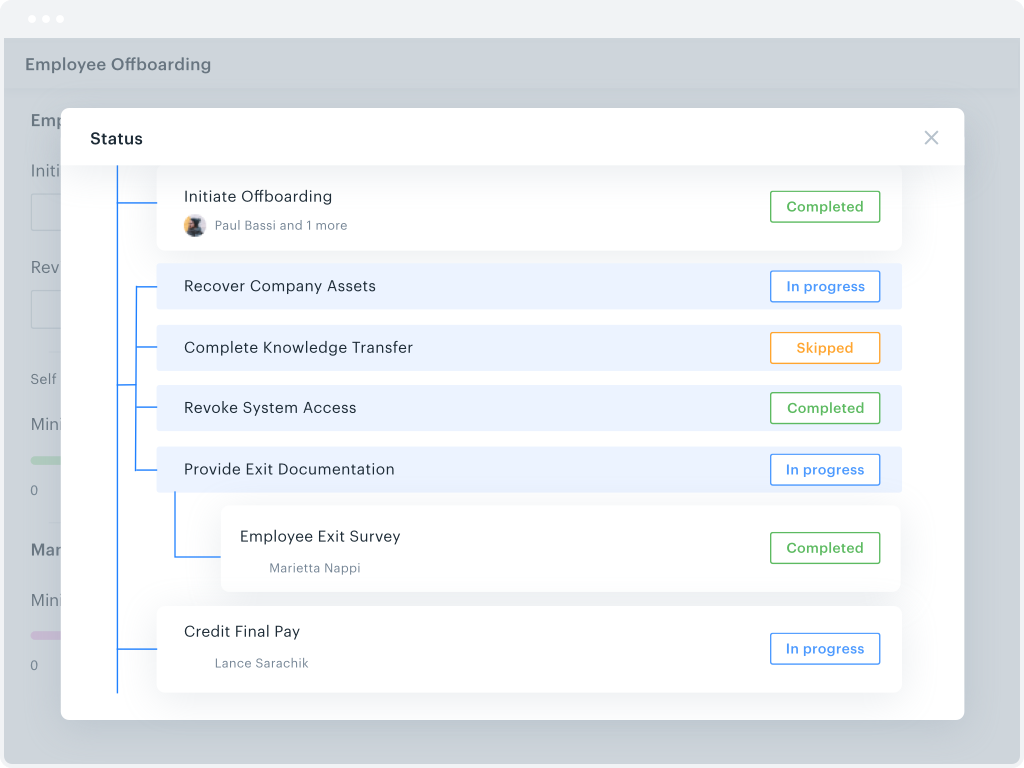
Kissflow is a low-code platform for custom application development tailored to business operations. Kissflow empowers process owners and IT developers to automate and build processes and applications for internal business operations.
$1,500
per month
Nintex
Score 7.9 out of 10
N/A
Nintex offers a platform that helps companies discover, automate, and optimize business processes.
KiSSFLOW is well suited for any information heavy paperwork that multiple people approve and have access to complete work. It is less suited for processes that require a lot of back and forth with a form initiator. The workflows like to be very linear without much back tracking. It can do that but it prefers to be forward linear.
The Nintex K2 platform is not only efficient and developer-friendly, but the support provided by the vendor is also highly commendable. The platform's ease of use and robust functionality make it a preferred choice for developers, while the vendor's exceptional support ensures smooth implementation and ongoing assistance, enhancing overall user satisfaction.
I appreciate the automatic email notifications when it is your turn to complete a task. This keeps everyone on track.
I appreciate being able to "reassign" a task as well--leaving flexibility for some folks to cover for others when needed.
I appreciate the personal check-ins from our rep, asking how things are going. That makes me feel like someone is paying attention and wants me to be happy with the product.
Learning. If you are coming from a 100% paper process and have employees who know nothing more, then there is definitely a learning curve. You will need to bring someone in to help you train employees on the core concept of the change (the "Why are we doing this" questions). KiSSFLOW does have support, but this is more getting down to the details in your own work environment.
Visual learners will love it, but not non-visual. If you are an accountant, and your brain works like an accountant, then this program will be difficult to learn. It is very visual, and I have seen more success with visual learners than any others.
Bugs. A few years ago, there were a lot of bugs. There are not that many anymore. This is to be expected with any program, so if you are training an impatient staff who doesn't do well with error messages, you will want to be sure to pad the training sessions. I have not seen error messages in a long time; however, the nature of the beast is that you won't see one until you actually find one...
Difficult to fix flows that are in process (such as re-assigning a task for someone that is OOO or has left the company).
Nintex support team does not have resolution SLAs (only acknowledgment SLAs). Occasionally this has led to key issues taking weeks to resolve.
The number of integrations available is impressive, however, sometimes key methods are not available within an integration. This has been improving significantly in the past 2 years as the platform has matured.
Renewal is mainly on the fact that Nintex is so widely used and it would be impossible to migrate all of these existing workflows to another engine. Third-party lock-in within SharePoint is pretty strong, which makes it difficult to move to something else. Our Nintex database is well-over 100 GBs. Nintex email support is very good, and I've been impressed. The Community however is non-existent and filled with unanswered questions.
The system has room to grow as it's limited by not being able to edit POs after they've been approved. The system is great for registrations and syncing to other systems while including the attachments. The reporting from Kissflow is also easy to setup to link to other platforms such as Looker
Nintex Workflow does exactly what it is advertised to do: make workflow development fast and easy. It doesn't provide very much new functionality, but it isn't really supposed to. When I am working with a client on a SharePoint project, I am always happy if I hear that they use Nintex Workflow, as it makes workflows much easier.
The Nintex Process Platform has never crashed or had any availability issues during my usage. However there was an issue that was of my own making that caused a slowdown of the system. I had set up a process to run once a day and check for employees on a list that had certain parameters selected, and for some reason that I had to troubleshoot, the process instead ran constantly, which filled the cache quickly. I ended up having to dismantle that process so the system didn't crash.
Unlike any other process automation product out there. Not only is it a low-code, easy to use tool for building processes in environments like SharePoint or Salesforce, they have really started to expand their tool-set by offering tools to manage other things like process mapping, RPA, mobile,etc.
I haven't encountered a need for support with KiSSFLOW. It's not a perfect platform, but it's functional, dependable, and reasonably intuitive. I can't fault a support team just because their product works!
The support team works as fast as they can and they are usually fast to solver the issues. Sometimes they need more time to solve one of them because our workflows and so on are more complex than usual clients.
I used the Nintex training software, it was easy to watch and follow along. It didn't go too fast and was descriptive enough to understand what the steps needed were in order to produce efficient workflows and user friendly forms.
1.Start with Simple Workflows: Begin with basic workflows to gain user confidence before tackling complex processes. 2.Involve Stakeholders Early: Engage business users and IT early to align workflows with real business needs. 3.Comprehensive Training: Invest in user training to ensure smooth adoption and reduce resistance. 4.Leverage Prebuilt Templates: Use Nintex’s templates to speed up implementation and maintain consistency. 5.Iterate and Optimize: Continuously improve workflows based on user feedback and performance metrics.
KiSSFLOW wants you to be able to increase productivity, make it possible to "manage the chaos" (their own words) and simply make things better. It is exactly what it sounds like. For a visual learner, KiSSFLOW is perfect. It really does make good on its promise to help you manage the chaos, and it makes it easy for your employees to understand how your business works. More specifically, I recommended this program for a small school that had never automated anything. They knew nothing about the process. Bringing in KiSSFLOW allowed them to not only refine their process, but it gave awareness to other employees and ensure that they could work as a team, knowing the intricacies of how each department works (so, the Director would understand the many steps of Admissions before taking over after enrollment -- they would know what each family experienced).
I was not part of selecting Nintex, but I think Nintex does a better job of generating linear flowcharts vs. Microsoft Visio because it automates the majority of the process of creating process maps. (Microsoft Visio is better for creating flowcharts that are not linear. because it is less automated and more flexible.)
The scalability is really bottlenecked by the imagination of the user. I was able to make processes for my own personal usage, making my daily tasks easier. I was also able to make processes that affected hundreds of employees, making large standardization and efficiency gains. So either way, the system is used the same way, and I was the limiting factor.
Somewhat expensive compared to other cheap (or free) task management alternatives. ROI depends on your specific needs and the size of your organization.
ROI can be ambiguous since KiSSFLOW is primarily for internal company use. A simple email thread could accomplish many of the same things, but with less efficiency.
People have woken up to the amount of overlap after mapping their processes.
People can be resistant to process changes. You need to have the support from above or support from the 'business' that you are process changing to be able to see the positive impacts.
Numbers talk. if you can get a general salary figure from your HR dept to show savings for 'employee bands', then when you present reports, they will be all the richer in data.