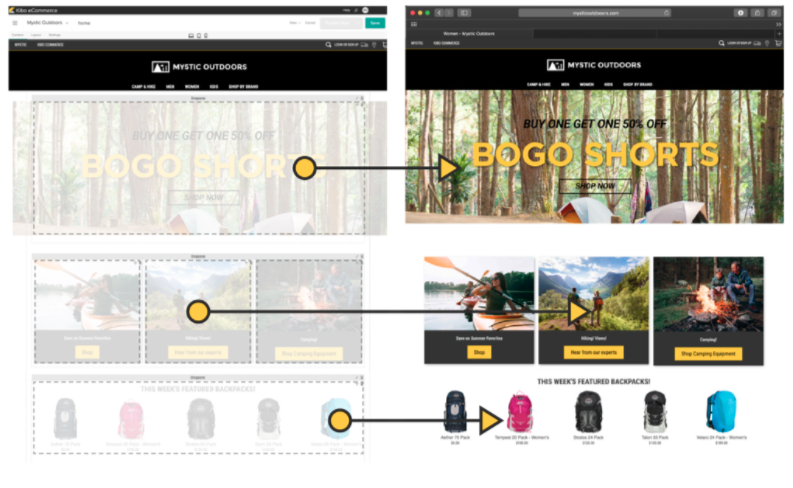
Kibo Software offers Kibo eCommerce (formerly Mozu), designed to support retailers with online offer creation and deployment, content publishing and landing pages, and many tools and widgets out of the box with a retail-oriented ecommerce solution.
Mozu was acquired by Kibo Software from Volusion in October 2016.
N/A
Webflow
Score8.9 out of 10
N/A
Webflow is a Website Experience Platform for modern marketing teams, used to visually build, manage, and optimize websites that offer both the consumer experience teams expect and enterprise-grade performance and scale.
$18
per month
Pricing
Kibo eCommerce
Webflow
Editions & Modules
No answers on this topic
Basic
$18
per month
CMS
$29
per month
Ecommerce - Standard
$42
per month
Business
$49
per month
Ecommerce - Plus
$84
per month
Ecommerce - Advanced
$235
per month
Offerings
Pricing Offerings
Kibo eCommerce
Webflow
Free Trial
No
Yes
Free/Freemium Version
No
Yes
Premium Consulting/Integration Services
No
No
Entry-level Setup Fee
No setup fee
No setup fee
Additional Details
—
Up to a 22% discount available for annual pricing.
The platform has flexibility at its core and we have made full use of that capability. Even if Kibo [eCommerce] hasn't been ready to provide features and functions we need, we have the opportunity to build them ourselves. The platform started as Mozu and while it was relatively well-developed for DTC, it lacked a lot of basic B2B functionality. As a result, when we were ready to move into that arena, we built a lot for ourselves (including a multi-level account system and a tool to manage it). Keep in mind, too, that Kibo eCommerce is part of a larger suite of tools. The company has purchased a mobile Point-of-Sale system, Baynote, Certona, Monetate, and an OMS. If you need a full-scale solution, they can offer a lot. As I mentioned previously, their support and documentation need shoring up. They're not terrible, but they hinder (rather than help) when it comes to fulfilling the platform's promise of letting the customers be self-service in building out their capabilities.
A de minimis incentive was given to thank the reviewer for their time. The incentive was not used to bias or drive a particular response, nor was the incentive contingent on a positive endorsement. More Info
Since the purpose in my case is to build a small professional looking site to present project outcomes and other research, I can create custom fields and design experimentations. Webflow builds sites that are super professional, with many amazing templates that don't look cheap. Additionally, I can test responsive layouts. Apart from this, I used 1-2 static pages to illustrate key findings for example what a multilingual site could look like with screenshots without needing CMS in free version, which are all the valuable skills to acquire. Compared to WordPress, Webflow is expensive with limited free features, although it has really cool additional features that will make the site I build stand out.
A de minimis incentive was given to thank the reviewer for their time. The incentive was not used to bias or drive a particular response, nor was the incentive contingent on a positive endorsement. More Info
Saves time- because I don't have to do double entry of content.
It saves money. I like that it is an all-in-one system, so I don't have to host elsewhere.
Flexibility - Webflow provides me with a lot of flexibility in my webpage design, allowing me to adjust pages as needed, depending on the content types.
A de minimis incentive was given to thank the reviewer for their time. The incentive was not used to bias or drive a particular response, nor was the incentive contingent on a positive endorsement. More Info
Prebuilt Integration - There is not currently a large number of preexisting integrations, but custom integrations are fairly quick
Time to Deploy - Don't get me wrong, We have deployed in the timeline we expected, but if you are trying to get something off the ground fast, Kibo might not be right for you. It is a robust platform that take some time to get up and running.
Complicated Shipping - if you have a complicated shipped process, you might want to look for a tool to help, Kibo does not have very robust out of the box shipping capabilities.
Brand recognition is still behind WordPress, which can make it a challenging sell for clients looking to play it safe in their CMS decision.
The CMS is ideal for smaller datasets, but higher content sites introduce some minor challenges.
Alignment between designers and developers is key prior to implementation. The flexibility of the platform requires careful planning to avoid over-engineering.
A de minimis incentive was given to thank the reviewer for their time. The incentive was not used to bias or drive a particular response, nor was the incentive contingent on a positive endorsement. More Info
A de minimis incentive was given to thank the reviewer for their time. The incentive was not used to bias or drive a particular response, nor was the incentive contingent on a positive endorsement. More Info
Webflow is very easy for a beginner to get started with and achieve good results, but to achieve an expert level of understanding requires experience and some web development knowledge. HTML5, CSS3 and JavaScript knowledge aren't required to use Webflow, but an expert will know BEM class naming patterns, be able to create reusable elements and design systems, and add 3rd party integrations that require custom code.
A de minimis incentive was given to thank the reviewer for their time. The incentive was not used to bias or drive a particular response, nor was the incentive contingent on a positive endorsement. More Info
In my experience, their customer service is an absolute joke, I tried reaching out to them they took forever. I had to keep following up with them as if they never received it in the first place. It’s a new platform, so guidance is needed. Tried the university they offer, in my opinion, it is completely useless, I would just completely move on from this website.
In my opinion, it is horrible, the rendering takes forever. I have the newest MacBook and the platform will still lag and slow down on me. I’m not a developer, I am a designer which makes it worst because I am using the features they are providing not extra coding features. In my opinion, it is a horrible platform really, stay away.
One positive note is that I have always been able to get someone on the phone in support whenever I have called, even at 1 AM. Getting someone on the phone is only half the battle though. In the first few months of using Mozu it often seemed that support didn’t know anymore about Mozu than we did. This has slowly started to change, but as a daily user you are likely to be on par with support in terms of knowing what to do when you encounter a problem. The support phone number is really most useful for having them put in a support ticket for you rather than typing it all out yourself and emailing it. It is very rare that the support reps are actually empowered to solve the problem at hand. Unless the issue you are having is user error, they will just take your information and pass it on the proper department. Your request or problem will then be ignored for months on end. Some day, it might actually get fixed but you are unlikely to be notified that this has happened. Most of these issues are assigned an internal ID that they use for tracking. Support is more than happy to pass this ID along, but it is useless. There is no way to actually see where the issue lies in the endless queue of similar issues.
I haven't had to engage them from a support perspective; however, there is a considerable user community for tips/ideas/troubleshooting and the like. I believe the Pro plan supports additional resources but we didn't find that the cost justified the outcome. Overall the need for support has been relatively minor.
A de minimis incentive was given to thank the reviewer for their time. The incentive was not used to bias or drive a particular response, nor was the incentive contingent on a positive endorsement. More Info
At the time of our implementation Mozu did not have any processes or procedures set up around going live. We basically were forced to just wing it and hope for the best
We had a custom, in-house ecommerce website before moving to Kibo. It was brittle, slow, and wasn't going to scale nearly well enough or fast enough to keep up with our requirements
A de minimis incentive was given to thank the reviewer for their time. The incentive was not used to bias or drive a particular response, nor was the incentive contingent on a positive endorsement. More Info
A lot more design control and easier to create a custom site, and then also to scale that site going forward. There's a lot about WordPress I miss, though, when it comes to managing a blog—user permissions, SEO control, edit HTML version of posts.
A de minimis incentive was given to thank the reviewer for their time. The incentive was not used to bias or drive a particular response, nor was the incentive contingent on a positive endorsement. More Info
I feel it doesn’t perform the way it’s supposed to and it doesn’t have any beneficial factors to it. In my opinion, there is no reason to use a platform like this when Wix and Shopify, and WordPress exist. I believe Webflow is a platform that shouldn’t exist and it’s only popular because of the hype it received. I tried it and hate it completely.
A de minimis incentive was given to thank the reviewer for their time. The incentive was not used to bias or drive a particular response, nor was the incentive contingent on a positive endorsement. More Info