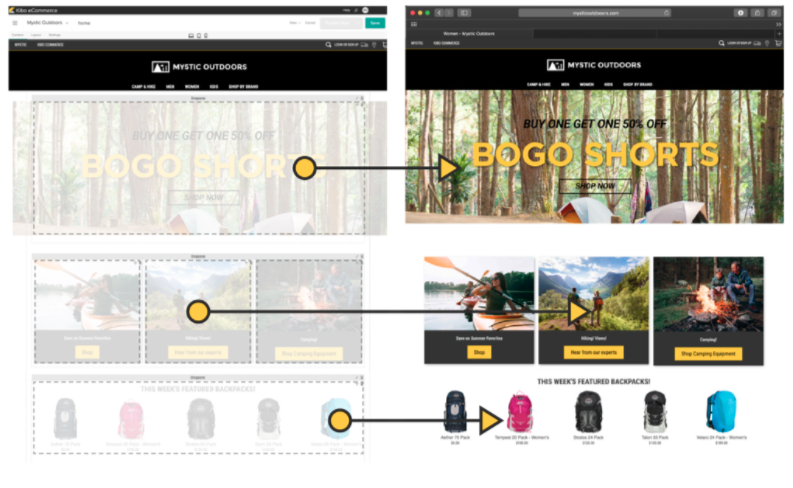
Kibo Software offers Kibo eCommerce (formerly Mozu), designed to support retailers with online offer creation and deployment, content publishing and landing pages, and many tools and widgets out of the box with a retail-oriented ecommerce solution.
Mozu was acquired by Kibo Software from Volusion in October 2016.
N/A
Squarespace
Score8.6 out of 10
N/A
Squarespace is a CMS platform that allows users to create a DIY blog, eCommerce store, and/or portfolio (visual art or music). Some Squarespace website and shop templates are industry or use case-specific, such as menu builders for restaurant sites.
The platform has flexibility at its core and we have made full use of that capability. Even if Kibo [eCommerce] hasn't been ready to provide features and functions we need, we have the opportunity to build them ourselves. The platform started as Mozu and while it was relatively well-developed for DTC, it lacked a lot of basic B2B functionality. As a result, when we were ready to move into that arena, we built a lot for ourselves (including a multi-level account system and a tool to manage it). Keep in mind, too, that Kibo eCommerce is part of a larger suite of tools. The company has purchased a mobile Point-of-Sale system, Baynote, Certona, Monetate, and an OMS. If you need a full-scale solution, they can offer a lot. As I mentioned previously, their support and documentation need shoring up. They're not terrible, but they hinder (rather than help) when it comes to fulfilling the platform's promise of letting the customers be self-service in building out their capabilities.
A de minimis incentive was given to thank the reviewer for their time. The incentive was not used to bias or drive a particular response, nor was the incentive contingent on a positive endorsement. More Info
Squarespace is one of the best solutions out there for building a website or web experience that looks good, has great functionality and is cost-effective, even for smaller businesses. Although most people in marketing will find most of the elements intuitive, if the creator is struggling with any of the functionality, there are many, many support options and other users who can offer assistance.
A de minimis incentive was given to thank the reviewer for their time. The incentive was not used to bias or drive a particular response, nor was the incentive contingent on a positive endorsement. More Info
Stupid simple to use. I know very creative people who cannot code and this is probably the easiest ever platform for them!
Pretty website templates and great functionality with showing off portfolios.
They've already figured out what are the problems that non-coding people have when creating websites and they've figured out a simple solution for all of it.
A de minimis incentive was given to thank the reviewer for their time. The incentive was not used to bias or drive a particular response, nor was the incentive contingent on a positive endorsement. More Info
Prebuilt Integration - There is not currently a large number of preexisting integrations, but custom integrations are fairly quick
Time to Deploy - Don't get me wrong, We have deployed in the timeline we expected, but if you are trying to get something off the ground fast, Kibo might not be right for you. It is a robust platform that take some time to get up and running.
Complicated Shipping - if you have a complicated shipped process, you might want to look for a tool to help, Kibo does not have very robust out of the box shipping capabilities.
A de minimis incentive was given to thank the reviewer for their time. The incentive was not used to bias or drive a particular response, nor was the incentive contingent on a positive endorsement. More Info
A de minimis incentive was given to thank the reviewer for their time. The incentive was not used to bias or drive a particular response, nor was the incentive contingent on a positive endorsement. More Info
It's simple to use for someone who is really good with computers as well as those who are not. I've been using my personal squarespace for years and have also helped clients build a starting page which they are later able to manage theirselves.
A de minimis incentive was given to thank the reviewer for their time. The incentive was not used to bias or drive a particular response, nor was the incentive contingent on a positive endorsement. More Info
One positive note is that I have always been able to get someone on the phone in support whenever I have called, even at 1 AM. Getting someone on the phone is only half the battle though. In the first few months of using Mozu it often seemed that support didn’t know anymore about Mozu than we did. This has slowly started to change, but as a daily user you are likely to be on par with support in terms of knowing what to do when you encounter a problem. The support phone number is really most useful for having them put in a support ticket for you rather than typing it all out yourself and emailing it. It is very rare that the support reps are actually empowered to solve the problem at hand. Unless the issue you are having is user error, they will just take your information and pass it on the proper department. Your request or problem will then be ignored for months on end. Some day, it might actually get fixed but you are unlikely to be notified that this has happened. Most of these issues are assigned an internal ID that they use for tracking. Support is more than happy to pass this ID along, but it is useless. There is no way to actually see where the issue lies in the endless queue of similar issues.
Help is available directly from the back end and uses full sentence searching to find answers to questions others may have asked before. With a ton of articles and support questions documents, it is very likely that your question has been answered. If not each page has the ability to open a direct email to support. Each case has a number and can be followed. Responses are often quick and have links and directions clearly stated
A de minimis incentive was given to thank the reviewer for their time. The incentive was not used to bias or drive a particular response, nor was the incentive contingent on a positive endorsement. More Info
At the time of our implementation Mozu did not have any processes or procedures set up around going live. We basically were forced to just wing it and hope for the best
We had a custom, in-house ecommerce website before moving to Kibo. It was brittle, slow, and wasn't going to scale nearly well enough or fast enough to keep up with our requirements
A de minimis incentive was given to thank the reviewer for their time. The incentive was not used to bias or drive a particular response, nor was the incentive contingent on a positive endorsement. More Info
Squarespace was quicker to set up and more accessible to manipulate the theme, pictures, and content. The page layouts are more versatile and fluid. With WordPress, more time-consuming efforts go into making a template work the way you want it to (because of the lack of the drag-and-drop grids that Squarespace has).
A de minimis incentive was given to thank the reviewer for their time. The incentive was not used to bias or drive a particular response, nor was the incentive contingent on a positive endorsement. More Info
The cost is reasonably decent. My client says they spent about $20 a month or $240 a year. I asked her if she could add Google AdSense to her blog one day, and they believe they can. They said a custom site would cost them $3000-10,000 depending on who does it. And I agreed, but I found the website they created was on the lower end of that range.
A de minimis incentive was given to thank the reviewer for their time. The incentive was not used to bias or drive a particular response, nor was the incentive contingent on a positive endorsement. More Info