Khoros Service offers omnichannel engagement on publicly available channels like social, digital, chat, and voice, as well as owned online communities like Khoros Communities. The solution offers 1-to-1 and 1-to-many engagement with customers and consumers, bringing together automation through bots and human agents. Customer inquiries and support-related conversations can be routed and prioritized based on a variety of parameters, and the robust agent desktop solution…
N/A
Kustomer
Score 8.7 out of 10
N/A
Kustomer is a customer service CRM platform built for managing high support volume by optimizing experiences throughout the customer service journey. Kustomer was acquired by Facebook in late 2020, but spun out in 2023 and re-launched as an independent entity, Kustomer, LLC.
$89
per month, per user
Pricing
Khoros Service
Kustomer
Editions & Modules
No answers on this topic
Enterprise
$89
per month, per user
Ultimate
$139
per month, per user
Offerings
Pricing Offerings
Khoros Service
Kustomer
Free Trial
No
No
Free/Freemium Version
No
No
Premium Consulting/Integration Services
No
No
Entry-level Setup Fee
Optional
No setup fee
Additional Details
Pricing is variable based on the needs of the customer.
All plans require an annual subscription and 8 users minimum.
More Pricing Information
Community Pulse
Khoros Service
Kustomer
Features
Khoros Service
Kustomer
Incident and problem management
Comparison of Incident and problem management features of Product A and Product B
Khoros Service
-
Ratings
Kustomer
8.1
Ratings
1% above category average
Organize and prioritize service tickets
00 Ratings
8.00 Ratings
Expert directory
00 Ratings
8.30 Ratings
Subscription-based notifications
00 Ratings
8.50 Ratings
ITSM collaboration and documentation
00 Ratings
8.00 Ratings
Ticket creation and submission
00 Ratings
8.00 Ratings
Ticket response
00 Ratings
8.00 Ratings
Self Help Community
Comparison of Self Help Community features of Product A and Product B
Khoros Service
-
Ratings
Kustomer
8.5
Ratings
8% above category average
External knowledge base
00 Ratings
8.00 Ratings
Internal knowledge base
00 Ratings
9.00 Ratings
Multi-Channel Help
Comparison of Multi-Channel Help features of Product A and Product B
If you need a content management system that allows you to add a wide variety of label categorization and have multiple users logged in at the same time, Khoros Care is suitable. However, I cannot say that it's the best system to use. There are other systems that have the same or similar features without as many issues.
It works really well for you to ask a teammate to review a case/email/message and provide some input since you can all review the same conversations and client accounts. They can also cover your inbox using your email handle in case you are out of the office suing some well deserved PTO.
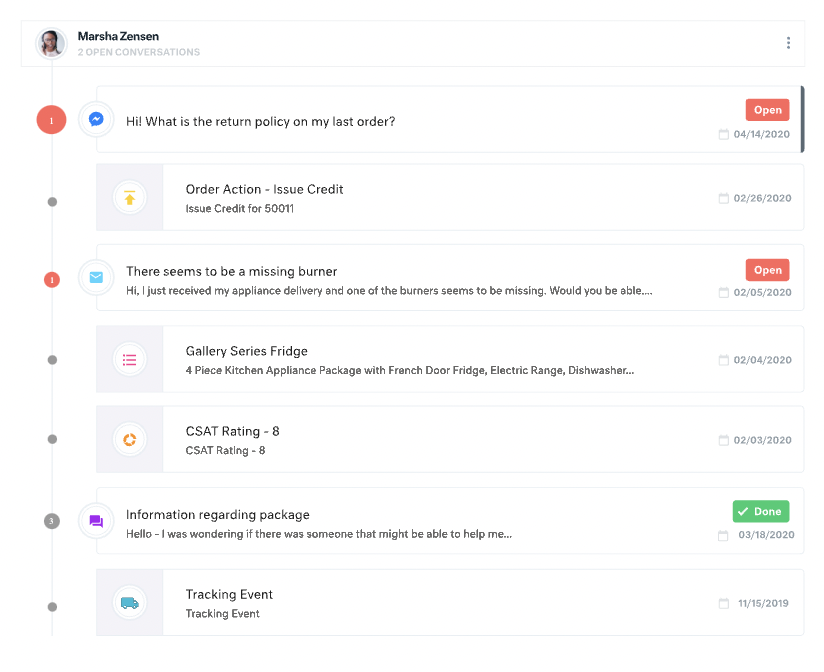
All customer data (past orders, communication with customer service, rewards account data) is in one place. This helps agents avoid confusion and reduces the number of tabs they need to open.
The Knowledge Base (or K Base) is very helpful. Any time we roll out a new policy or have a limited-time promotion, we can add all the relevant information and worksheets there for the convenience of the agents. That way they can stay in a chat while looking up the answer to a question.
We can seamlessly move from chat into email if the customer leaves or the queue times are too long. All the interactions will stay on the customer profile page, so they are kept up to date.
I would like to be able to see deleted comments/tweets so we can look into the issues.
I would like to be able to better customize dashboards for our exact metrics. Some things previously available in Spredfast are no longer available in Care.
For our team, the feature that defaults all notes to begin in "done" status is difficult. Throughout each day we need to have notes open and assigned back and forth to different teams, and we have to remember to manually "open" each note. There is too much room for human error with this setting, and it is easy for important notes to be missed if a user forgets to open the note.
Similarly, it can be hard to remember to assign emails/notes to a particular team in addition to a user. We almost exclusively work out of team inboxes, and if someone on Care writes an email to a customer, the email will automatically be "done" when it is created, and it will be assigned to the user who wrote it, but not also to the user's team. There are instances where an email needs to be snoozed for several days/hours with further action needed, and unless the user remembers to assign the email to their team it may "awake" from the snooze and not be visible to anyone except the user who created it. Similarly to my first comment, this leaves a lot of room for human error and is not very intuitive.
Personally, I do not love that all tickets/emails/notes are jumbled together in the same inbox. While this gives visibility to everything on the "to do" list at the same time, it can be visually overwhelming. We have created unique folders for certain types of projects or categories of work, but have experienced tech glitches or just the awkwardness of another step to manually read the note, determine what type of category it is, and then manually assign it to another folder. Would love to have things auto-sort and take out this manual lift.
I love the idea of the autopilot setting, but we have not been able to use this for our work because it sorts items based on time, and not based on priority. In our line of work, we may have an urgent situation arise that needs attention before an email that was sent in 60 minutes ago. The autopilot feature would push the email to my associates sooner than it would the urgent situation from 5 minutes ago. Due to this, we manually monitor inboxes and assign work to ourselves and others.
Simply, there isn't anything on the market that is quite as personable as Khoros Care. After using a few different client messaging systems, this program gave the closest feel to in-person interaction that we could get during the COVID-19 epidemic and is an important part of our agency still to this day in 2023.
The ability to auto tag, manually tag, make notes, and "snooze" posts is extremely helpful. The efficiency of the work flow for agents is also a huge plus. It keeps agents moving quickly and prioritizing responses for the cases that need it most.
There is a learning curve, but it is more than worth it, especially to have a dedicated resource pointed at Kustomer and any other software it interacts with. The basic implementation is useful, and powerful - certainly a MASSIVE upgrade over taking care of your customers in an email inbox or shuffling between multiple windows and applications! It is also set up really well to grow and reconfigure with your business. I'm a big fan.
Khoros Support has always very responsive and helpful when it comes to getting my issue/inquiry addressed. Their ticket portal is great for tracking any open tickets and they can be updated via the portal or by responding to the email thread. Support reps are always extremely knowledgeable and care about getting you taken care of
It’s a great tool that has helped our company and overall customer service. I believe if we were able to edit certain setting for our specific company that would be hopeful. We have been told before that certain desires of ours would make a change throughout all of Kustomer. Which is not something we would want, we would just want that to change for our business.
Implementing the platform was not a big hassle for our client, it was seamless and easy we just had to follow a few steps and it was done. Just scaling was a bit of an issue but it got resolved with time and a bit of effort at both ends
Multi-Channel Support:Khoros Care: Known for its ability to manage customer interactions across various channels, including social media, messaging, and more.Comparison: Evaluate how well each platform supports the channels most relevant to your business, whether it's email, social media, live chat, or others. Automation and Workflows: Khoros Care: Offers workflow automation features to streamline processes and handle routine tasks.Comparison: Compare the level of automation capabilities each platform provides and how well they align with your business processes.
I find it baffling how little data can be stored or associated with a customer in many other systems, and how difficult that can be to set up. It is fine if you already have a robust CDP that you can hook up and use to power your CRM, but it is rare that an organization has the resources or the customer-focus to rally behind setting up their customer service/experience team up for success. With a platform like Kustomer, you can actually evolve the relationship over time, or use the past experiences (number of contacts, purchases, previous issues, etc.) to power your next steps with a customer, making for a much more nuanced relationship with a human, not just a ticket.
Of course as the company grows owing to its growing customer base, they need to think of out-of-the-box solutions to offer its clients and customer satisfaction is one of them. Retention is very much needed in competitive environment like today and hence it becomes imperative for companies to find different ways to reach their client basis and fix their issues
We have seen a positive shift of customers from reaching out to the Call Centre to the Social Care Team.
Monthly and Annual Reporting to keep track of performance and stats related to the team has been much easier to highlight areas for improvement (month2month and anually)
CSAT/NPS Survey results have increased via Khoros Care in comparison to the Call Centre.
We’re getting so much positive feedback — which is not something you traditionally associate with a customer care team — because we’re making it effortless for customers to deliver both positive and negative feedback, and we can now resolve the bad feedback really really quickly.
Primarily from our increased efficiency with Kustomer, we’ve seen a significant reduction of $3 to $4 for every cost per contact.