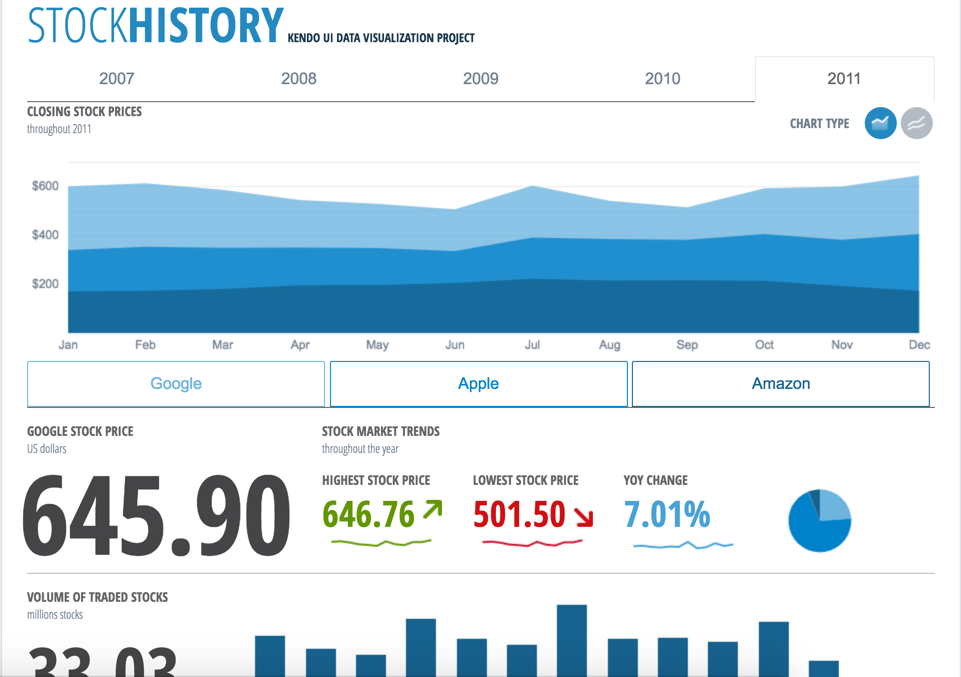
Kendo UI is a JavaScript UI toolkit that allows users to build responsive web-based apps integrated into their framework of choice (jQuery, Angular, React, or Vue). The vendor’s value proposition is that Kendo UI offers a large library of popular and configurable components ranging from sophisticated grids and charts to basic buttons, so users don’t have to waste development time building their UI. The vendor also says the large library of customizable themes means users can easily deploy a…
$999
per developer, royalty-free
Syncfusion® Essential Studio®
Score6.1 out of 10
N/A
Syncfusion Essential Studio is a suite of 1,900+ software components and frameworks for developing web, mobile, and desktop applications. Its UI controls are designed to be flexible and are optimized for high performance. Syncfusion enables users to speed the creation of modern user interfaces and read and write common file formats. Syncfusion states they have supplied components to 1 million+ developers across more than 30,000 organizations around the world, and the company offers…
$395
per month Team of up to 5 members.
Pricing
Progress Kendo UI
Syncfusion® Essential Studio®
Editions & Modules
Kendo UI with Priority Support
$999
per developer, royalty-free
DevCraft UI
$1,299
per developer, royalty-free
DevCraft Complete
$1,499
per developer, royalty-free
DevCraft Ultimate
$2,199
per developer, royalty-free
Team License - Up to 5 developers
$395
per month
Team License - Up to 10 developers
$695
per month
More than a team of 10*
Customized Quote
Offerings
Pricing Offerings
Progress Kendo UI
Syncfusion® Essential Studio®
Free Trial
Yes
Yes
Free/Freemium Version
No
Yes
Premium Consulting/Integration Services
Yes
No
Entry-level Setup Fee
No setup fee
No setup fee
Additional Details
—
o A subscription license that covers a team of up to 5 members is available for $395 per month. Transferable annual license with unlimited deployment. Includes a license management portal.
o A subscription license that covers a team of up to 10 members is available for $695 per month. Transferable annual license with unlimited deployment. Includes a license management portal.
o For teams of more than 10, the Syncfusion sales team can prepare a custom quote.
o Syncfusion offers subscription licenses that are suited to every organization's structure and needs. In addition to the Team Licenses described above, Project, Division, and Global subscription licenses are also available.
Last updated: January 28, 2025
A de minimis incentive was given to thank the reviewer for their time. The incentive was not used to bias or drive a particular response, nor was the incentive contingent on a positive endorsement. More Info
Verified User
Chose Progress Kendo UI
It seems that Kendo UI is most complete tool of the market. Moreover, the documentation and examples seems to be better than other competitors. They always tries to bring the best in class UIs, even with new overcoming technologies. Rarely I see a bug in the system, that brings …
A de minimis incentive was given to thank the reviewer for their time. The incentive was not used to bias or drive a particular response, nor was the incentive contingent on a positive endorsement. More Info
Verified User
Chose Progress Kendo UI
Kendo UI and Ignite UI have similar features sets, but at the time of evaluation 2 years ago, I enjoyed working with Kendo UI more, and felt more productive with it.
A de minimis incentive was given to thank the reviewer for their time. The incentive was not used to bias or drive a particular response, nor was the incentive contingent on a positive endorsement. TR verified that a representative sample of customers was invited. More Info
Verified User
Chose Progress Kendo UI
I see these pros for Kendo UI: - support for jQuery and AngularJS - active development of Angular components beyond Angular 2
A de minimis incentive was given to thank the reviewer for their time. The incentive was not used to bias or drive a particular response, nor was the incentive contingent on a positive endorsement. More Info
Senior Software Developer - ALS Life Sciences Division | Environmental in Information Technology at ALS (Environmental Services, 10,001+ employees)
Chose Progress Kendo UI
Actually, I did not try any other. When I arrived Kendo was already a standard tool in the organization. Outside of ALS, I've had contact with other web suits from Telerik and also from SyncFusion.
A de minimis incentive was given to thank the reviewer for their time. The incentive was not used to bias or drive a particular response, nor was the incentive contingent on a positive endorsement. More Info
A de minimis incentive was given to thank the reviewer for their time. The incentive was not used to bias or drive a particular response, nor was the incentive contingent on a positive endorsement. More Info
A de minimis incentive was given to thank the reviewer for their time. The incentive was not used to bias or drive a particular response, nor was the incentive contingent on a positive endorsement. More Info
Software Engineer in Professional Services at Gatoware, LLC (Computer Software, 1-10 employees)
Chose Syncfusion® Essential Studio®
Firstly, there is a free version for small businesses and it allows you to jump start without risk. I found one of the other products a bit short in the number of out-of-the-box supported events handlers for each control and, although you can manually add them, I feel more …
A de minimis incentive was given to thank the reviewer for their time. The incentive was not used to bias or drive a particular response, nor was the incentive contingent on a positive endorsement. More Info
UX Engineer in Research & Development at Serviceware SE (Information Technology & Services, 201-500 employees)
Chose Syncfusion® Essential Studio®
We evaluated DevExpress and two other libraries, whose names I've currently forgotten. But in the end, it was a race between DevExpress and Syncfusion Essential Studio Enterprise Edition, as they both offer a great amount of components with rich documentation. In the end we …
A de minimis incentive was given to thank the reviewer for their time. The incentive was not used to bias or drive a particular response, nor was the incentive contingent on a positive endorsement. More Info
Senior Software Developer in Information Technology at ALS (Computer Software, 1-10 employees)
Chose Syncfusion® Essential Studio®
They are basically on par, but the docs and in general, including support, Telerik is a bit superior. I find it to be better in terms of user-friendliness and also better polished UI wise, I mean, overall they just look better and offer somewhat better themes/skins to all the …
A de minimis incentive was given to thank the reviewer for their time. The incentive was not used to bias or drive a particular response, nor was the incentive contingent on a positive endorsement. More Info
It allows us to extend the components or create new components in an easy way. The control suite is complete and powerful enough that you do not need to consider other competing packages. The controls are relatively easy to implement and when we ran into problems the documentation and online support were very reliable.
A de minimis incentive was given to thank the reviewer for their time. The incentive was not used to bias or drive a particular response, nor was the incentive contingent on a positive endorsement. More Info
The datagrid is probably their most popular control I would think. It is so flexible and configurable. Most of mine are plain views in ASP.NET Core, but I have a whole bunch that are dynamically created at runtime in my controller. That is so powerful.
Kendo UI controls provides rich set of features and capability that is required for enterprise products.
Performance of controls are satisfactory overall though few other vendors provides extraordinary performance for specific controls and for specific purpose. Kendo UI provides most of the required controls and with rich feature that made us to select Kendo UI controls for our development.
Kendo UI controls quality, in terms of performance, robustness and well defined interfaces are very positive notes.
A de minimis incentive was given to thank the reviewer for their time. The incentive was not used to bias or drive a particular response, nor was the incentive contingent on a positive endorsement. More Info
Kendo UI is always moving forward and staying current with latest development trends. While that is beneficial, that can cause some issues when supporting customers (particularly government) that don't move their IT infrastructure along nearly as fast. A prime example is web font icons. Great and easy to use, but where Kendo UI utilizes web font icons as the sole means of displaying an icon, not all organizations (again, especially government) allow the use of these. There have been times where Kendo UI became unusable and we had to downgrade to a version a few years old. Makes continued payment for licenses sometimes feel wasted as we may not be able to always use the new releases
Kendo UI has a wonderful feedback system and they do indeed listen to the community. However, there do seem to be some instances where there is large support for a new feature/component and it never gets addressed. It is easy to understand that not all ideas are easy or even prudent to implement, but would be nice to see a better follow-up on ideas with a current status
Refreshing Kendo UI grids is simple, yet the standard API method causes the grid to return to the default state. We have many use cases where we would love to update the grid data but need current grid state (such as expanded detail rows, sorts, filters, etc) preserved after the grid is updated so that users do not have to perform grid actions again to return to the desired state.
A de minimis incentive was given to thank the reviewer for their time. The incentive was not used to bias or drive a particular response, nor was the incentive contingent on a positive endorsement. TR verified that a representative sample of customers was invited. More Info
Sometimes links point to dead addresses in the documentation.
Some components have a difficult learning curve but that is usually due to the complexity of the control.
Minor version changes introduce breaking changes, for example updating from 20.1.x to 20.2.x gives us licensing errors, which in my opinion is a kind of breaking change as it requires all users to update their licenses.
Theming with CSS variables is not possible. Access to Theme Studio code is not possible. So a fully custom solution is needed to make Syncfusion Essential Studio Enterprise Edition components themeable with CSS variables.
Nothing better has come along. I'm always on the lookout for new UI libraries and I have tried most of them. Kendo has done a good job of keeping my business. They aren't perfect, but no one has done it better as far as I can tell. I'll keep a look out and my rating may change in the future if they get complacent.
A de minimis incentive was given to thank the reviewer for their time. The incentive was not used to bias or drive a particular response, nor was the incentive contingent on a positive endorsement. More Info
It takes effort to include a new component library into existing software, especially in our case where we have 5 large applications that are written and maintained by about 100 developers. So changing such a core thing comes with a lot of effort. The other reason we will very likely renew our use of Syncfusion Essential Studio Enterprise Edition is that it works really well and has helped us to speed up the development process.
it's easy to implement in applications. The kendo widgets are able to be used in almost any type of business application which has a UI. For most part, once the developer has completed a project which uses Kendo, many time code can be copy/paste into a new application. Kendo UI documentation keeps improving so finding the answers to questions can be easy
A de minimis incentive was given to thank the reviewer for their time. The incentive was not used to bias or drive a particular response, nor was the incentive contingent on a positive endorsement. More Info
I would rate Syncfusion® Essential Studio® a 10 out of 10 for overall usability. The components are intuitive to implement, with clear APIs and consistent design patterns across the suite. This makes it easy for developers to get started quickly and reduces the learning curve even when working with new controls. In addition, the documentation and sample projects provide practical guidance that helps accelerate development. The built-in customization options also allow us to adapt the components to fit our branding and business requirements without excessive effort. Overall, the usability is one of the key reasons why Syncfusion has become an essential part of our development toolset.
A de minimis incentive was given to thank the reviewer for their time. The incentive was not used to bias or drive a particular response, nor was the incentive contingent on a positive endorsement. More Info
A de minimis incentive was given to thank the reviewer for their time. The incentive was not used to bias or drive a particular response, nor was the incentive contingent on a positive endorsement. More Info
Overall, we are satisfied with the support offered by the Progress Kendo UI team. We had raised few helpline incidents in the past and they have been resolved timely by the team. Also, we were satisfied with the level of information and support provided by the team.
A de minimis incentive was given to thank the reviewer for their time. The incentive was not used to bias or drive a particular response, nor was the incentive contingent on a positive endorsement. More Info
Although I have decades of software development experience, I had never created a website from scratch before, and my html and css skills are not particularly strong. Between documentation and incredible dedication from the support team they helped me overcome all of my challenges. It's amazing that they typically create sample code for most of the issues that I submitted. On rare occasions where I uncovered a defect they kept me informed as to its status, and typically resolved it in a short-term release, and/or gave me a reasonable workaround. They hopped on zoom calls with me on multiple occasions when necessary.
it took me about one day to make the components available for all the team members, including a quick demo, parallel setup in everyone’s workstation and packages deployment into our nuget server after 3 days of one to one support, everyone was able to use the components or find help in the documentation or resuest support
A de minimis incentive was given to thank the reviewer for their time. The incentive was not used to bias or drive a particular response, nor was the incentive contingent on a positive endorsement. More Info
At the time of our product selection we identified better cross-browser compatibility and we estimated that turnaround for support was superior. At the time, the vendor had a higher positive feedback footprint among their user community.
Firstly, there is a free version for small businesses and it allows you to jump start without risk. I found one of the other products a bit short in the number of out-of-the-box supported events handlers for each control and, although you can manually add them, I feel more comfortable to just have them ready. After using the free version I just felt in love with Syncfusion Essential Studio Enterprise Edition controls and decided to stay with them; they have all I need and more. The usage of Syncfusion Essential Studio Enterprise Edition controls is straightforward and intuitive. Support is world-class even for the free version; you get answers in 24 hours at most. Also, the support team is ready to remotely connect to your project in case it is needed; we have had one situation like this, and the issue was solved.
A de minimis incentive was given to thank the reviewer for their time. The incentive was not used to bias or drive a particular response, nor was the incentive contingent on a positive endorsement. More Info
Kendo UI has saved us a ton of time in development.
We were able to get certain things to market faster due to the fact that we didn't have to piece multiple libraries together like is so common with modern web development.
Because of the price of the library, however, we have not been able to purchase upgrades every year.
A de minimis incentive was given to thank the reviewer for their time. The incentive was not used to bias or drive a particular response, nor was the incentive contingent on a positive endorsement. More Info
First of all, I think the best positive impact is the reduce of time development. I do not know exactly how much time, but certainly, using the framework we save a lot of effort and time.
About negative impact, sometimes using the controls of the framewrok have a signifcant impact in the execution time and page load.
And of course, the use of Syncfusion Essential Studio Enterprise Edition has a significant impact of the learning of javascript and JQUERY.