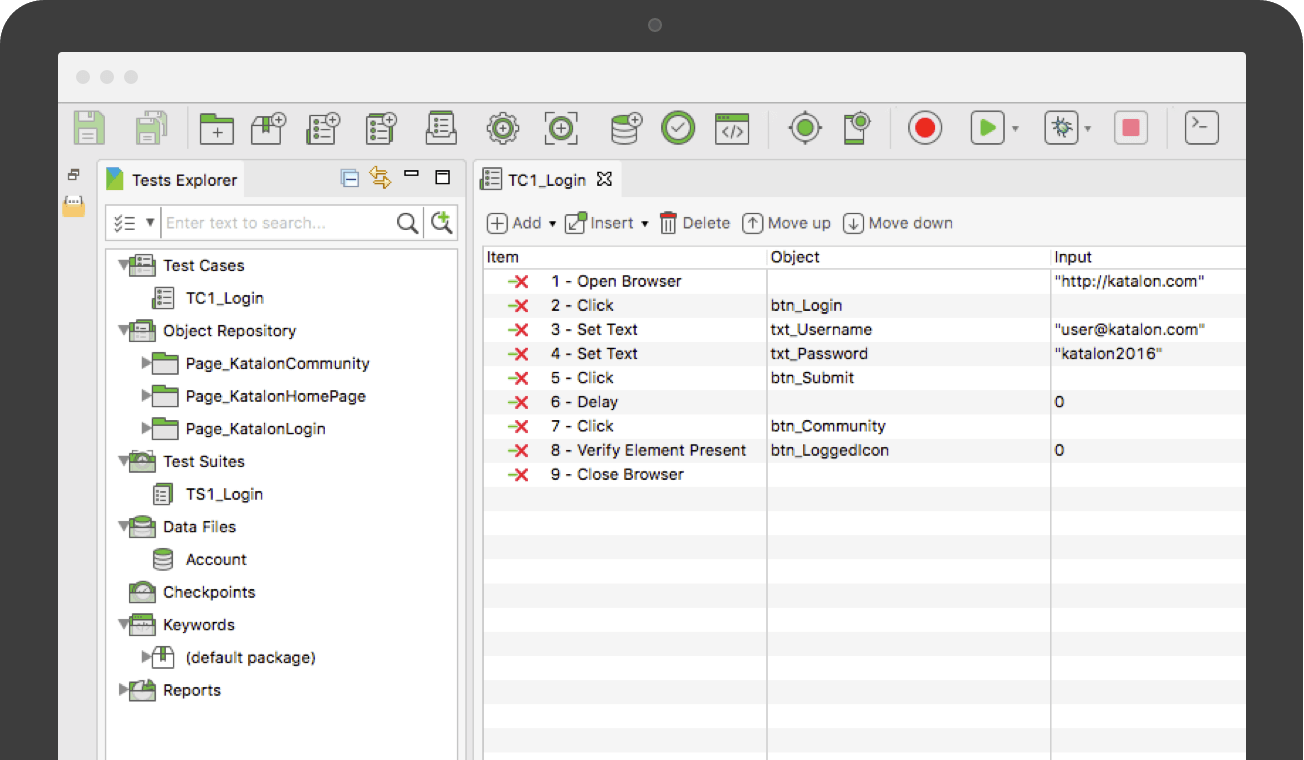
Katalon Studio is provided by the vendor as a free and robust automation solution for API, Web and Mobile testing. It is designed to eliminate the complexities of building an automation framework by integrating all necessary test components with built-in keywords and project templates. Katalon Studio includes a full feature set for a complete test automation process covering multiple platforms and testing types. New users can get started with test automation using its easy-to-use…
$69
per month
Selenium
Score8.1 out of 10
N/A
Selenium is open source software for browser automation, primarily used for functional, load, or performance testing of applications.
N/A
Pricing
Katalon
Selenium
Editions & Modules
Node Locked License
$69.00
per month
Floating License
$1,529.00
per year
No answers on this topic
Offerings
Pricing Offerings
Katalon
Selenium
Free Trial
Yes
No
Free/Freemium Version
Yes
No
Premium Consulting/Integration Services
Yes
No
Entry-level Setup Fee
No setup fee
No setup fee
Additional Details
Katalon Studio was originated from KMS Technology R&D. It has been a successful solution for numerous automation projects ranging from small team to enterprise client.
Katalon Studio is free for use, product development is funded by the testing services provided by KMS Technology. To support future releases, please consider subscribing to our business support services.
—
More Pricing Information
Community Pulse
Katalon
Selenium
Considered Both Products
Katalon Inc
Verified User
Chose Katalon
I've used the Selenium IDE before. According to Katalon Studio, it is very slow and has little functionality.
A de minimis incentive was given to thank the reviewer for their time. The incentive was not used to bias or drive a particular response, nor was the incentive contingent on a positive endorsement. More Info
Verified User
Chose Katalon
Ready API is one of the most popular and widely used tool for API automation. Data driven testing and reporting are some of the features which makes this tool very useful. but if we compare this tool with Katalon Studio, this is only useful for API automation where as Katalon …
A de minimis incentive was given to thank the reviewer for their time. The incentive was not used to bias or drive a particular response, nor was the incentive contingent on a positive endorsement. More Info
Verified User
Chose Katalon
Katalon Studio License cost is reasonable and it suits the budget where as other tools are expensive and its difficult to get right ROI. Capabilities are user friendly while using the Katalon Studio for api, mobile , web and desktop application automation where as expensive …
A de minimis incentive was given to thank the reviewer for their time. The incentive was not used to bias or drive a particular response, nor was the incentive contingent on a positive endorsement. More Info
Verified User
Chose Katalon
Katalon Studio is above both the tools is due to its codeless test automation feature and having API, desktop, web, and mobile automation in one place but obviously there is room for improvement when desktop automation is of primary importance in the automation.
A de minimis incentive was given to thank the reviewer for their time. The incentive was not used to bias or drive a particular response, nor was the incentive contingent on a positive endorsement. More Info
A de minimis incentive was given to thank the reviewer for their time. The incentive was not used to bias or drive a particular response, nor was the incentive contingent on a positive endorsement. More Info
A de minimis incentive was given to thank the reviewer for their time. The incentive was not used to bias or drive a particular response, nor was the incentive contingent on a positive endorsement. More Info
Katalon TestOps is well suited for an oraganization who want to organize their automation collections and have everything in one place. It provides good insight on test runs, failures and also helps in defect tracking. It is extremely easy to schedule and run test suites automatically. With the help of test history, it becomes easier to triage the report and identify if it is a product issue or a test flakiness. Also with the automation run scheduling features with custom options, user do not have to manually trigger the runs and just run the scheduler to do the job.
A de minimis incentive was given to thank the reviewer for their time. The incentive was not used to bias or drive a particular response, nor was the incentive contingent on a positive endorsement. More Info
When you have to test the UI and how it behaves when certain actions are performed, you need something that can automate the browsers. This is where Selenium comes to the rescue. If you have to test APIs and not the frontend (UI), I would recommend going with other libraries that support HTTP Requests. Selenium is good only when you have no choice but to run the steps on a browser.
A de minimis incentive was given to thank the reviewer for their time. The incentive was not used to bias or drive a particular response, nor was the incentive contingent on a positive endorsement. More Info
Easy to setup and quick to get started: As Katalon comes with built-in features a new automation tester can automate easily. Script creation time is quick.
Test Analytics: Katalon also provides analytics which tells you the pattern of your automated tests at a different instance of time.
Third Party Integration: Katalon provides amazing integration with 3rd party tools like JIRA, ALM, GIT, JENKINS, etc.
Image-based testing: Katalon also provides inbuilt image based test automation.
A de minimis incentive was given to thank the reviewer for their time. The incentive was not used to bias or drive a particular response, nor was the incentive contingent on a positive endorsement. More Info
A de minimis incentive was given to thank the reviewer for their time. The incentive was not used to bias or drive a particular response, nor was the incentive contingent on a positive endorsement. More Info
Integration with Azure is painstakingly slow as it takes too much time to upload reports to Azure. When raised with the support team i was advised to contact Microsoft who promptly and correctly replied that its an issue with the katalon plugin.
Non Responsive Customer Support. Several mails were replied late.
The Desktop app uses too much memory when booting up and running tests even on a 16gb RAM.
Selenium is pretty user-friendly but sometimes tests tend to flake out. I'd say roughly one out of twenty tests yields a false positive.
Selenium software cannot read images. This is a minor negative because a free plug-in is available from alternate sources.
Slowness may be a minor factor with Selenium, though this is an issue with basically any testing software since waiting on a site to execute JavaScript requires the browser to wait for a particular action.
A de minimis incentive was given to thank the reviewer for their time. The incentive was not used to bias or drive a particular response, nor was the incentive contingent on a positive endorsement. More Info
We love this product mainly because of its high customization abilities and the ease of use. Moreover, its free and can be learned easily through online communities and videos. The tests are more consistent and reliable as compared to Manual tests. It has enabled us to test a large number of features all in one go, which would have impossible through manual tests. The reports generated at the end of the tests are really helpful for the QA and the development teams to get a fair view of the application.
A de minimis incentive was given to thank the reviewer for their time. The incentive was not used to bias or drive a particular response, nor was the incentive contingent on a positive endorsement. More Info
A de minimis incentive was given to thank the reviewer for their time. The incentive was not used to bias or drive a particular response, nor was the incentive contingent on a positive endorsement. More Info
As I mentioned earlier, the reason I use Selenium is because there is a fairly widespread community of users, and user support services are at a good level. because the application is open source, it works on many platforms (Windows, Linux, IOS) without any problems. In addition, it gives us a lot of options for writing functional tests. For errors that we receive through the application, we can easily find the reasons for errors in the forums.
I love the support. They have provided answers and solutions for most of our questions or doubts that could come up. They also have provided basic tutorials on how to get familiarized with the program.
A de minimis incentive was given to thank the reviewer for their time. The incentive was not used to bias or drive a particular response, nor was the incentive contingent on a positive endorsement. More Info
Selenium does not have technical support available easily. You have to go through forums to get the information you need. However, there are excellent forums out there that make it easy to troubleshoot. The open-source flexibility makes it difficult to have dedicated support.
A de minimis incentive was given to thank the reviewer for their time. The incentive was not used to bias or drive a particular response, nor was the incentive contingent on a positive endorsement. More Info
We did everything we needed to use it. Now we can execute our tests on different operational systems and browsers running few tests simultaneously. We also implemented Appium framework to execute our tests on mobile devices, such as iPhones, iPads, Android phones and tablets. We use SauceLabs for our test execution and Jenkins for continuous integration.
A de minimis incentive was given to thank the reviewer for their time. The incentive was not used to bias or drive a particular response, nor was the incentive contingent on a positive endorsement. More Info
Katalon Studio is above both the tools is due to its codeless test automation feature and having API, desktop, web, and mobile automation in one place but obviously there is room for improvement when desktop automation is of primary importance in the automation.
A de minimis incentive was given to thank the reviewer for their time. The incentive was not used to bias or drive a particular response, nor was the incentive contingent on a positive endorsement. More Info
At the time of adoption, there were not many other alternatives that were even close to being competitive when it comes to browser testing. As far as I know now to this day, there is still little competition to Selenium for what it does. Any other browser-based testing still utilises Selenium to interact with the browser.
A de minimis incentive was given to thank the reviewer for their time. The incentive was not used to bias or drive a particular response, nor was the incentive contingent on a positive endorsement. More Info
Support can be better: As mentioned before, katlon community is still growing but is currently a small community. If you are stuck, its hard to find help in the community and one has to reach out to the support for help. This takes a while before you can get solution to your problem.
Result upload takes little longer time: It is been observed that uploading tests results takes little longer.
Sometimes it gets hard to integrate: Since this is fairly a new tool, requires lot of learning curve to get the job done effectively.
A de minimis incentive was given to thank the reviewer for their time. The incentive was not used to bias or drive a particular response, nor was the incentive contingent on a positive endorsement. More Info
A de minimis incentive was given to thank the reviewer for their time. The incentive was not used to bias or drive a particular response, nor was the incentive contingent on a positive endorsement. More Info