Paragon Insights (formerly HealthBot) is a cloud-native, network health and diagnostic solution that provides operational intelligence across all service provider, cloud, and enterprise network domains, from network access to servers in the data center. Paragon Insights supports multiple open-source data collection formats, including Junos telemetry interface (JTI) and standards-based OpenConfig telemetry. Once collected, built-in advanced…
N/A
SolarWinds Network Configuration Manager (NCM)
Score8.3 out of 10
N/A
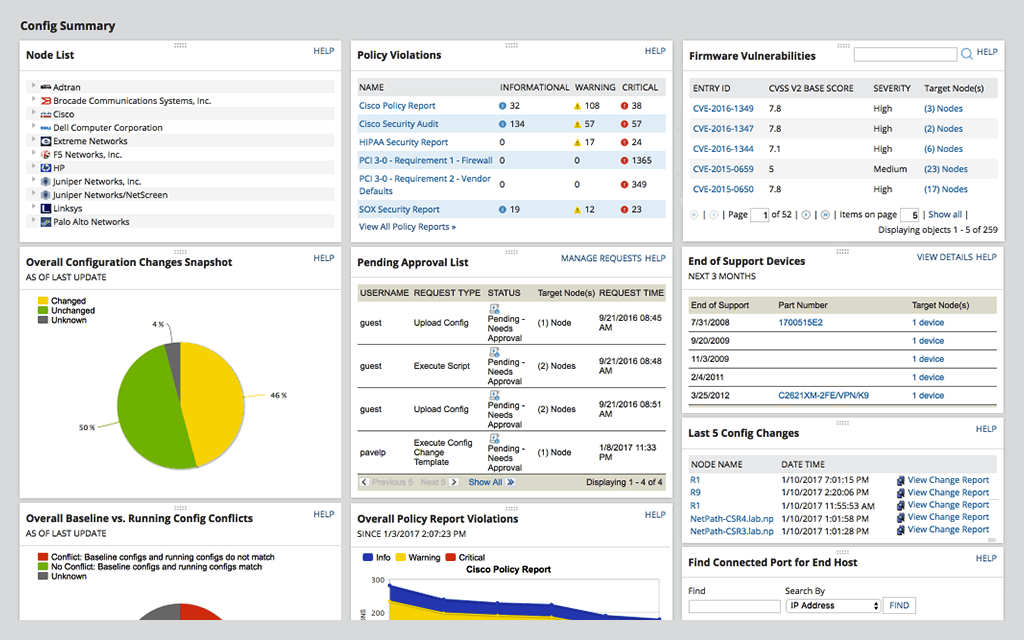
SolarWinds Network Configuration Manager is network diagnostics and troubleshooting technology, from Austin-based SolarWinds.
There are many products in this particular space. I believe Juniper has divided up the product suite which comprises automation, programmability and general DevOps, but this also makes it frustrating, as the functionality may not be inherent to the particular product. I recommend making sure all use-cases are covered by the product or products prior to being implementation, because a partial solution may grow stagnant or losing funding if it does not meet all KPI.
A de minimis incentive was given to thank the reviewer for their time. The incentive was not used to bias or drive a particular response, nor was the incentive contingent on a positive endorsement. More Info
If your IT team isn't proficient in automation and scripting, Solarwinds NCM can fill that gap (assuming your company's security team signs off on approving SW in your environment given the hack.) Basic device configuration, pushing mass changes reliably and backups are NCM's strong suites. If you have a complex scenario where if/then cases are needed, NCM is a bit lack luster. Auto discovery isn't as easy either as certain parameters need to be met for that feature to work 100% of the time
A de minimis incentive was given to thank the reviewer for their time. The incentive was not used to bias or drive a particular response, nor was the incentive contingent on a positive endorsement. More Info
Visibility: it is one of its key features that supports us by showing multidimensional views and facilitates [use] in the monitoring process.
Customization: its flexibility is worth appreciating and its dashboard offers customizations and we can have resource metrics according to our personalization.
Integration: integration is easy and great that allows us to integrate it with any 3rd source platform.
Data collection is another feature that allows us to collect data in our desired standard method.
A de minimis incentive was given to thank the reviewer for their time. The incentive was not used to bias or drive a particular response, nor was the incentive contingent on a positive endorsement. More Info
A de minimis incentive was given to thank the reviewer for their time. The incentive was not used to bias or drive a particular response, nor was the incentive contingent on a positive endorsement. TR verified that a representative sample of customers was invited. More Info
A de minimis incentive was given to thank the reviewer for their time. The incentive was not used to bias or drive a particular response, nor was the incentive contingent on a positive endorsement. More Info
For our use case, it does everything great and some of the features we underutilize but I would like to be able to set a configuration baseline when initially adding a node instead of after the configuration is pulled but it's not a particularly big deal to let it pull the configuration then set it as the baseline.
A de minimis incentive was given to thank the reviewer for their time. The incentive was not used to bias or drive a particular response, nor was the incentive contingent on a positive endorsement. TR verified that a representative sample of customers was invited. More Info
Medium complexity to set up in the beginning if using any non-standard devices or configurations, else fairly easy (e.g. Cisco Nexus or IOS-based devices). Reports are fairly straightforward to set up. Updates to the platform are fairly straightforward and don't take a major effort. Easy to add or remove devices.
A de minimis incentive was given to thank the reviewer for their time. The incentive was not used to bias or drive a particular response, nor was the incentive contingent on a positive endorsement. TR verified that a representative sample of customers was invited. More Info
The user interface is lacking. It is difficult to navigate at times and things can be done multiple ways. Quite often I am confused by how their notification structure works. It is not very intuitive. They do offer a free Academy. They also offer a community of other technical folks. I have enjoyed both.
A de minimis incentive was given to thank the reviewer for their time. The incentive was not used to bias or drive a particular response, nor was the incentive contingent on a positive endorsement. More Info
To be fair, I have not had to involve Support in a number of years, but when I did, I was greeted with enthusiastic engineers who wanted to understand and solve the issue. It was a fairly complex scenario and I have discovered in my most recent implementation that engineering included that option as a standard now.
A de minimis incentive was given to thank the reviewer for their time. The incentive was not used to bias or drive a particular response, nor was the incentive contingent on a positive endorsement. More Info
Solarwinds has actually produced new training since I last used it that is available on their site at any time. Their previous training was more than enough to get us started but now there is significantly more content. Since I'm comfortable with the Orion platform and the products we use I haven't checked the new training out yet but we have new staff go through portions of that training and they always come away with an understanding of the platform and ready to use it
A de minimis incentive was given to thank the reviewer for their time. The incentive was not used to bias or drive a particular response, nor was the incentive contingent on a positive endorsement. TR verified that a representative sample of customers was invited. More Info
it was a fairly easy implementation and everything was pretty straightforward. only challenge we had was getting all the snmp communities updated on the networking equipment
A de minimis incentive was given to thank the reviewer for their time. The incentive was not used to bias or drive a particular response, nor was the incentive contingent on a positive endorsement. More Info
We decided to go for Paragon after checking all the pros and cons as we didn’t have a good experience of Memfault and maybe it was just because we haven’t made enough research on it and we had to suffer cause of its malfunctioning and difficulty. Moreover, I think that I can never regard Memfault as a complete package which Paragon insight definitely is.
A de minimis incentive was given to thank the reviewer for their time. The incentive was not used to bias or drive a particular response, nor was the incentive contingent on a positive endorsement. More Info
Red Hat Ansible Automation Platform is a great tool and matches much of the functionality of SolarWinds Network Configuration Manager. Nothing about Ansible will likely be overwhelming to an engineer with a little time to spare, but that spare time combined with SolarWinds already being our monitoring tool made the decision easy. Time is at a premium in small teams and SolarWinds Network Configuration Manager is very easy to use right out of the box without all the tweaking required by powerful command line driven tools like Ansible.
A de minimis incentive was given to thank the reviewer for their time. The incentive was not used to bias or drive a particular response, nor was the incentive contingent on a positive endorsement. TR verified that a representative sample of customers was invited. More Info
A de minimis incentive was given to thank the reviewer for their time. The incentive was not used to bias or drive a particular response, nor was the incentive contingent on a positive endorsement. More Info
A de minimis incentive was given to thank the reviewer for their time. The incentive was not used to bias or drive a particular response, nor was the incentive contingent on a positive endorsement. TR verified that a representative sample of customers was invited. More Info