Journyx vs. Toggl Track

Overview
ProductRatingMost Used ByProduct SummaryStarting Price
Journyx
Score 9.0 out of 10
N/A
Journyx's time and expense tracking software aims to streamline the collection and processing of timesheets – reducing payroll time, growing client billings, and increasing project profitability. The vendor says Journyx helps you collect better time and expense data for better, more informed decisions. Key benefits include: Integrate Journyx time and expense tracking with existing business systems, including Microsoft Dynamics GP, NAV, SL, and AX, QuickBooks, MS Project,…N/A
Toggl Track
Score 9.1 out of 10
N/A
A solution for employee time tracking software that allows your team to track time on multiple platforms with just one click, featuring integrations with 100+ apps via browser extensions, and native calendar and integrations for any preferred project management tools.
$10
per month
Pricing
JournyxToggl Track
Editions & Modules
No answers on this topic
Starter
$10.00
per month
Premium
$20.00
per month
Enterprise
Custom
Offerings
Pricing Offerings
JournyxToggl Track
Free Trial
YesYes
Free/Freemium Version
NoYes
Premium Consulting/Integration Services
NoNo
Entry-level Setup FeeOptionalNo setup fee
Additional DetailsBoth our hosted and on-premise solutions are priced on a per license, per month basis. We have a base solution, Journyx, with additional products and add-ons that we offer based on your specific requirements. Pricing is highly dependent on your business requirements. We're happy to discuss your needs in detail so we can provide you with a solution that meets those needs.
More Pricing Information
Community Pulse
JournyxToggl Track
Best Alternatives
JournyxToggl Track
Small Businesses
Traqq
Traqq
Score 9.1 out of 10
Traqq
Traqq
Score 9.1 out of 10
Medium-sized Companies
TimeClock Plus
TimeClock Plus
Score 9.5 out of 10
TimeClock Plus
TimeClock Plus
Score 9.5 out of 10
Enterprises
Zoho People
Zoho People
Score 8.4 out of 10
Zoho People
Zoho People
Score 8.4 out of 10
All AlternativesView all alternativesView all alternatives
User Ratings
JournyxToggl Track
Likelihood to Recommend
9.0
(0 ratings)
9.5
(0 ratings)
Likelihood to Renew
8.5
(0 ratings)
-
(0 ratings)
Usability
6.0
(0 ratings)
9.5
(0 ratings)
Availability
8.0
(0 ratings)
-
(0 ratings)
Performance
5.0
(0 ratings)
-
(0 ratings)
Support Rating
6.0
(0 ratings)
8.6
(0 ratings)
Online Training
7.0
(0 ratings)
-
(0 ratings)
Implementation Rating
5.0
(0 ratings)
-
(0 ratings)
Product Scalability
7.0
(0 ratings)
-
(0 ratings)
Vendor post-sale
8.0
(0 ratings)
-
(0 ratings)
Vendor pre-sale
8.0
(0 ratings)
-
(0 ratings)
User Testimonials
JournyxToggl Track
Likelihood to Recommend
Our director of research utilized this software at another facility and implemented it here due to the success of data capture from his other hospital. We were very fortunate that he had already knowledge about the system and we were able to implement it our institution very quickly.
Read full review
I have been using Toggl for about seven years now, and I absolutely love it. It keeps me on track with the tasks I complete throughout the day. Tracking my time makes me more accountable for the work I produce and how much time my work takes. Having the breakdown of my tasks helps inform decisions on hiring support staff. I can see exactly where my time goes and then formulate a strategy to either bring in more help, delegate work, or re-prioritize. When coupled with other productivity apps (I particularly use ToDoist), you can unlock even more of Toggl's power. Toggl Track isn't so much a checklist tool--it's a time tracker; but when I integrate my to-do app with the time tracking, I can quickly and easily switch between tasks without disrupting workflow.
Read full review
Pros
  • Reporting of time - I know when I pull reports for each employee/contractor that I will have information at the touch of my fingertips.
  • Creating new users - is very easy.
  • Entering time - is easy for even the first time user
Read full review
  • Toggl integrates smoothly across multiple devices. I can seamlessly move from the field on my phone to the office on my computer and utilize Toggl the entire time.
  • It has great customization. Setting up multiple customers in a variety of ways is easy and quick to do. We haven't found something we needed that we couldn't set up.
  • The reporting is clean and informative. Reports can be generated for multiple criteria.
Read full review
Cons
  • There is a LOT of functionality, including a many functions that we don't ever use. If there were some way to set up a "dashboard" of only the functions we need, it might be a little easier to navigate some of the management and reporting areas.
  • Initial setup can be daunting, particularly for a larger company using a lot of functionality. Its been a long time since we've been through that, but the initial training and support has to be robust, comprehensive and very clear. (However, I can't say that it isn't now)
Read full review
  • The Mac App is great, but sometimes I miss the notification when the Pomodoro timer goes off... I wish it were more intrusive, so to speak, so that it would be impossible to miss the end of the pomodoro session.
  • I wish there was a way to automatically send reports via slack at the end of the week.
  • I would love to have some different visual themes. I don't particularly like the color choices they've made after the rebrand.
Read full review
Likelihood to Renew
All depending on cost for renewal. This is very expensive as a reporting tool, as we do not recover the cost through billing
Read full review
No answers on this topic
Usability
Back end, administration or set up on the software.
Read full review
Very easy to use, can enter projects and tasks on the fly, can use either a timer or enter hours later manually, the interface is simple and intuitive. Has a mobile app that is also easy to use.
Read full review
Reliability and Availability
Yes, it's there when I need it.
Read full review
No answers on this topic
Performance
Can be slow at times.
Read full review
No answers on this topic
Support Rating
No answers on this topic
I haven't needed much support from Toggl, as it's mostly come from a small team trying out the tool. I'm not entirely sure what the best way to reach them would be if I did need them. I'm also not sure how responsive they would be to support requests. But I think it's positive that I have not needed them
Read full review
Online Training
Good training overall, some areas we do use.
Read full review
No answers on this topic
Implementation Rating
It takes a lot of planning and it's time consuming.
Read full review
No answers on this topic
Alternatives Considered
This would be good for a small company who does not want to build their own time submission system. The interface is fairly dated, but we are quite familiar with it, so that is not really a negative for our company. The primary feature we struggle with most is the inability to allow line-item rejection of time entries
Read full review
I have used TickSpot before, but it was implemented by my workplace and not my choice. I thought it was fine, nothing superlative I would tell my friends about like Toggl, but I did like time tracking as a concept. I remember recording my time retroactively versus in real time. But my needs were also different at that time, because I was a full-time employee trying to give management an idea of how long tasks took me versus generating the information for myself. When I started freelancing three years ago, I looked up free time tracking apps because I did miss time tracking. I may have tried a few briefly, but I found Toggl fairly quickly and realized how well it suited my needs. Been together ever since! I'm sure there are other tools out there but I don't care to look because I'm happy with Toggl and get free use.
Read full review
Scalability
Server issues at first.
Read full review
No answers on this topic
Return on Investment
  • Easier and more efficient cost fund allocation.
  • Requires employee time reporting on activity, cost center and other custom fields synced with payroll so records are submitted, reviewed and approved every two weeks.
  • Funders are confident in our ability to appropriately allocate funds.
Read full review
  • My timetracking needs are simple, so this is a great tool for me. Start the timer, stop the timer as client work is performed, whether that is uninterrupted time or not.
  • It is very easy to review work time invested for each of my clients, making it easy for me to track my daily time and review monthly hours for preparing invoices.
  • Daily time is automatically aggregated.
  • Each time entry can be tagged with work activity, or projects can be segmented and time assigned to the segments with start and stop times.
Read full review
ScreenShots

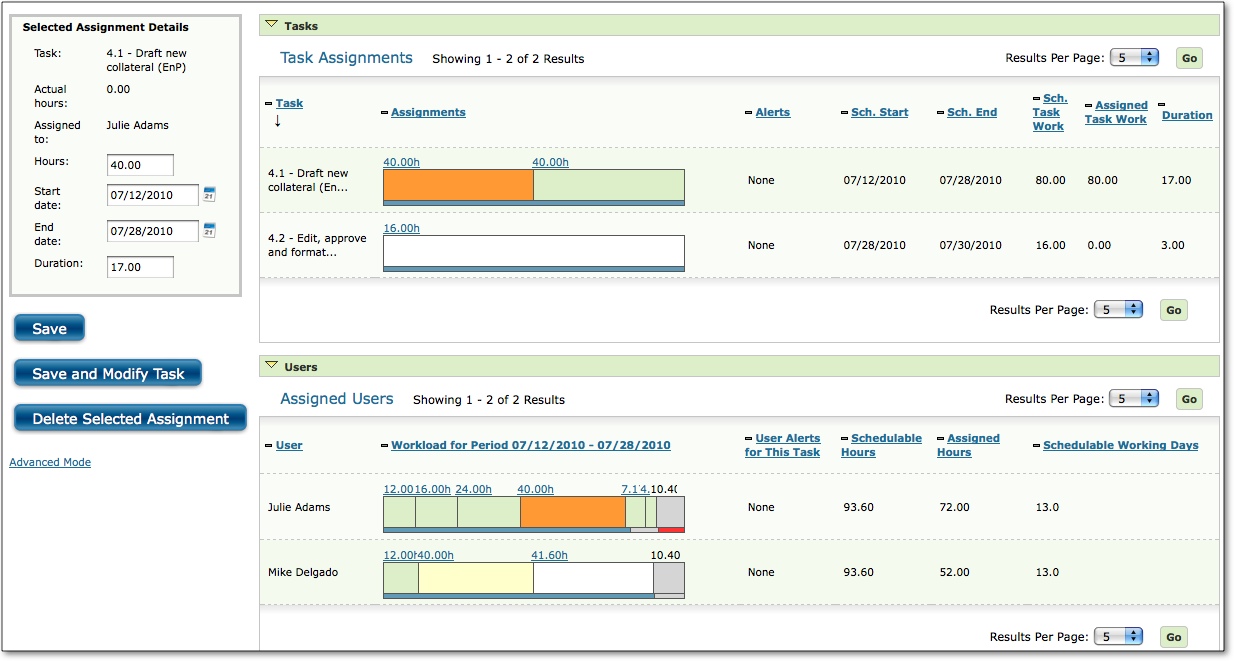
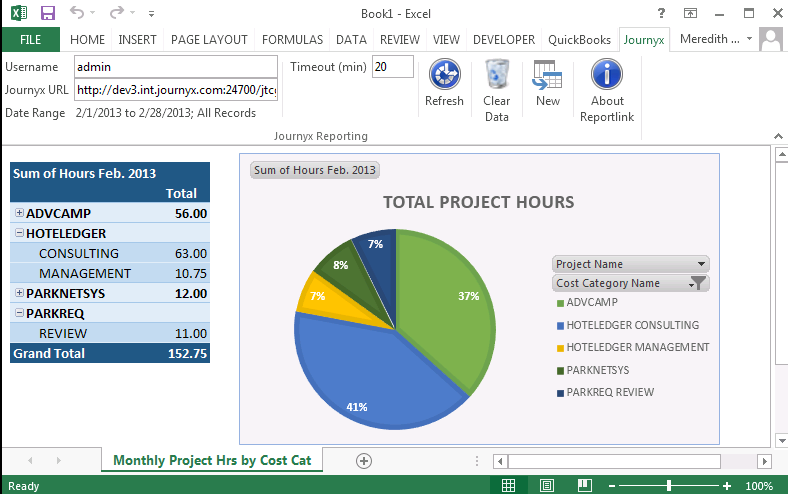
Journyx Screenshots

Screenshot of Main Time Entry screen in JournyxScreenshot of Expense Entry screen in JournyxScreenshot of Assignments screen in JournyxScreenshot of Journyx Reportlink for Excel