Jobber is field service management software from the company of the same name in Edmonton, Alberta.
$39
per month 1 user
QuickBooks Time
Score 8.6 out of 10
N/A
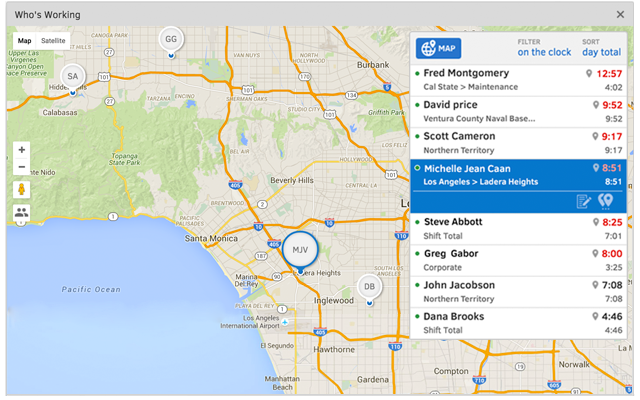
QuickBooks Time (formerly TSheets) is a cloud-based time tracking and scheduling app that allows employees to clock in and out from the job site with the devices they’ve already got in their pockets. The vendor aims to help companies replace paper timesheets with accurate, electronic time data as well as make payroll and invoicing faster and less costly. QuickBooks Time also accurately tracks time and GPS points (even without cell or internet service) then automatically syncs when back…
$0
1 user, unlimited projects
Pricing
Jobber
QuickBooks Time
Editions & Modules
Core
$39
per month 1 user
Connect (individual)
$119
per month 1 user
Connect
$169
per month up to 5 users
Grow (individual)
$199
per month 1 user
Grow
$349
per month up to 10 users
Plus
$599
per month Up to 15 users
Free
$0
1 user, unlimited projects
Premium
$8
per user/month + $20 base fee/month (paid annually)
Elite
$10
per user/month + $40 base fee/month (paid annually)
The cost of Jobber is not suitable for a startup - even our company size is hard pressed to squeeze in other areas of business to afford the cost. Zenmaid or other maid-forward services may be better suited since Jobber seems to focus it's offerings on one-off as opposed to recurring services like ours. For business who do in-person estimates like ours, the streamlined estimate feature which causes increased conversion rates makes it worth the cost - as we anecdotally gain more business this way. However, if we switch to an online booking / instant booking model as opposed to in-person estimates, we may not require this feature. Zenmaid has a "gamified" residential booking page that was extremely high converting for us - we received sometimes 30+ inquiries per day due to the ease of use - MANY more completed inquiries than we receive now - but they didn't have a quoting and deposit collection tool - so here we are. If we used their instant booking feature we would have stayed due to the scheduling tool, gap finder, prevention of double booking employees, and cleaning service focus, as well as significantly reduced pricing.
It would be very useful for certain remote jobs that require a high level of presence, as in the case of web development, or remote maintenance sessions, so that when reviewing the work data it is possible to ensure that there will be no failures. By being able to include files in the management, from the equipment tab, it is possible to fully control the hours in which each change in these files were made.
The recurring job feature was key to our decision in selecting Jobber. There's a lot of flexibility in how you schedule recurring work. I especially like that you can select the frequency (weekly, monthly) coupled with either a specific date or day of the week/month.
Client email reminders help our clients know when we're coming and provide an important point of contact. Customizing the email was easy.
Client overview. It's extremely helpful to be able to view a client's record and see the upcoming visits along with the completed work.
When I open Jobber for daily use, we frequently need to clear advertisements - specifically regarding referring Jobber to others. If it were related to product updates, it may be more relevant, but consistent referral promotions or online web-events are not what I want to clear when I just want to get to work in my expensive crm software
Reports are frustratingly bulky and inconsistently formatted - the report generator doesn't include all reports, most notably missing is timesheets. An extra step to view the list of available reports was recently added after additions to paid, optional service offerings were placed higher on the menu, requiring scrolling to reach the reports.
A web developer was hired by us to streamline some of our necessary reports into a calculation / report upload tool. Further changes were made to the actual reports on Jobber's end that were (very minorly helpful for us and not worth the cost or the effort put into the upgrade that I could tell, in the fact that) we have to pay the developer to rework our calculation tool due to simple changes in the order of the columns
Scheduling - we were optimistic about the beta schedule but the absence of dispatch view is a glaring gap. Additional page realestate is used in the beta mode that makes less of the schedule visible. Changes were made to "complete" job's next steps that add work for us.
TSheets tech support people, like Shawn Sommer, from Tsheets. She has been instrumental, after terminating the person in charge of TSheets I was left with a learning curve too high to climb but after 10 mins of her instructions I was able to make payroll in no time. She cleared all errors that nobody had fixed before. TSheets is not a vendor for me, TSheets is my partner in business. Thank you TSheets.
Jobber is an easy-to-use and friendly software designed for efficiency. Its interface is well-organized, ensuring that each section is intuitive and accessible. Users can navigate smoothly through tasks, making project management simpler. Overall, Jobber enhances productivity and streamlines operations, making it a valuable tool for various projects.
Overall good product. I think some integration issues that are probably on the way would give it a higher score. Easy to use, easy to see how well it connects to current book keeping software we use, and would be easy to adopt by someone who is a QuickBook user that has billable clients or just wants that metric to see how their time is allocated.
There is hardly an app that covers it all while staying simple and wrapping up the process. From the filing of the request, everything goes smoothly following a natural progression. Reports are insightful, give you an instant overview and easy to understand. In addition, you can easily track any information from those on clients to expense tracking.
I have never failed to have an issue resolved within minutes of contacting Support. Jen D recently assisted my with an export issue and I was back on track in less the 10 minutes. She was knowledgable and thought about the current and future contexts of the issue and assured there would be no recurrence next payroll.
More expensive than Jobber and more complicated. Pretty much does the same tasks. I canceled after 2 days of HouseCall Pro and continued using Jobber. Jobber makes my life simple and I need that while running a busy cleaning company
We used to do all of our scheduling manually or in archaic software that wasn't user-friendly. We researched other software and found that this was going to meet our needs most comprehensively. Staff used to track their hours on a notepad on their phone or on an excel spreadsheet. There was really nothing else available to us that did what TSheets could do and the price fit in our budget. We have been very happy with our decision!
Helps to ensure that employees are being held accountable for their clocked in time and allows us to clock them out if we see they're not where they say they are, saving us money.
Decreases time our staffing coordinator has to spend on inputting times after events - when managers can clock staff in and out during the event, it allows our staffing coordinator to use their office time more effectively.