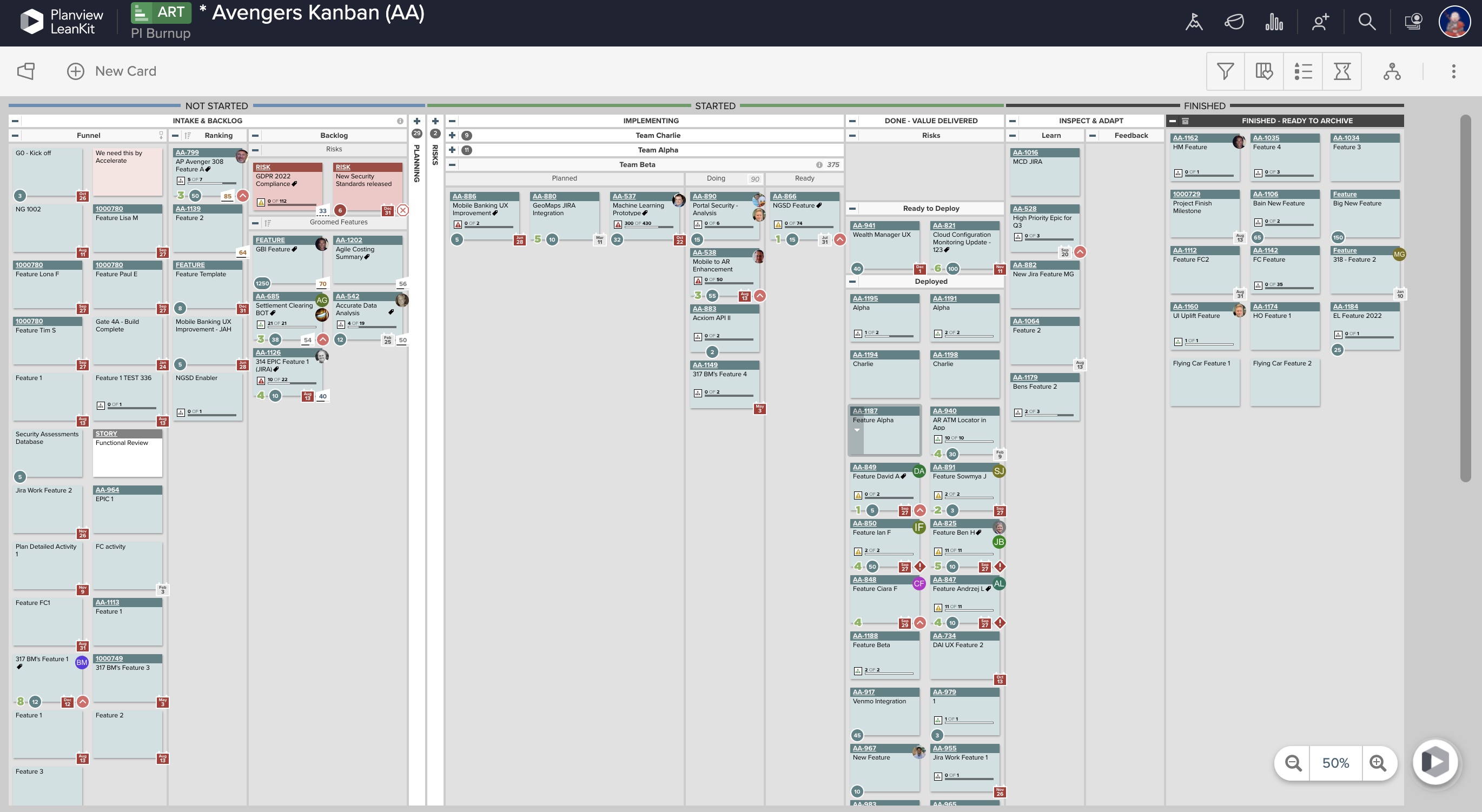
A solution to bridge the gap between strategy and execution for portfolio, product, and program management teams, used to manage idea intake, prioritize your feature backlog, and track progress with live roadmaps.
$27,000
per year
Planview AgilePlace
Score9.9 out of 10
N/A
AgilePlace is a project management solution built around flexibility, data-driven analytics, and workflow automation. The software was acquired by Planview in December 2017 to expand that company's capabilities.
$19
per user, per month
Pricing
Jira Align
Planview AgilePlace
Editions & Modules
Starting Price
$27,000.00
per year
Maximum Price
$3,987,600.00
per year
Teams
$19
per user, per month
Scaled Teams
$29
per user, per month
Custom
Contact Sales for Quote
per user, per month
Offerings
Pricing Offerings
Jira Align
Planview AgilePlace
Free Trial
No
Yes
Free/Freemium Version
No
No
Premium Consulting/Integration Services
No
No
Entry-level Setup Fee
No setup fee
No setup fee
Additional Details
—
All editions include unlimited boards.
More Pricing Information
Community Pulse
Jira Align
Planview AgilePlace
Considered Both Products
Atlassian
No answer on this topic
Planview
Verified User
Chose Planview AgilePlace
AgilePlace is better than JIRA when it comes to ease of use and intuitiveness of the tool. Card based model and ability to customize/tailor the way you want makes AgilePlace is a great tool. Look and feel as well as colored cards, makes the board layout much more easier to …
A de minimis incentive was given to thank the reviewer for their time. The incentive was not used to bias or drive a particular response, nor was the incentive contingent on a positive endorsement. TR verified that a representative sample of customers was invited. More Info
Verified User
Chose Planview AgilePlace
All these tools are different and have different uses. Depending upon SDLC your organization uses, you would use any of these tools. They all have their plusses and minuses.
A de minimis incentive was given to thank the reviewer for their time. The incentive was not used to bias or drive a particular response, nor was the incentive contingent on a positive endorsement. More Info
The Atlassian Jira Align (formerly AgileCraft) tools help keep our scrum teams moving in the right direction. It gives Sr. Executives visibility into the progress of our digital transformation efforts. It provides information to our program manager to create the necessary artifacts to justify continued funding of our initiatives. It also supports the SAFe framework, along with some others. And the Atlassian Jira Align (formerly AgileCraft) tools provide integration to other tools that we use in our portfolio.
A de minimis incentive was given to thank the reviewer for their time. The incentive was not used to bias or drive a particular response, nor was the incentive contingent on a positive endorsement. More Info
This tool enables the visual management needed in many offshore teams to easily and quickly see the pending work, work in progress and completed work.For teams that work with a waterfall methodology and do not have AGILE internalized, I believe there are other solutions from Planview or other providers.
Effective Sprint planning : Sprint planning can be done using Planning Poker in AgileCraft by clicking Team > Manage > Other > Estimation Games very effectively for distributed teams.
Team Capacity Allocation Report: After tasks are created at team or program level, the report from AgileCraft cab be pulled and can be verified that no team member is under or over allocated. A report can be generated by navigating to Team > Manage > Assign Tasks.
Effective Requirement trace-ability: To maintain requirements trace-ability follow the steps below:
Upload test cases against the story/requirement. once uploaded test cases will be visible under that story
Execute Test cases in AgileCraft and mark them as Pass/Fail based on the actual outcome
Based on test results, The acceptance criterion's can be marked as “Pass” or “Fail” & if marked failed corresponding defect can be logged & can be attached with the story
So against each story we can easily see whether all test cases been executed or not & which acceptance criterion's are failed & how many defects are in open or close state.
Daily Scrum: In AgileCraft, the option to run a daily stand-up is available from Team > Manage > Daily Standups. Selecting the sprint number opens the daily stand-up meeting window in which each team member's tasks are visible and hours can be burned against them. Conduct Scrum meetings in AgileCraft, and burn each associate hour against the tasks created during the meeting. The burn-down chart can be generated & viewed during the stand-up to check whether the team is on track.
A de minimis incentive was given to thank the reviewer for their time. The incentive was not used to bias or drive a particular response, nor was the incentive contingent on a positive endorsement. More Info
The initial ticket creation screen lacks some important features, such as assigning "point values" (a measure of effort needed for the ticket).
The browser needs to be manually refreshed to see new tickets, which can make things confusing when several people in a meeting are simultaneously creating tickets.
The interface on some smaller portions of the software are sometimes difficult to understand.
A de minimis incentive was given to thank the reviewer for their time. The incentive was not used to bias or drive a particular response, nor was the incentive contingent on a positive endorsement. More Info
Ability to add more than 1 visual cue to the card. We use custom icons and sometimes more than 1 is appropriate but you have to choose which is most important since only 1 can be applied.
Better visibility to board access from the user administration screens. Currently have to run 1-2 reports to see this information. Would like to be able to click on a user within Configure Users and see what boards they have access to quickly.
A de minimis incentive was given to thank the reviewer for their time. The incentive was not used to bias or drive a particular response, nor was the incentive contingent on a positive endorsement. More Info
Most of the things are easily manageable except certain things that are hidden and you need to ask teammates who are aware of how they can link attachements in the comment section and so on.
A de minimis incentive was given to thank the reviewer for their time. The incentive was not used to bias or drive a particular response, nor was the incentive contingent on a positive endorsement. More Info
LeanKit isn't the best designed Kanban system I've seen, but overall it's pretty usable. The boards I've used are pretty complex, so it can be difficult to find things. I found that searching and filtering for specific cards was somewhat of a challenge. Dragging a card from one lane to another is kind of a fun way to get things done though.
A de minimis incentive was given to thank the reviewer for their time. The incentive was not used to bias or drive a particular response, nor was the incentive contingent on a positive endorsement. More Info
A de minimis incentive was given to thank the reviewer for their time. The incentive was not used to bias or drive a particular response, nor was the incentive contingent on a positive endorsement. More Info
A de minimis incentive was given to thank the reviewer for their time. The incentive was not used to bias or drive a particular response, nor was the incentive contingent on a positive endorsement. More Info
Overall support from Jira team is good. It comes at an additional price but it is very efficient. There are no long wait times, you get a dedicated team to look into your issues. The support is available throughout the year and they keep a record of your issues. Overall we are very satisfied with the support they have provided us over the years, it has been very effective for the price that we pay.
A de minimis incentive was given to thank the reviewer for their time. The incentive was not used to bias or drive a particular response, nor was the incentive contingent on a positive endorsement. More Info
Every time I have reached out to the AgilePlace support team I have received a timely response in addition to professional & personal feedback. Their consultants are knowledgeable and the management team is happy to jump in and help when needed.
A de minimis incentive was given to thank the reviewer for their time. The incentive was not used to bias or drive a particular response, nor was the incentive contingent on a positive endorsement. More Info
Microsoft Azure Devops won't have the major functionality of software management like Jira. The customization provided by Jira is having a cutting edge over any project management tool. Adds-on and Plugins feature in the Jira Tool make it as perfect as desired task management tool for any company. One of the best Agile based Project Management Tools.
A de minimis incentive was given to thank the reviewer for their time. The incentive was not used to bias or drive a particular response, nor was the incentive contingent on a positive endorsement. More Info
Originally, we had evaluated two other tools next to Planview LeanKit: Kanbantool and Kanbanflow. The latter was a close contestant for productive use, as it was also very customizable and a joy to work with and look at. It also had lower user fees and a mobile integration. In the end, we picked Planview LeanKit because of several reasons: Aesthetics: The look was much more clean and professional. Reporting: It was obvious from the start that we could use Planview LeanKit as a tool for improvement. API: We needed to integrate the Kanban into our central systems and Planview LeanKit API was (and still is) a way to do it. Card Headers: This sounds like a simple thing, but the headers above the titles fit our work perfectly and looked perfect, which helped the decision.
A de minimis incentive was given to thank the reviewer for their time. The incentive was not used to bias or drive a particular response, nor was the incentive contingent on a positive endorsement. More Info
A de minimis incentive was given to thank the reviewer for their time. The incentive was not used to bias or drive a particular response, nor was the incentive contingent on a positive endorsement. More Info
It has positively impacted our tech teams, allowing them to better organize the tasks and items they are working on and has greatly improved their ability to communicate & review these tasks with other teams.
I believe it negatively impacted other departments as lengthy training was required by many associates to attempt using the tool, only to find out it didn't meet our needs, therefore much time was wasted.
A de minimis incentive was given to thank the reviewer for their time. The incentive was not used to bias or drive a particular response, nor was the incentive contingent on a positive endorsement. More Info
A de minimis incentive was given to thank the reviewer for their time. The incentive was not used to bias or drive a particular response, nor was the incentive contingent on a positive endorsement. More Info