AR Maker by iStaging vs. Unity

Overview
ProductRatingMost Used ByProduct SummaryStarting Price
AR Maker by iStaging
Score 0.0 out of 10
N/A
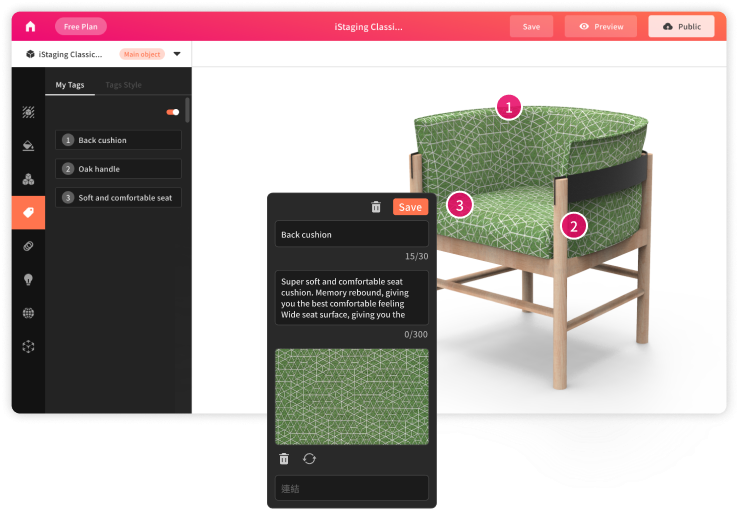
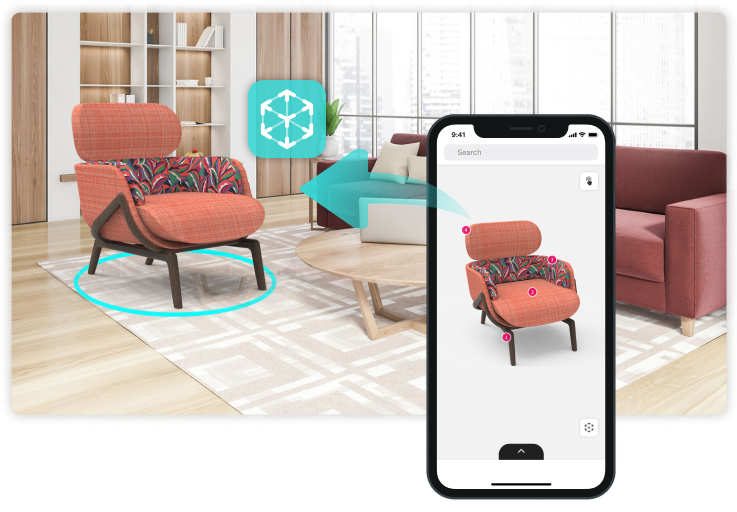
The AR Maker is a drag and drop platform to showcase and customize 3D models. UPLOAD - Upload 3D models with built-in drag and drop functionality and manage digital assets anytime with cloud-based encryption protection. EDIT - Add customized description labels and interactive settings to illustrate product features. SHARE - Publish and share 3D objects with anyone at anytime, anywhere.
$12
per month Per object
Unity
Score 9.4 out of 10
N/A
Unity Technologies headquartered in San Francisco offers the Unity real-time 3D and 2D development platform.
$200
per person/per month
Pricing
AR Maker by iStagingUnity
Editions & Modules
Basic
$12
per month Per object
Enterprise
$200
per person/per month
Plus
$399
per person/per year
Pro
1,800
per person/per year
Personal
Free
Offerings
Pricing Offerings
AR Maker by iStagingUnity
Free Trial
YesNo
Free/Freemium Version
NoNo
Premium Consulting/Integration Services
NoNo
Entry-level Setup FeeNo setup feeNo setup fee
Additional DetailsIn the Basic plan you can create and store up to 50 objects. You can publish 5 objects. An additional published object is $2 per object per month.
More Pricing Information
Community Pulse
AR Maker by iStagingUnity
User Ratings
AR Maker by iStagingUnity
Likelihood to Recommend
-
(0 ratings)
9.4
(0 ratings)
Usability
-
(0 ratings)
9.0
(0 ratings)
Support Rating
-
(0 ratings)
9.1
(0 ratings)
User Testimonials
AR Maker by iStagingUnity
Likelihood to Recommend
No answers on this topic
Unity can cover most of the needs of game development, both for 2D and 3D. It is particularly well suited to games designed to be played presented and played on web pages, but it can create high-end content as well. Perhaps it would be less suited in high-end games which depend to much of sophisticated lighting effects since Cryengine and Unreal are more evolved in this area. On the other extreme, in the case of very simple 2D games for web pages, like newsgames, simpler game engines probably would be more advisable for a faster production, like Construct (2 or 3) or even Twine (in case of text adventures)
Read full review
Pros
No answers on this topic
  • Great and simple interface.
  • Good pricing model for independent developers.
  • Powerful and flexible tool for making video games.
  • Great library of assets to save time in the asset store.
Read full review
Cons
No answers on this topic
  • Integration of disparate technologies required to build an application.
  • Streamline the versioning process using the hub, it's great so far.
  • Keep improving the ML learning models for AI.
Read full review
Usability
No answers on this topic
It's actually incredibly easy to use given the complex tasks you have. Once you learn the various windows it becomes second nature. Compared to something like Blender (which I would probably rate as a 2 on usability), the learning curve of Unity is a breeze! The only improvements I can think of would be to streamline some common workflows so you don't have to dig through menus to find them.
Read full review
Support Rating
No answers on this topic
I have not had to use Unity's support extensively. This is likely because there is so much documentation and so many classes available for free online. Due to this, there is little need for support. They were very responsive when I requested educational licensing. Setting it up and providing it all quickly.
Read full review
Alternatives Considered
No answers on this topic
Unreal Engine is a fantastic piece of software but it has a much steeper learning curve and an arcane, idiosyncratic way of developing software that is quite foreign. Unity uses some similar concepts to Adobe Flex, which we've always found easy and sensible. It is also easier to go to Unity having either a Java or C# background. We also explored using Android Studio and Xcode on their own for AR experiences and that is a suitable option depending on the use case, but Unity is still a great tool for rapid prototyping and even for building finished, shipped apps.
Read full review
Return on Investment
No answers on this topic
  • Saving money on construction design costs
  • Saved money on finding issues before they arise
  • Created a platform to per-cue future investments
Read full review
ScreenShots

AR Maker by iStaging Screenshots

Screenshot of Step 1 - UPLOADScreenshot of Step 2 - EDITScreenshot of Step 3 - PUBLISHScreenshot of Empower augmented reality!