InVision vs. OpenText Hightail

Overview
ProductRatingMost Used ByProduct SummaryStarting Price
InVision
Score 5.8 out of 10
N/A
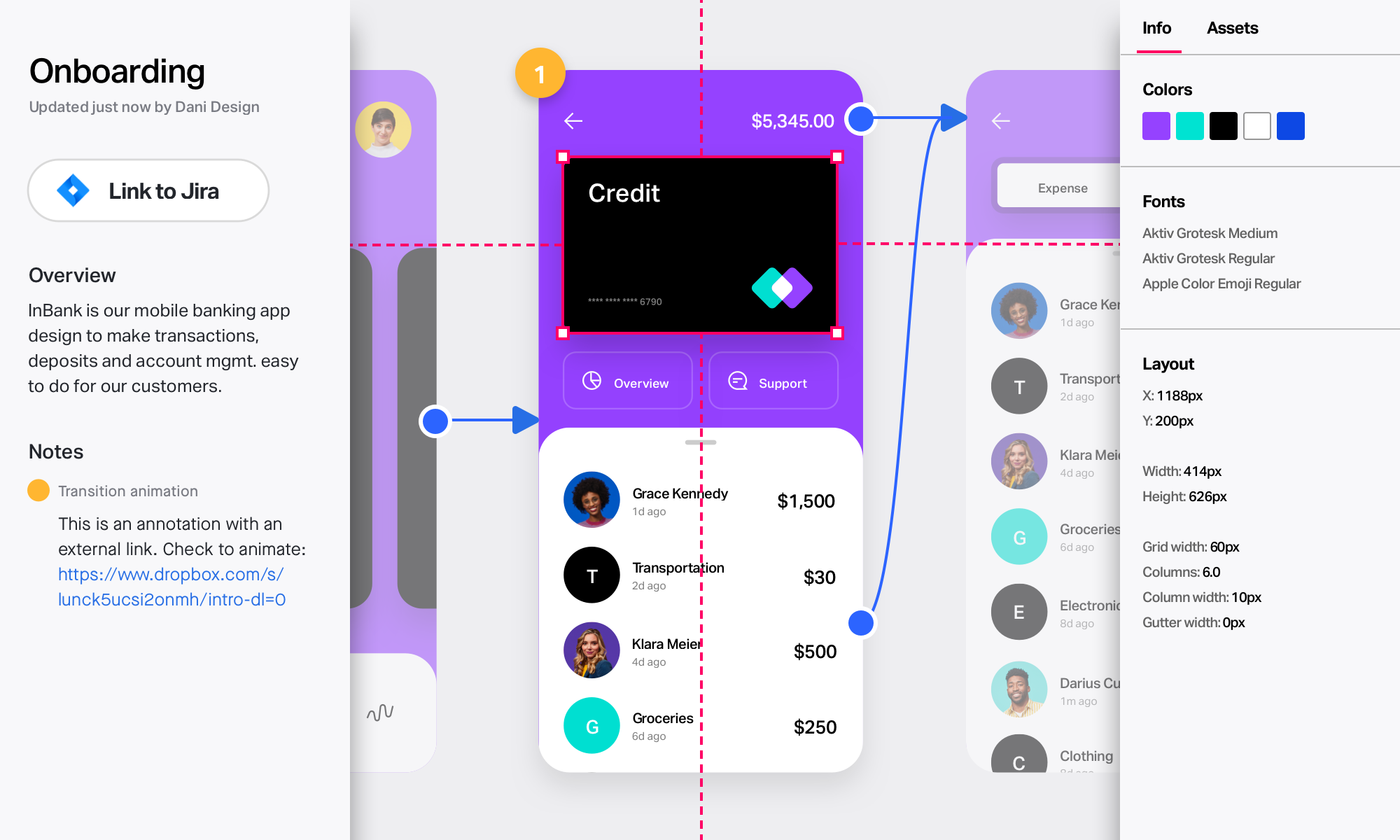
InVision is a collaborative design and prototyping platform with features such as freehand drafting mode and interactive mockups, collaboration, idea management, user testing, and integration with Slack and other collaboration tools. According to the vendor, 1 million designers are using the free version.
$0
OpenText Hightail
Score 10.0 out of 10
N/A
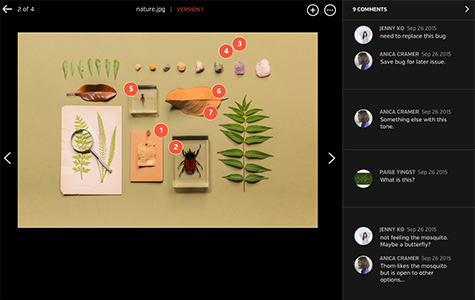
OpenText Hightail is a cloud-based collaboration software for creative content reviews and approvals. With one place for teams to share large, multimedia files, collect precise feedback and approve content, Hightail streamlines the creative process and helps teams keep projects on schedule.
$0
100MB per file upload
Pricing
InVisionOpenText Hightail
Editions & Modules
Free
$0
Pro
$7.75
per user/per month
Enterprise
Contact Sales
Lite
$0
100MB per file upload
Pro
$15
per user, per month
Teams
$30
per user/per month
Business
Custom
per user, per month
Offerings
Pricing Offerings
InVisionOpenText Hightail
Free Trial
NoYes
Free/Freemium Version
NoYes
Premium Consulting/Integration Services
NoNo
Entry-level Setup FeeNo setup feeNo setup fee
Additional DetailsLite: Send large files with anyone. Files are limited to 100MB for each file size uploaded, 2GB storage max. Files expire after 7 days. Pro: Send large files with anyone and set advanced security permissions such as expiration dates and access codes. Files are limited to 25GB for each file size uploaded, with unlimited storage. Teams: Send large files, collaborate in real-time and manage creative projects with your team. The Hightail Teams plan allows you to purchase multiple users online (from 1-30 users per organization) and allows users to send file sizes up to 50GB with unlimited storage. The Teams plan also includes features such as file previews, organization, annotations, version control, discussions, follow-ups, approval routing and more. Business: Create unlimited visual project folders (called a Space) with collaboration and project management features such as approval routing and assigning to-dos, upload unlimited files up to 100GB each, protect them with access codes and manage user permissions., plus intuitive admin controls , detailed activity analysis for your entire company, advanced organization options and priority support.
More Pricing Information
Community Pulse
InVisionOpenText Hightail
User Ratings
InVisionOpenText Hightail
Likelihood to Recommend
8.0
(0 ratings)
9.0
(0 ratings)
Likelihood to Renew
8.0
(0 ratings)
-
(0 ratings)
Usability
9.0
(0 ratings)
-
(0 ratings)
Support Rating
8.8
(0 ratings)
-
(0 ratings)
User Testimonials
InVisionOpenText Hightail
Likelihood to Recommend
InVision is well suited for design reviews and immersing yourself in the experience of an app-to-be. As a Product Manager, it's difficult to take abstract concepts, user pain points, and business needs, and produce a vision for an app without a visual aid to communicate a vision. InVIsion offers PMs, designers, and developers the opportunity to sketch a vision, communicate about it with inline commenting, and shareable with other stakeholders.
Read full review
-It is useful for carrying out projects and campaigns that use an interdisciplinary team and in which multiple documents have to be worked on, since sending them ends up being pleasant and comfortable for all the people involved. -When it is necessary to have real control and monitoring of the activities of an entire team, it facilitates visualization and coordination. -Intuitive and easy to use for the simplest functionalities such as sending files and material. -Due to its price, it is possible that if you do not use all the tools contained in the software, it might seem a bit expensive.
Read full review
Pros
  • Very easy to export Sketch files (where prototypes are actually created) into Invision and preserve the interactivity.
  • Additional interactivity can be added in InVision. Like scrolling with locked footer.
  • Clients, designer and developers can collaborate - leave notes and respond to notes made by others.
Read full review
  • Storage: OpenText Hightail has a large amount of storage and can handle videos.
  • Organization: It's easy to shuffle and organize data to make sense for you.
Read full review
Cons
  • Designs can be very slow to load on mobile devices, particularly when they include many screens.
  • There isn’t an offline version of the full app, which feels less-than-ideal for many of our teammates who live in areas with more spotty internet.
  • There are limited functionalities to portray animations and transitions. This hasn’t been a huge issue, but it makes the app feel a little out of date, considering the range of such functionalities in other apps.
Read full review
  • Some of our recipients are not very tech-savvy and can get confused with how to download a file. There is some room for improvement by making it clearer where the user should click to download the file.
Read full review
Likelihood to Renew
it does what we bought it for, so would buy again :)
Read full review
No answers on this topic
Usability
The interface is well designed, but I had a hard time figuring out how the various pieces of software integrate together.
Read full review
No answers on this topic
Support Rating
I didn't need to contact InVision support, as I've never needed it. They have an intuitive UI, and most of the questions are answered in their help portal or in tutorials online. Since many people use it, there a great resources available on for example YouTube. No problems so far with InVision.
Read full review
No answers on this topic
Alternatives Considered
[InVision] provides the ability to iterate really quickly, in fact, it is so intuitive that can be applied on live wireframe designing, while the ideas are being scratched and stormed from the team in a single discovery session, as well as allowing and giving access to the whole organization to the final outcome
Read full review
I've used WeTransfer on the receiving end, and only once to send large files (because the client specifically asked that I send his files with WeTransfer). I can't really comment on how it stacks up against Hightail. On the receiving end, it works. I get an email from them with a download button that takes me to a page (with excellent image content) and I start the download from there. Simple and it works. Using their free option to send files was easy. It was browser-based, which is fine. Whether or not there are desktop and mobile apps I have no idea, although I would imagine there are. I use Hightail because it was the best option when I started using it and it continues to work well for me.
Read full review
Return on Investment
  • For the price it is well worth it. It improves collaboration and efficiency which can be easily attributed to cost savings or improved margins.
  • It also adds an element of professionalism and sophistication to the process and presentation of the work, which in turns aids in brand favorability.
Read full review
  • Hightail simply saves time. We no longer struggle with trying to meet the requirements of OutLook. When we have a file that is too large to send via OutLook we just "hightail it".
Read full review
ScreenShots

InVision Screenshots

Screenshot of Take designs from ideas to development in one unified platformScreenshot of Collaborate in real time on an endless digital whiteboard. Start fast with a blank canvas or pre-built templates.Screenshot of Create rich, interactive prototypes. Import from Sketch, then gather feedback from any device.Screenshot of Involve your developers early and often. Collect input and provide detailed specs to keep builds on track.

OpenText Hightail Screenshots

Screenshot of Improve review process with inline commenting for visual files.Screenshot of Compare each update instantly with visual versions.Screenshot of Bring everyone and everything together in a Space.Screenshot of Improve the audio and video review process with time-stamped commenting.