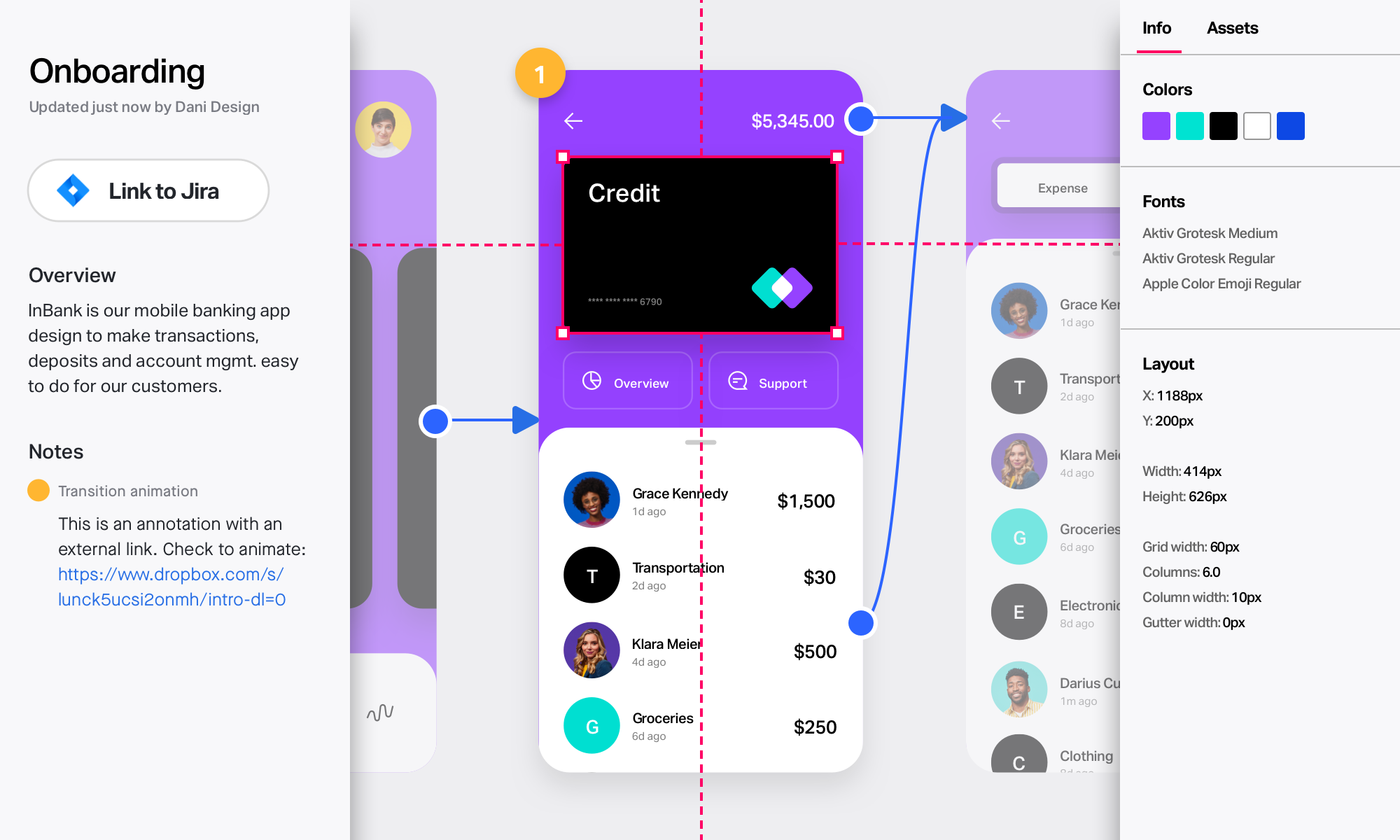
InVision is a collaborative design and prototyping platform with features such as freehand drafting mode and interactive mockups, collaboration, idea management, user testing, and integration with Slack and other collaboration tools. According to the vendor, 1 million designers are using the free version.
InVision is well suited for design reviews and immersing yourself in the experience of an app-to-be. As a Product Manager, it's difficult to take abstract concepts, user pain points, and business needs, and produce a vision for an app without a visual aid to communicate a vision. InVIsion offers PMs, designers, and developers the opportunity to sketch a vision, communicate about it with inline commenting, and shareable with other stakeholders.
As I said earlier in this review, OmniGraffle does an excellent job with arcs if they are created in OmniGraffle. The same is not true if the drawing I'm working on was imported from Visio. In that case, I need to just start all over with the arc lines, and that is not often a reasonable option.
The ability to easily map out process flows for users of a wide range of tech comfort levels—The design is intuitive enough for even people with lower tech comfort levels to visually chart process flows. We have never had to do significant onboarding for less tech-savvy colleagues—this is a huge timesaver!
Collaborative mind mapping—OmniGraffle is a great platform to get together with people and brainstorm ideas in the early stages of a project, then link ideas together to create visual relationships to inform business and product design decisions.
Communicating strategy to stakeholders—Communicating the complexities of a workflow to stakeholders is a lot easier and more effective, with a diagram that clearly shows the relationships between factors rather than showing them a PowerPoint that, because of its slide-by-slide nature, makes it difficult to consistently show how different factors play into an overall workflow.
Designs can be very slow to load on mobile devices, particularly when they include many screens.
There isn’t an offline version of the full app, which feels less-than-ideal for many of our teammates who live in areas with more spotty internet.
There are limited functionalities to portray animations and transitions. This hasn’t been a huge issue, but it makes the app feel a little out of date, considering the range of such functionalities in other apps.
No support for team collaboration. I would really like to see a way to share files to iCloud so that others can access and edit.
Better print settings. If you're trying to print a document across many pages, it's not easy to make this happen.
No ability to pre-configure settings. For example, I have to manually change the unit of measure from "inches" to "pixels" when I create a new document, would like the ability to change that fundamentally.
I didn't need to contact InVision support, as I've never needed it. They have an intuitive UI, and most of the questions are answered in their help portal or in tutorials online. Since many people use it, there a great resources available on for example YouTube. No problems so far with InVision.
[InVision] provides the ability to iterate really quickly, in fact, it is so intuitive that can be applied on live wireframe designing, while the ideas are being scratched and stormed from the team in a single discovery session, as well as allowing and giving access to the whole organization to the final outcome
Because we're primarily a Mac shop, Visio was a non-starter. (It's monstrously complex compared to OmniGraffle, which works against the quick-and-dirty just-enough-documentation ideal common on agile teams.) We've used draw.io on internal projects and when coordinating with external teams, but a web-based tool was too awkward for heavy use and bogged down with complex documents. For us, OmniGraffle sits in the "sweet spot" between complex data-driven modeling tools and lightweight "drawing" programs that force too much manual labor when doing heavy diagramming work.
I've created multiple OmniGraffle template files that I use constantly. I create covers for our proposals in OmniGraffle with pictures of the the client's buildings or sites. All I need to do is drag and drop the image into the template, change the title and client name and address accordingly and it's ready to go.
Using templates in OmniGraffle has saved lots of time.
Using OmniGraffle to design drawing details for construction documents has allowed us to land projects, purchase orders and new clients to the tune of hundreds of thousands of dollars.