InfluxDB vs. Retrace

Overview
ProductRatingMost Used ByProduct SummaryStarting Price
InfluxDB
Score 8.8 out of 10
N/A
The InfluxDB is a time series database from InfluxData headquartered in San Francisco. As an observability solution, it is designed to provide real-time visibility into stacks, sensors and systems. It is available open source, via the Cloud as a DBaaS option, or through an Enterprise subscription.N/A
Retrace
Score 8.0 out of 10
N/A
Retrace (formerly APM+) is a lightweight Application Performance Management solution. Retrace gives developers continuous, real-time analysis through a combination of code-level visibility with in-line log and error data. Retrace helps identify top performance offenders by analyzing top page requests, top SQL queries, and top external web services.
$99
up to 3 servers, 500,000 traces, and 1,000,000 logs
Pricing
InfluxDBRetrace
Editions & Modules
No answers on this topic
Essentials
$99
up to 3 servers, 500,000 traces, and 1,000,000 logs
Standard
249+
2,000,000+ traces and 5,000,000+ logs
Enterprise
Custom
Customer number of traces and logs
Offerings
Pricing Offerings
InfluxDBRetrace
Free Trial
NoYes
Free/Freemium Version
NoNo
Premium Consulting/Integration Services
NoNo
Entry-level Setup FeeNo setup feeNo setup fee
Additional DetailsPricing is based on trace and log usage.
More Pricing Information
Community Pulse
InfluxDBRetrace
Best Alternatives
InfluxDBRetrace
Small Businesses

No answers on this topic

InfluxDB
InfluxDB
Score 8.8 out of 10
Medium-sized Companies

No answers on this topic

Sumo Logic
Sumo Logic
Score 9.4 out of 10
Enterprises

No answers on this topic

NetBrain Technologies
Score 9.2 out of 10
All AlternativesView all alternativesView all alternatives
User Ratings
InfluxDBRetrace
Likelihood to Recommend
9.0
(0 ratings)
8.0
(0 ratings)
Likelihood to Renew
9.1
(0 ratings)
-
(0 ratings)
Support Rating
9.0
(0 ratings)
-
(0 ratings)
User Testimonials
InfluxDBRetrace
Likelihood to Recommend
InfluxDB is a time series database and should be used in that intent. Each data ingestion streams should be properly configured to ensure optimal database performance. InfluxDB works very well but like any other databases requires maintenance and tuning. We have been using the TICK stack and are very happy with the results.
Read full review
If you're a Java or .net shop they will do excellent. I believe that for PHP, Ruby, Java and few others they have only the error and log management and the application and server monitoring.
Read full review
Pros
  • Time series data
  • Very fast queries
  • Many options to configure and tune database
Read full review
  • Integration of performance management with log management so you get the parameters sent
  • In-line log and error data in trace
  • Integration of error and log data, so in one click you can see all the logs recorded when an error was thrown
  • Very reasonably priced
Read full review
Cons
  • Small, but growing community - This database engine's community is much smaller than alternatives. This can make finding a DBA or support less easy, but not impossible.
  • Documentation could be improved - The docs for getting started don't effectively lead first-time users to understand how the underlying systems are designed.
  • Performance Analysis - There seems to be a lack of tools to give context to slow queries or other performance issues
  • Out-of-the-box security - The out of the box security is designed to operate in an internal network and is limited.
Read full review
  • To set up the fields that APM Plus monitors, you need to map each field area on each document.
  • APM Plus could use a way to link the documents back into the finance or business software so you can find the document under the PO, Sales Order, Invoice, etc.
  • APM Plus setup is only for the professionals. There are many areas that need tweaking on setup, having a better default setup would lessen the learning curve to set it up for use.
Read full review
Likelihood to Renew
InfluxDB is a near perfect product for time series database engines. The relatively small list of cons are heavily outweighed by it's ability to just work and be a very flexible and powerful database engine. The community and support provided by the corporation are the only areas I have little experience.
Read full review
No answers on this topic
Support Rating
We have worked with the InfluxDB support team a few times so far and it has been positive. Issues submitted are worked on promptly and we have good feedback.
Read full review
No answers on this topic
Alternatives Considered
We have looked around to find different options we had when we first started to move to cloud. At that time, the options we had is Google Cloud BigTable and InfluxDB. But quickly we realized that InfluxDB is the database specialized in time series database and performs better than other options we have.
Read full review
APM Plus does a better job of archiving documents than DocSend and makes it easier to find the documents when you need them. DocSend seemed to be more of a marketing tool than a business tool. APM Plus is all business and consistently does what you need on a daily basis. We selected APM Plus because of the great support on setup and after implementation. They are always ready to help.
Read full review
Return on Investment
  • Provided us a time series DB.
  • With the SQL-like language, it is very easy to learn.
  • Empowered us to keep track of our events.
Read full review
  • APM Plus has freed up users from having to manually attach documents to each place they are sending it. APM Plus will do it automatically.
  • APM Plus provides a searchable archive to re-visit sent documents with customers and vendors. Having to reprint a document you risk the potential that something has changed since it was last printed.
  • APM Plus does need IT staff for adjustments and to review sending problems. Not for an average user.

Read full review
ScreenShots

Retrace Screenshots

Screenshot of Detailed stack trace with inline error and logsScreenshot of Web Apps Dashboard:
The Apps Page gives you a high-level overview of all applications found and monitored across all servers in each environment. Click on any app to take you to the App Dashboard to view more information for a particular app.Screenshot of Apps Dashboard:
The App Dashboard is a powerful monitoring and troubleshooting perspective that gives you a view of application health across one or more environments.Screenshot of Performance (APM+) Dashboard:
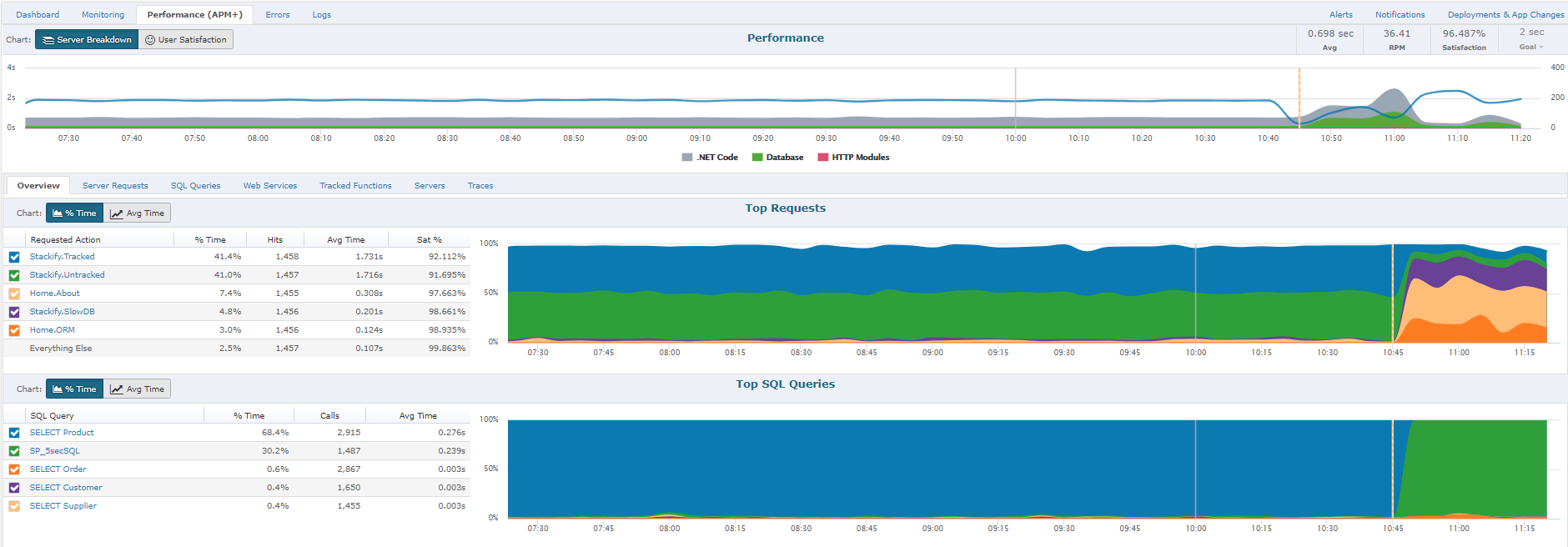
The Performance section will give you a report of how well the application is performing overall, as perceived by your users.  A graph will allow you to view all requests by Satisfaction by viewing "Fast", "Sluggish", "Too Slow", or "Failed" types of requests.  Another report includes graphs of HTTP Error%, Satisfaction Score%, and Page Load Time.  Lastly, you will have the ability to sort each page request of your App by different categories: Satisfaction, Slowest page, Failed pages, pages hit, and total load time.  By clicking on an individual page a Performance Details page with further information about that specific page's health, performance, and errors will be displayed.Screenshot of Performance Traces:
One of the ways we strive to deliver relevant insights is to only collect traces around interesting requests. Some examples of these request types that are interesting would be faster than normal, slower than normal, new web requests, requests introducing new SQL, requests introducing new exceptions, or abnormal satisfaction scores. Under performing requests will be profiled more often than fast requests. As long as the app is getting steady traffic Retrace should be saving a trace every 5 to 15 minutes.Screenshot of Errors Dashboard:
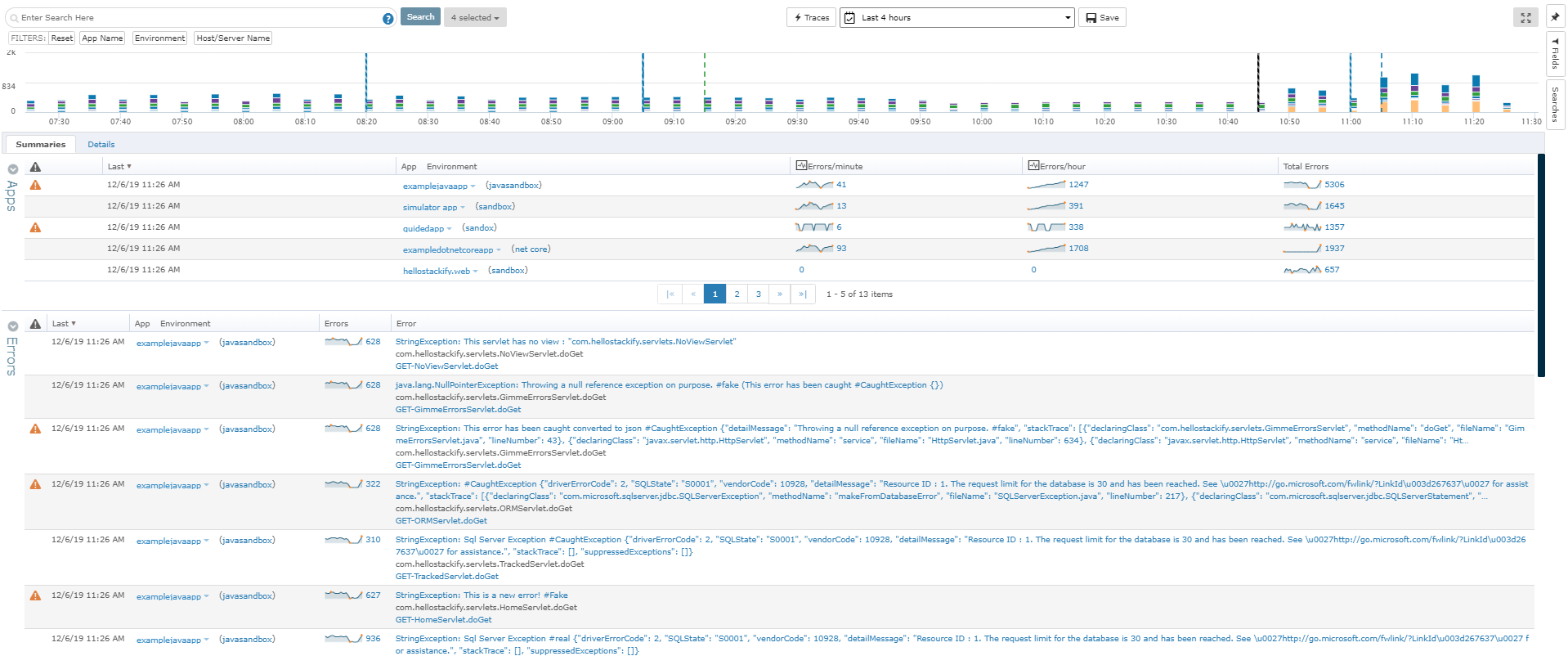
From the Errors Dashboard, you can get an overview of all the exceptions of all your applications across different environments. It gives you a central location to view details about your errors.