TrustRadius: an HG Insights company

Save this comparison

Save this comparison

Add Product

Recommended Comparisons

    Overview
    ProductRatingMost Used ByProduct SummaryStarting Price

    iFax

    Score8.8 out of 10
    N/AHIPAA-compliant fax. With advanced encryption and strict adherence to HIPAA regulations, iFax ensures maximum security for sensitive information and documents, as a HIPAA-compliant fax provider for businesses. The vendor states iFax has earned the

    $0

    OpenText XM Fax

    Score10 out of 10
    Small Businesses (1-50 employees)
    XM Fax, now from OpenText (acquired March 2020) is a software-based solution for sending and receiving confidential faxes by email. It allows secure transmission of highly sensitive documents, using standardized T.38 Fax-over-IP and G.711 Fax Pass-Through protocols. The vendor says it is easy to install, and faxes can be sent using a desktop client (SendFAX), email clients (MS outlook), networked MFPs or via Web Services. According to the vendor, one of the main benefits of using XM Fax…N/A
    Pricing
    iFaxOpenText XM Fax
    Editions & Modules
    No answers on this topic
    No answers on this topic
    Offerings
    Pricing Offerings
    iFaxOpenText XM Fax
    Free Trial
    YesYes
    Free/Freemium Version
    YesNo
    Premium Consulting/Integration Services
    YesNo
    Entry-level Setup FeeOptionalOptional
    Additional Details——
    More Pricing Information
    Community Pulse
    iFaxOpenText XM Fax
    Considered Both Products
    iFax
    No answer on this topic
    OpenText
    No answer on this topic
    Key User Insights
    Would buy again
    94%
    Would buy again
    15 Answers
    No answers on this topic
    Delivers good value for the price
    100%
    Delivers good value for the price
    13 Answers
    No answers on this topic
    Happy with the feature set
    100%
    Happy with the feature set
    16 Answers
    No answers on this topic
    Lived up to sales and marketing promises
    100%
    Lived up to sales and marketing promises
    12 Answers
    No answers on this topic
    Implementation went as expected
    100%
    Implementation went as expected
    13 Answers
    No answers on this topic
    Best Alternatives
    iFaxOpenText XM Fax
    Small Businesses
    No answers on this topic
    No answers on this topic
    Medium-sized Companies
    OpenText XM Fax
    Score10 out of 10
    No answers on this topic
    Enterprises
    OpenText XM Fax
    Score10 out of 10
    No answers on this topic
    All AlternativesView all alternativesView all alternatives
    User Ratings
    iFaxOpenText XM Fax
    Likelihood to Recommend
    9.0
    (16 ratings)
    10.0
    (9 ratings)
    User Testimonials
    iFaxOpenText XM Fax
    Likelihood to Recommend
    iFax
    iFax is the best for people who need to submit documents to government agencies and offices that don't use email as a means to sends pdf files and other forms of documents like word, excel, etc. It is best for those who only need to send less than 5 pages of documents to the recipient.
    Read full review
    OpenText
    XMedius is well suited for a large business with hundreds of fax numbers. Could you imagine trying to manage 1000 individual fax machines? That would be a nightmare! Instead it's all in one neat place
    Incentivized
    Read full review
    Pros
    iFax
    • The sign-up to use their service was really easy.
    • The online dashboard for my account was intuitive and had a nice look.
    • Setting up the account so I was ready to send my first fax was smooth and simple.
    • Sending my first fax was very simple and took very little time.
    Incentivized
    Read full review
    OpenText
    • Contacted sales to set up the creation of enterprise accounts directly through the dashboard.
    • XM Fax Support worked directly with Xerox to correct an issue I had with a device software update. Issues correct within a few days.
    • XM Fax provided onsite sales support for sales and technical training.
    Incentivized
    Read full review
    Cons
    iFax
    • I would like to see a better price package that caters to small clinics.
    • The clarity of uploaded logo images is not the best and improvement is needed to promote a more professional look.
    • I am not aware of any referral offers for small business that refer other clinics to use the product, which would be helpful to all parties.
    Incentivized
    Read full review
    OpenText
    • Error logs include error codes, but sometimes it is hard to understand what it means. Either a shared documentation or detailed error log might help end users better to detect any issue on fax requests.
    Read full review
    Alternatives Considered
    iFax
    the services were honestly the same but efax forces you to add a credit card so that they can charge you once a month in order to get their free trial. I only sent one fax with efax this year and canceled immediately. at least with ifax I can send one small document per month
    Incentivized
    Read full review
    OpenText
    XMedius does faxing for a quick response from an end user where Egnyte is best suited for secure file transfer.
    Read full review
    Return on Investment
    iFax
    • Having faxing capabilities makes my company look more professional.
    • It is helpful to have faxing capabilities to better communicate with other providers as well as insurance companies, however I have only noted a small ROI at this time.
    • With faxing capabilities my referrals have increased from providers.
    Incentivized
    Read full review
    OpenText
    • I m not sure on pricing or how XMedius is pricing solutions now
    • Cloud-based / vs On-Prem I think my vote always goes for on Prem
    • ROI (not my field)
    Read full review
    ScreenShots

    iFax Screenshots

    Screenshot of the dashboard where users can send and receive fax through filling all the needed information and preferred time. This helps users to schedule a fax that needs to be sent in a preferred schedule/time.Screenshot of Professional Settings, where users can customize their profile's privacy, and the information to be shown in faxes.Screenshot of a customizable fax number depending on preferred location.Screenshot of the screen where users can:

Scan: Capture documents with the mobile scanner, included in apps.
Import: Connect to cloud storage platforms, import documents, and fax them securely.
Fax: Use the iFax website or mobile fax apps to fax from any device.
Store: Maintain an encrypted fax history in the cloud for optimal security and accessibility.Screenshot of New fax number creation (or use an existing number).
- Dedicated fax numbers are available to new users
- Transfer an existing business fax number to keep it so there is no need to update contacts and print-ads
- Porting an existing fax number takes 3-5 days
- A toll-free number can be generated, or a fax local numberScreenshot of iFax uses military-grade 256-bit AES end-to-end encryption, helping businesses to comply with HIPAA, GLBA, and other strict security guidelines. All faxes sent and received have complete audit trails, making iFax a fax solution for regulated industries like legal, finance, healthcare, insurance, and real estate.

    OpenText XM Fax Screenshots

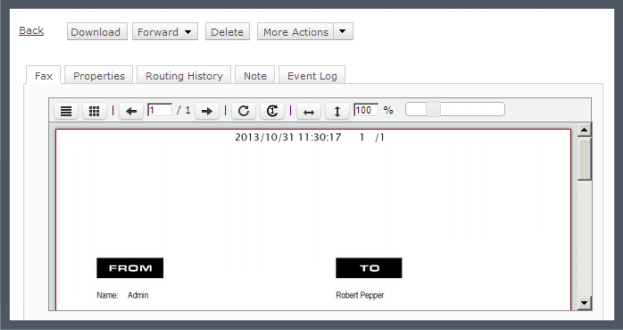
    Screenshot of Track your faxes through an event log tab.Screenshot of Built-in viewer in the web client: XMediusFAX® allows you to view faxes directly in your browser without having to download files.Screenshot of Download the free XMediusFAX® application for Android, iPhone or iPad and send secure faxes from your mobile.Screenshot of Choose your fax recipients (Device contacts, Fax service Phone Book, Favorites).Screenshot of Select your documents from any file management application available on your mobile device.Screenshot of Configure your fax options (priority, resolution, retries).