TrustRadius: an HG Insights company

IDrive Online Backup and Object Storage e2 vs. vBoxxCloud

Save this comparison

Save this comparison

Add Product

Recommended Comparisons

    Overview
    ProductRatingMost Used ByProduct SummaryStarting Price

    IDrive Online Backup and Object Storage e2

    Score9.1 out of 10
    N/AIDrive protects PCs, Macs, mobile devices, Servers, Cloud Applications Data (SAAS) including Office 365, and Google Workspace, and provides S3 compatible Object Storage with IDrive e2. IDrive offers different plans for cloud backup for devices: - IDrive Personal - IDrive Core - IDrive Team - IDrive Small Business - IDrive Enterprise - IDrive360 EndPoint IDrive provides Cloud Applications data (SAAS) Backup: - Microsoft Office 365 Backup - Google…

    $99.50

    per year One user, unlimited computers 5TB storage

    vBoxxCloud

    Score8.2 out of 10
    Small Businesses (1-50 employees)
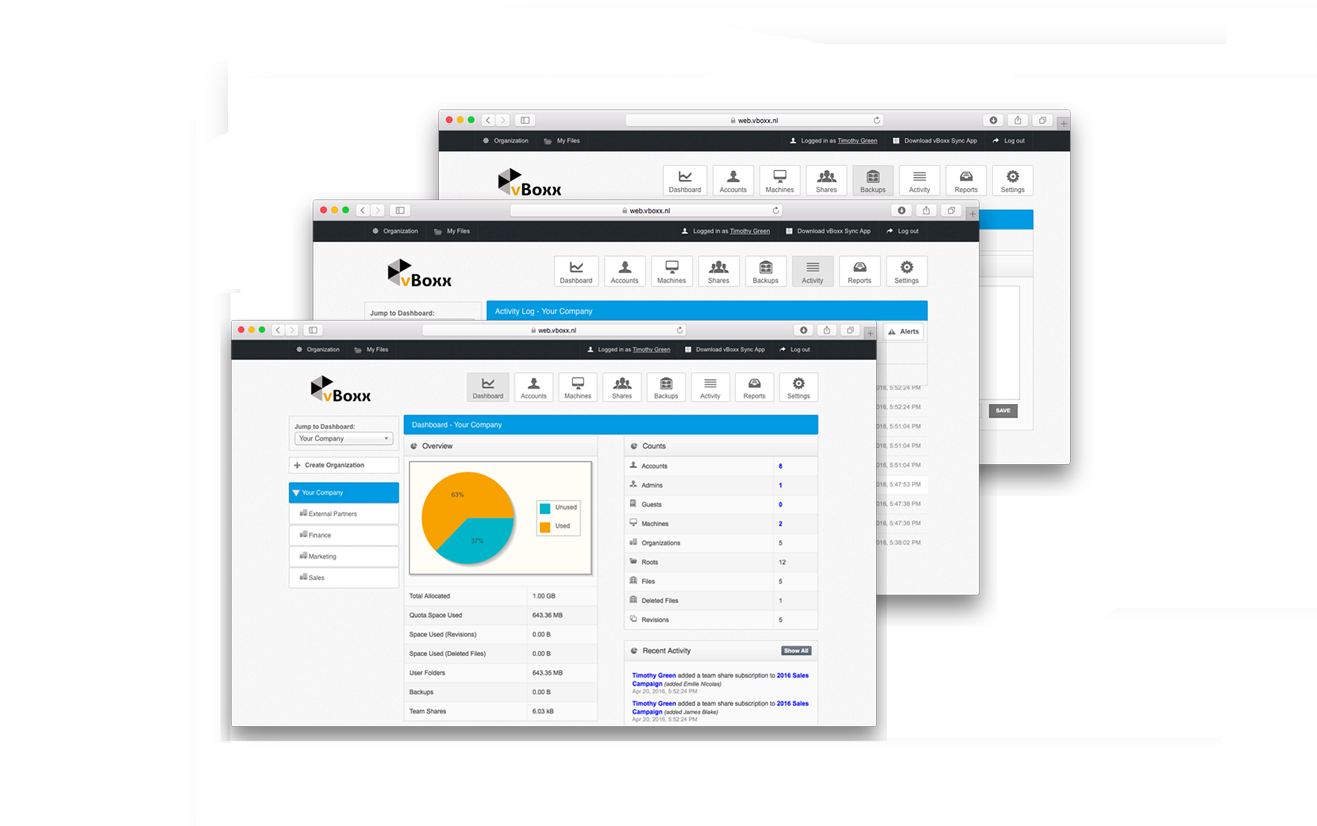
    vBoxxCloud is a business solution for managing company files.The extensive online dashboard allows users to see who has access to which folders. Users can see who is connected with their Cloud and can even remove specific folders on systems or devices by adjusting the rights online. Users can also set up shared folders and control how and from which device they can be accessed. Users can easily access shared documents through the sync tool or web browser. Admins can keep track of all…

    $2

    Pricing
    IDrive Online Backup and Object Storage e2vBoxxCloud
    Editions & Modules
    IDrive Cloud to Cloud Backup
    $20
    per year
    IDrive 360 EndPoint
    $29.50
    per year
    IDrive e2
    $49.50
    per year
    IDrive Core
    $79.50
    per year
    Personal
    $99.50
    per year
    IDrive Team
    $99.50
    per year
    IDrive Business
    $99.50
    per year
    25 GB
    $2.00
    User
    $7.50
    Offerings
    Pricing Offerings
    IDrive Online Backup and Object Storage e2vBoxxCloud
    Free Trial
    YesYes
    Free/Freemium Version
    YesNo
    Premium Consulting/Integration Services
    NoNo
    Entry-level Setup FeeNo setup feeNo setup fee
    Additional DetailsIDrive regularly offers first year discounts for all plans and offers a full-featured 30-day free trial for IDrive 360 EndpointUser: The pricing is flexible, you can choose freely the amount of users and storage packs. The more users your order, bigger the discount, click here to customize your order. Storage: You can choose as many storage packs as you would like. You can assign it to one user through vBoxxCloud policies or share it among all the users. Discount: We support educational and non-profit organizations with special discounts. Contact us to learn about our special prices.
    More Pricing Information
    Community Pulse
    IDrive Online Backup and Object Storage e2vBoxxCloud
    Considered Both Products
    IDrive
    No answer on this topic
    vBoxx B.V.
    No answer on this topic
    Key User Insights
    Would buy again
    96%
    Would buy again
    91 Answers
    No answers on this topic
    Delivers good value for the price
    97%
    Delivers good value for the price
    88 Answers
    No answers on this topic
    Happy with the feature set
    93%
    Happy with the feature set
    88 Answers
    No answers on this topic
    Lived up to sales and marketing promises
    95%
    Lived up to sales and marketing promises
    84 Answers
    No answers on this topic
    Implementation went as expected
    92%
    Implementation went as expected
    86 Answers
    No answers on this topic
    Features
    IDrive Online Backup and Object Storage e2vBoxxCloud
    File Sharing & Management
    Comparison of File Sharing & Management features of IDrive Online Backup and Object Storage e2 and vBoxxCloud
    Feature
    IDrive Online Backup and Object Storage e2
    9.3
    92 Ratings
    10% above category average
    vBoxxCloud
    8.0
    1 Ratings
    5% below category average
    Versioning9.667 Ratings00 Ratings
    Video files9.270 Ratings8.21 Ratings
    Audio files9.265 Ratings8.21 Ratings
    Document collaboration10.03 Ratings8.21 Ratings
    Access control9.26 Ratings8.21 Ratings
    File search9.277 Ratings7.31 Ratings
    Device sync9.083 Ratings8.21 Ratings
    Cloud Storage Security & Administration
    Comparison of Cloud Storage Security & Administration features of IDrive Online Backup and Object Storage e2 and vBoxxCloud
    Feature
    IDrive Online Backup and Object Storage e2
    9.1
    87 Ratings
    5% above category average
    vBoxxCloud
    7.3
    1 Ratings
    17% below category average
    User and role management9.270 Ratings7.31 Ratings
    File organization9.083 Ratings7.31 Ratings
    Device management9.184 Ratings7.31 Ratings
    Cloud Storage Platform
    Comparison of Cloud Storage Platform features of IDrive Online Backup and Object Storage e2 and vBoxxCloud
    Feature
    IDrive Online Backup and Object Storage e2
    9.3
    92 Ratings
    9% above category average
    vBoxxCloud
    8.2
    1 Ratings
    4% below category average
    Performance9.389 Ratings8.21 Ratings
    Reliability9.287 Ratings8.21 Ratings
    Storage Reports9.380 Ratings8.21 Ratings
    Best Alternatives
    IDrive Online Backup and Object Storage e2vBoxxCloud
    Small Businesses
    Egnyte
    Score9.7 out of 10
    Egnyte
    Score9.7 out of 10
    Medium-sized Companies
    Azure Backup
    Score8.2 out of 10
    Azure Backup
    Score8.2 out of 10
    Enterprises
    ownCloud
    Score9.2 out of 10
    ownCloud
    Score9.2 out of 10
    All AlternativesView all alternativesView all alternatives
    User Ratings
    IDrive Online Backup and Object Storage e2vBoxxCloud
    Likelihood to Recommend
    9.4
    (96 ratings)
    8.2
    (1 ratings)
    Likelihood to Renew
    9.1
    (2 ratings)
    -
    (0 ratings)
    Usability
    9.6
    (22 ratings)
    -
    (0 ratings)
    Support Rating
    9.1
    (5 ratings)
    8.2
    (1 ratings)
    Implementation Rating
    5.5
    (1 ratings)
    -
    (0 ratings)
    User Testimonials
    IDrive Online Backup and Object Storage e2vBoxxCloud
    Likelihood to Recommend
    IDrive
    It scales well from the individual to corporate environments with many different plans to suit your needs and budget. For backing up servers such as Exchange or SQL I've used their sister product iBackup, which is also excellent and we have no problems with, so maybe they should merge the two products into one which would make it a better overall proposition. It also seems to handle backing up mapped drives as well, which is what we used for a while before getting the on server version. That being said it can use up quite a bit of bandwidth so make sure you schedule at night when noone is working. However it does only backup changed files which is great.
    Incentivized
    Read full review
    vBoxx B.V.
    See advantages and disadvantages [below].
    Incentivized
    Read full review
    Pros
    IDrive
    • I'm using it on MAC, the app works very well in the background
    • Logging activities is something I really like, because I can check whether the backup was successful or not.
    • I really like the option of being able to select external drivers and back up only specific folders or files.
    • The application itself is very easy to use, even though it doesn't have a version in my language (pt-br), I had no trouble setting it up and I'm using it without any problems.
    Incentivized
    Read full review
    vBoxx B.V.
    • Service. You can mail, chat and call them and they always make time for the questions.
    • Their servers are located in the Netherlands.
    • Administrator interface
    • Reports
    Incentivized
    Read full review
    Cons
    IDrive
    • DropBox-protected folders were not initially backed up as IDrive Online Backup and Object Storage e2 did not follow the symbolic links created
    • I experienced some UX confusion in adding new folders to backup; it's a different interface than setting up exclusions, and they should follow the same workflow and page buttons
    • After a reboot, it appears like a full disk scan is performed which can take quite a long time on a disk which has many files and lots of space
    Incentivized
    Read full review
    vBoxx B.V.
    • To use vBoxx you have an interface as administrator. To add a user, you have to use another interface.
    • When you are accessing your files via the web (not via the sync folder on your laptop, pc or tablet), you have to download and upload the file, you can't change it without downloading it. Unless I don't know [how to do] it.
    Incentivized
    Read full review
    Likelihood to Renew
    IDrive
    It does everything that it needs to to create an effecitve Three level backup to the cloud of all your important data, its reliable, dependable and peformant in its use cases. It overcomes the need to store offsite physical media such as Tape or disk storage. And its cost and level of reporting can be tailored to fit the use case of your business.
    Incentivized
    Read full review
    vBoxx B.V.
    No answers on this topic
    Usability
    IDrive
    While both the desktop and mobile apps are pretty straightforward and not complicated to navigate with features and settings fairly easy to understand and execute with clear enough descriptions they could use a refresh to be a but more intuitive and improvements made so they are less glitchy. Also backup speeds could use some improvement
    Incentivized
    Read full review
    vBoxx B.V.
    No answers on this topic
    Support Rating
    IDrive
    I have not had to use their tech support. I did call once but luckily figured out what to do while I was on hold so I disconnected. If I really needed them it would have been a very long hold time I suppose.
    Incentivized
    Read full review
    vBoxx B.V.
    Never expected to receive this kind of service as a small company.
    Incentivized
    Read full review
    Implementation Rating
    IDrive
    Did not participate in the implementation.
    Incentivized
    Read full review
    vBoxx B.V.
    No answers on this topic
    Alternatives Considered
    IDrive
    I was a Backblaze user for 5 years because they had a very cost effective plan for my storage needs. However, they were very poor at backing up external devices quickly, and made it a pain in the butt to keep the backups active due to their 30 days connectivity policy.
    Dropbox is a great fit for cloud backup when you need to access the backup files in the cloud frequently.
    IDrive is the best solution out there for true backup of devices in case they are damaged or lost.
    Read full review
    vBoxx B.V.
    Not used but evaluated: Dropbox (not secure enough + American servers) Google (not secure enough + American servers) OneDrive (not secure enough + American servers) Tresorit (is secure and has European servers) VBoxx won because of the availability by mail, chat and phone. That is the only thing that counts during emergencies.
    Incentivized
    Read full review
    Return on Investment
    IDrive
    • For individual users such as my case, the savings with the Personal plan are important compared to alternatives like ElephantDrive. For 5TB ElephantDrive costs $600/yr in the comparable Family plan, whereas IDrive Online Backup and Object Storage e2 costs only $99.50/yr.
    Incentivized
    Read full review
    vBoxx B.V.
    • Too soon to say
    Incentivized
    Read full review
    ScreenShots

    IDrive Online Backup and Object Storage e2 Screenshots

    Screenshot of IDrive WindowsScreenshot of IDrive WebScreenshot of IDrive Server BackupScreenshot of IDrive 360

    vBoxxCloud Screenshots

    Screenshot of vBoxxCloud is the business solution for managing your company files.The extensive online dashboard allows you to see who has access to which folders. You can see who is connected with your Cloud and you can even remove specific folders on systems or devices if you adjust the rights online.Screenshot of Each user in vBoxxCloud is part of an organization. For each organization you have access to a clear dashboard, you can set different user policies and you can manage the machines. You can define any number of administrators who can access and change these functionalities. And if you have different departments, projects or teams with different needs, you just create a sub-organization with its own users, shares, policies, branding and more.Product screenshotScreenshot of The Sync Tool synchronizes all files between the cloud and your devices, making all data available even offline. If you connect later, your changes will be synchronized automatically.