TrustRadius: an HG Insights company

Save this comparison

Save this comparison

Add Product

Recommended Comparisons

    Overview
    ProductRatingMost Used ByProduct SummaryStarting Price

    IBM SPSS Statistics

    Score7.7 out of 10
    N/ASPSS Statistics is a software package used for statistical analysis. It is now officially named "IBM SPSS Statistics". Companion products in the same family are used for survey authoring and deployment (IBM SPSS Data Collection), data mining (IBM SPSS Modeler), text analytics, and collaboration and deployment (batch and automated scoring services).

    $99

    per month per user

    Roboflow

    N/AN/ARoboflow creates software-as-a-service products to make building with computer vision easier. Developers can use Roboflow to manage image data, annotate and label datasets, apply preprocessing and augmentations, convert annotation file formats, train a computer vision model in one-click, and deploy models via API or to the edge.

    $249

    per month

    Pricing
    IBM SPSS StatisticsRoboflow
    Editions & Modules
    Base
    USD 3,830
    one-time fee per user
    Standard
    USD 8,440
    one-time fee per user
    Professional
    USD 16,900
    one-time fee per user
    Premium
    USD 25,200
    one-time fee per user
    Monthly subscription
    USD 99
    per month per user
    Annual subscription
    USD 1,188.00
    per year per user
    Starter
    $249
    per month 3 users (Additional users $99/user/mo)
    Enterprise
    Custom Pricing
    Offerings
    Pricing Offerings
    IBM SPSS StatisticsRoboflow
    Free Trial
    YesYes
    Free/Freemium Version
    NoYes
    Premium Consulting/Integration Services
    NoNo
    Entry-level Setup FeeNo setup feeNo setup fee
    Additional Details
    More Pricing Information
    Community Pulse
    IBM SPSS StatisticsRoboflow
    Considered Both Products
    IBM
    No answer on this topic
    Roboflow
    No answer on this topic
    Key User Insights
    Would buy again
    90%
    Would buy again
    28 Answers
    No answers on this topic
    Delivers good value for the price
    89%
    Delivers good value for the price
    24 Answers
    No answers on this topic
    Happy with the feature set
    97%
    Happy with the feature set
    30 Answers
    No answers on this topic
    Lived up to sales and marketing promises
    95%
    Lived up to sales and marketing promises
    18 Answers
    No answers on this topic
    Implementation went as expected
    95%
    Implementation went as expected
    18 Answers
    No answers on this topic
    User Ratings
    IBM SPSS StatisticsRoboflow
    Likelihood to Recommend
    4.3
    (91 ratings)
    -
    (0 ratings)
    Likelihood to Renew
    8.6
    (22 ratings)
    -
    (0 ratings)
    Usability
    8.0
    (14 ratings)
    -
    (0 ratings)
    Availability
    6.0
    (1 ratings)
    -
    (0 ratings)
    Performance
    6.0
    (1 ratings)
    -
    (0 ratings)
    Support Rating
    6.4
    (12 ratings)
    -
    (0 ratings)
    Implementation Rating
    8.7
    (7 ratings)
    -
    (0 ratings)
    Configurability
    5.0
    (1 ratings)
    -
    (0 ratings)
    Ease of integration
    5.0
    (1 ratings)
    -
    (0 ratings)
    Product Scalability
    5.0
    (1 ratings)
    -
    (0 ratings)
    Vendor post-sale
    5.0
    (1 ratings)
    -
    (0 ratings)
    Vendor pre-sale
    5.0
    (1 ratings)
    -
    (0 ratings)
    User Testimonials
    IBM SPSS StatisticsRoboflow
    Likelihood to Recommend
    IBM
    I described earlier that the only scenarios where I use SPSS are those where we have legacy projects that were developed in the late 90s or early 2000s using SPSS, and for some reason, the project (data set, scope, etc.) hasn't changed in 24+ years. This counts for 1-2 out of around 80 projects that I run. Whenever possible, I actively have my team move away from SPSS, even when that process is painful.
    Incentivized
    Read full review
    Roboflow
    No answers on this topic
    Pros
    IBM
    • SPSS has been around for quite a while and has amassed a large suite of functionality. One of its longest-running features is the ability to automate SPSS via scripting, AKA "syntax." There is a very large community of practice on the internet who can help newbies to quickly scale up their automation abilities with SPSS. And SPSS allows users to save syntax scripting directly from GUI wizards and configuration windows, which can be a real life-saver if one is not an experienced coder.
    • Many statistics package users are doing scientific research with an eye to publish reproducible results. SPSS allows you to save datasets and syntax scripting in a common format, facilitating attempts by peer reviewers and other researchers to quickly and easily attempt to reproduce your results. It's very portable!
    • SPSS has both legacy and modern visualization suites baked into the base software, giving users an easily mountable learning curve when it comes to outputting charts and graphs. It's very easy to start with a canned look and feel of an exported chart, and then you can tweak a saved copy to change just about everything, from colors, legends, and axis scaling, to orientation, labels, and grid lines. And when you've got a chart or graph set up the way you like, you can export it as an image file, or create a template syntax to apply to new visualizations going forward.
    • SPSS makes it easy for even beginner-level users to create statistical coding fields to support multidimensional analysis, ensuring that you never need to destructively modify your dataset.
    • In closing, SPSS's long and successful tenure ensures that just about any question a new user may have about it can be answered with a modicum of Google-fu. There are even several fully-fledged tutorial websites out there for newbie perusal.
    Incentivized
    Read full review
    Roboflow
    No answers on this topic
    Cons
    IBM
    • collaboration - SPSS lacks collaboration features which makes it near impossible to collaborate with my team on analysis. We have to send files back and forth, which is tedious.
    • integration - I wish SPSS had integration capabilities with some of the other tools that I use (e.g., Airtable, Figma, etc.)
    • user interface - this could definitely be modernized. In my experience, the UI is clunky and feels dated, which can negatively impact my experience using the tool.
    Incentivized
    Read full review
    Roboflow
    No answers on this topic
    Likelihood to Renew
    IBM
    Both
    money and time are essential for success in terms of return on investment for any kind of research based project work. Using a Likert-scale questionnaire is very easy for data entry and analysis
    using IBM SPSS. With the help of IBM SPSS, I found very fast and reliable data
    entry and data analysis for my research. Output from SPSS is very easy to
    interpret for data analysis and findings
    Incentivized
    Read full review
    Roboflow
    No answers on this topic
    Usability
    IBM
    Probably because I have been using it for so long that I have used all of the modules, or at least almost all of the modules, and the way SPSS works is second nature to me, like fish to swimming.
    Incentivized
    Read full review
    Roboflow
    No answers on this topic
    Reliability and Availability
    IBM
    SPSS can tend to crash when I am trying to do a lot of data. This can slow me down when I need to do a lot of data
    Incentivized
    Read full review
    Roboflow
    No answers on this topic
    Performance
    IBM
    SPSS does the job, but it can be slow. I do have to plan a lot of time to get through a huge amount of data.
    Incentivized
    Read full review
    Roboflow
    No answers on this topic
    Support Rating
    IBM
    I have not contacted IBM SPSS for support myself. However, our IT staff has for trying to get SPSS Text Analytics Module to work. The issue was never resolved, but I'm not sure if it was on the IT's end or on SPSS's end
    Read full review
    Roboflow
    No answers on this topic
    Implementation Rating
    IBM
    Have a plan for managing the yearly upgrade cycle. Most users work in the desktop version, so there needs to be a mechanism for either pushing out new versions of the software or a key manager to deal with updated licensing keys. If you have a lot of users this needs to be planned for in advance.
    Incentivized
    Read full review
    Roboflow
    No answers on this topic
    Alternatives Considered
    IBM
    I have used R when I didn't have access to SPSS. It takes me longer because I'm terrible at syntax but it is powerful and it can be enjoyable to only have to wrestle with syntax and not a difficult UI.
    Incentivized
    Read full review
    Roboflow
    No answers on this topic
    Scalability
    IBM
    I am neutral because I have not had to look into scalability since I am using as a student.
    Incentivized
    Read full review
    Roboflow
    No answers on this topic
    Return on Investment
    IBM
    • I found SPSS easier to use than SAS as it's more intuitive to me.
    • The learning curve to use SPSS is less compared to SAS.
    • I used SAS, to a much lesser extent than SPSS. However, it seems that SAS may be more suitable for users who understand programming. With SPSS, users can perform many statistical tests without the need to know programming.
    Incentivized
    Read full review
    Roboflow
    No answers on this topic
    ScreenShots

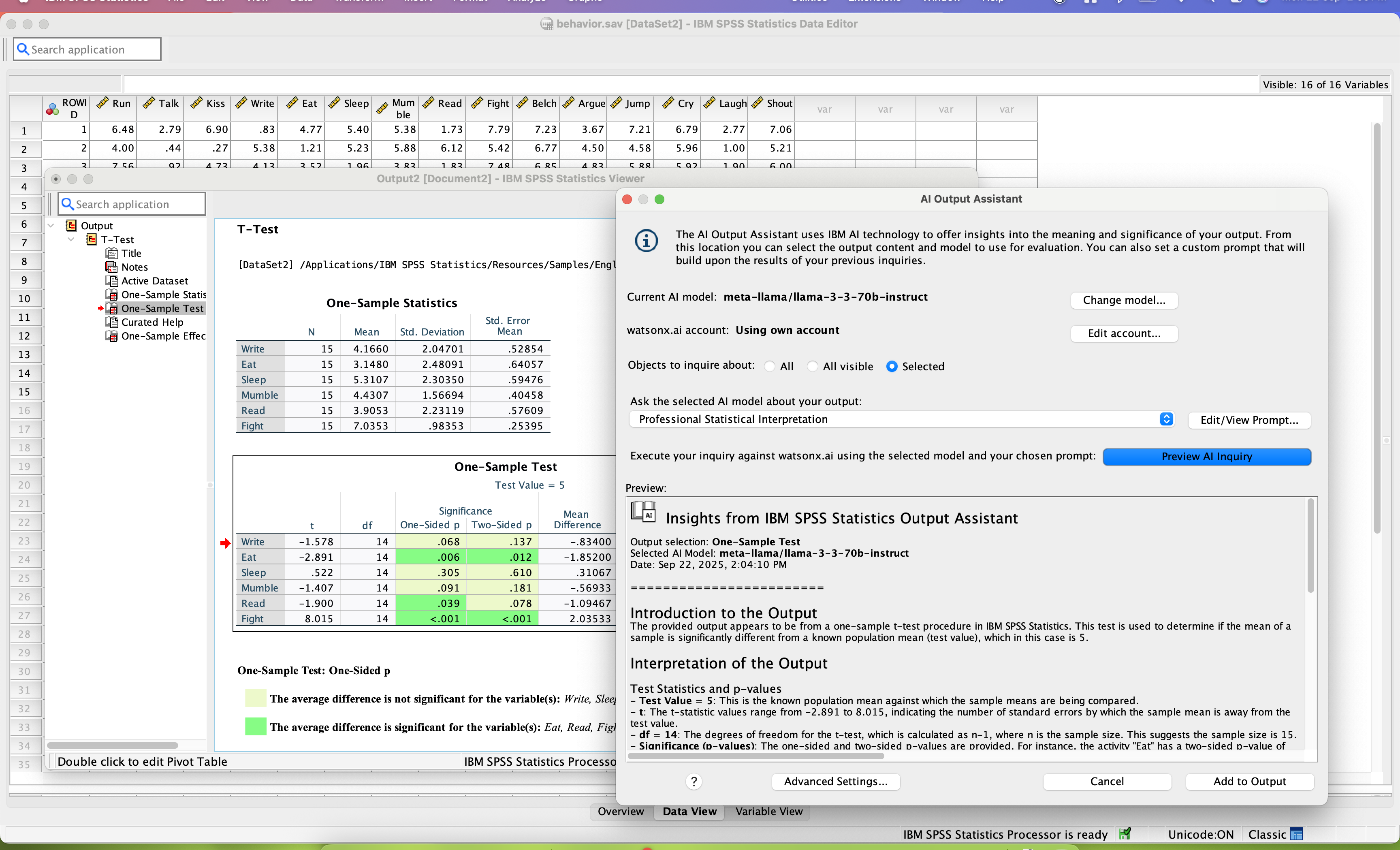
    IBM SPSS Statistics Screenshots

    Screenshot of SPSS Statistics Forecasting. This enables users to build time-series forecasts regardless of their skill level.Screenshot of SPSS Statistics Regression. These predict categorical outcomes and apply nonlinear regression procedures.Screenshot of IBM SPSS Statistics Neural Networks. These can discover complex relationships and improve predictive models.Screenshot of IBM SPSS Statistics Curated Help. These can interpret correlation output.Screenshot of IBM SPSS Statistics AI Output Assistant interprets statistical output in easy to consume language