IBM SevOne vs. Nmap

Overview
ProductRatingMost Used ByProduct SummaryStarting Price
IBM SevOne
Score 8.0 out of 10
N/A
IBM SevOne’s app-centric, hybrid network observability empowers NetOps teams with ML-driven insights, enabling proactive issue prevention and resolution. With a single source of truth for network performance, it delivers visibility to optimize operations and support agility in complex, multi-cloud environments.N/A
Nmap
Score 10.0 out of 10
N/A
Nmap is a free, open source network discovery, mapper, and security auditing software. Its core features include port scanning identifying unknown devices, testing for security vulnerabilities, and identifying network issues.
$7,980
Every Three Months per license
Pricing
IBM SevOneNmap
Editions & Modules
No answers on this topic
Nmap OEM Small/Startup Company Redistribution License - Quarterly Term Maintenance Fee
$7,980
Every Three Months per license
Nmap OEM Mid-Sized Company Redistribution License - Quarterly Term Maintenance Fee
$11,980
Every Three Months per license
Nmap OEM Enterprise Redistribution License - Quarterly Term Maintenance Fee
$13,980
Every Three Months per license
Nmap OEM Small/Startup Company Redistribution License - Annual Maintenance Fee
$14,980
per year per license
Nmap OEM Mid-Sized Company Redistribution License - Annual Maintenance Fee
$19,980
per year per license
Nmap OEM Enterprise Redistribution License - Annual Maintenance Fee
$23,980
per year per license
Nmap OEM Small/Startup Company Redistribution License - Perpetual License
$49,980
one-time fee per license
Nmap OEM Small/Startup Company Redistribution License - 5 year prepay Maintenance Fee
$59,920
Every Five Years per license
Nmap OEM Mid-Sized Company Redistribution License - 5 year prepay Maintenance Fee
$79,920
Every Five Years per license
Nmap OEM Mid-Sized Company Redistribution License - Perpetual License
$79,980
one-time fee per license
Nmap OEM Enterprise Redistribution License - 5 year prepay Maintenance Fee
$95,920
Every Five Years per license
Nmap OEM Enterprise Redistribution License - Perpetual License
$98,980
one-time fee per license
Offerings
Pricing Offerings
IBM SevOneNmap
Free Trial
NoNo
Free/Freemium Version
NoNo
Premium Consulting/Integration Services
NoNo
Entry-level Setup FeeNo setup feeNo setup fee
Additional DetailsIBM® SevOne® uses Managed Device (MD) and Managed Client Device (MCD) as pricing metrics. These can be mapped to managed devices for physical, virtualized and containerized functions in the managed environment.All perpetual licenses include a six-month trial period during which you can cancel for any reason and receive a full refund of all money paid (including maintenance). The term license is only a 3-month commitment and cal also be terminated with full refund during the first 30 days of the initial quarter.
More Pricing Information
Community Pulse
IBM SevOneNmap
Features
IBM SevOneNmap
Network Performance Monitoring
Comparison of Network Performance Monitoring features of Product A and Product B
IBM SevOne
8.9
Ratings
8% above category average
Nmap
5.3
Ratings
43% below category average
Automated network device discovery10.00 Ratings5.00 Ratings
Network monitoring10.00 Ratings10.00 Ratings
Baseline threshold calculation9.00 Ratings9.00 Ratings
Alerts10.00 Ratings3.00 Ratings
Network capacity planning8.00 Ratings6.00 Ratings
Packet capture analysis8.00 Ratings2.00 Ratings
Network mapping8.00 Ratings10.00 Ratings
Customizable reports8.50 Ratings1.00 Ratings
Wireless infrastructure monitoring9.00 Ratings2.00 Ratings
Hardware health monitoring9.00 Ratings5.00 Ratings
Best Alternatives
IBM SevOneNmap
Small Businesses
NinjaOne
NinjaOne
Score 9.0 out of 10
NinjaOne
NinjaOne
Score 9.0 out of 10
Medium-sized Companies
SolarWinds NetFlow Traffic Analyzer (NTA)
Score 9.0 out of 10
SolarWinds NetFlow Traffic Analyzer (NTA)
Score 9.0 out of 10
Enterprises
SolarWinds NetFlow Traffic Analyzer (NTA)
Score 9.0 out of 10
SolarWinds NetFlow Traffic Analyzer (NTA)
Score 9.0 out of 10
All AlternativesView all alternativesView all alternatives
User Ratings
IBM SevOneNmap
Likelihood to Recommend
8.0
(0 ratings)
10.0
(0 ratings)
Usability
-
(0 ratings)
10.0
(0 ratings)
Support Rating
-
(0 ratings)
8.4
(0 ratings)
User Testimonials
IBM SevOneNmap
Likelihood to Recommend
The software is handy and really helps us track all the issues that may occur in our network, allowing us to rectify them before any significant problems with our server can arise. It also enhances the overall performance of all our servers and networks, but, as I mentioned earlier, it will take considerable time for a beginner to become familiar with every feature of the software.
Read full review
Nmap is the ideal solution if you are working alot in network environments. If you come to grips with the syntax and the most-used features (the online community helps alot), you will be able to much more quickly and thoroughly troubleshoot networks or check for security vulnerabilities, for instance. It is free to use and is available for Windows and Linux, so I would say it is very much warrented for any network administrator or sysadmin to take it out for a spin.
Read full review
Pros
  • The software integrates well with existing systems and infrastructures, offering very customisable templates and a library of plugins.
  • Use of the software ensures real-time alerts and on-network status.
  • Software pricing is considerably more affordable than that of its competitors.
  • The ability of the software to ensure deep network visibility.
Read full review
  • Nmap is very good at discovering systems on your network.
  • Nmap is very good at guessing a systems operating system with a high degree of accuracy.
  • Nmap is good at validating externally facing systems to make sure that unauthorized access is not allowed.
Read full review
Cons
  • Documentation for the embedded help pages in NMS and more. In my opinion, these do not provide anything of any depth or maybe anything helpful at all. If anything it just seems to be a guide of what actually exists on the page. It is nicely searchable documentation though.
  • It is very surprising and disappointing for us to learn that it isn't until the latest version of IBM SevOne that bulk editing was introduced. I think this is such a basic and foundational feature that should have been a part of the original rollout. My team is still trying to configure the REST API.
  • It was disappointing for the webinar to start with a speaker who had a thick accent and simply read from slides. To me, it felt hopeless until the second speaker, who was engaging and easy to understand. It's as if this fact wasn't considered. I'm sure the first speaker lost a lot of viewers who didn't stick around to discover the 2nd speaker.
  • I asked three different questions during the webinar and none were answered.
Read full review
  • exporting, There's a serious lack of ability to export the information in a readable format to present to VPs and such. I always find myself doing a lot of data massaging to get it in a pretty format
  • some scans can trigger sensitive IDS/IPS
  • SYN scans can be particularly aggressive and cause problems on remote systems.
Read full review
Usability
No answers on this topic
Nmap uses are very practical and I don't think there is a better tools for what Nmap does. It is open-sources that therefore there is no cost to use it. It offers a number of benefits, including but not limited to network mapping, port scanning and more. It is very reliable as a network scanning tool.
Read full review
Support Rating
No answers on this topic
There is a very large support community and a robust selection of add-ons and scripts. Once you get the use down this is one of the most powerful tools and you can find anything you are looking for as far as examples on the web. While not having official support its not lacking by any means.
Read full review
Alternatives Considered
IBM SevOne was selected instead of Datadog because it is perfect for large insurance networks and also connects trouble-free between the on-premise and cloud environments. Its alerts are in real-time, it offers comprehensive dashboards and it allows to gain a better grip on the network issues, thus helping to keep the downtime small and the operations well managed thanks to the good communication.
Read full review
A similar but more basic alternative is available on Android, called Fing. It's very useful for diagnosing issues on networks when you only have your mobile device to hand.
A graphical user interface alternative to Nmap, is Zenmap. It's the official GUI for Nmap and does use Nmap under the hood. It makes things a bit more 'point and click'.
Read full review
Return on Investment
  • The software has made network monitoring simple and efficient by providing us with an integrated dashboard that give us a clear picture of our network infrastructure.
  • IBM SevOne has value for money. it is both time and expense saver.
  • Use of the software has enabled us to timely detect performance issues and solve them before they affect our IT infrastructures.
  • Use of the software has solved the issue of real-time network visibility.
Read full review
  • NMap being free of charge has a positive impact on our budget. It is an enterprise-class tool that anyone can download and use.
  • NMap, both command line and GUI, is a very advanced tool that is easy to use, so there's very little learning curve involved, which has a positive impact on productivity and security.
  • A valuable feature that is a huge time saver is that you can compare scans. This saves hours of searching manually for differences in scan results. Faster results means faster mitigation of problems, which can be a real money saver.
Read full review
ScreenShots

IBM SevOne Screenshots

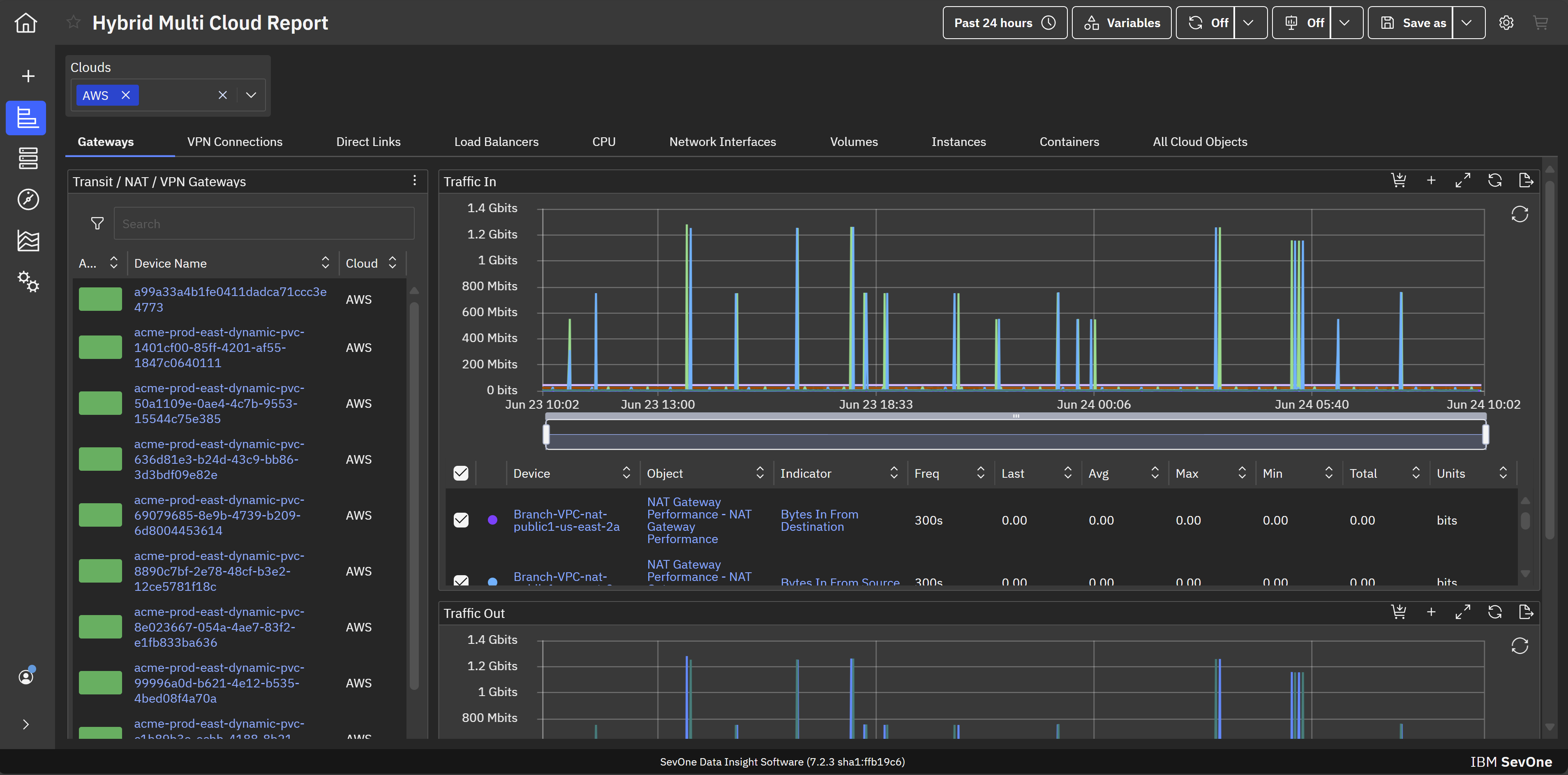
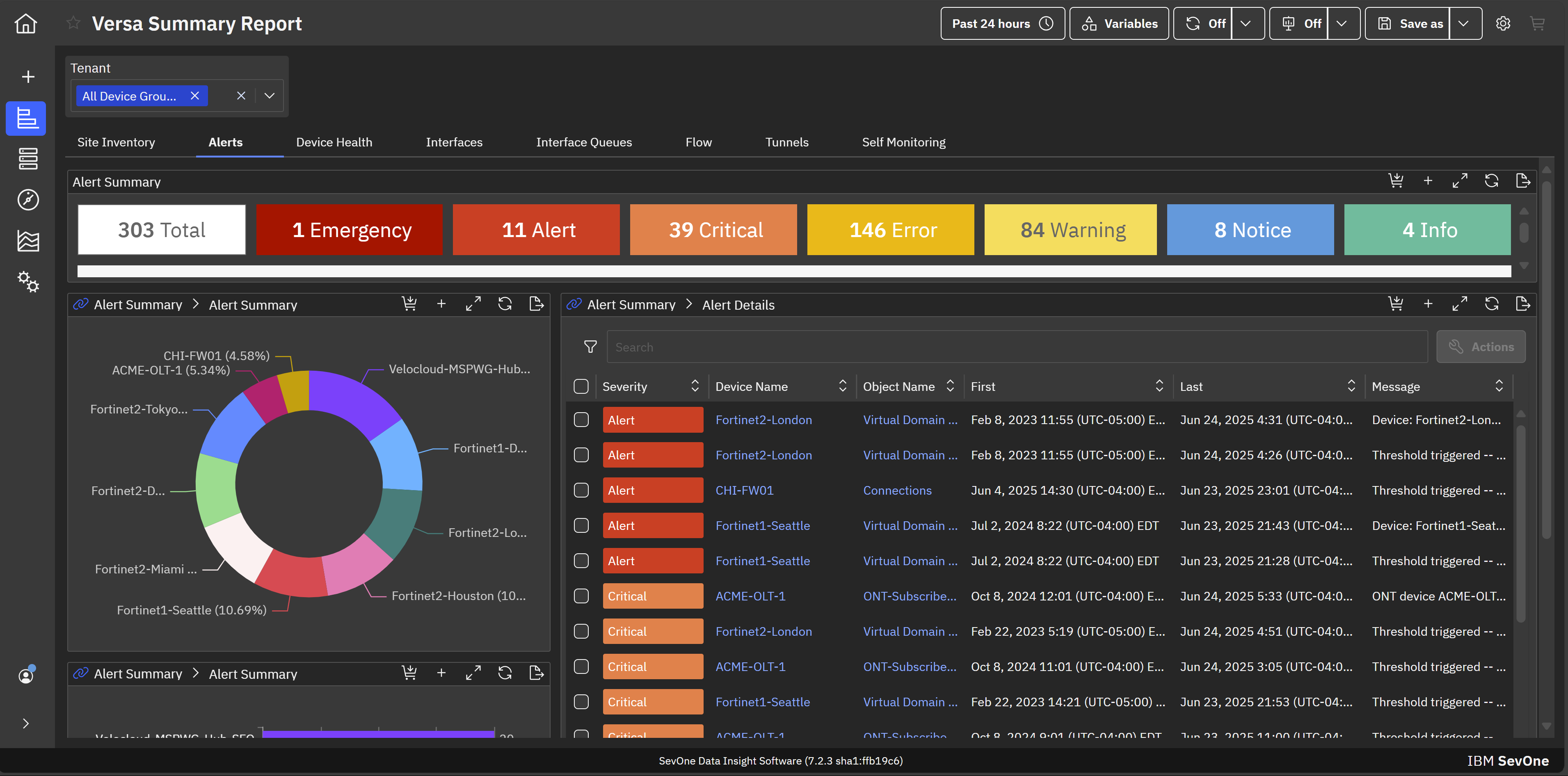
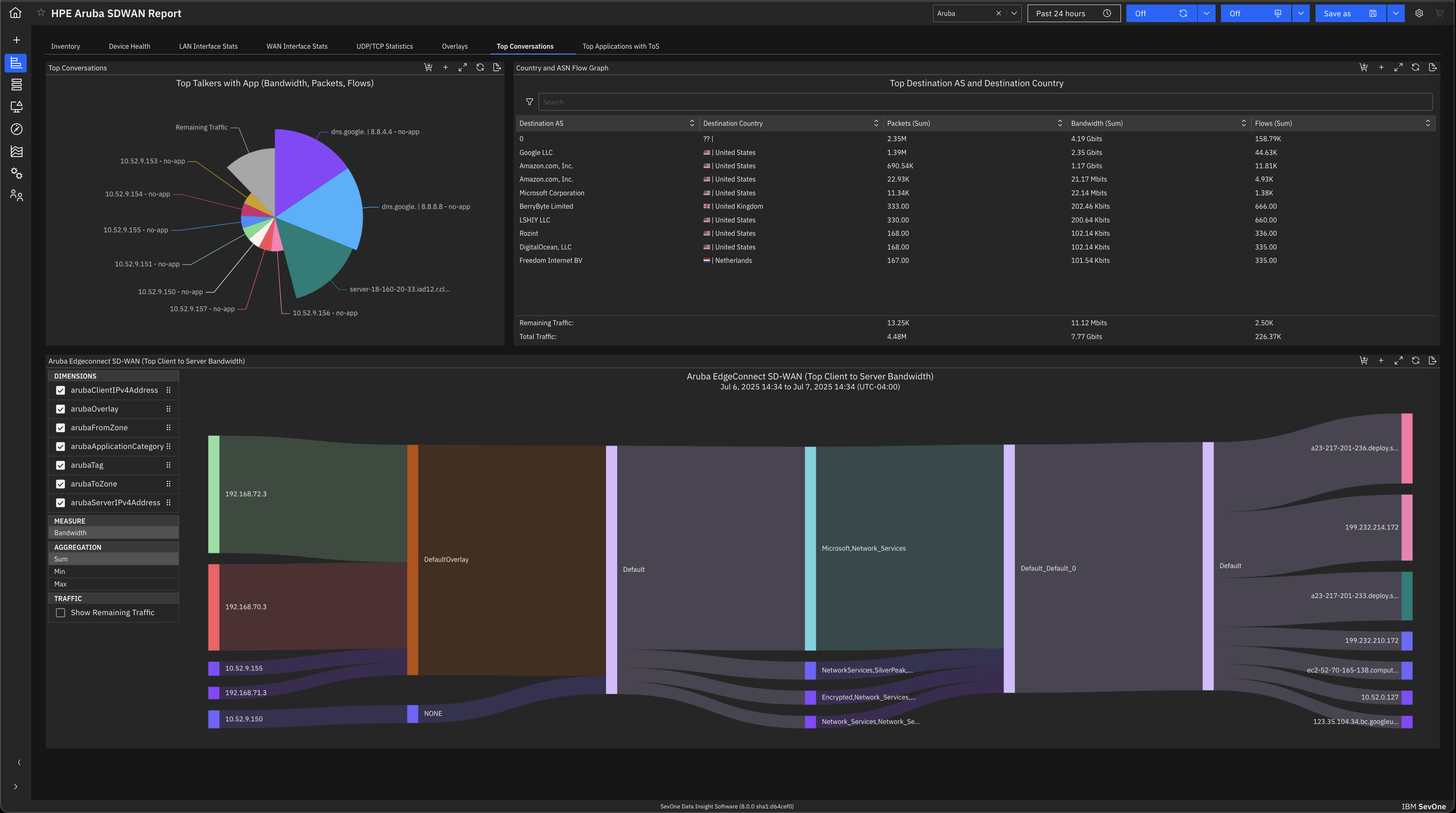
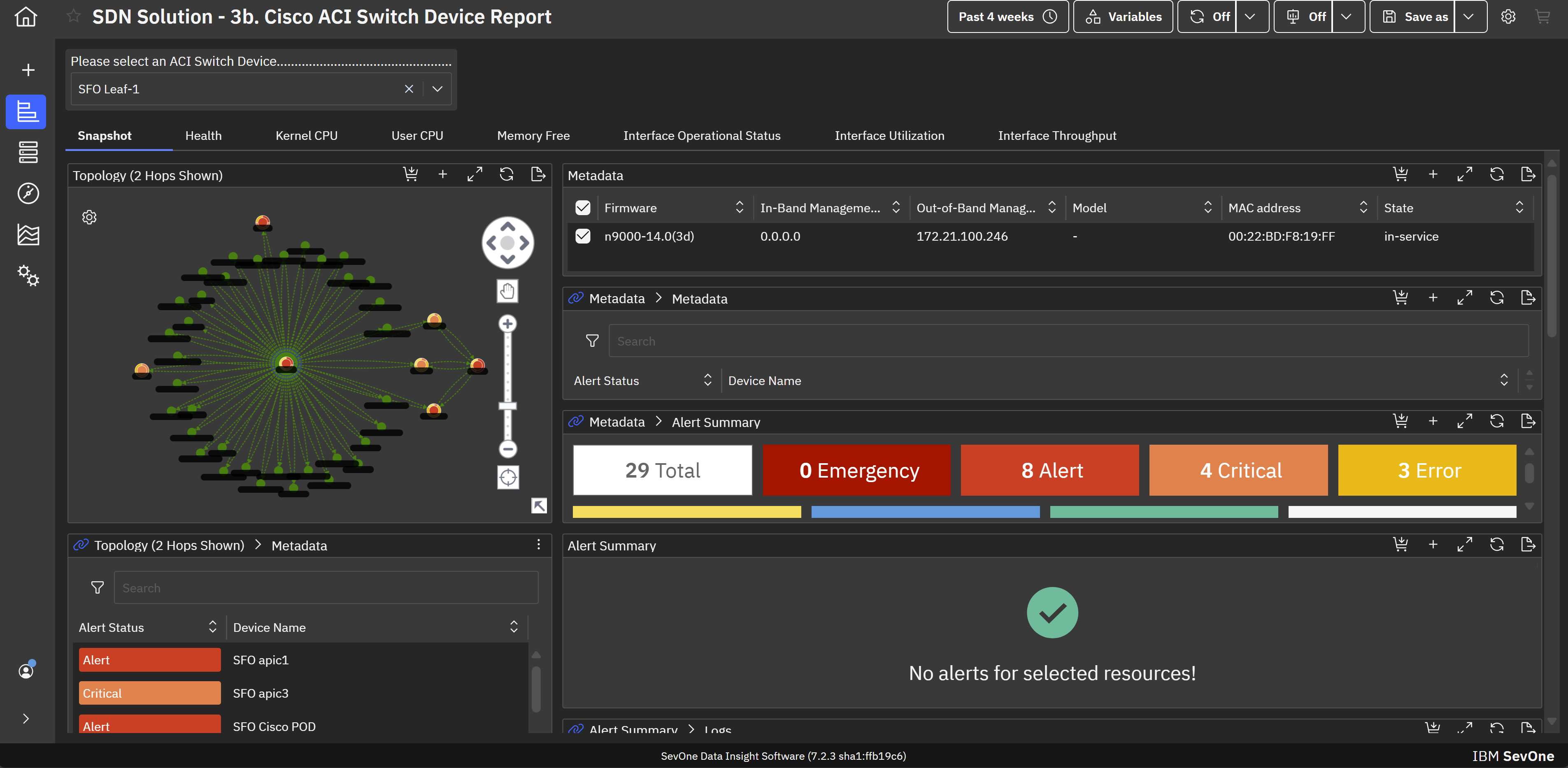
Screenshot of hybrid cloud network monitoring. This view helps achieve application-centric observability in hybrid cloud environments for maintaining optimal performance across infrastructure.Screenshot of MSP network monitoring. This provides comprehensive network monitoring and observability that empower MSPs to support enterprise clients on their hybrid multicloud journeys.Screenshot of SD-WAN monitoring. This helps mitigate the transitional risk of moving from traditional WANs to fast and dynamic SD-WAN links.Screenshot of SDN monitoring. This helps maximize the performance and value of Cisco ACI infrastructure with built-in support for monitoring Cisco ACI-based software-defined networks (SDNs).Screenshot of Enterprise wifi monitoring. This creates visibility across wifi infrastructures to assure consistent high-quality services with modern wifi monitoring and management capabilities.Screenshot of a view of the default machine learning analytics and visualizations that aid in troubleshooting, anomaly detection, and forecasting. This allows for proactive identification and troubleshooting of issues before they impact end-users.