IBM Maximo Application Suite is an enterprise asset management (EAM) platform.
N/A
UpKeep Maintenance Management
Score 7.0 out of 10
Small Businesses (1-50 employees)
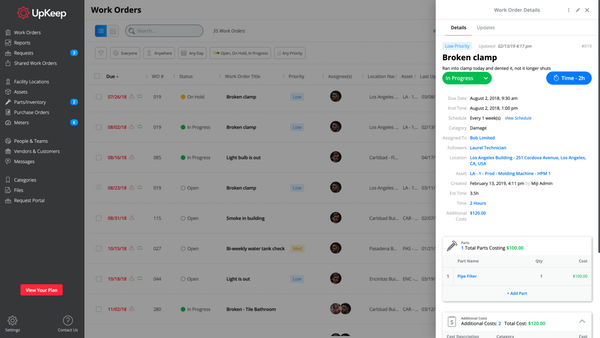
UpKeep allows users to snap a picture of a broken piece of equipment, create a work order, and schedule it for repair - all from a mobile device. UpKeep is designed for facility, property, restaurant, and manufacturing managers looking to improve communication by enabling real-time status updates for their teams. The vendor says it is a modern, intuitive, and customizable CMMS that is proven to expedite workflow processes. Capabilities include: -Add co-workers and easily assign work…
I would recommend Maximo to organizations with the patience and budget for long-term returns. It is not an easy platform to learn at first, but if you invest the time, it pays you back tenfold. It is not for people looking for a simple solution; this is a tool built for serious asset management.
Very appropriate within our business since It is so easy to use and implement. The software gives the techs more accountability and ownership of jobs, along with the ability to create re-occurring work orders for inspections and checks. I now get accurate data to report against on a weekly basis, and get KPI's to set goals for our team.
Extensive asset tracking and management. IBM Maximo is extremely capable of handling all sorts of assets so you can track every detail and part of the lifecycle of an asset inside an organization.
Highly customizable. If the broad array of possibilities inside IBM Maximo still isn't suited for your specific application, it is possible to customize it to a very high degree so it can fit the needs of your organization.
Preventive maintenance and services. With IBM Maximo, it is possible to schedule all sorts of preventive maintenance for your equipment, maximizing the uptime of your systems and machinery and minimizing unforeseen events.
Periodic maintenance needs are still a little tricky keeping in the system without flooding the user with too many work orders.
It does not immediately update all the time. For example, closing out work orders and the number of total work orders stays the same until it’s rebooted.
IBM MAS is the leader in the EAM space. They continue to evolve with the newest technology to stay on the forefront of cutting edge asset management. Their continued international growth and market share demonstrate the effectiveness of the product, its ease of use, and the return on investment of new functionalities.
The IBM Maximo Application Suite is well known for inventory management solutions. This solution is in use by many corporations but mostly I have seen its use in Ports, defense and aerospace industries. Some of the benefits are 1. asset tracking is amazing 2. Maintenance cost is less 3. Reduced inspection costs 4. Less downtime 5. It allows customization 6 Simplify data management 7. Highly adaptable
I think the platform is user-friendly but there have been some issues that colleagues have been complaining about. For example, the program tends to run slow from time to time. Reporting could be better. We could use more fields for categories under parts and assets.
I have regularly contacted IBM Support to report issues and raise requests for issues we face during project implementations. The response from them has overall been good and to the point, and they get back to us within a day or 2 and guide us through the process of fixing it or providing an interim fix of the product
I cannot say enough great things about their customer service. From the start of the purchase, Upkeep was extremely helpful and informative. They have been ongoingly keeping us informed and available to answer any of our questions as they arise. They ongoing learning portal is also helpful when new features and changes happen with the interface.
Implementation of IBM MAS as a service provider has been easy. The functionality in the OEM space has been the best of its class with all related modules and application subject to maintenance
SAP Plant Manager. We’re working a lot in critical infrastructure, so in Europe it’s not allowed by law to put asset data in the cloud, especially when it’s connected to geolocation. SAP is moving to the cloud, and IT is a cloud-only solution. So that’s the advantage of Maximo, and that’s why we’re sticking with it.
We liked the Hippo CMMS for the mapping feature - you can do an overlay of the building plan and markup the locations - but the barcode feature was not there at the time we reviewed, so there was some automation lost there. UpKeep had the barcode - but lacked the mapping. We preferred the barcode feature. Also - the mobile app for UpKeep was much more mature, and they've since added the sensors (beta) which I don't believe Hippo has yet.
A Significant improvement in Tracking and Managing Assets with a History of PM Work Orders, Asset transfers, and maintenance costs linked to procurement and inventory usage
Record accurate labor work hours with proper people management while not missing any schedules and appointments
With the Cost Management and Budgeting application, it has allowed budget controllers to make timely and proper decisions in preparing budgets, booking costs, track commitments and over commitments, and make deliverable forecasts
It's a bit too soon to speak of ROI, but being able to track issues over multiple service calls has proven to be useful, especially when it comes to holding workers accountable for their use of the machines.
It's easy to use for those who use it.
It's no harder to submit issues than it is to send an email. If you can send an email, you can submit an issue.