The ibi™ WebFOCUS® product is an enterprise business intelligence and analytics solution equipped with data management, visual discovery, predictive analytics, and visualizations. Combining these capabilities and data science in one unified containerized platform, the WebFOCUS® solution can be used to make data-driven decisions across the enterprise and provide reports, dashboards, and customer-facing applications at scale.
N/A
SAS Visual Analytics
Score 7.6 out of 10
Enterprise companies (1,001+ employees)
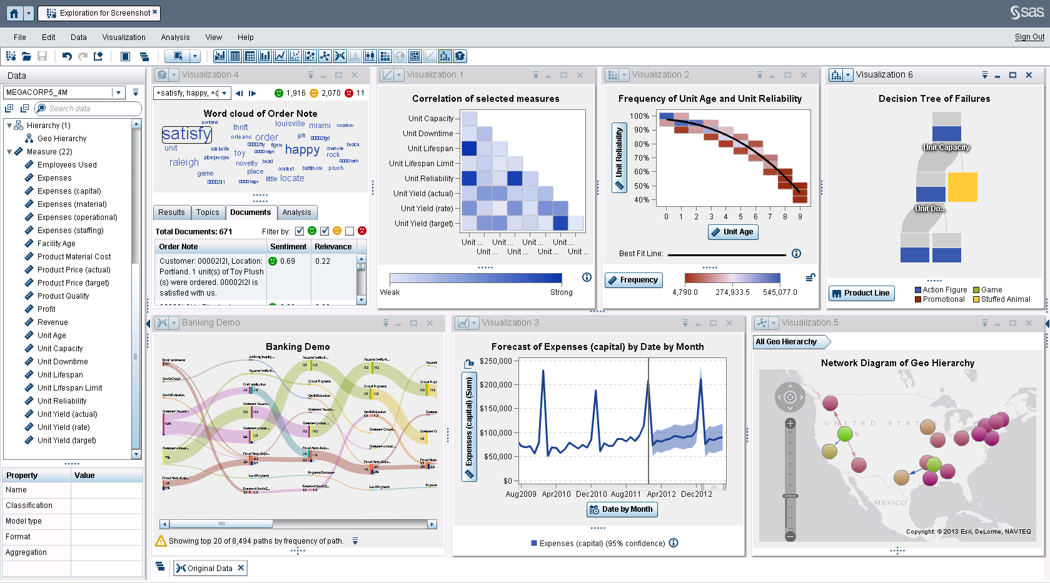
SAS Visual Analytics provides a complete platform for analytics visualization, enabling users to identify patterns and relationships in data that weren't initially evident. Interactive, self-service BI and reporting capabilities are combined with out-of-the-box advanced analytics so everyone can discover insights from any size and type of data, including text.
N/A
Pricing
ibi WebFOCUS
SAS Visual Analytics
Editions & Modules
No answers on this topic
SAS Visual Analytics for SAS Cloud
$0
Annual By Users: 5, 10, 20
Offerings
Pricing Offerings
ibi WebFOCUS
SAS Visual Analytics
Free Trial
No
Yes
Free/Freemium Version
No
No
Premium Consulting/Integration Services
No
No
Entry-level Setup Fee
No setup fee
No setup fee
Additional Details
—
SAS Visual Statistics and SAS Office Analytics are also available as add-ons.
More Pricing Information
Community Pulse
ibi WebFOCUS
SAS Visual Analytics
Features
ibi WebFOCUS
SAS Visual Analytics
BI Standard Reporting
Comparison of BI Standard Reporting features of Product A and Product B
ibi WebFOCUS
7.7
Ratings
6% below category average
SAS Visual Analytics
8.3
Ratings
2% above category average
Pixel Perfect reports
7.00 Ratings
8.00 Ratings
Customizable dashboards
9.00 Ratings
8.00 Ratings
Report Formatting Templates
7.00 Ratings
9.00 Ratings
Ad-hoc Reporting
Comparison of Ad-hoc Reporting features of Product A and Product B
ibi WebFOCUS
9.3
Ratings
14% above category average
SAS Visual Analytics
8.8
Ratings
9% above category average
Drill-down analysis
8.00 Ratings
9.00 Ratings
Formatting capabilities
10.00 Ratings
8.00 Ratings
Integration with R or other statistical packages
9.00 Ratings
8.00 Ratings
Report sharing and collaboration
10.00 Ratings
10.00 Ratings
Report Output and Scheduling
Comparison of Report Output and Scheduling features of Product A and Product B
ibi WebFOCUS
8.2
Ratings
1% below category average
SAS Visual Analytics
9.2
Ratings
10% above category average
Publish to Web
10.00 Ratings
9.00 Ratings
Publish to PDF
8.00 Ratings
9.00 Ratings
Report Versioning
6.00 Ratings
9.00 Ratings
Report Delivery Scheduling
10.00 Ratings
10.00 Ratings
Delivery to Remote Servers
7.00 Ratings
9.00 Ratings
Data Discovery and Visualization
Comparison of Data Discovery and Visualization features of Product A and Product B
WebFOCUS is a good comprehensive tool for BI for companies. I feel that scenarios where you want the user to interact and be able to ingest data in different formats would be a good use of the tool. Performing data discovery is easier with InfoAssist, especially the most recent versions, and allows users to customize their views and provide comments.
SAS Business Intelligence is more suited to organizations which are already using SAS as the primary software for their analytics needs. Learning curve is relatively shorter for teams already skilled in BASE SAS. For organizations already working with open source software like Julia and Python, it doesn't make much sense to use SAS BI.
Webfocus reports all have the option to export to Excel. The excel spreadsheet is always very organized and clean, and the information is very easy to read.
Webfocus is able to maintain data from years prior. We can look up what we featured in catalogs and all the sales history attached with it.
Webfocus is able to provide support to a variety of departments. For example, our buying team uses it for planning in advance and our marketing team uses the tool to see how categories and products as the selling
SAS BI makes it very easy to create interactive dashboards even for someone who is not from an IT background. For some specific requirements, basic knowledge of SQL is good enough.
A lot of functions have been predefined which makes it very convenient to create dashboards and reports. One doesn't need to be from an IT or a programming background to understand and create dashboards.
It supports other programming languages like R and also has a seamless API integration with various data management platforms.
This software is deeply engrained with my organization and has become a tool that would not easily be replaced without spending more money and resources to get the same results. License cost is comparable to other report writing tools and the capabilities are greater than the competition without having to buy multiple apps to do the same thing.
There is no other product that can match SAS. There are some products that can compare to ETL but lack the analytics that SAS has. Others can perform a limited set of analytical procedures but lack the data processing that comes with SAS. Using thin client allows users to access data whenever they have an internet connection.
Best BI tool/product I have used. The others don't compare overall. Some can look fancier, but when you actually use them with large data and data from numerous systems/sources that is where most of the competition falls away. I also don't like downtime. I have basically none for a large user base with WebFocus. Even SAP Crystal Reports went down for 4 days once - 4 days because the admin password got locked out due to a glitch and we had zero reports for 4 days. WebFocus has never had more than a few minutes of downtime. It's like a tank that just keeps rolling. There is no other choice for reliable BI.
SAS BI is good for creating reports and dashboards and then sharing it with the users. It also has ability to manage access to the reports and dashboards but somehow with most of the world moving to open source languages R, Python and Julia, SAS BI feels to be archaic in terms of feature set and integrations it allow[s]. Also, comparing it with other Business Intelligence tools like Tableau and Microsoft BI, the functionality of SAS BI is very limited and doesn't justify the pricing.
They have extremely knowledgeable techs that I have worked with over the years. Some have actually become really good friends of mine. I see them often at local user groups and when we show them how we are using their tools to save millions of dollars throughout the company
When you call tech support, you are immediately routed to a person who can answer your question. Often they can answer on the spot. However, if they cannot, you are given a track number and then followed up with. There have been times when I have had multiple track numbers open and they will actually TRACK YOU DOWN to ensure that your problem has been resolved. Issues do not fall into black holes with SAS. They are also willing to do a WebEx with you to diagnose the problem by seeing your environment, which is always helpful.
Plan ahead on what data will be accessible and the type of security required on the database and if you will want to use security that is built into the software. It is worth consulting with the vendor on what your plan is and how they recommend you proceed in order to get results you are happy with.
Above average. Feature wise [Information Builders WebFOCUS] stands out. User friendliness is OK. It can handle the most complex tasks and its extensions with for example R make it extremely versatile. Support is lagging in western Europe, although i am more than happy with current level. With takeover by tipco it remains to be seen how European strategy will evolve
I have chosen SAS Visual Analytics because one of my colleagues suggests using the software for the same for our work. As earlier, we use to take a lot of time in analyzing the data but after using the SAS Visual Analytics software our work has improved and time has decreased. It's very helpful for us.
We are not yet a success story. Though we've been implementing WebFOCUS for over a year, we have very few products in our Production portal. Of course, this is not all the responsibility of Information Builders, but we were ill-advised by our 'training coordinator' in our training of staff and coming up to speed with the tools has been very slow.
Once skilled analysts and professional IT staff achieve a grasp of the products, they are able to very quickly create polished and well-received products.
The DW/BI project has helped us to establish standards and protocols of communication that will allow us to more quickly meet knowledge transfer requirements