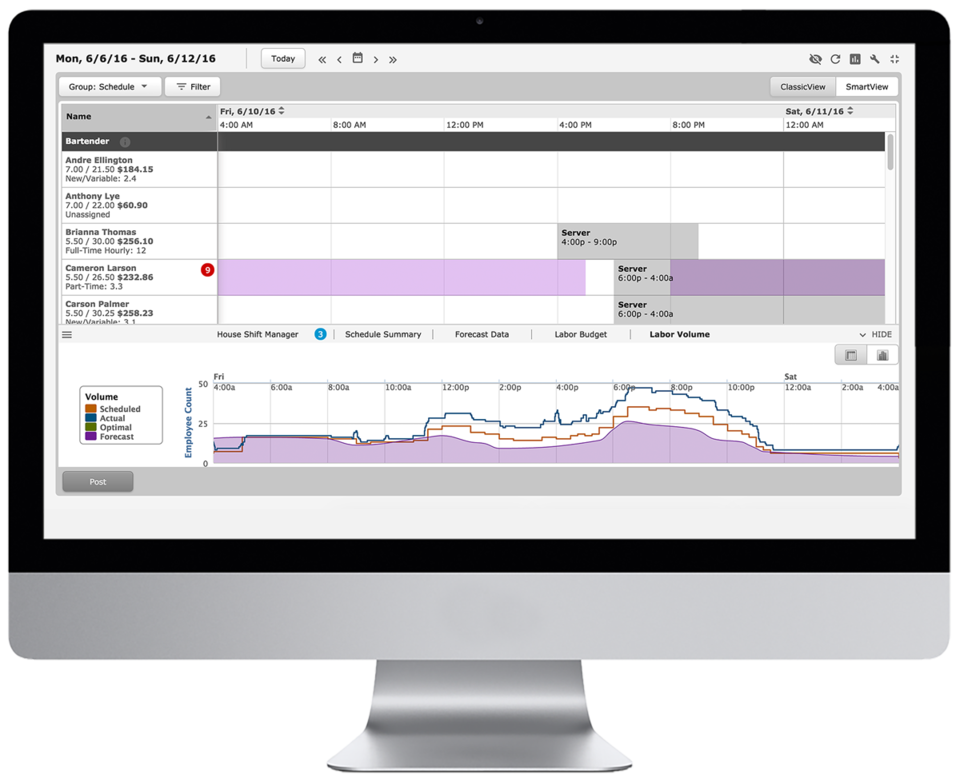
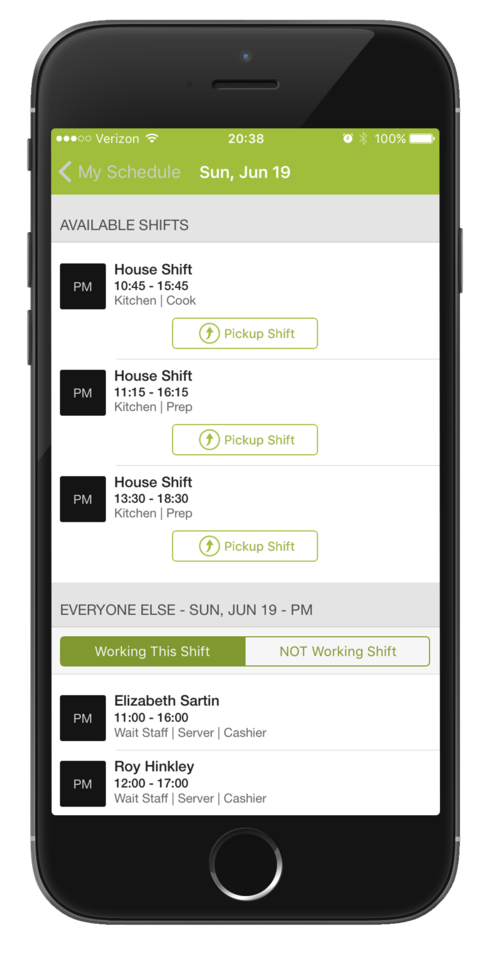
HotSchedules is a cloud-based scheduling, labor and communication management software solution serving the restaurant and hospitality industry. According to the vendor, key benefits include: Build & Communicate Schedules The scheduling and labor management software reduces the time it takes managers to create and communicate schedules. All scheduling and employee information is stored in one central location, so managers have access to time-off requests,…
$2
per month per employee
UKG Workforce Central (discontinued)
Score 5.1 out of 10
N/A
UKG Workforce Central (formerly Kronos Workforce Central) was a suite of HR Management offerings targeted mainly at enterprise customers with larger-scale and more complex HR and workforce management issues. The product is discontinued.
HotSchedules can be implemented in any organization that has to staff a store with varying hours. I have recommended this to my colleague who has 8 employees, yet he has seen great results with the shift swaps and availability tracking/time off requests. I do wish we could see some more attention to general staffing and training VS. the heavy emphasis on restaurant businesses. It feels HotSchedules has grown into many more areas and should work away from marketing so directly to restaurant businesses. Some training programs for other business would be a welcome sight.
We use Kronos Workforce Central only for it's timekeeping and scheduling/forecasting capabilities. It absolutely meets our needs for these areas. The reporting functionality also serves us well; exporting reports in excel covers the needs for most teams that use the system. Finally, business leaders and local HR crews are able to run reports on the teams they support.
All the information needed for your employees can all be found in one place. From the availability of an employee to their pay rate to their phone number. It's all just a click away. Before HotSchedules all of this information was kept in different places and the managers would need to open several documents and contact lists to find what they were looking for about a single employee.
Control over how indepth you use the product. The possibilities of this service are seemingly endless. However if you are solely looking for a specific feature HotSchedules offers you have the ability to soley use that feature. HotSchedules can simply schedule, or it can automatically schedule, or you can assign a specific job to a specific person on a specific day. For us, we have employees who are doing a specific job/task one week and then they are needed for a different job/task the next week. HotSchedules allowed us to narrow down our options starting with department, moving to location, moving down to the job they would be preforming for that scheduled day.
The ease of changing/releasing shifts. If an employee wants more hours they can go in and select shifts that are up for grabs or request to work on a specific day at a specific time. The opposite is also true. If an employee is worried they will have too many hours that week, they can release their shift and put it up for grabs by a different employee. And of course, all of this is fairly customizable to what you want your employees to have the ability to do, with or without your intervention and approval. In our case, if a shift lead releases a shift we only want other shift leads to be able to pick up the shift. HotSchedules allows us to do just that.
As a full service hospital there can be demands of staff to respond to high census or staffing shortages. Kronos has offered great utilization in floating hours between units and departments, identifying direct or indirect patient care hours, and ultimately offering analytics to clinical and operational leaders. This ability to specifically move hours while at work is exceptional for reporting and planning purposes across the organization.
The self-managed and leader managed options of an employee’s time card is of huge benefit. As a 24/7 hour operation it is critical that each individual is accountable for their own timekeeping. Kronos allows each employee to manage and submit adjustment, updates, and changes while at work without having to have their manager do it for them. The proceeding approval/acceptance process with these changes is well established and easy to authenticate.
The ability to access and navigate the user interface is very friendly and forgiving. Other systems can be quite cumbersome and hard to navigate, update, and easily change, but Kronos is pretty straight forward both for users and administrators. This ability to easily orient new team members and managers has been a great benefit to the organization.
Training required to use the product effectively, not simple at first
Dependent on Java, frequent updates to Java necessary to continue using the Kronos platform
Reporting tools are extensive and solid, though some reports can only be extracted in PDF, not in the more usable Excel format. How Kronos determines which can be extracted in Excel vs. PDF, I can't tell.
Now that the system is installed and operational, the "pain is gone"...therefore we see no reason to change to a different application. There is no functionality that is missing from the system that would drive us to consider another solution at this time. Maintenance support from Kronos is sufficient and updates occur regularly.
6 Years of Experience provides me the insight on the upgrades and changes that HotSchedules has done to improve the experience of its users. There are so many features that we still have not started or used to the fullest, but we believe that we are currently getting a strong value out of the money that is paid for this product.
Always cheerful, informative, and educated staff. Each person seems to want to find a way to help us with any issues or questions we have. I love that all the staff is friendly and in a good mood when you call, I have never had a rep be unhelpful or short tempered, or ever less than accommodating to our needs!
Kronos Workforce Central's support is amazing! From the support the software alone gives our department to the customer service team, we have never been more thorough as we are now. There are plenty of trainings provided and assistance is always there when you need it. The launching process was very detailed.
HotSchedules was the first to tie into a POS to control clocking in and out for employees compared to a canned product from major POS providers. HotSchedules is more widely used by hourly employees in the industry, so there is less of a training curve.
We looked this product first and actually started the conversion process before we realized it could not do some essential functions we needed. One of the simple ones was allowing for employees to select to clock in or out and not just assume the direction based on their schedule or last punch. With bus drivers working multiple routes or shifts this was imperative that they be able to select this as while they may forget one punch being able to select the direction helps identify where the missing punches are. I'm hoping this has since been corrected because it absolutely floored me that such a relatively simple thing was not an option.
Saving time on scheduling means our managers can focus more on guest experience, managing the floor and other areas that contribute to the success of our business.
Kronos is much more expensive than the previous systems we were using, so at this point the ROI is negative. The idea is that it will allow us to scale and grow the company more easily so time will tell if that is the case.