HotGloo vs. OmniGraffle

Overview
ProductRatingMost Used ByProduct SummaryStarting Price
HotGloo
Score 8.0 out of 10
Small Businesses (1-50 employees)
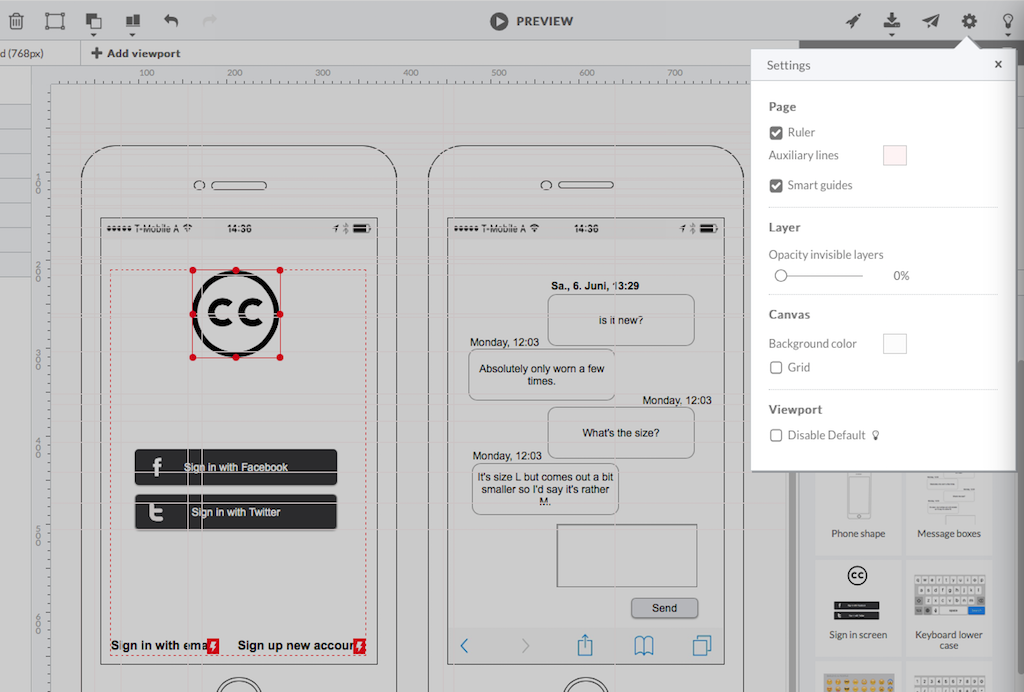
HotGloo is an online wireframing and prototyping tool. This solution has been designed for all those engaged in the concept, design and development of web or app projects: project managers, information architects, usability experts, freelancers, concept people, digital agencies, web companies, publishers, web designers, web developers and many more. The vendor’s value proposition is that this solution makes it easy to wireframe web and mobile sites and to collaborate with others due to the…
$13
up to 4 users, 2 active projects, unlimited reviewers
OmniGraffle
Score 9.1 out of 10
N/A
OmniGraffle is a wireframing tool for Mac users.N/A
Pricing
HotGlooOmniGraffle
Editions & Modules
Group
$13
up to 4 users, 2 active projects, unlimited reviewers
Team
$27
up to 10 users / 6 active projects / unlimited reviewers
Agency
$54
up to 20 users / 15 active projects / unlimited reviewers
Enterprise
150 +
More users and projects, priority support. Get in touch for an individual quote.
No answers on this topic
Offerings
Pricing Offerings
HotGlooOmniGraffle
Free Trial
YesNo
Free/Freemium Version
NoNo
Premium Consulting/Integration Services
NoNo
Entry-level Setup FeeNo setup feeNo setup fee
Additional DetailsThe billing period starts on the day you upgrade from the free trial to a paying plan. If you pay by credit card the service is billed in advance on a monthly basis and is non-refundable. There will be no refunds or credits for partial months of service, upgrade/downgrade refunds, or refunds for months unused with an open account. If you do choose to cancel your account in the future, you will never be charged again, but you are responsible for charges already incurred up until your cancellation. For monthly recurring payments we accept Visa, MasterCard and American Express through our online payment system. You can also prepay any account for 12 months with credit card. In certain cases we also take money transfers – please contact us beforehand if you want to use this option.
More Pricing Information
Community Pulse
HotGlooOmniGraffle
Best Alternatives
HotGlooOmniGraffle
Small Businesses
OmniGraffle
OmniGraffle
Score 9.1 out of 10
MindManager
MindManager
Score 8.3 out of 10
Medium-sized Companies
OmniGraffle
OmniGraffle
Score 9.1 out of 10
Cvent Event Diagramming
Score 9.5 out of 10
Enterprises
OmniGraffle
OmniGraffle
Score 9.1 out of 10
Cvent Event Diagramming
Score 9.5 out of 10
All AlternativesView all alternativesView all alternatives
User Ratings
HotGlooOmniGraffle
Likelihood to Recommend
7.8
(0 ratings)
10.0
(0 ratings)
Likelihood to Renew
-
(0 ratings)
10.0
(0 ratings)
Support Rating
-
(0 ratings)
10.0
(0 ratings)
User Testimonials
HotGlooOmniGraffle
Likelihood to Recommend
HotGloo is well suited to a dispersed team of users who are looking to collaboratively wireframe and prototype their latest web solutions. It's extremely intuitive and comes with a large widget library meaning the newest user can be up and running very quickly. In browser access means it's extremely accessible whether you're working in a room together or across the country at home.
Read full review
As I said earlier in this review, OmniGraffle does an excellent job with arcs if they are created in OmniGraffle. The same is not true if the drawing I'm working on was imported from Visio. In that case, I need to just start all over with the arc lines, and that is not often a reasonable option.
Read full review
Pros
  • Elements Library
  • Symbols Library
  • Interface supports workflow
Read full review
  • The ability to easily map out process flows for users of a wide range of tech comfort levels—The design is intuitive enough for even people with lower tech comfort levels to visually chart process flows. We have never had to do significant onboarding for less tech-savvy colleagues—this is a huge timesaver!
  • Collaborative mind mapping—OmniGraffle is a great platform to get together with people and brainstorm ideas in the early stages of a project, then link ideas together to create visual relationships to inform business and product design decisions.
  • Communicating strategy to stakeholders—Communicating the complexities of a workflow to stakeholders is a lot easier and more effective, with a diagram that clearly shows the relationships between factors rather than showing them a PowerPoint that, because of its slide-by-slide nature, makes it difficult to consistently show how different factors play into an overall workflow.
Read full review
Cons
  • logical structure of interface objects
  • preview view does not scale frame on small screens
  • Tool ribbon
Read full review
  • No support for team collaboration. I would really like to see a way to share files to iCloud so that others can access and edit.
  • Better print settings. If you're trying to print a document across many pages, it's not easy to make this happen.
  • No ability to pre-configure settings. For example, I have to manually change the unit of measure from "inches" to "pixels" when I create a new document, would like the ability to change that fundamentally.
Read full review
Likelihood to Renew
No answers on this topic
Best product for my needs on the market
Read full review
Support Rating
No answers on this topic
OmniGraffle is an excellent application for chart and diagrams development. Been using it for a while now and it's a multiple platform application.
Read full review
Alternatives Considered
HotGloo is tailored to this use case and therefore considers the right user needs. I think one strength is that it focuses on the main aspect. There are other tools, that have more extensive features. However, those are then more complex and not so well made for the specific work I use it for. Thus, I like HotGloo also because of the element and symbols library. Which has the right depth and detail - no more, no less then needed.
Read full review
Because we're primarily a Mac shop, Visio was a non-starter. (It's monstrously complex compared to OmniGraffle, which works against the quick-and-dirty just-enough-documentation ideal common on agile teams.) We've used draw.io on internal projects and when coordinating with external teams, but a web-based tool was too awkward for heavy use and bogged down with complex documents. For us, OmniGraffle sits in the "sweet spot" between complex data-driven modeling tools and lightweight "drawing" programs that force too much manual labor when doing heavy diagramming work.
Read full review
Return on Investment
  • Build more wireframes quicker and deliver to client and provide options.
Read full review
  • I've created multiple OmniGraffle template files that I use constantly. I create covers for our proposals in OmniGraffle with pictures of the the client's buildings or sites. All I need to do is drag and drop the image into the template, change the title and client name and address accordingly and it's ready to go.
  • Using templates in OmniGraffle has saved lots of time.
  • Using OmniGraffle to design drawing details for construction documents has allowed us to land projects, purchase orders and new clients to the tune of hundreds of thousands of dollars.
Read full review
ScreenShots

HotGloo Screenshots

Screenshot of HotGloo 24/7 run & test anywhere.Screenshot of Responsive wireframing with different viewports.Screenshot of Create mobile app wireframesScreenshot of From desktop over tablet to mobile.