HID DigitalPersona (formerly Crossmatch) provides a comprehensive multi-factor authentication solution. The vendor’s value proposition is that their solution frees users from cumbersome login activities while making it easy for an IT Team to secure access to their networks, data and applications.
$3.75
per user per month
WatchGuard AuthPoint
Score9.2 out of 10
N/A
AuthPoint Total Identity Security provides businesses with a solution to protect user accounts and credentials. With
multi-factor authentication and dark web credential
monitoring, AuthPoint mitigates the risks associated with workforce credential
attacks. AuthPoint adds an extra layer of security by monitoring for
potential credential exposure in the dark web for both personal and corporate
accounts.
During the onboarding process, remote workers can enroll their fingerprints or create secure PINs. This eliminates the need for complicated passwords and enables them to safely access company resources and critical apps from remote locations. HID DigitalPersona's robust authentication techniques and access control features can assist you in adhering to data security laws.
A de minimis incentive was given to thank the reviewer for their time. The incentive was not used to bias or drive a particular response, nor was the incentive contingent on a positive endorsement. TR verified that a representative sample of customers was invited. More Info
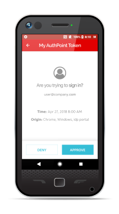
We use multiple authenticators at my company. We use WatchGuard AuthPoint just for our VPN for security purposes. The app works very well and over the past year we've only had a handful of issues with the authentication service, and these were resolved relatively quickly. We do have to remind people to enable push notifications from the app, or have the app open when they need to use it to authenticate, otherwise they won't get the push to approve. The biggest issue I've found is that people will forget to do this and then say that the VPN isn't working - the VPN is working, it's just that they didn't get/approve the push from AuthPoint in time.
A de minimis incentive was given to thank the reviewer for their time. The incentive was not used to bias or drive a particular response, nor was the incentive contingent on a positive endorsement. More Info
Speeding up the login process with fingerprint in PIN rather than having to remember a long password. Our IT department has seen a huge decrease in the amount of account lockout and forgot password calls.
It is highly customizable to meet the needs of remote or on-premises workers. It is all configurable through group policy, so it is very easy to set specific requirements on certain groups.
Setup was quick and the administration guides are very easy to follow if you need to go back in and adjust things.
A de minimis incentive was given to thank the reviewer for their time. The incentive was not used to bias or drive a particular response, nor was the incentive contingent on a positive endorsement. TR verified that a representative sample of customers was invited. More Info
Works well with the free Authpoint client and the OpenVPN clinet.
Token management is simple and hosted completely in the cloud to reduce overall complexity
Setup was simple and and staighforward
Suppports several authentication methods we have used both RADIUS and SAML effectively, but ADFS, IDP, RDWeb, and RESTful API, and other custom apps are supported.
Geofencing for RDP has been very useful as it is independant of our firewall geofencing. This is quite useful for organizations like us who do not Geofence at at the firewall level so as to provide global access to resources on the DMZ.
A de minimis incentive was given to thank the reviewer for their time. The incentive was not used to bias or drive a particular response, nor was the incentive contingent on a positive endorsement. More Info
I find that sometimes I have had to delete a users fingerprints and re-add them. There must be something going on where the software believes that the user has changed their fingerprints.
I have on occasion come across a person where the reader was unable to create fingerprints for that user. It would be interesting to see if the sensitivity of the 4500 reader could be improved on.
I find that using the DigitalPersona software makes the users ultimately forget their passwords. Maybe every once in a while the software could require the user to type in their Windows password to help them remember it.
A de minimis incentive was given to thank the reviewer for their time. The incentive was not used to bias or drive a particular response, nor was the incentive contingent on a positive endorsement. TR verified that a representative sample of customers was invited. More Info
Email support is SLOW unless I want to allow a stranger to access my production firewall. That is never allowed here, so our hands are tied in terms of being able to get support in less than 48 hours.
Again, support takes far too long because you refuse to employ any staff that works in US time zones during normal business hours.
There has to be another option besides: 1) you take full control of my systems or 2) I wait on SLOW email support that isn't that great.
A de minimis incentive was given to thank the reviewer for their time. The incentive was not used to bias or drive a particular response, nor was the incentive contingent on a positive endorsement. More Info
It is wonderful for multifactor authentication and gives us many options for what we use to authenticate. All of our users use it and it is engrained into our group policies and people would be very disappointed if it went away.
A de minimis incentive was given to thank the reviewer for their time. The incentive was not used to bias or drive a particular response, nor was the incentive contingent on a positive endorsement. More Info
Today to ensure our ISO 27001 certification it is important that we maintain this solution. Today it is part of the way any employee within the organization works, we no longer have any other way of working and it is the simplest way to ensure that access to the workstation is done with MFA.
A de minimis incentive was given to thank the reviewer for their time. The incentive was not used to bias or drive a particular response, nor was the incentive contingent on a positive endorsement. More Info
I think there are still fundamental enhancements needed to be added to the management consoles and I think there ought to be a Centralized, Windows Based "Thick" Management Application instead of individual utilities which vary from MMCs, Scripts, Wizards, etc.
A de minimis incentive was given to thank the reviewer for their time. The incentive was not used to bias or drive a particular response, nor was the incentive contingent on a positive endorsement. TR verified that a representative sample of customers was invited. More Info
After initial setup, it practically runs itself. Onboarding new users is fast and easy as it should be. The AuthPoint mobile app is small and simple to use. The only reason I do not give it a 10 is that I frequently get complaints from end users that the AuthPoint app is "constantly downloading". In fact, it's not downloading anything and that what the users are seeing in the app is a timer for the 6-digit code that changes every minute.
A de minimis incentive was given to thank the reviewer for their time. The incentive was not used to bias or drive a particular response, nor was the incentive contingent on a positive endorsement. More Info
A de minimis incentive was given to thank the reviewer for their time. The incentive was not used to bias or drive a particular response, nor was the incentive contingent on a positive endorsement. More Info
A de minimis incentive was given to thank the reviewer for their time. The incentive was not used to bias or drive a particular response, nor was the incentive contingent on a positive endorsement. More Info
Extremely poor; I've never encountered such. Professional Services completely dropped us for months. Crossmatch tech support seems like it has 3 techs tops! No response to emails, calls, the absolute worst! I will never recommend DP to anyone.
A de minimis incentive was given to thank the reviewer for their time. The incentive was not used to bias or drive a particular response, nor was the incentive contingent on a positive endorsement. TR verified that a representative sample of customers was invited. More Info
WatchGuard support is always quick and reliable. They have urgency levels that you are able to select when creating your support ticket, and they respond in accordance to the severity that you have set. I have never had an issue with getting someone on the phone in the same business day, even for very low priority issues.
A de minimis incentive was given to thank the reviewer for their time. The incentive was not used to bias or drive a particular response, nor was the incentive contingent on a positive endorsement. More Info
It was an Onsite demo at the ditributor with the benefits of Watchguard Authpoint. Was very nice to see the abilities of the product. This Demo was a few years back, since then Authpoint changed allot. It is very nice for partners that you can get this demo without any aditional cost.
A de minimis incentive was given to thank the reviewer for their time. The incentive was not used to bias or drive a particular response, nor was the incentive contingent on a positive endorsement. More Info
We use the online training for all our employees. There are both sales and technical trainings available and there even is a technical certification. You can use this for the Watchguard Partner Program which can give you aditional benefits. Every now and then you have a webinar that discusses multiple Watchguard products.
A de minimis incentive was given to thank the reviewer for their time. The incentive was not used to bias or drive a particular response, nor was the incentive contingent on a positive endorsement. More Info
Could use tools to audit license usage at a more granular level as to allow an administrator to free up licenses from users whom seldom use their biometrics to login.
A de minimis incentive was given to thank the reviewer for their time. The incentive was not used to bias or drive a particular response, nor was the incentive contingent on a positive endorsement. TR verified that a representative sample of customers was invited. More Info
the first time it takes more effort. It is helpful to already understand how each authentication type works. Then it's much easier to understand the MFA solution that you implement. It is useful to check the release notes from time to time and update the key parts of the Watchguard Authpoint. Authpoint Gateway, Logon App, RDWeb... Also, it's useful to set up notifications when something goes wrong or sometimes check the statistics of how many requests are being approved/denied, etc.
A de minimis incentive was given to thank the reviewer for their time. The incentive was not used to bias or drive a particular response, nor was the incentive contingent on a positive endorsement. More Info
We have used One Identity for software tokens. The Defender software tokens were originally included with our bundle and work pretty well for integration into the AnyConnect VPN client with Cisco. All that said, we use the two products for different applications and DP does what it does very well.
A de minimis incentive was given to thank the reviewer for their time. The incentive was not used to bias or drive a particular response, nor was the incentive contingent on a positive endorsement. TR verified that a representative sample of customers was invited. More Info
I would slot Authpoint (as a product) as better than ESET but not Duo. ESET has the same limitations as Watchguard in the OTP support. It also is an on-prem installed console rather than a cloud, which increases cost and maintenance requirements. The duo now supports standard OTP for admin accounts, so it can be managed by a team. Duo support however leaves a lot to be desired and gives Watchguard the edge
A de minimis incentive was given to thank the reviewer for their time. The incentive was not used to bias or drive a particular response, nor was the incentive contingent on a positive endorsement. More Info
A de minimis incentive was given to thank the reviewer for their time. The incentive was not used to bias or drive a particular response, nor was the incentive contingent on a positive endorsement. TR verified that a representative sample of customers was invited. More Info
I'm happy to say I'm not involved in budgeting or finance, but the financial benefits are easy to state: Less helpdesk time - helpdesk staff don't have to spend time resetting people's passwords.
Users don't have to wait for Helpdesk to get around to helping them log in.
A de minimis incentive was given to thank the reviewer for their time. The incentive was not used to bias or drive a particular response, nor was the incentive contingent on a positive endorsement. TR verified that a representative sample of customers was invited. More Info
We currently have 300 users on Authpoint, and most of them use insecure passwords. Authpoint gives us peace of mind that we don't have to police individual employee passwords.
In line with the comment above, with so many people in our organization using insecure passwords, I'm sure that Authpoint has already saved us from many potential security breaches.
Security breaches can cost a lot of money. Preventing them saves the company money and helps to achieve our bottom line.
A de minimis incentive was given to thank the reviewer for their time. The incentive was not used to bias or drive a particular response, nor was the incentive contingent on a positive endorsement. More Info