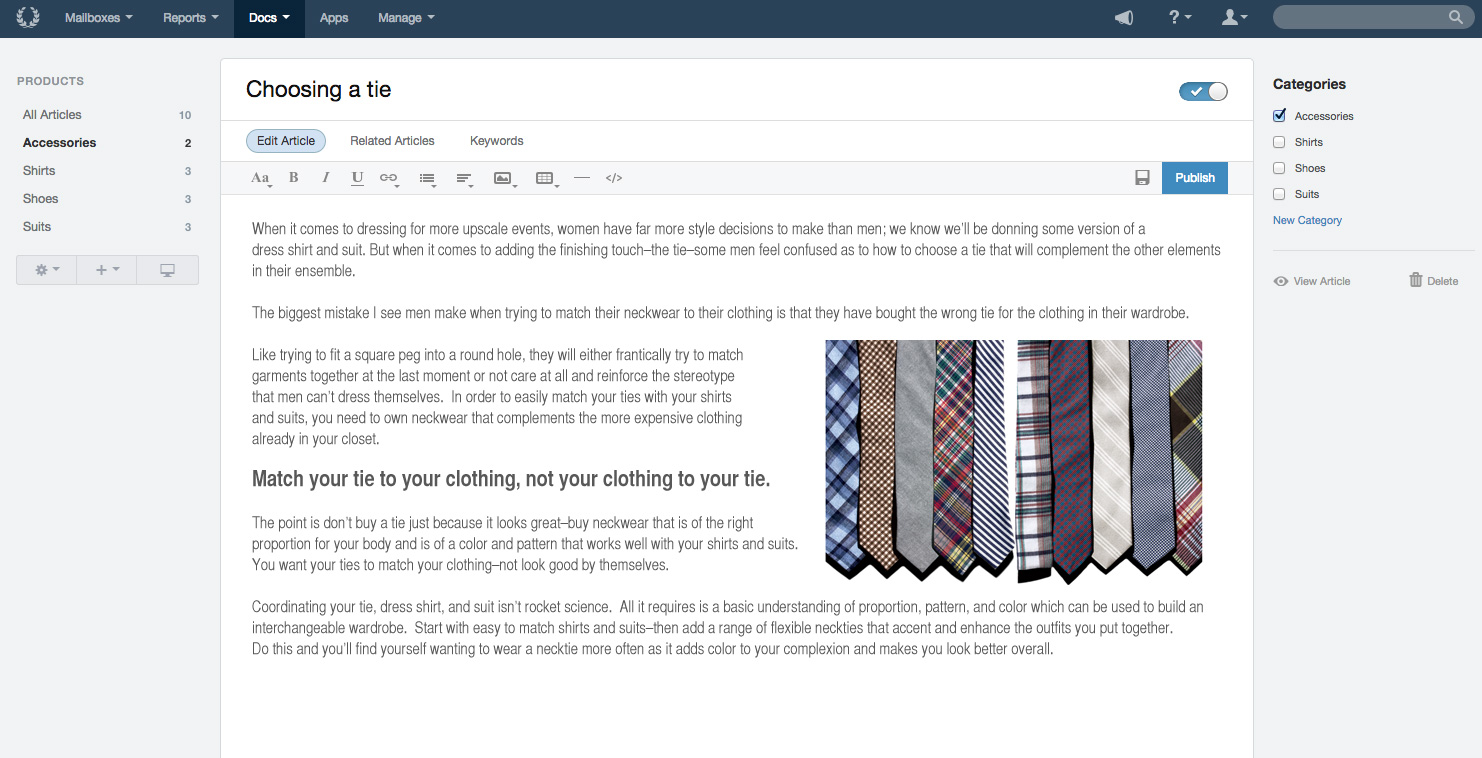
Help Scout is help desk software. The vendor’s value proposition is that that their solution reduces time spent on training users because Help Scout is simple to use and set up and scales like any enterprise product. This solution includes multiple mailboxes to support as many email addresses as needed in order to work collaboratively across teams, and manage several products or brands from one account. Reports on conversation trends, team performance, productivity, and customer happiness are…
$30
per month starts with 100 contacts
Spiceworks Cloud Help Desk
Score6.8 out of 10
N/A
Spiceworks offers a set of free tools for IT network management and help desk support ticketing. The inventory management system essentially provides comprehensive device information for asset management.
Small businesses that want a conversational type of customer support experience. Nothing wrong with support tickets, but it does make you feel like a number. Also, we needed to get up and running quickly so the "inbox" feel of the dashboard was already familiar with the team so they could adopt the new software quickly.
A de minimis incentive was given to thank the reviewer for their time. The incentive was not used to bias or drive a particular response, nor was the incentive contingent on a positive endorsement. More Info
It's a great helpdesk solution - we currently have five years of data within it, roughly 25,000 tickets. The older edition is a great inventory and software license tracking tool. It is easy for users to use the interface and submit tickets and requests on the web, and its email integration is solid. The new version is a below-average system monitoring tool, only giving up/down status and a few other metrics.
A de minimis incentive was given to thank the reviewer for their time. The incentive was not used to bias or drive a particular response, nor was the incentive contingent on a positive endorsement. More Info
Extremely simple to use and understand as a user - treats communications like human beings and provides a much more personal feel to communication (as opposed to making people feel like numbers).
The email newsletter.
They are super responsive. They are pretty rad and transparent: if something goes wrong on their end they are not afraid of admitting fault. Which leads me to trust them because I can believe them. I know that tells you very little about the product, but as leadership, that's something that I really need
Help Scout does exactly what it needs to (facilitate organized, efficient conversations between customers and support people) without getting in the way.
A de minimis incentive was given to thank the reviewer for their time. The incentive was not used to bias or drive a particular response, nor was the incentive contingent on a positive endorsement. More Info
A de minimis incentive was given to thank the reviewer for their time. The incentive was not used to bias or drive a particular response, nor was the incentive contingent on a positive endorsement. More Info
Trying to group tickets is a bit unflexible. You can create folders which can be part of a workflow (automatic trigger) but you can't create a folder based on tags. This needs to be improved because there's a need to create smarter segments and mix them.
Metrics are useful but there needs to be more details about them. You can drill down in some but others are still not very actionable or visible (ok, that number went down, but what was the cause? what's the criteria with what you measure that?)
A de minimis incentive was given to thank the reviewer for their time. The incentive was not used to bias or drive a particular response, nor was the incentive contingent on a positive endorsement. More Info
A de minimis incentive was given to thank the reviewer for their time. The incentive was not used to bias or drive a particular response, nor was the incentive contingent on a positive endorsement. More Info
We are receiving feedback from the organizational level that they may want us to transition to a different solution to provide consistency across the company.
A de minimis incentive was given to thank the reviewer for their time. The incentive was not used to bias or drive a particular response, nor was the incentive contingent on a positive endorsement. More Info
Spiceworks is a free tool, so there would be no hesitation if we are required to upgrade it. We have installed Spiceworks on a dedicated server with more than enough resources to get the most from this tool, so we will have this running in our department for years to come.
A de minimis incentive was given to thank the reviewer for their time. The incentive was not used to bias or drive a particular response, nor was the incentive contingent on a positive endorsement. TR verified that a representative sample of customers was invited. More Info
Help Scout is a great solution for support teams. There are many articles and webinars to help you learn how to use Help Scout. There are also many features to help make your workflows easier and more efficient. I would readily recommend Help Scout to any small or medium-growing support teams.
A de minimis incentive was given to thank the reviewer for their time. The incentive was not used to bias or drive a particular response, nor was the incentive contingent on a positive endorsement. More Info
Spiceworks is user friendly and easy to set up. It can be customized to suit your needs. If there are any problems, you can go to the community forums for support and be in contact with many IT Pros, as well as the Spiceworks support staff and development teams who are always happy to help users out
A de minimis incentive was given to thank the reviewer for their time. The incentive was not used to bias or drive a particular response, nor was the incentive contingent on a positive endorsement. More Info
A de minimis incentive was given to thank the reviewer for their time. The incentive was not used to bias or drive a particular response, nor was the incentive contingent on a positive endorsement. More Info
Spiceworks has been working out of the box, and some of the basic customizations have been successful with just our internal staff handling. We don't have any other issues with the tool. It provides us with the inventory information we want in a quick and concise report in a variety of formats for our team.
A de minimis incentive was given to thank the reviewer for their time. The incentive was not used to bias or drive a particular response, nor was the incentive contingent on a positive endorsement. More Info
If you can spin up a VM to run it on, you'll thank yourself later. If you have remote sites, set up a local server (or dedicated computer) at each site and set them up as remote collectors for the main site. You'll save time and bandwidth
A de minimis incentive was given to thank the reviewer for their time. The incentive was not used to bias or drive a particular response, nor was the incentive contingent on a positive endorsement. More Info
Only have minimal experience with G-Suite for a much smaller company. This worked well for that organization but did not have similar specialization functions that suite our larger organization very well. Help Scout's pricing makes sense, and continues to service our needs well. Minimal usage of other programs, but have no need to explore alternatives at this time.
A de minimis incentive was given to thank the reviewer for their time. The incentive was not used to bias or drive a particular response, nor was the incentive contingent on a positive endorsement. More Info
EGroupware UI is clunky and hard to use, Jira is great but the pricing is expensive in comparison with spice works that has a free version and you can test it out properly before buying and make a correct decision based on your business plan and company objectives with the right software.
A de minimis incentive was given to thank the reviewer for their time. The incentive was not used to bias or drive a particular response, nor was the incentive contingent on a positive endorsement. More Info
We are able to retain our customer base due to the outstanding customer service our Customer Experience department provides. Without an organized tool like Help Scout, this would not be possible. We pride ourselves in quick response times to customers and are able to do so by effectively routing tickets to the right agents.
A de minimis incentive was given to thank the reviewer for their time. The incentive was not used to bias or drive a particular response, nor was the incentive contingent on a positive endorsement. More Info
A de minimis incentive was given to thank the reviewer for their time. The incentive was not used to bias or drive a particular response, nor was the incentive contingent on a positive endorsement. More Info