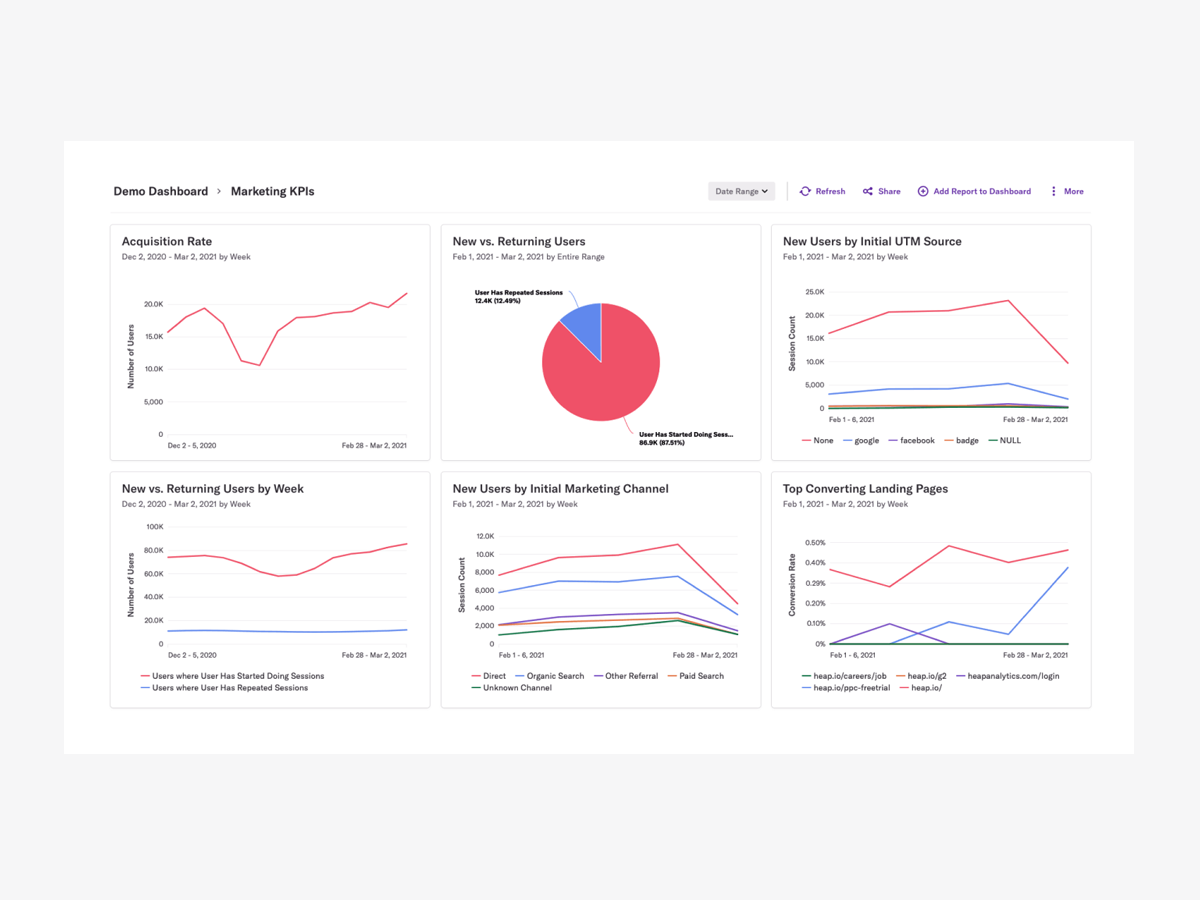
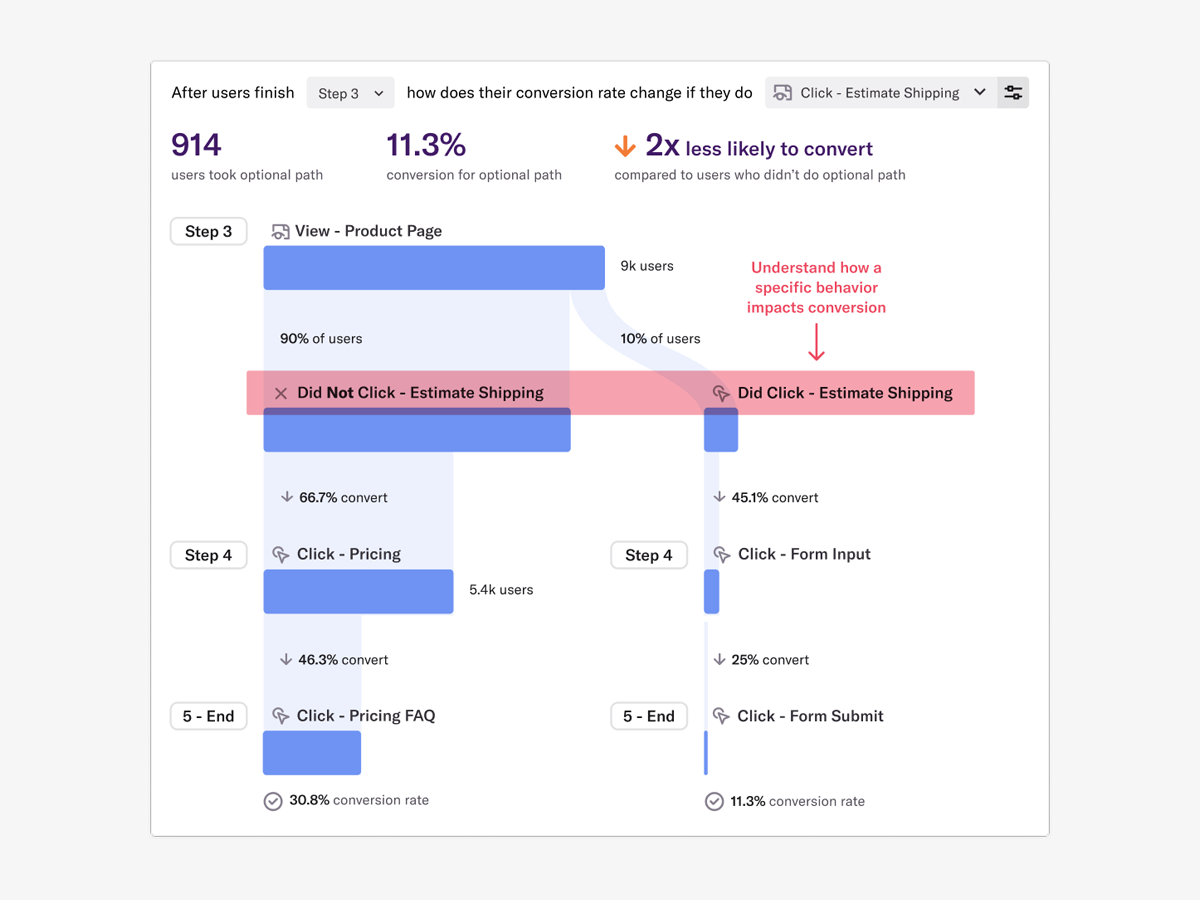
Heap is a web analytics platform captures every user interaction on web iOS with no extra code. The tool allows you to track events and set up funnels to understand user flow and dropoff. It also provides visualization tools to track trends over time.
$0
per month
Mixpanel
Score8.7 out of 10
N/A
Mixpanel helps companies measure what matters, make decisions fast, and build better products through data. With self-serve product analytics solution, teams can analyze how and why people engage, convert, and retain—in real-time, across devices—to improve their user experience. Mixpanel serves over 26,000 companies from different industries around the world, including Expedia, Uber, Ancestry, DocuSign, and Lemonade. Headquartered in San Francisco, Mixpanel has offices in New York,…
$0
per month
Pricing
Heap
Mixpanel
Editions & Modules
Free
$0
Up to 10k sessions/month
Growth
Starting at $3,600 annually
Up to 300k sessions/year
Pro
Contact Heap Sales
Custom sessions per month and unlimited projects
Premier
Contact Heap Sales
Custom sessions per month
Free
$0
per month
Growth
$17
per month
Enterprise
Contact sales
Offerings
Pricing Offerings
Heap
Mixpanel
Free Trial
Yes
No
Free/Freemium Version
Yes
Yes
Premium Consulting/Integration Services
Yes
No
Entry-level Setup Fee
Optional
No setup fee
Additional Details
Heap pricing is based on session volume. A session is a period of activity from a single user on your app or website. It can include many pageviews or events.
Mixpanel uses MTU (Monthly Tracked User) pricing, which is designed to scale with your company. MTUs are roughly equivalent to the number of unique visitors on your product and each user is counted once per month, even if they use multiple devices. If Events based pricing makes more sense for your business, reach out to us and we can work with you!
More Pricing Information
Community Pulse
Heap
Mixpanel
Considered Both Products
Heap
Verified User
Chose Heap
We evaluated Heap against Mixpanel but realized that Mixpanel was a non-starter for us. (Kudos to their sales rep, who quickly identified this and told us.) We inherited a Google Analytics implementation but have since had to stop using it due to GDPR restrictions.
A de minimis incentive was given to thank the reviewer for their time. The incentive was not used to bias or drive a particular response, nor was the incentive contingent on a positive endorsement. More Info
Verified User
Chose Heap
Mixpanel forced us to put tracking tags everywhere which wasn’t helping us achieve our goals. amplitude looked good but found it harder to use
A de minimis incentive was given to thank the reviewer for their time. The incentive was not used to bias or drive a particular response, nor was the incentive contingent on a positive endorsement. More Info
Verified User
Chose Heap
More robust event capture that is easier to implement. Simplified capabilities that typically get the job done. However, customization was much more robust on Mixpanel.
A de minimis incentive was given to thank the reviewer for their time. The incentive was not used to bias or drive a particular response, nor was the incentive contingent on a positive endorsement. More Info
Digital Marketing Operations Manager in Marketing at Newsela (Computer Software, 501-1000 employees)
Chose Heap
I wouldn't know necessarily because I didn't get far with a Mixpanel evaluation. All I know is that it was much easier to set up the types of user events that we were looking to track out of the box with Heap. I also think the flexible pricing that Heap provided was a good …
A de minimis incentive was given to thank the reviewer for their time. The incentive was not used to bias or drive a particular response, nor was the incentive contingent on a positive endorsement. More Info
Verified User
Chose Heap
I wasn't making the decision to use either product - my old company had Mixpanel and my new company has Heap. That said, I've found Heap to be much more intuitive and user friendly - it could be a feature of the different companies' setups, but it seems as though Heap is much …
A de minimis incentive was given to thank the reviewer for their time. The incentive was not used to bias or drive a particular response, nor was the incentive contingent on a positive endorsement. More Info
Verified User
Chose Heap
Heap was selected by my predecessor. Heap does not include a digital adoption component, which is something we did not need. Pendo and Gainsight include DAP, which adds to the overall cost. Mixpanel requires developer resources to add tracking to any new features. In …
A de minimis incentive was given to thank the reviewer for their time. The incentive was not used to bias or drive a particular response, nor was the incentive contingent on a positive endorsement. More Info
Verified User
Chose Heap
A lot cheaper than GA and user-based analytics better than session-based. Event auto capture a lot more flexible than Mixpanel.
A de minimis incentive was given to thank the reviewer for their time. The incentive was not used to bias or drive a particular response, nor was the incentive contingent on a positive endorsement. TR verified that a representative sample of customers was invited. More Info
Verified User
Chose Heap
The big thing for me, that I've mentioned already, is Heap storing all event data retroactively. That's what keeps me with Heap. Google Analytics is industry standard and connected very intimately with all of the ad networks, so we have to use it, even if I think Heap is a …
A de minimis incentive was given to thank the reviewer for their time. The incentive was not used to bias or drive a particular response, nor was the incentive contingent on a positive endorsement. More Info
Verified User
Chose Heap
Comparing to Mixpanel and Amplitude, the retro analytics option and the engineering light event implementation functions that Heap provides were crucial.
Comparing to FullStory, Heap analytics BI options and the data complexity were the reasons.
A de minimis incentive was given to thank the reviewer for their time. The incentive was not used to bias or drive a particular response, nor was the incentive contingent on a positive endorsement. More Info
Senior Project Manager in Engineering at E2E Telelink India Pvt Ltd (Telecommunications, 201-500 employees)
Chose Heap
Google Analytics stacks up for high level traffic and marketing data but not ideal for enterprises looking user level product interactions in detail. On the other hand Heap stood out for its automatic data capturing, faster onboarding, easy to use dashboards, Highly integrable …
A de minimis incentive was given to thank the reviewer for their time. The incentive was not used to bias or drive a particular response, nor was the incentive contingent on a positive endorsement. More Info
Verified User
Chose Heap
The ability to view events in real time as they occur, restrict them to just show mine, and then create dashboards using those events is the finest feature for me. It eliminates the requirement for constant 100% accuracy in documentation maintenance and guessing. I can monitor …
A de minimis incentive was given to thank the reviewer for their time. The incentive was not used to bias or drive a particular response, nor was the incentive contingent on a positive endorsement. More Info
Verified User
Chose Heap
Mix panel did not have automated event tracking so a developer would need to manually add every single event which was not functional. Outside of that, many core features were the same although mix panel did allow for custom reporting and querying. Mix panel felt much more …
A de minimis incentive was given to thank the reviewer for their time. The incentive was not used to bias or drive a particular response, nor was the incentive contingent on a positive endorsement. More Info
Verified User
Chose Heap
What really stood out was the auto capture functionality and the ability to do as many custom reporting as we can, and it had very comparable features to a lot of other user analytics tools, but we liked how clean it was at pulling in data as well. definitely recommend for …
A de minimis incentive was given to thank the reviewer for their time. The incentive was not used to bias or drive a particular response, nor was the incentive contingent on a positive endorsement. TR verified that a representative sample of customers was invited. More Info
A de minimis incentive was given to thank the reviewer for their time. The incentive was not used to bias or drive a particular response, nor was the incentive contingent on a positive endorsement. More Info
A de minimis incentive was given to thank the reviewer for their time. The incentive was not used to bias or drive a particular response, nor was the incentive contingent on a positive endorsement. More Info
Verified User
Chose Heap
As I mentioned before, Heap has been by far the most user-friendly tool out there to easily get tracking events defined, and quickly create intuitive reports and dashboards. It doesn't require a lot of engineering effort once the tool is set up. It provides so many quick ways …
A de minimis incentive was given to thank the reviewer for their time. The incentive was not used to bias or drive a particular response, nor was the incentive contingent on a positive endorsement. More Info
Verified User
Chose Heap
Retroactive tracking really makes the difference. We use both Heap and FullStory.
A de minimis incentive was given to thank the reviewer for their time. The incentive was not used to bias or drive a particular response, nor was the incentive contingent on a positive endorsement. More Info
A de minimis incentive was given to thank the reviewer for their time. The incentive was not used to bias or drive a particular response, nor was the incentive contingent on a positive endorsement. More Info
Verified User
Chose Heap
Most other tools have good features but heap has the historical data and collects every type of data you can imagine. That allows us to make new queries as things evolve while we still have the point of reference from all these data points. Other tools are good but its harder …
A de minimis incentive was given to thank the reviewer for their time. The incentive was not used to bias or drive a particular response, nor was the incentive contingent on a positive endorsement. More Info
Verified User
Chose Heap
Heap stood out from other tools in the following ways: Comprehensive auto-tracking and "spotlight" tool allows us to add event attributes through their UI which greatly reduces the reliance on Engineering resources for instrumentation. Their "Effort Analysis" tool helps …
A de minimis incentive was given to thank the reviewer for their time. The incentive was not used to bias or drive a particular response, nor was the incentive contingent on a positive endorsement. More Info
A de minimis incentive was given to thank the reviewer for their time. The incentive was not used to bias or drive a particular response, nor was the incentive contingent on a positive endorsement. More Info
A de minimis incentive was given to thank the reviewer for their time. The incentive was not used to bias or drive a particular response, nor was the incentive contingent on a positive endorsement. More Info
Product Manager in Product Management at PocketSuite (Computer Software, 11-50 employees)
Chose Heap
We're a fairly small team with limited Dev resources. So the main reason that we went with Heap is that it allows non-technical users to define events. That way we're never blocked by needing Dev to define an event and then waiting to collect data.
A de minimis incentive was given to thank the reviewer for their time. The incentive was not used to bias or drive a particular response, nor was the incentive contingent on a positive endorsement. More Info
Director of Product Management in Product Management at HG Insights (Computer Software, 51-200 employees)
Chose Heap
Heap is a clear winner when it comes to instrumentation. Pendo is more of a customer engagement platform but their instrumentation layer is still a bit light.
A de minimis incentive was given to thank the reviewer for their time. The incentive was not used to bias or drive a particular response, nor was the incentive contingent on a positive endorsement. More Info
CTO in Engineering at Canopy (Financial Services, 1-10 employees)
Chose Heap
Heap's implementation is by far the easiest across the different analytics products I've used. The only downside is that the analysis part is a bit more confusing to set up, and sometimes the confidence of the auto track is a bit shaky, although, these issues can usually be …
A de minimis incentive was given to thank the reviewer for their time. The incentive was not used to bias or drive a particular response, nor was the incentive contingent on a positive endorsement. More Info
Co-Founder, CTO and Product Lead in Engineering at SixPlus (Hospitality, 11-50 employees)
Chose Mixpanel
Mixpanel does what it does very well. We sometimes don't see it as the only tool in the arsenal. When combined with other solutions, we get a more complete picture. It also allows us to validate data across different tools.
While Heap isn't as simple as Mixpanel, its major …
A de minimis incentive was given to thank the reviewer for their time. The incentive was not used to bias or drive a particular response, nor was the incentive contingent on a positive endorsement. More Info
Users of both Heap and Mixpanel have found that these tools are tremendously useful in tracking user interactions on websites or mobile apps. Mixpanel enables clients to build insights based on actions rather than page views, offering real-time data and clear analytics, while Heap is appreciated for its simple setup and admin interface, requiring no additional coding skills to initiate and manage.
A key difference noted by reviewers is the approach each tool takes to data collection. Users appreciate that Heap automatically tracks events and user interactions, even retroactively, providing a comprehensive data set. On the other hand, they value Mixpanel for its targeted data collection, which allows for pre-defined events, detailed segmentation and flexibility.
In terms of integration, customers observe that Mixpanel pairs well with a multitude of other tools and platforms, thereby increasing its overall utility. Heap, while also offering integrations, appears to be more standalone and can serve as a comprehensive solution itself, without relying heavily on external functions. Both tools are seen as primary assets for product, marketing, and analytics teams.
Scenarios when Heap was well suited: It is when a user claims that he encountered a bug without giving us the details of the error message. Scenarios where it is less appropriate: Its when we try to capture user interaction in our mobile app
A de minimis incentive was given to thank the reviewer for their time. The incentive was not used to bias or drive a particular response, nor was the incentive contingent on a positive endorsement. More Info
As a worker in the sales area, I see closely how complex it can be to evaluate the commercial funnel and Mixpanel has been an indispensable guide to prioritize above all what customers expect to receive from our company, and thus be able to determine the main service we offer. Without a doubt, Mixpanel has special functions to be the one that guides the route and marks the objectives much more clearly.
A de minimis incentive was given to thank the reviewer for their time. The incentive was not used to bias or drive a particular response, nor was the incentive contingent on a positive endorsement. More Info
A de minimis incentive was given to thank the reviewer for their time. The incentive was not used to bias or drive a particular response, nor was the incentive contingent on a positive endorsement. More Info
Mixpanel is a daily use application for everyone in my organization; it helps us have a better flow of information and interaction between work teams.
The user interface of this platform is simple and has a wide variety of functions and resources to help us work in the most organized way, have better team coordination, and keep efficiency high.
I love that it is so easy to program our calendar to our liking, so we can prioritize our activities and know what is pending, and the best thing is that I can update the calendar if necessary.
The chat function is great to improve the interaction between colleagues and share work schedules and any information with third parties.
A de minimis incentive was given to thank the reviewer for their time. The incentive was not used to bias or drive a particular response, nor was the incentive contingent on a positive endorsement. More Info
A de minimis incentive was given to thank the reviewer for their time. The incentive was not used to bias or drive a particular response, nor was the incentive contingent on a positive endorsement. More Info
Mixpanel requires an explicit setting of events from your app. This means you need to be very thoughtful in the design of your events because missing one means you aren't collecting any data from it. Inserting it into the process later on then brings challenges in tracking when certain events came online.
A tool like Mixpanel comes packed with features that sometimes are harder to discover. It's very easy to get sucked into one part of its toolset and not be aware of other tools which may be very useful.
A de minimis incentive was given to thank the reviewer for their time. The incentive was not used to bias or drive a particular response, nor was the incentive contingent on a positive endorsement. More Info
It's a great platform. I'm glad that one of our product managers introduced it because it has allowed us to create all kinds of new functionality. We're not only able to create a better product experience from our communications because of Heap, but we're also able to generate all kinds of helpful analysis.
A de minimis incentive was given to thank the reviewer for their time. The incentive was not used to bias or drive a particular response, nor was the incentive contingent on a positive endorsement. TR verified that a representative sample of customers was invited. More Info
It's not an all encompassing solution like Google Analytics tries to be, but MixPanel offers much easier to use and understandable data insights. That's valuable when juggling many responsibilities as startup life demands, so a renewal would be easily justified.
On a scale from 1-10, I find Heap to be incredibly user-friendly and easy to use. I enjoyed the training videos available and was quickly able to pick up how to create events and reports to track user interactions on our product. I would recommend Heap for its usability first and foremost.
A de minimis incentive was given to thank the reviewer for their time. The incentive was not used to bias or drive a particular response, nor was the incentive contingent on a positive endorsement. TR verified that a representative sample of customers was invited. More Info
Relativity easy to use. Once you get the hang of it, very easy to create dashboards for different use cases. I split my dashboards between customers or use cases
A de minimis incentive was given to thank the reviewer for their time. The incentive was not used to bias or drive a particular response, nor was the incentive contingent on a positive endorsement. More Info
I've never run into any issues with Heap's availability, Heap is always there when I need it. I haven't run into any issues like application errors or unplanned outages during my 2+ years of using Heap. Each and every time I log in to Heap I have a completely functional experience
A de minimis incentive was given to thank the reviewer for their time. The incentive was not used to bias or drive a particular response, nor was the incentive contingent on a positive endorsement. More Info
Heap doesn't affect page load times considerably nor has a large impact [on] our overall score, as far as page loading times inside of the tool its pretty reliable to retrieve data as much as "instant" that it can be the delay seems to be on data getting tracked into the servers to be read but it's not significant.
A de minimis incentive was given to thank the reviewer for their time. The incentive was not used to bias or drive a particular response, nor was the incentive contingent on a positive endorsement. More Info
Heap support has allowed us to troubleshoot and test a lot of different items. Their support team is always helpful and friendly, even when we come to them with the most complicated questions. I think this greatly improves the value proposition of the product because their support team is knowledgable and friendly.
A de minimis incentive was given to thank the reviewer for their time. The incentive was not used to bias or drive a particular response, nor was the incentive contingent on a positive endorsement. TR verified that a representative sample of customers was invited. More Info
We have only ever had to use their support once, when we were setting up the account, but their responses were prompt and the solutions were well documented. The people who solved our issues were helpful, even to non-tech people.
A de minimis incentive was given to thank the reviewer for their time. The incentive was not used to bias or drive a particular response, nor was the incentive contingent on a positive endorsement. More Info
Mixpanel has a great resource about their product, with videos on how to use it and real world examples from other companies on how they integrate Mixpanel into their business processes.
The implementation was smooth and easy. The Heap team helped us with implementation and it went great! Within a few weeks, we were fully up and running and utilizing the platform to its full capability. This is an additional thing that has made this platform so great and we couldn't recommend it enough.
A de minimis incentive was given to thank the reviewer for their time. The incentive was not used to bias or drive a particular response, nor was the incentive contingent on a positive endorsement. TR verified that a representative sample of customers was invited. More Info
Again, somewhat annoying to be charged based on data points when many other analytics providers have one flat fee. Implementation was good, but I might have tracked a few more detailed points if I had the option.
Heap offers a ton of functionality on a single platform.It also has an smart data science layer to offers suggestions for next steps in the analysis, allowing us to explore alternative paths we may not think to take. The low-code option for updating data is appealing, and there is a lot of automation with minimal engineering effort.
A de minimis incentive was given to thank the reviewer for their time. The incentive was not used to bias or drive a particular response, nor was the incentive contingent on a positive endorsement. More Info
A de minimis incentive was given to thank the reviewer for their time. The incentive was not used to bias or drive a particular response, nor was the incentive contingent on a positive endorsement. More Info
The most challenging part of using Heap in a growing organization is the naming and structure in which reports and dashboards are organized. I work within the marketing department and our Heap leader internally works within the IT/Product department, which makes it challenging because we often don't speak the same language, so the learning curve has been steep without any specific use-case examples to leverage online.
A de minimis incentive was given to thank the reviewer for their time. The incentive was not used to bias or drive a particular response, nor was the incentive contingent on a positive endorsement. More Info
A de minimis incentive was given to thank the reviewer for their time. The incentive was not used to bias or drive a particular response, nor was the incentive contingent on a positive endorsement. More Info
We've been able to increase the funnel conversions of one of our new product funnels from a 1% conversion rate to a 5% conversion rate.
We've been able to increase the CTR on another of our main product pages from ~3% to ~10% (so far)
We've been able to segment out how users from different traffic sources behave, allowing us to eliminate thousands of dollars of wasteful spending on advertising campaigns that weren't working.
A de minimis incentive was given to thank the reviewer for their time. The incentive was not used to bias or drive a particular response, nor was the incentive contingent on a positive endorsement. More Info