HappyFox is a web-based customer support ticketing system hosted in the cloud. It helps track and manage all customer support requests across multiple channels like email, chats, social media and phone in a centralized ticket support system.
$29
per month per user
Kustomer
Score8.7 out of 10
N/A
Kustomer is a customer service CRM platform built for managing high support volume by optimizing experiences throughout the customer service journey. Kustomer was acquired by Facebook in late 2020, but spun out in 2023 and re-launched as an independent entity, Kustomer, LLC.
$89
per month per user
Pricing
HappyFox Help Desk
Kustomer
Editions & Modules
Basic
$29
per month per agent
Team
$69
per month per agent
Enterprise Plus
$89
per user/per month
Pro
$119
per month per agent
Growth - Unlimited Agents
$23988
per year 20,000 Tickets / year
Scale- Unlimited Agents
$47988
per year 150,000 Tickets / year
Scale Plus - Unlimited Agents
$71988
per year 1,000,000 Tickets / year
Enterprise Pro
Contact Sales
Enterprise
$89
per month, per user
Ultimate
$139
per month, per user
Offerings
Pricing Offerings
HappyFox Help Desk
Kustomer
Free Trial
Yes
No
Free/Freemium Version
No
No
Premium Consulting/Integration Services
No
No
Entry-level Setup Fee
No setup fee
No setup fee
Additional Details
Discounts are offered for annual and biannuall billing on per agent plans.
All plans require an annual subscription and 8 users minimum.
Happy Fox works well in companies that want a full look at all of their tickets in one place. It may be better suited to smaller companies who can check or double check their tickets and have the time to spare. For bigger companies, I think there are better, more robust solutions.
A de minimis incentive was given to thank the reviewer for their time. The incentive was not used to bias or drive a particular response, nor was the incentive contingent on a positive endorsement. More Info
I would say the greatest strength of Kustomer is its flexibility. In the hands of a skilled admin, it can be adapted to tons and tons of different use cases. I've been able to make custom displays for different groups of agents, produce complex cross sections of users, draw interesting data relationships combining marketing contacts and customer-initiated contacts. For example, there's really no other data source in our company which could tell you which users received a specific promo code and checked out with it, received their delivery within 14 days and then can related that to the number of times they contacted us about using our product. At the intersection of communication, marketing, data, and relationship-management, Kustomer shines at the center. I would say it falls short when you are trying to coordinate multiple "side conversations" with multiple sources to resolve an issue. This is a tough task for any type of platform, but if you're maintaining 3 different email chains with a 3PL partner, the customer, and a separate internal conversation, it would be confusing anyway!
A de minimis incentive was given to thank the reviewer for their time. The incentive was not used to bias or drive a particular response, nor was the incentive contingent on a positive endorsement. More Info
Smart Rules - Easily create triggers that run based on a variety of criteria. This allows for easily moving tickets through our process. An awesome example is our manager's ability to assign tickets to technicians right from their email simply by responding to the ticket in a certain way. This prevents the opening of a web browser or the mobile app to complete basic functions. Removing one step from the process has already saved us countless hours.
Easy to use and clean interfaces all around. Whether it's the web interface, mobile web interface, or one of the mobile apps, HappyFox is all around intuitive. Plenty of things can be made to be updated in two or fewer clicks (Assigned to, due date, priority).
HappyFox allows our users to easily create tickets on behalf of customers. Any person who has previously contacted the Help Desk is stored as a contact and can be referenced again quickly.
While the portal they provide is basic, it can be quite heavily customized with color schemes and logos. Ours ended up looking better than almost anything else we host both internally and externally. It's clean, simple and provides an easy way for users to input a ticket.
Between the Smart Rules and SLAs it's easy to make sure every ticket gets the attention it deserves. Automatic reminders can be sent to technicians based on criteria. Reports can be run to ensure that service levels are being met. These two things alone have greatly increased the quality of service.
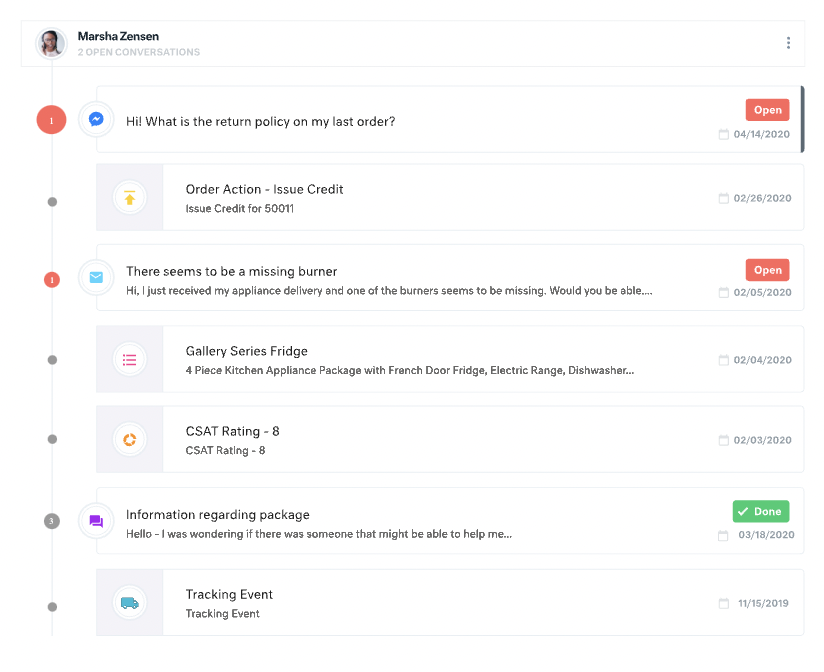
All customer data (past orders, communication with customer service, rewards account data) is in one place. This helps agents avoid confusion and reduces the number of tabs they need to open.
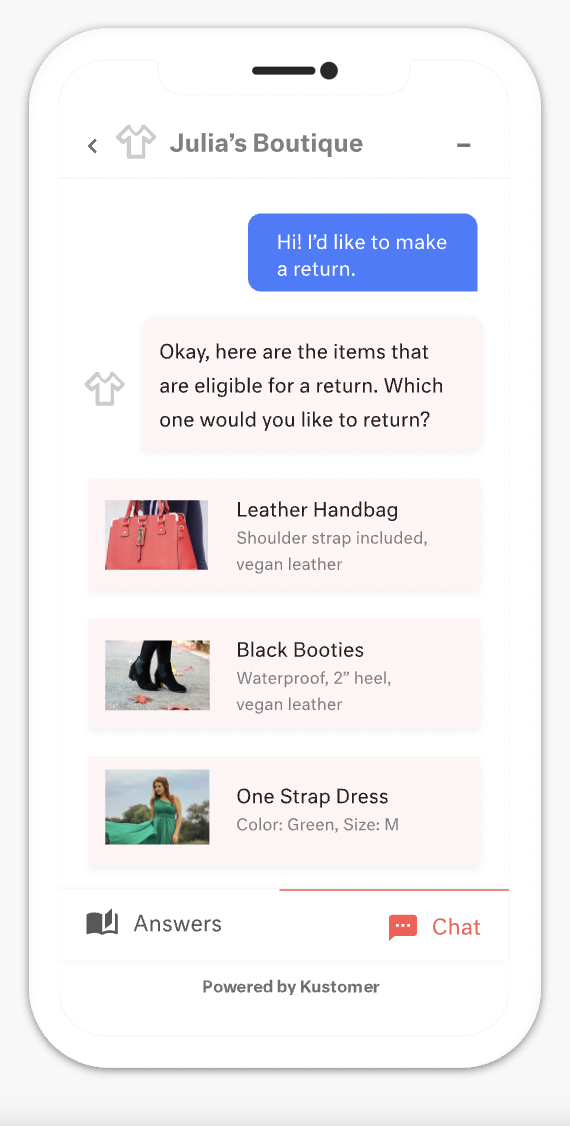
The Knowledge Base (or K Base) is very helpful. Any time we roll out a new policy or have a limited-time promotion, we can add all the relevant information and worksheets there for the convenience of the agents. That way they can stay in a chat while looking up the answer to a question.
We can seamlessly move from chat into email if the customer leaves or the queue times are too long. All the interactions will stay on the customer profile page, so they are kept up to date.
A de minimis incentive was given to thank the reviewer for their time. The incentive was not used to bias or drive a particular response, nor was the incentive contingent on a positive endorsement. More Info
There are a few features that I would hope to be standard that are not yet accessible. For instance, having different time zones isn't a choice, and clients aren't able to create their own reports, only staff can. So, my staff is required to run those reports for our clients.
A de minimis incentive was given to thank the reviewer for their time. The incentive was not used to bias or drive a particular response, nor was the incentive contingent on a positive endorsement. More Info
For our team, the feature that defaults all notes to begin in "done" status is difficult. Throughout each day we need to have notes open and assigned back and forth to different teams, and we have to remember to manually "open" each note. There is too much room for human error with this setting, and it is easy for important notes to be missed if a user forgets to open the note.
Similarly, it can be hard to remember to assign emails/notes to a particular team in addition to a user. We almost exclusively work out of team inboxes, and if someone on Care writes an email to a customer, the email will automatically be "done" when it is created, and it will be assigned to the user who wrote it, but not also to the user's team. There are instances where an email needs to be snoozed for several days/hours with further action needed, and unless the user remembers to assign the email to their team it may "awake" from the snooze and not be visible to anyone except the user who created it. Similarly to my first comment, this leaves a lot of room for human error and is not very intuitive.
Personally, I do not love that all tickets/emails/notes are jumbled together in the same inbox. While this gives visibility to everything on the "to do" list at the same time, it can be visually overwhelming. We have created unique folders for certain types of projects or categories of work, but have experienced tech glitches or just the awkwardness of another step to manually read the note, determine what type of category it is, and then manually assign it to another folder. Would love to have things auto-sort and take out this manual lift.
I love the idea of the autopilot setting, but we have not been able to use this for our work because it sorts items based on time, and not based on priority. In our line of work, we may have an urgent situation arise that needs attention before an email that was sent in 60 minutes ago. The autopilot feature would push the email to my associates sooner than it would the urgent situation from 5 minutes ago. Due to this, we manually monitor inboxes and assign work to ourselves and others.
A de minimis incentive was given to thank the reviewer for their time. The incentive was not used to bias or drive a particular response, nor was the incentive contingent on a positive endorsement. More Info
The way we have our implementation customized has allowed us to tailor the application to exactly how we would like to use it. We didn't have to change our procedures and fear the potential of poor adoption. Instead we customized the application to be used the way we already ran our help desk. From there on out we reaped the benefits of quicker resolutions, increased transparency, and much happier end users. After setting up Smart Rules, HappyFox does a lot of thinking for us. Tickets go where they need to go, close when they are supposed to close and even remind techs of inactivity. This removes the necessity for micromanagement, which is appreciated by our employees and managers alike
A de minimis incentive was given to thank the reviewer for their time. The incentive was not used to bias or drive a particular response, nor was the incentive contingent on a positive endorsement. More Info
There is a learning curve, but it is more than worth it, especially to have a dedicated resource pointed at Kustomer and any other software it interacts with. The basic implementation is useful, and powerful - certainly a MASSIVE upgrade over taking care of your customers in an email inbox or shuffling between multiple windows and applications! It is also set up really well to grow and reconfigure with your business. I'm a big fan.
A de minimis incentive was given to thank the reviewer for their time. The incentive was not used to bias or drive a particular response, nor was the incentive contingent on a positive endorsement. More Info
A de minimis incentive was given to thank the reviewer for their time. The incentive was not used to bias or drive a particular response, nor was the incentive contingent on a positive endorsement. More Info
A de minimis incentive was given to thank the reviewer for their time. The incentive was not used to bias or drive a particular response, nor was the incentive contingent on a positive endorsement. More Info
I did not reach out to Kustomer support when we had an issue. Still, whenever we provide feedback to our manager regarding what can improve based on our experience using Kustomer, our manager always comments that Kustomer support always replies with some positive feedback based on our suggestions.
A de minimis incentive was given to thank the reviewer for their time. The incentive was not used to bias or drive a particular response, nor was the incentive contingent on a positive endorsement. More Info
A de minimis incentive was given to thank the reviewer for their time. The incentive was not used to bias or drive a particular response, nor was the incentive contingent on a positive endorsement. More Info
A de minimis incentive was given to thank the reviewer for their time. The incentive was not used to bias or drive a particular response, nor was the incentive contingent on a positive endorsement. More Info
A de minimis incentive was given to thank the reviewer for their time. The incentive was not used to bias or drive a particular response, nor was the incentive contingent on a positive endorsement. More Info
HappyFox delivered a more cost effective solution and asset management had no limit. The main problem I saw with the various other services I demoed, was the up charges. The pricing seems manageable until you see that they charge for every 100 or so of this and 100 of that. HappyFox is truly a one-stop shop for us.
A de minimis incentive was given to thank the reviewer for their time. The incentive was not used to bias or drive a particular response, nor was the incentive contingent on a positive endorsement. More Info
Apps like Intercom, Zendesk, and Gorgios all treat customer inquiries as tickets, just tracking that one issue or interaction with a customer. Kustomer treats each customer as an individual, which allows us to provide top-notch customer service. Customers love that we're able to be more conversational and informal, while still solving their issues quickly. It also helps us build relationships with customers and increases repeat orders.
A de minimis incentive was given to thank the reviewer for their time. The incentive was not used to bias or drive a particular response, nor was the incentive contingent on a positive endorsement. More Info
A de minimis incentive was given to thank the reviewer for their time. The incentive was not used to bias or drive a particular response, nor was the incentive contingent on a positive endorsement. More Info
A de minimis incentive was given to thank the reviewer for their time. The incentive was not used to bias or drive a particular response, nor was the incentive contingent on a positive endorsement. More Info
We’re getting so much positive feedback — which is not something you traditionally associate with a customer care team — because we’re making it effortless for customers to deliver both positive and negative feedback, and we can now resolve the bad feedback really really quickly.
Primarily from our increased efficiency with Kustomer, we’ve seen a significant reduction of $3 to $4 for every cost per contact.
A de minimis incentive was given to thank the reviewer for their time. The incentive was not used to bias or drive a particular response, nor was the incentive contingent on a positive endorsement. More Info