Google Workspace for Education includes Google products like Classroom, Meet, Gmail, Calendar, Drive, Docs, Sheets, and Slides, to create an online ecosystem for learning. The Google Workspace for Education Fundamentals edition is available at no per student cost to available institutions.
$3
per month
WizIQ LMS
Score5.4 out of 10
N/A
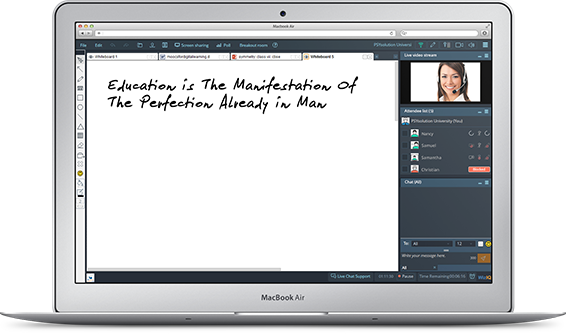
WizIQ LMS is designed to meet both teaching and training
needs and to give users more control over the learning process. Users can build their learning environment within
minutes, add and manage multiple teacher accounts, create online courses, and
schedule live classes. This solution provides a space that can be built and
customized to the user’s liking.
Google [Workspace for Education (formerly G Suite for Education)] is pretty darn good [at] meeting the needs for educators and students. It is not designed to run your business office, transportation group, or lunch services. It doesn't need to be good at those. Focus on teachers and students. They do that really, really well. The Google folks continue to add features that help serve teacher and students. For example, they have really done a good job of adding Google Meet features such as polling and breakout rooms. Those features required a paid subscription to Workspace, but it makes sense since those features compete with Zoom, which requires a subscription for those services.
A de minimis incentive was given to thank the reviewer for their time. The incentive was not used to bias or drive a particular response, nor was the incentive contingent on a positive endorsement. More Info
They have to try out within their own use case scenarios with a sample learner, and test the features of their course and delivery needs. As there is not a content structuring tool, the course author has to have expertise in content and instruction design to create their own materials. The rest is easy to test and check. Test it on all browsers and test the functionality under various internet service speeds.
A de minimis incentive was given to thank the reviewer for their time. The incentive was not used to bias or drive a particular response, nor was the incentive contingent on a positive endorsement. More Info
Email: The best email experience, period. It's fast, has the best mobile apps and tons of addons that extend it.
Office suite: The Google editors might not have all the features of their MS Office counterparts, but they have most of them and the apps are surprisingly performant.
Domain management: The Google Admin Console, coupled with the GAM command line tool, is very powerful, easy to use and simplifies any admin's work.
A de minimis incentive was given to thank the reviewer for their time. The incentive was not used to bias or drive a particular response, nor was the incentive contingent on a positive endorsement. More Info
A de minimis incentive was given to thank the reviewer for their time. The incentive was not used to bias or drive a particular response, nor was the incentive contingent on a positive endorsement. More Info
Although all are good but WizIQ needs to improve in these fields...It goes offline once in a while which is a headache as it needs to be constantly managed and needs to be kept under observation all the time.
It is better for less userbase management as its browser platform is not stable for a larger number of participants.
We need to manage each online department separately.
I need to overcome some of the important limitations which have been pending for more than 6 months indicating inability of the vendor or lack of clarity among the development team about what we want and how it can be done easily on their platform and MySQL at virtually no cost without ending up in a feature modification custom development and cost. Teaching and learning with respect to an Indian scenario is different and needs to be adapted to the local needs and realities.
A de minimis incentive was given to thank the reviewer for their time. The incentive was not used to bias or drive a particular response, nor was the incentive contingent on a positive endorsement. More Info
Always up, never down. Compatible with so many different platforms, OSes, and tools. For instance, someone can be on a phone, tablet, laptop, and all of those tools are compatible with Google apps like Meet, Docs, Slides, and anything else Google based. It's flexiblity is fantastic and meets our changing hardware and software requirements
A de minimis incentive was given to thank the reviewer for their time. The incentive was not used to bias or drive a particular response, nor was the incentive contingent on a positive endorsement. More Info
I have understood and used most of it by now after 6-7 months of exploration and use. Though there are small glitches that could be easily resolved by WizIQ, I feel comfortable to handle the product by now. However, clients find it a challenge to explore and do not wish to spend time to learn
A de minimis incentive was given to thank the reviewer for their time. The incentive was not used to bias or drive a particular response, nor was the incentive contingent on a positive endorsement. More Info
A de minimis incentive was given to thank the reviewer for their time. The incentive was not used to bias or drive a particular response, nor was the incentive contingent on a positive endorsement. More Info
A de minimis incentive was given to thank the reviewer for their time. The incentive was not used to bias or drive a particular response, nor was the incentive contingent on a positive endorsement. More Info
Very responsive and accommodating during the sales period, then totally unhelpful, rude and dismissive when you are unhappy with the product. Now ignoring my messages.
A de minimis incentive was given to thank the reviewer for their time. The incentive was not used to bias or drive a particular response, nor was the incentive contingent on a positive endorsement. More Info
It was a product presentation and not a live work through kind of training. I had to remember the presentation from remote and then go about the tool/ builder. It was difficult to handle and I had a lot of doubts and clarifications to address in my initial rounds of launching my courses.
A de minimis incentive was given to thank the reviewer for their time. The incentive was not used to bias or drive a particular response, nor was the incentive contingent on a positive endorsement. More Info
I have developed my own expertise and that is for sale to my clients as a part of my consulting services. I have much to share for assignment and assessment models, course design aspects and mentoring aspects as this is a remote self paced service. If the courses are live and managed still there needs to be mentoring and support to help the learner.
A de minimis incentive was given to thank the reviewer for their time. The incentive was not used to bias or drive a particular response, nor was the incentive contingent on a positive endorsement. More Info
Google has a simpler approach to its apps. With all applications being online, things like auto-save being a default have been helpful for many staff in our organisation. Compare this to Microsoft where much of the admin has to be managed by the ICT Team, Google allows for a portion of control to the user to manage permissions of areas. This type of user empowerment helps people see how important ICT is to a business.
A de minimis incentive was given to thank the reviewer for their time. The incentive was not used to bias or drive a particular response, nor was the incentive contingent on a positive endorsement. More Info
I selected WizIQ because I used them when I subscribed for org.wiziq for nearly 10 years. It was firstly trusting in their technical support system in place and their new plug-in. Other products that are available for free or a nominal amount, e.g. Zoom and Google Meet are way better in their performance and features in my opinion.
A de minimis incentive was given to thank the reviewer for their time. The incentive was not used to bias or drive a particular response, nor was the incentive contingent on a positive endorsement. More Info
A de minimis incentive was given to thank the reviewer for their time. The incentive was not used to bias or drive a particular response, nor was the incentive contingent on a positive endorsement. More Info
A de minimis incentive was given to thank the reviewer for their time. The incentive was not used to bias or drive a particular response, nor was the incentive contingent on a positive endorsement. More Info