Google Slides is a presentation tool that enables users to create, edit, collaborate, and present. It is free for personal use, and available to businesses via a Google Workspaces subscription.
N/A
Reveal Trial Director
Score 7.0 out of 10
N/A
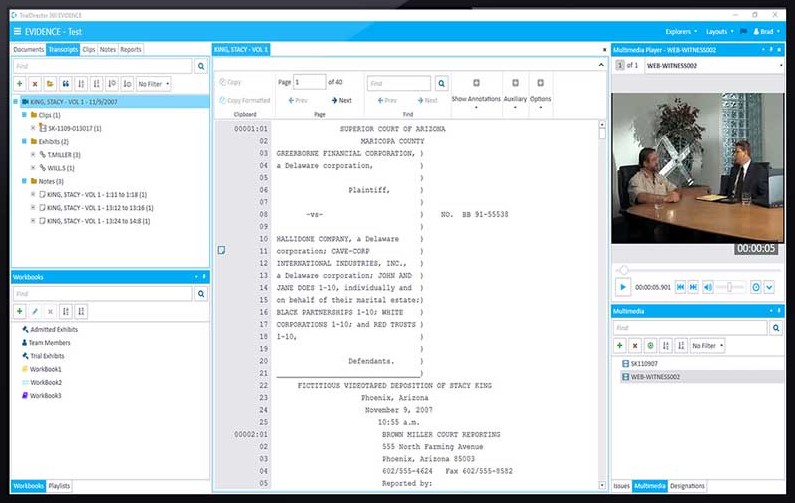
A solution to streamline pre-trial, trial, mediation, and other litigation-related presentations. Users can also Share the case and collaborate with colleagues, outside counsel, expert witnesses, and other key stakeholders on a centrally stored case.
Google Slides is perfect for teams working on a presentation for a customer, where multiple people can be working on the same presentation at the same time. It is also helpful to see who is currently viewing the presentation and if and what they are currently editing. Google Slides might not be the best solution for all presentations as sometimes a customer requests a live demo.
This trial presentation software is very well suited for trial, depositions and mediations. The software organizes exhibits and allows for synchronized deposition transcripts to be viewed simultaneously. It allows the attorney to tell the complete story of the case by quickly putting together productions, discovery and any additional documentation needed to build a case.
The popularity for Google Slides among the casual technology tool users is so great that we are not in a position to replace this tool with anything else. Every other tool either doesn't have the popularity, or doesn't match the ease of sharing level of Slides. The training needed to learn a different tool is too great. Google Slides is very easy to pick up and master.
It fairly easy to use and manage, especially if you are already in the Google Suite - however design styling is often lacking and missing - which can be a major draw back if you are presenting to an external party. For those cases I will typically use Keynote or Figma Slides
Google Slides works both online and offline, they are free to use if you have a Google account. Easy to share and are supported by most web browsers. A great addition to your arsenal of interactive educational online platforms.
I have used TrialPad in the past and found it very user friendly and easy to use. However, functionality is limited as to what you can do or how the data can be manipulated once uploaded to TrialPad. TrialDirector 360 by Ipro gives the user a full array of tools and functionality and in some ways is easier to navigate and control in presentation mode.
We're switching from microsoft to google and it has had a decently positive ROI due to reduced friction of figuring out and managing sharepoint
The negative impact is that it does not do everything we need for product and design so we do have to supplement it with more specific software
Another positive is that it has reduced the friction in easily creating and sharing PPTs during client-facing meetings making it easier for our bd, sales and product teams to make a positive impact on potential + current clients