Google Search Console is a search engine optimization software solution offered by Google.
N/A
Textmetrics
Score6 out of 10
N/A
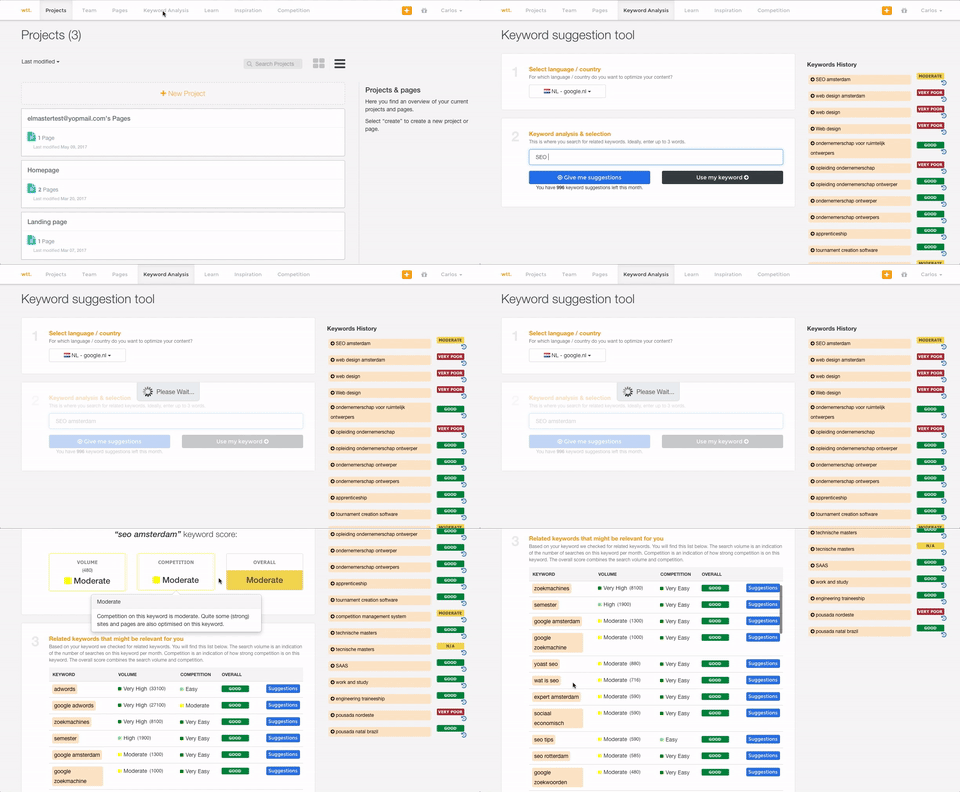
Textmetrics (formerly Webtexttool) aims to help content creators create rank-boosting web content. The tools key differentiator is big data Textmetrics creates predictive data, by analyzing the data of users (anonymously). 20.000+ user generated texts are analyzed and compared to real-world outcomes. The best performing outcomes are used to better its real-time optimization tips. Value prop: More website…
There are lots of tools and platforms that help us rank well on search engines. While that is helpful, we do need to know how those efforts paid off. This is where Google Search Console comes in. It is vital for every business or website trying to rank well on search engines to have Google Search Console so that they can track their performance and make necessary adjustments.
A de minimis incentive was given to thank the reviewer for their time. The incentive was not used to bias or drive a particular response, nor was the incentive contingent on a positive endorsement. More Info
I honestly can't think of a scenario where WebTextTool (TextMetrics) would not be valuable for anyone writing content intended for publishing either online or in print media. If the intent is for print media, then even if you completely ignore the SEO section of the analysis, all of the other analysis tools intended for content are incredibly insightful and helpful. These days, even print media almost always ends up online in some form or another on the publisher's website or in a digital format of the publication. So the SEO tools can still give a little boost in reworking or rewording some parts to make sure they will be effective not only in print but online as well.
A de minimis incentive was given to thank the reviewer for their time. The incentive was not used to bias or drive a particular response, nor was the incentive contingent on a positive endorsement. More Info
A de minimis incentive was given to thank the reviewer for their time. The incentive was not used to bias or drive a particular response, nor was the incentive contingent on a positive endorsement. More Info
A de minimis incentive was given to thank the reviewer for their time. The incentive was not used to bias or drive a particular response, nor was the incentive contingent on a positive endorsement. More Info
More training resources would be an asset. A beginner is given the power to completely destroy a sites search results at the push of a button. Likewise it is a powerful tool to enhance search results also.
An option to take care of multiple versions of the same site simultaneously would be helpful. An option to use the same validation script across all versions and administer them simultaneously would be a time save (i.e. non-www, www, http://, and https:// versions of the same site).
A de minimis incentive was given to thank the reviewer for their time. The incentive was not used to bias or drive a particular response, nor was the incentive contingent on a positive endorsement. More Info
WebTextTool (TextMetrics) assumes that each uploaded or typed in the article is intended for online publishing, mostly in a blog type environment. While this is a perfectly understandable assumption in this day and age, it shouldn't be so difficult to ask the question of whether the content is intended for online or print media.
The "Credibility" section tends to be a little too harsh for my taste. Depending on the style of writing and the type of content, "too many adjectives" is too subjective a metric to apply to all writing ( still, I do get why they try to do it).
This is a little nitpicky, but I'd prefer to see how many projects and credits I have left to use on the dashboard page as opposed to having to click over to my account. A dashboard should show everything that a user needs to see in one shot.
A de minimis incentive was given to thank the reviewer for their time. The incentive was not used to bias or drive a particular response, nor was the incentive contingent on a positive endorsement. More Info
It's easy to use, but some features are lacking a clear explanation. Somethings don't always match up. For example, the Core Web Vitals often doesn't match what you would see in the Chrome Lighthouse report or the Google Page Speed Insights tool. The tool itself is a little too basic and has to be used alongside other SEO tools and other Google properties such as Analytics
A de minimis incentive was given to thank the reviewer for their time. The incentive was not used to bias or drive a particular response, nor was the incentive contingent on a positive endorsement. More Info
As with all Google software, your primary source of help is their forums, their knowledge base articles, or whatever tutorials you can find on the web. Often answers on their forums are not straightforward and may not address the actual issue you're experiencing. The KB articles are typically written like instruction manuals - for better or for worse. Tutorials on the web may vary, but the odds are good someone out there had the same questions as you and was kind enough to document their experience.
A de minimis incentive was given to thank the reviewer for their time. The incentive was not used to bias or drive a particular response, nor was the incentive contingent on a positive endorsement. More Info
I only had to reach out to TexMetrics once when initially getting my account setup after signing up. The response was swift, and they addressed my question completely. I've had no other issues since I began using TextMetrics, so based on that one interaction, I have to give them a great score. I assume that it is still the same as when I reached out that one time (at least I hope it is!).
A de minimis incentive was given to thank the reviewer for their time. The incentive was not used to bias or drive a particular response, nor was the incentive contingent on a positive endorsement. More Info
SEMRush is a supplementary tool we use to provide competitive analysis. While it does, or should, provide the same data that Search Console does, but I only fully trust Search Console when it comes to basic performance in Google for the sites we develop and own. SEMRush, and other products like it, does provide much more in-depth insights that can help drive business decisions, including site performance on other search engines, along putting organic and paid search performance in one spot. However, SEMRush costs money while Search Console is free.
A de minimis incentive was given to thank the reviewer for their time. The incentive was not used to bias or drive a particular response, nor was the incentive contingent on a positive endorsement. More Info
A de minimis incentive was given to thank the reviewer for their time. The incentive was not used to bias or drive a particular response, nor was the incentive contingent on a positive endorsement. More Info
Given that this is a free tool, the return on investment has been particularly high - we've identified and addressed a few site issues that could have meant a reduction in search traffic.
Our organic search traffic has been on the rise in part due to the insights gained from the search traffic analytics provided within the console.
A de minimis incentive was given to thank the reviewer for their time. The incentive was not used to bias or drive a particular response, nor was the incentive contingent on a positive endorsement. More Info
A de minimis incentive was given to thank the reviewer for their time. The incentive was not used to bias or drive a particular response, nor was the incentive contingent on a positive endorsement. More Info