Google Search Console is a search engine optimization software solution offered by Google.
N/A
Moz Pro
Score7.8 out of 10
N/A
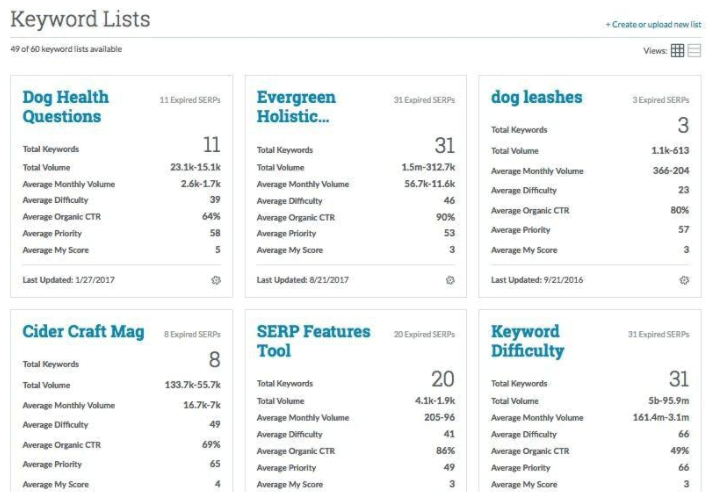
MozPro , from Moz in Seattle, Washington, is an SEO platforms for tracking the performance of all inbound marketing efforts comprehensively. It reveals how content is being shared through social channels and how that drives traffic to a website, and features a broad toolset for search engine optimization: rank tracking, link opportunites, site audit via Moz Analytics, prospective keyword analysis and content grading, as well as a crawl test to find broken or poorly designed site elements.
Moz…
Product Marketing Manager in Marketing at BambooHR (Marketing and Advertising, 501-1000 employees)
Chose Google Search Console
All of these other tools have positives and negatives. We use Google Search Console along with Semrush in the past and are using it with Ahrefs right now. Search Console is like the foundation of monitoring our search presence and these other tools are what lets us do the heavy …
A de minimis incentive was given to thank the reviewer for their time. The incentive was not used to bias or drive a particular response, nor was the incentive contingent on a positive endorsement. More Info
Product R&D Manager in Engineering at intelza.ai (Information Technology & Services, 1-10 employees)
Chose Google Search Console
If you need advanced SEO information, then of course you need to use expensive tools. Google console will give basic information, but most importantly, it will give promptly and free of charge. So do not ignore the possibilities of this great free tool, because all webmasters …
A de minimis incentive was given to thank the reviewer for their time. The incentive was not used to bias or drive a particular response, nor was the incentive contingent on a positive endorsement. More Info
Director of Digital Marketing in Marketing at 407 Marketing (Marketing and Advertising, 1-10 employees)
Chose Google Search Console
Google Search Console offers more information than Google Analytics alone (though they can be integrated together). Google Search Console is also a free tool, so that can be an attractive facet when compared to Moz or other SEO programs (though the information provided is …
A de minimis incentive was given to thank the reviewer for their time. The incentive was not used to bias or drive a particular response, nor was the incentive contingent on a positive endorsement. More Info
Verified User
Chose Google Search Console
I use Moz & SEO PowerSuite to help monitor site performance, rank, & find keyword opportunities. But I wouldn't consider them the same type of product as Search Console. Google doesn't use either of these two products to send me alerts about issues they've found on my sites. …
A de minimis incentive was given to thank the reviewer for their time. The incentive was not used to bias or drive a particular response, nor was the incentive contingent on a positive endorsement. More Info
Verified User
Chose Google Search Console
Google search console has different features than the other tools and provides help in ways other tools don't such as sitemap optimization and overall impressions of your brand online.
A de minimis incentive was given to thank the reviewer for their time. The incentive was not used to bias or drive a particular response, nor was the incentive contingent on a positive endorsement. More Info
Digital Media Specialist in Marketing at Chesapeake Regional Healthcare (Hospital & Health Care, 1001-5000 employees)
Chose Google Search Console
Again, Google Search Console is mandatory if you're a search marketer or developer. It is a free tool and it links directly to Google, so it's hard to not recommend. Although, if you want more actionable (and often cleaner) data, then using one of the above tools is necessary. …
A de minimis incentive was given to thank the reviewer for their time. The incentive was not used to bias or drive a particular response, nor was the incentive contingent on a positive endorsement. More Info
Marketing Manager, HMX in Marketing at Harvard Medical School (Higher Education, 501-1000 employees)
Chose Google Search Console
We use Google Search Console in tandem with other products like Google Analytics - not in place of it. Search Console definitely provides information about organic search keywords that Google Analytics does not provide, so that's been a very helpful addition. We also use Yoast …
A de minimis incentive was given to thank the reviewer for their time. The incentive was not used to bias or drive a particular response, nor was the incentive contingent on a positive endorsement. More Info
Verified User
Chose Google Search Console
Usually, I use multiple tools and GSC is the first on my list along with Google Analytics since both of these tools are free and are sufficient for monitoring, analyzing and managing digital marketing for a small business. However, there are some limitations to these tools like …
A de minimis incentive was given to thank the reviewer for their time. The incentive was not used to bias or drive a particular response, nor was the incentive contingent on a positive endorsement. More Info
Verified User
Chose Google Search Console
There are not other products like Google Search Console.
A de minimis incentive was given to thank the reviewer for their time. The incentive was not used to bias or drive a particular response, nor was the incentive contingent on a positive endorsement. More Info
A de minimis incentive was given to thank the reviewer for their time. The incentive was not used to bias or drive a particular response, nor was the incentive contingent on a positive endorsement. More Info
iContact
Verified User
Chose Moz Pro
The main thing that we liked [about] Moz Pro is the insights / dashboard (besides its colors). We do think it's better then the others tools we checked.
A de minimis incentive was given to thank the reviewer for their time. The incentive was not used to bias or drive a particular response, nor was the incentive contingent on a positive endorsement. More Info
Search Marketing Manager in Marketing at Primacy (Marketing & Advertising, 51-200 employees)
Chose Moz Pro
Moz tends to be more consistent with their data/metrics. Their crawler is also pretty powerful and able to pick up large sets of pages where some other tools may fall short.
A de minimis incentive was given to thank the reviewer for their time. The incentive was not used to bias or drive a particular response, nor was the incentive contingent on a positive endorsement. More Info
Verified User
Chose Moz Pro
I like that I don't need to download anything to use all of the features MOZ has to offer. It is all contained online, so I don't have to open separate applications. And the cost is extremely reasonable.
A de minimis incentive was given to thank the reviewer for their time. The incentive was not used to bias or drive a particular response, nor was the incentive contingent on a positive endorsement. More Info
There are lots of tools and platforms that help us rank well on search engines. While that is helpful, we do need to know how those efforts paid off. This is where Google Search Console comes in. It is vital for every business or website trying to rank well on search engines to have Google Search Console so that they can track their performance and make necessary adjustments.
A de minimis incentive was given to thank the reviewer for their time. The incentive was not used to bias or drive a particular response, nor was the incentive contingent on a positive endorsement. More Info
Businesses looking to keep track of their web presence and utilize a tool to identify areas of opportunity. The trends tracking and competitor modeling allow businesses to be able to build an SEO strategy that they can track progress over time and fill in content gaps. This is used by our company in conjunction with our marketing automation tool and Google's web presence suite (eg. Google Analytics, Search Console, Tag Manager).
A de minimis incentive was given to thank the reviewer for their time. The incentive was not used to bias or drive a particular response, nor was the incentive contingent on a positive endorsement. More Info
A de minimis incentive was given to thank the reviewer for their time. The incentive was not used to bias or drive a particular response, nor was the incentive contingent on a positive endorsement. More Info
A de minimis incentive was given to thank the reviewer for their time. The incentive was not used to bias or drive a particular response, nor was the incentive contingent on a positive endorsement. More Info
More training resources would be an asset. A beginner is given the power to completely destroy a sites search results at the push of a button. Likewise it is a powerful tool to enhance search results also.
An option to take care of multiple versions of the same site simultaneously would be helpful. An option to use the same validation script across all versions and administer them simultaneously would be a time save (i.e. non-www, www, http://, and https:// versions of the same site).
A de minimis incentive was given to thank the reviewer for their time. The incentive was not used to bias or drive a particular response, nor was the incentive contingent on a positive endorsement. More Info
Some of the auto-gen visual tables aren't all that useful for smaller companies. For instance on the Search Visibility tab, many of my clients have a tiny % of keywords in the top-10, so the table shows basically 4 overlaid flat lines. I wish we had some options to customize this table or expand the range or something.
I wish there were some more tools relating to the technical aspects of the site/pages. The whole tool is very keyword-oriented, which is fine, but I feel like over time this has become and will continue to be less important than technical aspects, site speed, voice search, etc.
There's an Anchor Text tab, but it only looks at Inbound links—I wish this feature was for on-site anchor text—this could be a much better optimization tool. Because there's nothing you can do about inbound link text.
A de minimis incentive was given to thank the reviewer for their time. The incentive was not used to bias or drive a particular response, nor was the incentive contingent on a positive endorsement. More Info
We've been paying monthly for Moz for at least four years. We rely heavily on it for our daily work, and would need to re-engineer many of our processes if we were to cancel our subscription. I suspect we'll continue to use Moz as long as we are in business (assuming they maintain their quality).
It's easy to use, but some features are lacking a clear explanation. Somethings don't always match up. For example, the Core Web Vitals often doesn't match what you would see in the Chrome Lighthouse report or the Google Page Speed Insights tool. The tool itself is a little too basic and has to be used alongside other SEO tools and other Google properties such as Analytics
A de minimis incentive was given to thank the reviewer for their time. The incentive was not used to bias or drive a particular response, nor was the incentive contingent on a positive endorsement. More Info
it's easy to use once you get the hang of it and most people with any sort of background in using online tools and analytics systems can figure it out. it's just not as intuitive as it could be like google webmaster tools or Adobe (Site Catalyst)
As with all Google software, your primary source of help is their forums, their knowledge base articles, or whatever tutorials you can find on the web. Often answers on their forums are not straightforward and may not address the actual issue you're experiencing. The KB articles are typically written like instruction manuals - for better or for worse. Tutorials on the web may vary, but the odds are good someone out there had the same questions as you and was kind enough to document their experience.
A de minimis incentive was given to thank the reviewer for their time. The incentive was not used to bias or drive a particular response, nor was the incentive contingent on a positive endorsement. More Info
As I have mentioned before, if you have enterprise subscription, the staff are super helpful. Moz also participated in the marketing tech conferences especially moz in seattle. These sessions are super useful in helping digital marketing analyst like me to investigate new marketing techniques, tracking leads and conversions and eventually monetize them. Their staff is not only knowledgeable in their own product but they have been around. For example Dr Peter from moz always publishes his insights and I have relied somewhat on his opinions.
A de minimis incentive was given to thank the reviewer for their time. The incentive was not used to bias or drive a particular response, nor was the incentive contingent on a positive endorsement. More Info
SEMRush is a supplementary tool we use to provide competitive analysis. While it does, or should, provide the same data that Search Console does, but I only fully trust Search Console when it comes to basic performance in Google for the sites we develop and own. SEMRush, and other products like it, does provide much more in-depth insights that can help drive business decisions, including site performance on other search engines, along putting organic and paid search performance in one spot. However, SEMRush costs money while Search Console is free.
A de minimis incentive was given to thank the reviewer for their time. The incentive was not used to bias or drive a particular response, nor was the incentive contingent on a positive endorsement. More Info
Moz emerged as an industry leader with a great reputation for driving optimal SEO performance and ROI for customers. Moz' thought leadership on all things SEO gave us a lot of confidence to invest and partner with them. The wide array of product features was also something that was important to us relative to Moz' competitors. In the end, we felt there wasn't anything we couldn't do with Moz. We were also impressed with the on demand platform training and tools provided from day 1. Lastly, Moz was one of the more expensive platforms, but it wasn't the most expensive, so we felt we received great value for the overall price.
A de minimis incentive was given to thank the reviewer for their time. The incentive was not used to bias or drive a particular response, nor was the incentive contingent on a positive endorsement. More Info
Given that this is a free tool, the return on investment has been particularly high - we've identified and addressed a few site issues that could have meant a reduction in search traffic.
Our organic search traffic has been on the rise in part due to the insights gained from the search traffic analytics provided within the console.
A de minimis incentive was given to thank the reviewer for their time. The incentive was not used to bias or drive a particular response, nor was the incentive contingent on a positive endorsement. More Info
Here I can easily find competitor's ranking keywords and their backlinks. It also gives you another exciting feature where you can compare two domains at the same time.
The thing that I don't like about this software is, that sometimes your page can take too much time for crawling.
A de minimis incentive was given to thank the reviewer for their time. The incentive was not used to bias or drive a particular response, nor was the incentive contingent on a positive endorsement. More Info